

Table of Contents
amazon Dell 1420X reviews
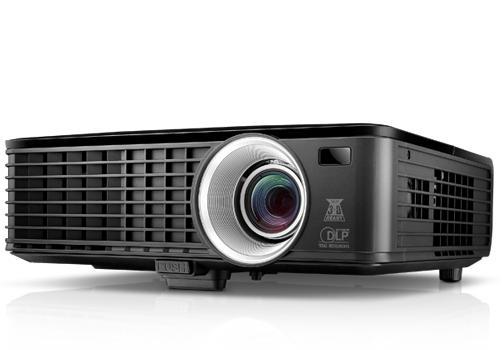
With good image quality, high brightness, the Dell 1420X is suitable for meeting rooms with multiple light sources and convenient for the educational environment.
The Dell 1420X is one of two enterprise-class business projectors. Both models (Dell 1420X and Dell 1430X) feature prominent high-brightness designs suitable for the environment, Auxiliary light, Small distance coefficients are suitable for limited projection rooms.
In terms of looks, the Dell 1420X also has a square block design with slightly rounded angles that look quite simple. Occupying almost the entire front of the machine is the large heat sink with a heat sink inside. Similar to the 1430X model, the Dell 1420X is also equipped with a silver-lined compact camera body that fits neatly into the device’s neat appearance. This lens has a focal range of 18.18 – 21.84mm (1.2x optical zoom), a distance factor of 1.64 – 1.97. With this distance factor, the Dell 1420X can display a 38″ frame from a distance of just 1m and a maximum of about 180″ at a distance of 8m.
In terms of technology, the Dell 1420X also features DLP 3D Ready projection technology (0.55 “DLP chip) combined with its proprietary BrilliantColor color technology. This combination not only gives the Dell 1420X the ability to display 3D content (from compatible sources), but also promises to deliver true image quality suitable for a variety of uses. . In addition, with a brightness of 2700 ANSI Lumen, 2400: 1 contrast ratio, the Dell 1420X is also suitable for environments with multiple light sources in the crowd room.
Due to the user-oriented design of small and medium enterprises, the Dell 1420X only supports 1024×768 pixel resolution and 4: 3 standard frame rate. Video signal inputs are also limited to the most basic level, including S-Video, Composite Video, and two VGA inputs. In addition, to meet the needs of slide / video presentations with sound effects, the Dell 1420X is equipped with a TRS (3.5mm) audio input connector and a 2W speaker.
Setup and Installation
The Dell 1420X projector is really easy to set up. A quick start guide is included with the projector and it shows every step of the initial setup process, so even if you are a first-time owner of a projector it won’t be difficult for you to start. The next thing you can do is video-source connection after placing the projector on flat surface or mounting it using the ceiling mount kit which is optional at extra cost.
You will find the projector equipped with various input and output ports such as VGA, HDMI, S-Video, composite video and audio thereby making it very easy to connect it to a number of devices like laptops, desktop computers, DVD players, etc. The presence of both VGA and HDMI ports allows users to switch between analog and digital sources with ease. The Dell 1420X also features an audio output jack for external speakers, although the inbuilt 2 watts speaker is adequate for smaller rooms.
In terms of installation, the projector is quite flexible since it can work with both front and rear projection modes as well as ceiling and desktop setups besides the fact that it has an adjustable front foot which can be used to vary the height and angle of the projector thus making it easier to position the image exactly where you want it on the screen or wall.
The Dell 1420X’s keystone correction feature makes setup even simpler as it allows the user to adjust the image distortion whenever the projector is not placed at the exact angle perpendicular to the screen. The vertical keystone correction feature gives correction up to ±30 degrees, which is more than enough for most setups.
where can you get a Dell 1420X online
Dell 1420X 3D Ready DLP Projector – 720p – HDTV – 4:3: Buy it now


In general, with a size of 290×90,82×238 mm, weight of 2.6 kg, the Dell 1420X does not appear to be heavy and occupies a lot of space when moving or when installed with ceiling mount. The number of ports on the Dell 1420X not much, but also quite “fit” for business needs. To prepare for the testing process, Test Lab connects the Dell 1420X to the computer through the VGA interface via the cable that came with the device. At a distance of about 1.8 meters, the maximum zooming focal length (1.2x), Test Lab captures a frame of about 113cm (56 “) wide. After a warm-up period of about 30 minutes, Test Lab begins the testing process with the machine’s default settings for resolution, color, contrast, brightness, color mode and display mode. Marketing (preset).
Despite the high brightness specifications, Test Lab still decides to test the Dell 1420X in dark rooms and minimize ambient light sources. In the “Presentation” default presentation mode, the 56″ frame of the Dell 1420X has pretty good brightness, sharpness, rich color and depth. The hot colors of the Dell 1420X are very well reproduced, and the white / black colors look quite natural. Even with the default settings, the Dell 1420X can easily pass tests on the ability to display characters, colors, and contrasts with a fairly high score. In particular, the letters 9 still look sharp when viewed from a distance of nearly 2m; Color gradations of about 2% are quite clear, easily distinguishable from the naked eye.
One by one the HD 720, HD 1080i and 1080p movies are often used in test scenarios. The Dell 1420X does not face any hurdle when it comes to fast motion pictures. The only limit that can be seen is the quality and volume of the built-in loudspeaker when it is nearing its maximum level (level 20). Testing through some device configuration items, Test Lab found that the Dell 1420X has an intuitive menu layout, logical grouping, and quite similar to the menu design on Dell monitor models. The physical button system design on the back of the unit is much easier to operate than the buttons on the remote control, just as small as the business card of the device.
Performance in Different Scenarios
Business Presentations
The Dell 1420X is definitely the best projector in the case of business presentations. Its high brightness, contrast ratio, and XGA resolution help in displaying text, graphs, and PowerPoint slides very clearly in brightly lit rooms. During our tests, presentation slides containing detailed charts and small fonts were easy to read, and the slide transitions were smooth. The color reproduction was always consistent, thus enabling the branding colors and logos to be accurate.
Classroom Use
The Dell 1420X is very impressive in the educational setting. The projector can manage different input sources (VGA, HDMI) which makes it easy for teachers to connect their laptops, tablets, or other devices. The XGA resolution guarantees that all the educational materials (text-heavy slides, images, and videos) are displayed crisply. The internal speaker is not very strong but it is just right for small to medium classrooms.
It is also easy to move the projector around because of its portability, so it can be used in different classrooms or departments. In this way, the Dell 1420X projector is a powerful yet inexpensive option for multimedia-based teaching in schools and colleges.
Multimedia Playback
The Dell 1420X projector is mainly for corporate use and eduacation but it also takes a role in multimedia playback. The projector does video and movie with good color and sharpness. The XGA resolution may not produce as much sharpness as HD or 4K projectors do, but the image quality is good enough for casual viewing. The projectors’ built-in speaker is not very deep in sound, therefore, to recreate proper movie sound, the use of external speakers is encouraged.
The projector is capable of scaling content from various resolutions, letting it deal with video content that is of lower resolution without too much distortion or quality loss.
Gaming
Though the Dell 1420X is not primarily designed for gaming, it still allows for casual gaming sessions. There is quite a bit of input lag and the projector’s color brilliance and contrast are wanted by most games. But, the XGA resolution is such that some new games may show pixelation, particularly in comparison to high-resolution gaming monitors or projectors. Still, the Dell 1420X is great for retro gaming and gaming with no resolution concerns, as it delivers a satisfactory experience.
Lamp Life and Maintenance
DLP projectors have a long lamp life as one of their major advantages and the Dell 1420X certainly is no different. The 4,500 hours in normal operation and the 6,000 hours in eco mode are the ratings given to the projector’s lamp. Thus, the lamp will last even so long that it will need to be replaced only after several years of regular use. Eco mode does cut down the brightness a bit but greatly increases the lamp life, therefore it is a good choice for users who are aiming for the maximum value throughout the lamp’s life.
The maintenance operation of the Dell 1420X is rather simple. The projector contains a lamp compartment that can be opened easily, thus allowing the users to change the lamp without depending on any professional help. Also, the air filter can be cleaned or changed as per the requirement to keep the projector performance at its best and to avoid overheating.
Connectivity and Ports
The Dell 1420X is equipped with a variety of connectivity options so it can be connected to almost all modern devices. The ports are as follows:
VGA In: Connects to older laptops and desktop computers that operate with analog signals.
HDMI: Ensures a premium digital connection to laptops, Blu-ray players, gaming consoles, and other HDMI-compatible devices.
S-Video: A connection for analog video input for older devices like old DVD players and camcorders.
Composite Video: The connection for older devices that still use RCA cables is another option.
Audio In/Out: It is for connecting external speakers or audio systems to provide better sound quality.
USB Type B: It’s for firmware updates and servicing only.
Having both VGA and HDMI ports, the projector is compatible with a large number of devices, from very old hardware to the latest in multimedia equipment. Not having USB Type A or wireless connection might be a disadvantage for some users who want to have more advanced features, yet the ports available are sufficient to cover most typical cases of use.
Audio Quality
Incorporating a 2-watt mono speaker, the Dell 1420X projector is equipped with a built-in speaker. Although this speaker is good enough for small to medium-sized rooms and basic audio for presentations, it does not possess the power and richness needed for larger spaces or engaging multimedia experiences. At the higher volume levels, the sound may get distorted, especially in the case of bass-heavy content, like music or action scenes in movies.
The projector’s built-in speaker is fit for business or academic presentations, broadcasting clear and simple sound, but we suggest to use external speakers for more demanding purposes, such as watching movies or playing games. The audio output jack of the projector allows easy connection to either powered speakers or a sound system for better sound quality.
Remote Control and On-Screen Menu
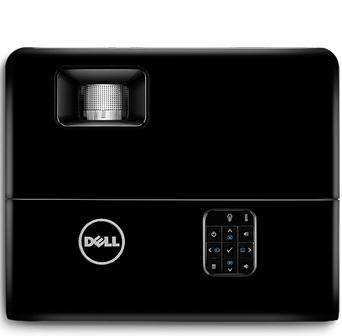
The Dell 1420X projector is supplied with a small, user-friendly remote control, which has been ergonomically designed to make the operation of the projector as easy as possible. The remote is equipped with all necessary buttons for projector control, such as power, input selection, volume, keystone correction, and navigation through the on-screen menu. The arrangement of the buttons is logical and the markings on the buttons are clear, hence it is not difficult to switch inputs, modify settings or cycle through presentation modes during the use.
Besides the physical buttons present on the projector, the remote control further allows to access projector’s onscreen menu (OSD) as well. The OSD is simple to use and easy to manage since it has a clear and neat structure which splits the settings into such categories as Display, Image, Audio and System settings. The menus are very clear, and it is just a matter of choosing the option you like for example brightness, contrast, color adjustment, aspect ratio and others. Besides that, through the OSD one can control some advanced features such as keystone correction and lamp settings.
One attractive feature of the OSD is that it gives you the chance to save settings for different scenarios. For instance, you can have separate profiles for daytime use, low light settings or multimedia playback. The option of switching quickly between different modes with no need to manually adjust setting each time is really appealing.
Keystone Correction and Image Adjustment
The Dell 1420X projector provides vertical manual keystone correction with a range of ±30 degrees. When the projector cannot be placed perfectly perpendicular to the screen, keystone correction is a necessity feature since it helps to straighten the image even when projected at an angle. This thus makes the projector placement in such places where the projector cannot be put right in front of the screen easier.
In addition to keystone correction, the projector furthermore provides manual adjustments for zoom and focus at the lens. The zoom ring makes it possible for the user to change the projected image size without having to move the projector; therefore it can be mentioned that this feature is handy in cases where space is limited. On the other hand, the focus ring takes care of the sharpness and clarity of the picture. With these features, the Dell 1420X can be used for different projection distances, thus every user can get the screen size they want even in small and irregularly shaped rooms.
Along with the basic customization of images, users can also change the aspect ratio settings according to the content type. The Dell 1420X can be used in aspect ratio modes of 4:3 (native),16:9, and auto, thus making it suitable for both standard and widescreen formats.
Energy Efficiency and Eco Mode
The Dell 1420X projector is energy-efficient, its main feature. The same as most modern projectors, it has Eco Mode which power consumption is reduced while the projector’s bulb life is prolonged, and also the need of being constantly replaced is avoided. When Eco Mode is enabled, the projector vews a slight decline in brightness levels, but at a price, the user can expect the bulb life to be extended from about 4,500 hours in normal mode to as much as 6,000 hours. It is especially the case for businesses and educational institutions that have been frequently using the projector, thus creating a huge savings over time.
Eco Mode comes in particularly handy in low-light situations where it is not necessary to use maximum brightness, like dimly lit conference rooms or classrooms with light control. It is a win-win situation here, as the reduced brightness not only prolongs lamp life but also cuts down the heat generated by the projector, thus making it possible to operate the fan quietly and consume lower energy costs in total.
The Dell 1420X is also equipped with auto shutoff and power-saving features that are designed to further boost its energy efficiency. For instance, the user is allowed to schedule the projector to turn off automatically after a certain period of inactivity, thus eliminating the risk of unnecessary power consumption in case the device is accidentally left on. The vending machine like projector consumes very little power in standby mode making the projector an energy-efficient device even when not in active use.
Noise Levels and Cooling
A very common issue among projectors is the noise that is made by the cooling fan. The Dell 1420X, however, is a projector with great performance in this aspect, and during its operation, noise levels are relatively low. A little fan noise can be heard, especially in high-brightness modes, but it does not interfere with people hearing during presentations or media playback. The overall noise output is lower when the fan runs quietly in Eco Mode.
The cooling system is highly efficient in preventing overheating and at the same time it lasts for a longer time before users experience the problem of overheating. The projector’s side-mounted ventilation grilles greatly assist in the vertical flow of hot air from the projector, while the intake vents regulate the inflow of cool air to maintain a constant and optimal operating temperature. The heat build-up issue will be very slight if the projector is placed in a well-ventilated area.
Durability and Longevity
The projector, Dell 1420X, is really tough and long-lasting since it is manufactured by one of the best companies in the world in terms of product durability and reliability, Dell. The projector’s extremely robust construction and use of high-quality materials mean that the projector can easily cope with the everyday use of business, education, and home environments. The long life of the projector’s lamp when coupled with the en-efficiency features supports the durability and longevity of the projector even further.
The whole process of lamp replacement is rather simple, and there are access panels that make it easy to get to the various parts for quick and hassle-free changes. Replacement lamps for the Dell 1420X are always in stock and, although they come at a slightly higher price, the Eco mode during which the lifetime of the lamp is extended is a good deal that offsets the cost of the lamp over the long run.
Apart from this, Dell guarantees the 1420X projector warranty coverage, which usually contains one year of limited hardware warranty and tech support. Moreover, the users who desire further protection for their device can choose from the extended warranty options and protection plans.
Good and Bad
Good Points:
Very bright level (2700 ANSI lumens): Clear and bright images can be made even in very bright rooms.
Convenient and portable design: The projector is light in weight and can be easily moved from one place to another.
Also, providing many connectivity options: VGA, HDMI, composite video, S-video, and audio input/output make it compatible with a huge range of devices.
Long Life of Lamp: In the case of using Eco Mode, the lamp will last around 6,000 hours which cuts down maintenance and operating costs.
Friendly user setup and OSD: The menus are easy to navigate and the installation process is straightforward.
Budget-friendly: It is good value for money, particularly for small businesses and educational institutions.
Along with that, the projector has keystone correction and zoom features: These allow easy setup and image adjustment according to the layout of the room.
Bad Points:
XGA resolution (1024×768): the resolution is lower than that of Full HD or 4K projectors, thus, it may not be ideal for high-definition content.
Weak built-in speaker: The 2-watt mono speaker is insufficient for large areas or multimedia applications, thus, external speakers may be needed for improved audio quality.
No wireless connection: the projector does not have built-in Wi-Fi or Bluetooth that can be used for wireless presentations and content streaming.
Feedback on installation: the lack of horizontal lens shift makes installation difficult in uneven setups.
Competitor Analysis
The Dell 1420X is not shaky at all against its competitors in its price range when compared in terms of brightness, durability, and connection. However, it is necessary to keep in mind resolution of XGA which might restrict users who are looking for projecting videos in higher definition.
Projectors like the Epson EX3280 or ViewSonic PA503X, for instance, allow the same level of brightness and resolution as XGA but at the same time, they may have extra features such as better color accuracy or and sharper overall image quality. The Dell 1420X projector could possibly be ahead of the Optoma S334e, for example, in terms of overall construction quality and user-friendliness.
If users are mainly concerned about image resolution, they might want to check projectors that support Full HD like the BenQ MH535FHD, but these will come at a higher price. In contrast, if the users focus is on brightness and sturdiness, the Dell 1420X is still a powerful player in its category.
Conclusion
With its amazing combination of brightness, small size, and price, the Dell 1420X projector is a solution for many different settings. Its high brightness and contrast ratio make sure that the viewing of presentations, educational content, and multimedia playback will be clear and easy even in moderately lit rooms.
Users who are looking to use the projector for Full HD or higher will find the XGA resolution limiting, but it is still a good enough quality for most of the business and educational applications. The projector’s long lamp life, energy-saving features, and easy setup process further enhance its appeal, especially for users looking for a low-maintenance, budget-friendly device.
In conclusion, the Dell 1420X is a good projector with solid performance in its price range, offering a reliable and user-friendly experience. If you are after a projector for the office, classroom, or even casual home use, the Dell 1420X will give you a practical and economically wise choice that fits different kinds of projection needs.