

Table of Contents
amazon Linksys EA6350 reviews
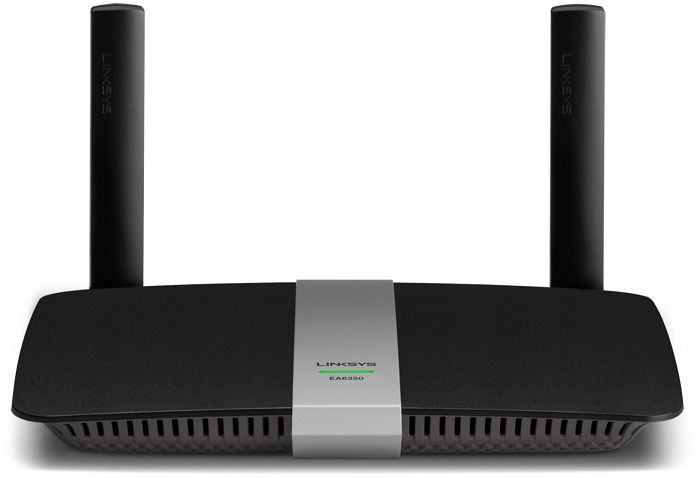
If you have a small home and have a modest network consisting of a handful of wired and wireless clients, you may not need to spend a fortune on a router with the latest Wi-Fi technology. For only $100, the Linksys EA6350 AC1200+ dual-band smart Wi-Fi router gives you lightning-fast 5GHz transfer speeds, as well as a host of management settings and excellent I/O ports.
Design and features
The EA6350 looks similar to the Linksys EA6100 AC1200 dual-band Wi-Fi router. Both use black housing and have two non-removable antennas, which means you can’t swap out one high-gain antenna. The EA6350 measures 2.8 x 22.6 x 17.8 cm (HWD) and features a gray strip containing a single status light that separates the top of the case. The light flashes green during setup and remains solid green while the router is powered on.
A single-core 800MHz CPU powers this dual-band 802.11ac router. It can achieve transfer rates (theoretical) up to 300Mbps on the 2.4GHz band and 867Mbps on the 5GHz band. The EA6350 supports beamforming, sending wireless signals directly to each client rather than over the broad spectrum, without transmitting Multi-User, Multiple Input, Multiple Output (MU-MIMO) data. The back of the router houses four Gigabit LAN ports, a WAN port, a single USB 3.0 port, a WPS button, and a Reset button.
The Smart Wi-Fi Web Panel opens to a Home screen with a list of Smart Wi-Fi Tools and Router Settings on the left and utilities for frequently used settings on the right. The Device List page shows all connected devices and their current status, and the Guest Access page is where you go to activate the guest network and set up a password. Curiously, the guest network is only available for 2.4GHz clients, like other Linksys routers that use this control panel, including the Linksys EA6100 and Linksys EA7500 Max-Stream AC1900 MU-MIMO Gigabit Router. You get Parental Controls, Speed Test that measures upload speeds and Internet downloads, as well as Media Priority settings, allow you to prioritize the network for game consoles and specific applications.
Router settings include a Connections page, where you can change things like DHCP settings, enable Dynamic Routing, update firmware, and change the router’s password. There’s also a Wireless Settings page, where you can create a Wi-Fi password, choose a security mode, rename the SSID, and choose a channel width setting. You also enable and configure MAC Address Filtering and enable/disable Wi-Fi Protected Setup for the router. The Troubleshoot page lets you view the system logs, check the status of each client, and run network diagnostics, and the Security page lets you configure Firewall, VPN Pass-through, and Port Forwarding settings.
Settings and Performance
Installing and configuring the EA6350 with the Linksys Smart Wi-Fi Web Console is simple and fast. The router should be plugged in and connected to the Internet, together with a host PC. Then, open a browser and type “linksyssmartwifi.com”. The Setup Wizard opens up to take the user through the basic setup of Internet and wireless settings.
The 5GHz transfer rate tests mean that the measurements for the EA6350 are the best-ever recorded for a budget-grade router. It attained 427 Mbps in the close test (in the room) much faster than the Netgear AC1200 smart Wi-Fi Router (R6220) (331 Mbps), Linksys EA6100 (95.1 Mbps), and D-Link DIR-842 (332 Mbps). At 30 feet away, again, the EA6350 yields the top score with 199 Mbps; the Netgear R6220 has reached only 104 Mbps, Linksys EA6100 86.6 Mbps, and D-Link DIR-842 gave a transfer rate of 111 Mbps.
The EA6350’s transfer rate scores at 2.4GHz are more comparable to other budget models. The EA6350 registered 72.5Mbps inside, and 39.3Mbps at 30 feet. The Netgear R6220 has transfer rates of almost 74.1Mbps at close range and 48.3Mbps at 30 feet, whereas the Linksys EA6100 registered 77.4Mbps at close range and 40.2 Mbps at 30 feet – and the D-Link DIR-842 was listed as 75Mbps and 41.5Mbps, respectively.
We connected a USB drive to the router’s fastest USB port to test file transfer speeds. Then, a 1.5-GB folder containing a mixture of photos, music, videos, and documents was moved back and forth between the drive and a desktop wired to the router. At 21.5 and 28MBps on the file copying and reading tests, respectively, the EA6350 was slightly ahead of the Netgear R6220 (17.6 and 25.6MBps) but behind the Linksys EA6100 (27.4 and 28.3MBps). The D-Link DIR-842 was absent from these tests since it lacked a USB port.
Conclude
For the fewer needs of an advanced router, the Linksys EA6350 AC1200+ Dual-Band Wi-Fi Smart Router is a fine choice. For smaller spaces, it gave excellent 5GHz transfer speeds during testing, whereas the 2.4 GHz spectrum seems the average considering the category, thanks almost to the norm acceptability. As with other Linksys units, setting up an EA6350 should be a breeze, giving thanks to the Linksys Smart Wi-Fi Web Control Panel and mobile app. The only major downside to this router, a hundred-dollar one, is that it is priced $30 more than its closest competitor — the D-Link AC1200 Wi-Fi router (DIR-842). However, the extra money brings the promise of completing faster speed and a USB 3.0 port to your side.
where can you get a Linksys EA6350 online
Linksys (EA6350-4B) Wi-Fi Router for Home (Fast Wireless Router for Streaming, Gaming, Video Calls, more) AC1200 Dual Band Router, Internet Router: Buy it now
Linksys EA6350 Dual-Band Wi-Fi Router for Home (AC1200 Fast Wireless Router),Black: Buy it now
Linksys EA6350 Wi-Fi Wireless Dual-Band+ Router with Gigabit & USB Ports – (Renewed): Buy it now