

The Lenovo Yoga Pro 9i displays its premium design elements through its upgraded model which maintains the same appearance as the Yoga 9i. The design displays its aesthetic value through the developed structure of its robust aluminum frame which received precise treatment through a sequence of CNC machining and sandblasting and anodizing and high-temperature polishing methods.
The keyboard contains 50 percent recycled plastic from post-consumer sources and the back cover contains 50 percent recycled aluminum yet the premium quality of the product remains intact until customers discover this information. The device comes in a Tidal Teal (blue) color, a subtle shade suitable for everyone. The 14.5-inch Yoga Slim Pro 9i I have here weighs about 1.7 kg which isn’t heavy at all considering its internal configuration I always feel comfortable carrying this laptop in my backpack.
The Yoga Pro 9i has a very complete set of ports. The left side contains a Thunderbolt 4 port together with a full-function USB Type-C port which supports USB 3.2 Gen 1 and DisplayPort 1.2 and PowerDelivery 3.0 and a latest HDMI 2.1 port which delivers up to 12 Gbps of bandwidth and an SD card slot which provides essential functionality. The right side contains two USB-A 3.2 Gen 1 ports together with an audio combo jack and a quick webcam toggle switch. The machine supports Wi-Fi 6E which delivers the fastest connection speeds for outdoor work.
Display and Keyboard
The Yoga Pro 9i offers the best screen performance of all laptops I have tested during this year. Lenovo calls this the PureSight Pro display, and it’s only available on their Pro line Yoga.
The display uses a 165Hz miniLED panel with 3K resolution, a 16:10 aspect ratio, and brightness up to 1200 nits. There’s also a 120Hz 3K 400 nits IPS LCD version for those needing more moderate display quality.
The miniLED screen experience on this product is very satisfying; the blacks are very deep thanks to the excellent control from the tiny LEDs, the colors are vibrant, and the brightness is much higher than typical OLED screens. Lenovo claims this screen covers 100% of sRGB, DCI-P3, and Adobe RGB colors, with a Delta E color accuracy of <1, and these numbers don’t lie.
With 165Hz, even fast mouse movements are smoother, let alone when watching football or playing high-speed games. In addition, the external speakers are of good quality thanks to four JBL speakers with decent sound reproduction across the frequency ranges. The sound is clear and the midrange is smooth. If possible, I wish the bass range extended a bit further.
Besides the fairly standard 5MP webcam, the Yoga Pro 9i has four microphones for voice capture and noise filtering. Testing several voice calls, I found the sound to be clear, with good midrange and a slight bass, making the voice sound warmer, unlike most other laptops that produce a harsh, shrill voice.
The keyboard provides an excellent typing experience because it delivers good tactile feedback and allows users to type comfortably for long periods. The touchpad features a glass surface which provides large dimensions and responsive performance and enables users to execute multi-touch movements while maintaining smooth control of their movements. The Lenovo Yoga Pro 9i’s keyboard and trackpad design provides users with uninterrupted functionality which supports both their professional tasks and their leisure activities.
Lenovo Yoga Pro 9i 16″ Laptop – Intel Ultra 9 285H 16-Core, NVIDIA GeForce RTX 5050, 32GB RAM, 1TB NVMe SSD, 16.0″ 2.8K OLED 120Hz 500-nits, Windows 11 Pro:
Lenovo Yoga Pro 9i Laptop, Intel Ultra 9-285H, 32 GB LPDDR5x RAM, 1 TB PCIe SSD, 16″ 2.8K (2880×1800) OLED Touchscreen, Nvidia G-Force RTX 5050, Backlit Keyboard, W11 Pro, Luna Grey:
Lenovo Yoga Pro 9i 16″ Laptop – Intel Ultra 9 285H 16-Core, RTX 5050, 32GB RAM 2TB SSD, 16″ 2.8K WQXGA+ OLED 120Hz 1000-nits, Win11, WiFi7, Backlit KB, Luna Grey, w/2TB USB Drive, W/GaLiMu:
Lenovo Yoga Pro 9i 16″ Laptop – Intel Ultra 9 285H 16-Core, RTX 5050, 32GB RAM 1TB SSD, 16″ 2.8K WQXGA+ OLED 120Hz 1000-nits, Win11, WiFi7, Backlit KB, Luna Grey, w/2TB USB Drive, W/GaLiMu:
Lenovo Yoga Pro 9i Laptop, Intel Ultra 9-285H, 32GB LPDDR5x RAM, 2TB SSD, 16″ 2.8K (2880×1800) OLED Touch, NVIDIA GeForce RTX 5050, WiFi7, Backlit KB, Win11, Luna Grey, w/2TB USB Drive, W/GaLiMu:
Lenovo Yoga Pro 9i Laptop, Intel Core Ultra 9 285H, 32GB RAM 1TB SSD, 16″ 2.8K WQXGA+ (2880×1800) OLED 1100nits 120Hz Touch, RTX 5050, WiFi7, Backlit KB, Win11, Luna Grey, w/2TB USB Drive, W/GaLiMu:
Lenovo Yoga Pro 9i Laptop, Intel Ultra 9-285H, 32 GB LPDDR5x RAM, 4 TB PCIe SSD, 16″ 2.8K (2880×1800) OLED Touchscreen, Nvidia G-Force RTX 5050, Backlit Keyboard, W11 Pro, Luna Grey:
Significantly Upgraded Configuration
The Lenovo Yoga Pro 9i maximum configuration supports Intel Core i9-13905H Raptor Lake CPU RTX 4060 GPU 64GB RAM and 1TB storage. The machine uses an NVMe SSD to support content creation AI work video editing and 3K resolution gaming.
Lenovo X Power combines hardware and software components to produce faster application opening times which creates an immediate sense of readiness for users. The machine recognizes your usage patterns because you tend to use Photoshop after Premiere to create thumbnails and keep MSI Afterburner active during your gaming sessions.
The system achieved performance above 430 frames per second during CS:GO testing at maximum graphics settings while Far Cry reached 123 frames per second and Battlefield V delivered over 75 frames per second at 1440p Ultra settings and Shadow of the Tomb Raider achieved 53 frames per second at 3K resolution with High graphics settings and DLSS Quality. Adobe Premiere needed about 8 minutes to render a 13-minute 4K H.264 video clip.
The Yoga Pro 9i offers exceptional gaming performance because the RTX 4060 functions as a high-performance graphics card. The system maintains a comfortable temperature for gaming activities because its CPU temperature stays below 90-93°C maximum limit. The cooling fan produces loud sounds at that time while office work requires the fan to function at low sound levels. The machine needs only to be turned on for its complete power capacity to become accessible.
Lenovo AI Engine and Creator Center combine to create intelligent tools that support all your content creation requirements. Lenovo AI Engine enables users to work efficiently through its smart features which maintain system performance with demanding creative software applications.
The perfect combination with the Lenovo L15 monitor
The laptop contains advanced specifications but its performance becomes diminished when used with a single primary display. The Lenovo L15 portable monitor functions as an ideal work solution for people who need to handle multiple tasks at once.
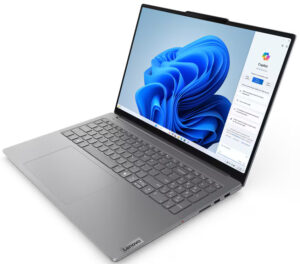
The Yoga Pro 9i operating system handles large monitor connections without causing lagging issues which occurs with laptops that lack strong hardware capabilities. The Lenovo L15 display offers excellent display performance because I can easily transition between screens despite its 16-inch display size.
The Lenovo L15 display uses an IPS panel which provides Full HD resolution and 16:9 aspect ratio and 60Hz refresh rate. The device stands as one of the most portable mobile monitors because its measurements show a thickness of 4.4mm and a weight of 860g.
The L15 display produces accurate color output without using high-quality miniLED technology which exists in the Yoga Pro 9i. I used both screens together without any discomfort because their colors showed accurate calibration. The Yoga Pro 9i display functions better as a reference screen while the L15 display serves as a tool for showing timelines and discovering content. I can work more efficiently because the two screens create approximately 30 inches of display space which enables me to open multiple windows at once. The output is also higher.
The L15 connects to the Yoga Pro 9i through the included USB Type-C cable which enables fast connection. The USB Type-C port provides users with a special feature that enables them to transfer data and images and videos while charging laptops and smartphones. The L15 provides me with entertainment when I travel because I connect it to my smartphone for my entertainment needs. The 16-inch screen of the system provides users with a better movie-watching experience than tablets. The device features an anti-glare screen which allows users to work effectively in outdoor environments.
Battery life and charging
The Yoga Pro 9i comes with a 75 Whr battery which has Evo certification and delivers 9 hours of battery life during Full HD operation. The 140W charger delivers fast charging because it reaches full power in one hour while maintaining a small size.


Tech Reviewer & Product Analyst
Định Bia has spent over 10 years testing consumer electronics with a focus on smart technology. He work as a product advisor at Biareview where he helped customers find the right devices for their needs. He personally tests every product featured on this site using a consistent evaluation framework covering quality, durability, and value. All reviews are based on experience, not influenced by the manufacturer.