

The Synology BeeDrive produces two initial impressions because of its small lightweight design which creates unexpected results. The BeeDrive functions as a separate product which serves customers who require dependable portable backup capabilities without the need to purchase a NAS server despite Synology’s reputation for its NAS products.
Unboxing and Design Overview The BeeDrive functions as a portable USB device which provides data storage options between 1TB and 2TB to both individual users and small businesses through its USB-C 3.2 Gen 2 interface which supports data transfer rates of 10Gbps.
The BeeDrive functions as the best solution for people who handle vital information through their Android and iOS devices and computer systems. The product serves users who travel frequently because it combines portable design with extensive storage capacity and various system compatibility options. The solution provides users with an affordable cloud storage alternative which eliminates the need for them to pay for annual subscription plans.
The BeeDrive design resembles the Crucial X6 design because both products share identical dimensions of 65mm width 15mm thickness and total weight of 43 grams. The USB-C cable which comes with the device has a length of 30cm and its design allows for easy handling during mobile operations. The device casing contains lightweight plastic materials which provide sufficient room for internal components that require heat dissipation.
The connection between the USB-C cable and the USB-A adapter is maintained through a secure interface which lacks any anti-slip protection feature.
The product packaging is also very minimalist, but provides sufficient general information about the product. Besides the device and USB-C cable, the box also contains a USB-A to USB-C adapter. This is a plus point for Synology’s thoughtfulness, allowing users to use it with many devices without needing to buy additional adapters.
Practical Performance
Currently, BeeDrive supports Windows OS and macOS through the BeeDrive software application. Users can use BeeDrive with any PC, Mac, or Linux computer.
With macOS, users can operate the device as a regular external hard drive or exFAT-formatted USB drive. For Windows, the BeeDrive software installer (installer.exe) is available online for installation. All operations are quite simple.
For macOS on machines using Apple Silicon chips, installing the BeeDrive application involves more steps, as users must allow kernel extensions to function. This is because Apple disables these extensions for third-party applications by default. Detailed instructions will be provided in a later guide by Biareview. Rest assured that all kernel extensions used by BeeDrive are approved by Apple and pose no threat to computer security.
The process is similar for Linux operating systems. For example, connecting a drive to a Synology NAS will show up in Control Panel > External devices and allow its use in the DSM operating system. The maximum data transfer speed depends on the speed of the USB port connected to the device, and according to the manufacturer, BeeDrive supports 10G speeds via USB 3.2 Gen 2.
The product has two technical specifications which include its capacity and its part number which shows a storage capacity of 2TB and its identification as BDS70-2T.
The product uses NVMe SSD technology for its internal storage system.
The product shows a black color.
The product dimensions measure 2.56 x 2.56 x 0.59 inches which is equivalent to 6.5 x 6.5 x 1.5 centimeters.
The product has a weight of 1.52 ounces which corresponds to 43.1 grams.
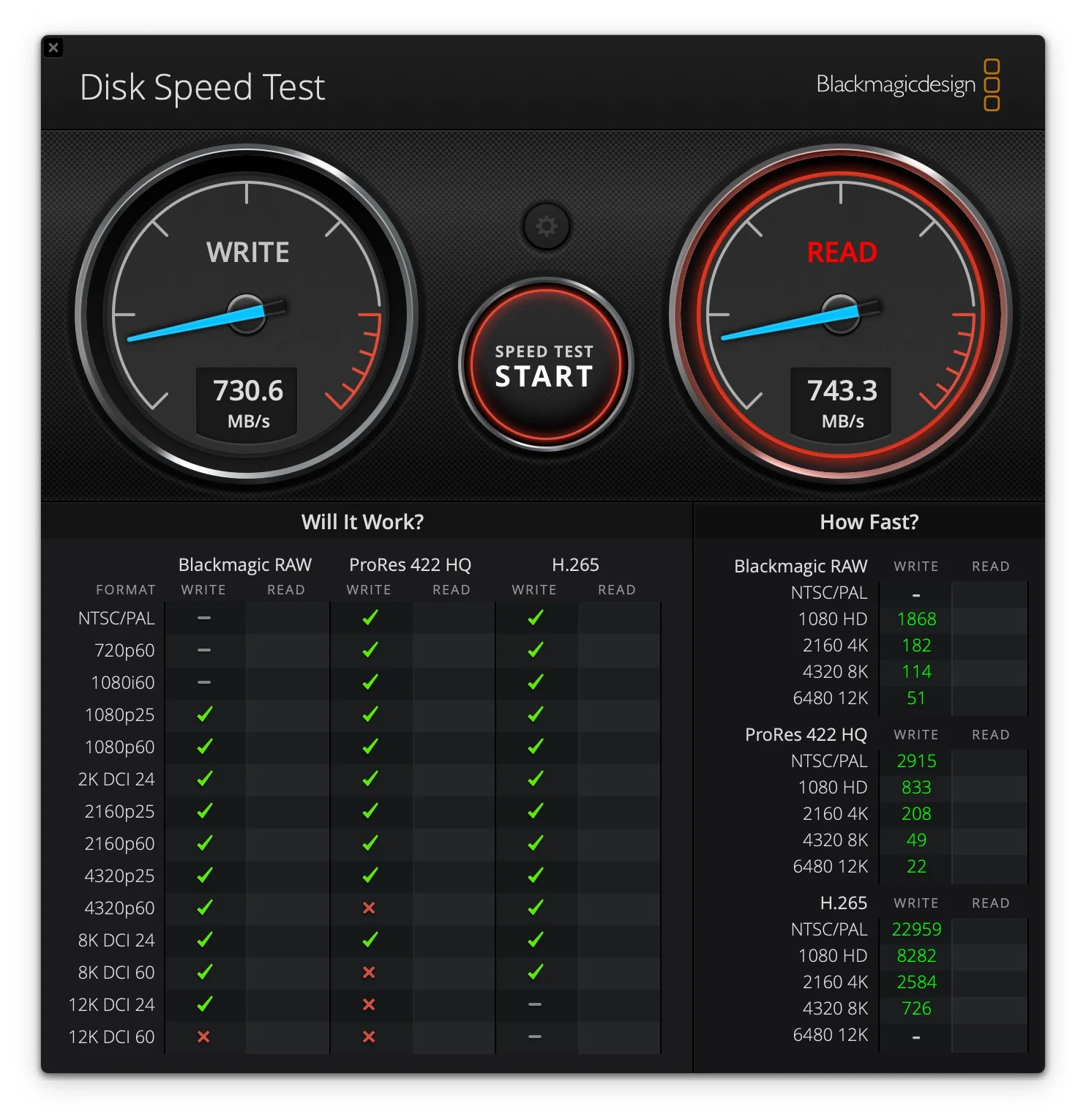
The device supports a maximum copy speed which reaches 1,050 megabytes per second.
The product features a USB 3.2 Gen 2 Type-C interface which supports data transfer speeds of 10Gb/s.
The device supports backward compatibility to USB 3.2 Gen 1 and USB 3.0 which operates at 5Gb/s and USB 2.0 standards.
The product received multiple certifications which include RoHS, FCC, CE, BSMI, VCCI, RCM, KC, UKCA, and BIS.
The product gets its power supply through the USB-C port.
The box contains one BeeDrive device together with one USB-C to C cable and one USB-C to A adapter and one Quick Start Guide.
The Windows 10 and later and macOS platforms support BeeDrive as their desktop application.
BeeDrive provides mobile application support for Android and iOS 15 and later devices.
The product offers a three year warranty period.
The BeeDrive system requires simple configuration procedures.
The Synology account login process allows users to access the main BeeDrive window which contains all system settings and available tasks.
The software enables users to perform three main functions which include backing up their computer system and synchronizing files and transferring data from mobile devices.
The upper left corner dropdown menu enables users to access settings and updates and their usage history.
The user interface offers support for various languages and push notifications which create an user-friendly experience.
Synology BeeDrive 2TB │ Simultaneously Back up Windows Files & iOS/Android Photos │ Transfer Files from Smartphone to PC Over Wi-Fi:
Synology BeeDrive 4TB , Featuring BeeDrop – Transfer files from mobile device to PC over Wi-Fi:
Computer Backup
The device provides computer backup as its standard function which users need to use. The function enables users to create backups of their data from both standard file locations and their chosen file locations on their Windows operating system. The system will start automatic backups whenever BeeDrive gets linked to the computer system.
File Sync
The file sync function enables users to synchronize their data between a designated folder on their computer and their BeeDrive storage system across all connected devices. The mobile data transfer function enables users to create backups of their photos while transferring files through BeeDrop to BeeDrive. The process requires users to install the application from the mobile store which includes Apple App Store and Google Play Store before using the QR code to connect their mobile device with BeeDrive.
Note: The computer that connects to BeeDrive can function without needing to join the same Wi-Fi network. The backup process will operate correctly through the mobile device pairing process when users connect to the same subnet.
Conclusion
The Synology BeeDrive portable hard drive operates as a fast and portable yet user-friendly storage solution. The software included in the package functions as an advanced yet user-friendly backup solution which demonstrates Synology’s expertise in software development.


Tech Reviewer & Product Analyst
Định Bia has spent over 10 years testing consumer electronics with a focus on smart technology. He work as a product advisor at Biareview where he helped customers find the right devices for their needs. He personally tests every product featured on this site using a consistent evaluation framework covering quality, durability, and value. All reviews are based on experience, not influenced by the manufacturer.