

The Zyxel SCR 50AXE router functions as a protected cloud-based AXE5400 Tri-Band WiFi 6E networking device which provides secure wireless access to both small office spaces and home environments. The router provides remote working professionals and small business owners with a secure high-speed wireless network solution.
The SCR 50AXE system detects potential security threats and stops cyberattacks which include both ransomware and malware attacks and phishing attempts. The router enables users to track their internet and application usage, which helps them see what their connected devices are doing. The 50AXE system automatically detects and blocks internet traffic from specific countries based on their IP address, which improves security measures.
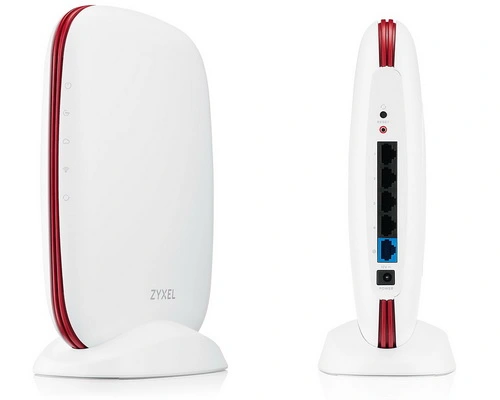
The design showcases surprising beauty which creates an elegant appearance for the product. The Zyxel SCR 50AXE displays a rounded design which creates an attractive appearance through its white body and red design elements. Biareview highly appreciates this design because its modern look will not go out of style over time and can be placed anywhere, whether in the living room, kitchen, or bedroom.
This device features a design which does not include multiple antennas that surround typical routers because it maintains a streamlined appearance through its plastic body. Biareview believes that the hidden antennas are concealed within the red plastic casing even though we have not yet opened the device to investigate its internal components.
The router includes a stand which allows it to stand vertically and uses a magnetic system to keep the router stable on horizontal surfaces. The router supports multiple mounting options because users can place it on surfaces like desks bookshelves and cabinet tops or they can use the mounting clips located at the back to install it on walls. The user can hide the device’s location by closing the cover which creates a more polished appearance for the device.
The product displays its operational status through lights which show their status on a red strip that runs along the front edge. The green indicator lights create an impressive display which becomes more visible during nighttime hours. The device contains four Gigabit ports which operate in addition to one Gigabit WAN port that exists behind the unit next to its reset button.
The router provides users with straightforward operation through cloud technology. The setup process for the Zyxel SCR 50AXE cloud-managed router follows different procedures because the device operates as a cloud-controlled system. Users should install the Nebula app on their smartphones to control advanced settings while they can also access the system through their web browser from their computers.
Zyxel Secure Cloud-Managed Router with AXE5400 Tri-Band WiFi Subscription-Free Network Security, Manageable via Nebula APP/Ideal for Small Office/Small Branch. [SCR 50AXE]:
Users must establish a Zyxel account and complete the two-factor authentication setup process for account access. You should activate the security feature now because the Nebula Control Center will operate through cloud control.
The Setup wizard will prompt you to create a website name, so choose any name (you can change it later), select your country, time zone, etc. The first step to add the device to Nebula requires you to either scan the QR code on the back of your device or enter the serial number and MAC address manually. The 30-day trial period allows users to test all management features in Zyxel’s various management packages. The application allows users to create a secure network connection through three simple steps. The installation process depends on automated systems that execute all tasks while a comprehensive detailed guide provides assistance. The app interface enables users to handle configuration changes through efficient and straightforward methods.
The web UI of the system provides essential features because it operates as a cloud-managed router system. Users will only have enough control to change their WAN connection type if they experience internet connection issues or have special configurations like VLAN ID (for telecommunications companies). The product also allows you to free up the Public IP (if you’re using DHCP there) and some basic troubleshooting tools.
The Nebula Control Center stores the local administrator password for devices that existing users have registered with Nebula. The one printed on the device will no longer work.
With the Nebula application on your mobile device you gain additional control over your ZYXEL SCR 50AXE wireless access point. You can establish four WiFi networks while configuring VLANs and selecting Band Modes which include 2.4 GHz and 5 GHz and 6 GHz frequencies.
The connection check function allows users to test their network connection through either IP address or FQDN (Fully Qualified Domain Name) which will attempt to resolve domain names through FQDN and create network connections.
The router includes a reset button which allows users to restart the system after encountering system errors or during required system updates following each configuration process. The application dashboard provides detailed statistics together with a complete list of devices that are connected to all VLANs. When you enable the options you will receive ‘snapshots’ that show how applications were used together with threat reports and content filter reports. The application allows you to handle your website together with its administrators and the licenses needed for operation.
The Control Center (NCC) in Nebula gives you a complete view of your network system after you complete your login process.
The NCC provides access to every feature which exists in the application. The NCC system enables users to oversee all Zyxel devices which they possess.
You must use NCC at Secure router interface section to modify your ZYXEL SCR 50AXE local IP address.
Threat Management
Zyxel has made Threat Management a free feature for all users. Furthermore, threat management is not grouped into a single category but is divided into 6 separate categories:
Malware/Device Anti-malware
Intrusion Blocker
Dark Web Blocker
Phishing and Email Scam Prevention
Ad Blocker
VPN Proxy Blocker
Each function can be enabled or disabled individually, with exception lists by client or IP, as well as custom allowed/blocked domains.
In addition to the Threat Management features listed above, Zyxel also offers free firewall, country restrictions (GeoIP), allow/block lists, and traffic management (apps & clients) features in the SCR Free plan.
If using the SCR Pro plan, users will have access to features such as: Real-time threat intelligence provided by Trellix (Trellix is the new name for McAfee); Web filtering (DNS) provided by Trellix; Nebula Pro Pack – Advanced feature set (more enterprise-level features). Furthermore, Ransomware Prevention Premium with real-time threat updates is also included in this plan.
In short, this superior cloud management method optimizes management, not only for the SCR 50AXE device but also for all Zyxel Nebula-supported products. All in a single platform without the need for any additional software or hardware.
What is your assessment of both network performance and Wi-Fi functionality?
The product uses tri-band WiFi 6E from the SCR 50AXE to deliver superior wireless network performance which enables faster internet speeds and better connection stability during Wi-Fi operation at distances of 4.5 meters from the 1.788 Gbps speed point which reaches maximum performance of 5.4 Gbps through AXE5400 connection technology.
The SCR 50AXE enables users to establish secure VPN connections through its user-friendly interface which requires only a few steps to complete thus enabling businesses to create remote access solutions that permit home-based workers to connect with office networks safely.
Basic Specifications The CPU consists of a Dual-core processor which operates at a speed of 1.00GHz using the Cortex A53 architecture. The device has 1GB of RAM and 256MB of flash memory with 10/100/1000 Mbps RJ-45 Port which includes 1 WAN port and 1 RJ45 GbE port and 4 LAN ports and 1 GbE RJ45 port.
The system can handle 900 Mbps of throughput through its SPI LAN to WAN Firewall. The system has a capacity to manage threats with a throughput speed of 900 Mbps. The system operates according to IEEE 802.11ax/ac/n/a 2.4 GHz standard and IEEE 802.11ax/ac/n/a 5 GHz standard and IEEE 802.11ax 6 GHz standard.
The device operates on three different wireless frequency bands which include 2.4 GHz and 5 GHz and 6 GHz. The system supports four different SSID configurations which enable users to create multiple wireless networks. The device contains four internal antennas which provide its wireless connectivity functions.
The system provides wireless connectivity with speed capabilities of 575 Mbps on 2.4 GHz and 2400 Mbps on both 5 GHz and 6 GHz frequencies. The device requires 12V DC power with 2.0 A current input. The device can consume a maximum power of 21 watts.
The security system protects against ransomware attacks and software threats while blocking malware and preventing unauthorized access through dark web monitoring and email fraud and phishing protection and ad blocking and VPN proxy defense and web filtering and firewall protection and geoip-based country access limitations and allow list and block list management and traffic control for applications and clients and real-time threat monitoring and DNS-level web filtering and Nebula Pro Package.
VPN Features The system enables site-to-site connections through its IPSec-based VPN functionality.


Tech Reviewer & Product Analyst
Định Bia has spent over 10 years testing consumer electronics with a focus on smart technology. He work as a product advisor at Biareview where he helped customers find the right devices for their needs. He personally tests every product featured on this site using a consistent evaluation framework covering quality, durability, and value. All reviews are based on experience, not influenced by the manufacturer.