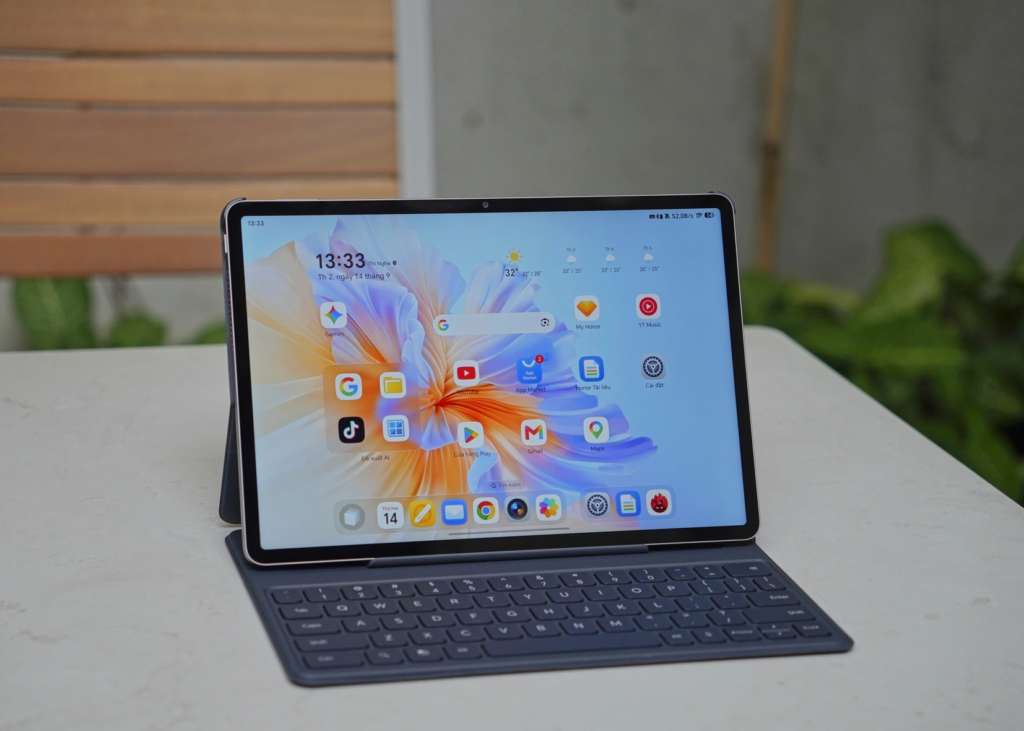
There is one question I always find myself asking whenever a high-end Android tablet lands in my hands: can it really carry a full working day, not just web browsing and video watching? HONOR positions the Pad V9 as an all-round performance machine, so I decided to put that claim to the test. I left the laptop closed at home and took the Pad V9 and its accessories to work for an entire day.
Light on my feet from the moment I walked out the door
The first thing that made me comfortable leaving the laptop behind was the weight and thinness. 475g and 6.1mm. Lighter than any thin laptop I’ve carried, and you notice it the second you lift it. The body is one piece of metal with an NIL nano-topography finish, which in practice means my fingerprints stopped showing up after a day of handling it. It’s rated SGS Gold Five-star for durability too, so I gave up being careful with it fairly quickly. It went in the bag and onto a rush-hour bus wedged between two other people’s backpacks, and came out fine.
The screen is what I actually used all day. 11.5 inches, 2.8K, 144Hz. Documents, meeting playback, email, the usual. Sharp text, smooth scrolling, no complaints there. The part I’d been dreading was eye strain, because I was going to be staring at this thing for eight hours instead of a laptop I’m used to. HONOR lists four eye-care certifications for it, TÜV Rheinland Low Blue Light, Dynamic Dimming, Circadian Night Display and AI Defocus Comfort Display, and I’m never quite sure how much of that is marketing. But I finished the day without the headache I’d half expected, so something in there is doing its job.
Meetings without a laptop: recording and summarising with HONOR Notes
The first test of the day was a team meeting with the editorial staff. Instead of opening the laptop and typing notes the way I normally do, I set the HONOR Pad V9 down in the middle of the table and switched on recording in HONOR Notes. What surprised me was how well it told the speakers apart: voice recognition picked out each person, speech was turned into text close to real time, and it then pulled everything together into a logically structured summary. That is exactly the kind of minutes I used to sit down and type out myself after every meeting.
This was probably the single biggest time-saver of the whole day. Once the meeting ended there was almost nothing left to do: open the summary, tidy it up a little, and send it straight to the group.
One detail I noticed was that the meeting room had the air conditioning running and people walking past outside, yet AI Voiceprint Noise Reduction kept the speaker’s voice clear. When I played the recording back in the afternoon, the background noise had not swallowed it.
Handling documents and formulas without Word or Excel
After the meeting came document work, the part where I assumed a tablet would fall furthest behind a laptop. HONOR Docs let me pull together files scattered across different apps into one place, create new ones, and, most importantly, convert between document formats (images or sheets to PDF and so on) in a few taps. Someone slid a printed page of figures across the table mid-meeting. That sheet would normally have sat in my bag until I got back to the office scanner. I pointed the camera at it instead and had a usable PDF a few seconds later, though I did have to straighten the crop myself because I was holding it at an angle.
Then there was the maths. I had formulas and a bit of technical notation to drop into a report, so I wrote them out by hand with the stylus and let HONOR Notes read them back. It gave me proper text, and when I pasted it into a Word file I had open alongside, the formatting held. That is more than I can say for the formula OCR tools I have used on a laptop. I pasted one into a Word file I had open alongside just to check, and the layout held up, with none of the mangled formatting I have run into using formula OCR tools on a computer.
Working from a café: Free Space and Magic Portal
In the afternoon I took the HONOR Pad V9 to a café near the office to finish what was left, the classic office-worker move of slipping out for a change of scenery. This is where Free Space earned its keep.
Free Space floats windows over the home screen, so I had a work tutorial running, a chat thread open and a document to read, without backing out of one app to reach another the way you have to on a phone. You can drag the split to whatever ratio you like. When a document needed real attention I pulled the reading window wide and shoved the chat into a corner where it couldn’t nag me.
The other thing I kept doing was grabbing small bits of information. An address buried in a message that I wanted on the map. A paragraph worth sharing. Press, circle it, drag it to the edge of the screen, and Magic Portal offers up the app it thinks you want. It guessed right most of the time, which is more than I expected.
Handwritten notes, cleaned up on the fly
I still think with a pen when I’m working an idea out, so this part mattered to me. The scrawl I produce on the move gets read back as proper text, legible enough to send to someone else. There are a few handwriting fonts to pick from if you want it to look less like a shopping list. With the Magic Pen in the box, circling a chunk of writing to convert it or reformat it happened fast. I’d assumed there would be a pause while it thought about it. There wasn’t.
Performance and battery: the part that decides the day
Any tablet can do a few hours. Morning to night on one charge is a different question. The MediaTek Dimensity 8350 Elite never once stumbled on me, not when I was switching apps, not when it was recording in the background while I scrolled through something else. RAM Turbo pushes memory from 12GB up to 24GB when it needs to, which is presumably why I could leave a dozen-odd browser tabs open with apps running behind them and still not have a page reload on me.
On battery, the 10,100mAh cell carried me from morning through to early evening — recording the meeting, reading documents, working with a split screen, watching videos over lunch — and still had a decent amount left at the end of the day, with none of the working-while-watching-the-charger that other mobile devices tend to force on you. Over the lunch break I played a few songs to unwind and was taken aback by how full and wide the sound was from the eight-speaker array with HONOR Spatial Audio. There is far more depth to it than I had expected from tablet speakers.
The Magic Pen and keyboard: free extras, but a real part of the experience
Used with fingers alone, I think the HONOR Pad V9 still leans more towards entertainment. Attach the detachable keyboard, though, and typing documents and drafting reports starts to feel much closer to a laptop. Key travel is solid, fast typing does not trip it up, and switching between the keyboard and the stylus for notes or quick sketches is seamless thanks to the flexible split screen. The pair comes free with the tablet, but it lifts the experience enough that I would not go hunting for a cheaper deal without the accessories.
So can the HONOR Pad V9 replace a laptop?
After a day with it, the honest answer is not entirely, but closer than I thought it would be before I started. For work that demands heavy specialist software or complicated multi-window setups, such as serious video editing or programming, the Pad V9 still cannot match a laptop. For most everyday office work, though — meetings, note-taking, basic document handling, working on the move — combined with how thin and light it is, a battery that comfortably lasts the day and performance that holds up throughout, the HONOR Pad V9 does the job well for anyone who is constantly on the move and does not want to carry a laptop around.
HONOR Pad V9 (11.5 inch, Wi-Fi) Tablet 2024 256GB Storage 8GB RAM Android 15 (Gray): Check Availability on Amazon
HONOR Pad V9 (11.5 inch, Wi-Fi) Tablet 2024 256GB Storage 8GB RAM Android 15 (White): Check Availability on Amazon
Related Posts