Introduction
The Asus K53SV is one of those mid-range laptops that kinda felt like it was trying to aim, at that sweet spot between actual performance, build feel, and cost. It arrived in the early 2010s, and honestly it didn’t take long before it became a solid go-to for students, office folks , and even casual users too, who just wanted something dependable for day-to-day work, movie nights, and a little bit of lighter gaming. In this review, we’re going to poke around the Asus K53SV from multiple angles, including how it looks, how it’s put together, the screen, speed in real life use, keyboard typing feel, touchpad response, wireless features, speaker output, battery life and yeah, the overall value side.
Design and Build Quality
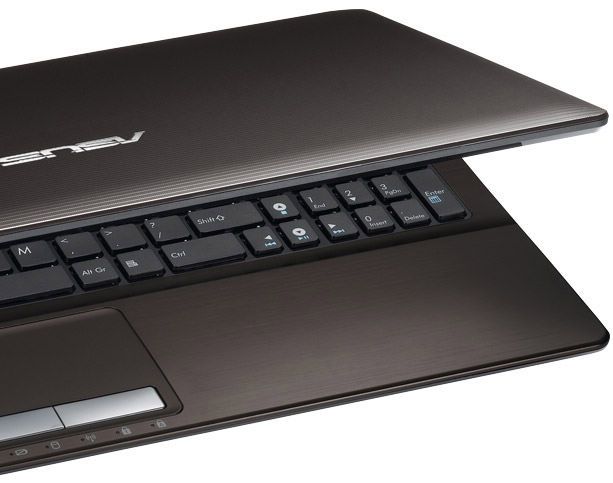
The Asus K53SV has a fairly tidy contemporary look, with brushed aluminum on the lid and also the palm rest, which gives it more of that “premium-ish” vibe than you’d expect at this class. The main frame is plastic, but it doesn’t really read as cheap or wobbly, which is good though. Overall it feels sturdy, with only a little flex when you press around. So, for the usual tossing it in and out of bags, plus routine handling, the build quality comes off dependable. On size, it measures about 378 x 253 x 35.6 mm, and it weighs around 2.6 kg, pretty standard for a 15.6 inch laptop. It’s not, exactly what you’d call easy to carry every single day, but you do get that decent tradeoff of a larger display while still keeping it in the “manageable” zone.
The hinge is one of those parts that feels like it was assembled with some real care. It opens smoothly, and you can swing the lid out to a maximum angle of around 140 degrees. The brushed aluminum is not just for looks either, it also seems to help with smudges and fingerprints, which is small, but honestly it’s a nice little detail. Down below, the bottom cover is plastic, and it includes a large ventilation opening for cooling, and yeah we’ll revisit that in a bit.
The Asus K53SV comes with a 15.6-inch LED-backlit display, set to run at 1366 x 768 pixels ,and honestly it’s kinda fine for most daily chores, movies, and casual multimedia stuff. Still, it feels a little behind, because Full HD has been kinda normal for a while now. Since the pixel density isn’t super high, the text and visuals don’t feel as sharp and crisp as what you get on more recent machines.
Even so, the panel itself is fairly decent. Color reproduction comes through in a good way, brightness levels hold up, so the screen ends up looking pretty lively overall. Contrast is also pretty satisfactory, especially for a laptop in this sort of price bracket. That said, the viewing angles aren’t really its strong side. If you tilt it from the side, or glance from above,or below, you’ll see color shift and you’ll also notice brightness dropping.
One more thing it has a glossy finish, sure it makes colors look more vibrant but it also turns the whole surface into more of a mirror. You get extra reflections and glare, especially when you’re in a room with strong lighting . So if you plan to use it outdoors or near windows most of the time it might end up being kind a distracting.
Performance
The Asus K53SV looks like it runs on an Intel Core i7-2670QM processor, basically a quad-core chip from Intel’s second generation Sandy Bridge lineup. This one starts at a base clock of 2.2 GHz and if things heat up, it can turbo boost up to 3.1 GHz, so you get a lot of punch for multitasking and more demanding workloads. It also ships with 8 GB of DDR3 RAM, which is frankly plenty for most folks. You can upgrade it up to 16 GB too , just in case you bump into extra demand later on.
A big part of the K53SV appeal is its dedicated graphics card, the NVIDIA GeForce GT 540M with 2 GB of DDR3 VRAM. This mid range GPU delivers a noticeable jump in graphics power compared with integrated options so the laptop should handle light to moderate gaming, plus photo and video editing along with other graphics heavy tasks pretty comfortably.
In day to day use, the K53SV still does pretty well, more or less for normal web browsing, office style tasks, multimedia playback, and honestly even a little casual gaming. Once you start throwing heavier apps at it like video editing, or 3D rendering though, it can still run, but people may notice the longer processing times, mainly when you compare it with newer, higher end laptops.
On the storage side, you’re looking at a 750 GB 5400 RPM hard drive, so there’s plenty of space for documents, media collections, and everyday programs. But since it’s the slower type of drive, load times might feel a bit extended, and data transfers won’t feel anywhere near modern SSDs. If someone wants a clear improvement, going for a solid state drive is a smart upgrade, usually that boosts boot time and overall smoothness a lot.
Keyboard and touchpad
The Asus K53SV brings a full sized chiclet style keyboard, plus it has a dedicated numeric keypad too, which is pretty helpful if you deal with numbers a lot, or you just like that extra typing comfort. The keys sit with good spacing , decent travel, and a tactile feel, so typing comes across as steady and kind of satisfying. The layout is pretty simple, nothing overly strange with the key positions, so most people can get comfortable quickly.
There’s also this small detail that really kind of adds up, the anti dust design. It helps keep the keys cleaner over time, and it cuts down dust buildup, which matters if you use the laptop pretty often. In the end, a cleaner keyboard tends to stay more responsive and more pleasant for typing, even after months of everyday use.
The touchpad on the K53SV is kinda generously sized, and yeah it supports multi touch gestures, like two finger scrolling, pinch to zoom, and a three finger swipe. The surface itself feels smooth and pretty responsive too, so cursor control comes off accurate, in a normal way that you notice right away. The mouse buttons are built in, at the bottom area of the touchpad, and each press feels solid enough, a click that is actually satisfying. So overall the touchpad works well, and it kinda complements the keyboard nicely, like they’re both on the same page.
Connectivity
The Asus K53SV comes with a pretty wide set of connectivity choices, it covers a bunch of needs and keeps peripherals in mind. On the left side of the laptop, you get these ports, in plain sight:
VGA port: for attaching to external monitors and projectors.
HDMI port: for linking to HDTVs and other HDMI compatible devices.
Ethernet port: for a stable, wired internet connection.
USB 3.0 port: for quicker data transfers with supported accessories.
3.5mm audio jack: for headphones or external speakers.
On the right side you’ll find:
Optical drive: a DVD-RW drive for reading and writing CDs, and DVDs also.
Two USB 2.0 ports: for connecting things like mice, keyboards, or external storage drives.
Kensington lock slot: for locking the laptop down in public places.
The laptop comes with that multi format card reader built into the front edge. It supports SD, MMC, MS, and xD cards, so yeah it’s pretty handy, especially when you need to shift files from a digital camera or other gadgets, without extra cables or all that fuss.
For the wireless side the K53SV includes 802.11b/g/n Wi‑Fi, plus Bluetooth 3.0. That basically gives you dependable wireless internet, and the same time it lets you pair up with Bluetooth enabled devices like smartphones, headsets, or even small speakers. It feels like a good blend, because you’re not stuck using just one single option, or only one kind of connection.
Audio
About the audio on the Asus K53SV, it’s decent, for a laptop in this price bracket anyway. You get Altec Lansing stereo speakers sitting above the keyboard, and that helps keep the sound fairly clear. It also gets loud enough for everyday use, so for videos, music, and casual gaming it’s fine, nothing super fancy, but it does what it’s supposed to.
That said, once you start expecting a fuller low end, or a more deep kind of feel, the built in speakers can feel a bit restricted. They don’t really deliver that bass punch, or the layered depth you might get from external speakers or a solid pair of headphones. If audio is a big deal for you, like music sessions, or movie nights, then plugging in external speakers might be the way to go. Or, if you prefer, higher quality headphones for a more immersive vibe.
The laptop also includes SRS Premium Sound tech. It helps sharpen the clarity, and adds a little extra sense of depth too. Plus there’s a 3.5mm audio jack, so you can connect external headphones or speakers, for a better output, overall.
Battery Life
Battery life is one of those things you notice pretty fast with any laptop, and the Asus K53SV does a decent job here. It comes with a 6-cell lithium-ion battery, rated around 5200mAh, so you can usually expect roughly 4–5 hours of use on a full charge, depending on how you work, what apps you keep open, and which power settings you have enabled.
If you’re doing everyday stuff like web browsing, office tasks, and casual media playback, the K53SV can last a few hours without needing a plug, more or less comfortably. But when you jump into heavier stuff, like gaming , or video editing, the battery starts dropping quicker, almost immediately, and you’ll probably want a charger nearby.
To help with the run time, users can tweak the power plan and turn on energy-saving modes when it actually makes sense. Asus also includes the Power4Gear Hybrid utility, which kind of helps you switch between different performance profiles based on what you’re doing, and that usually boosts battery efficiency a little.
Cooling and Noise
Now, cooling wise, the Asus K53SV has a system designed to deal with heat from the internal components. There’s a large vent on the bottom panel, plus an exhaust vent on the left side, so hot air can escape more effectively. In everyday use, the laptop stays fairly cool, and it’s on the quieter side too, since the fans often run at a low speed.
However, when you get into more demanding things, like gaming or video editing, the laptop temperature can start going up, and the fans usually get a bit more noticeable, in terms of sound. The cooling system does a decent job, so internal parts stay within safe temperature limits, but people may still hear the fan noise when they’re pushing it hard. This kind of thing is pretty normal for laptops that have a dedicated graphics card and a high-performance processor.
User Experience
In day to day use, the Asus K53SV feels mostly solid, more than anything because of its dependable performance, comfortable keyboard, and flexible connectivity. With the Intel Core i7 processor plus the dedicated NVIDIA graphics, it has enough punch for a broad mix of work and entertainment , think productivity, media playback, plus light gaming, and yeah even photo or video editing.
The 15.6 inch display isnt the highest resolution you can track down but it still lands on pretty strong color accuracy and solid brightness, kinda. So for most everyday stuff it holds up well, honestly. The keyboard and touchpad, those feel thoughtfully put together too, and they’re comfortable enough that you dont keep feeling the urge to tweak your grip or shift your posture every few minutes.
Then there’s the connectivity side of things, which is a big part of why it feels versatile. Users can hook up peripherals and external devices without much hassle, so it supports both work setups and more casual “sit down and play” scenarios. On top of that, the battery life is pretty reasonable, and the cooling system keeps things stable, and that all together makes the experience come out positive overall.
Operating System and Software
The Asus K53SV was sold with Windows 7, and back then it was pretty popular, honestly, and a lot of people seemed to like it. But nowadays, plenty of users still choose to upgrade to a newer Windows edition such as Windows 10 or Windows 11, mostly so they can grab the newest features, the security fixes, and better overall compatibility with software. When you do that kind of update it can kind of “reanimate” the machine, and make sure everything stays running smoothly with current apps and online services.
On top of the operating system, Asus throws in several preloaded utilities plus some extra programs too. For example, Power4Gear Hybrid is there for power management, and Asus WebStorage gives you cloud storage access. Some people like having these tools right away, but others may want to uninstall a few things, just to avoid that extra bloat, and keep things a bit more streamlined… also, yes, to get back some actual free space.
Real-World Performance
To get a more real life feel for how the Asus K53SV performs, it helps to think in normal day scenarios rather than just specs:
Office Productivity: For typing documents, working with spreadsheets, and putting together slide decks, the K53SV does really well. Its quad-core Intel Core i7 processor supports fairly smooth multitasking, so you can bounce between several programs without constant stutters. And the dedicated numeric keypad is surprisingly useful if you deal with numbers a lot, accounting data entry, you know the sort of thing. It makes the whole workflow feel less clunky.
Web Browsing and Multimedia: For web browsing, the laptop handles it comfortably, even if you keep a lot of tabs open. Streaming on YouTube or Netflix feels stable and smooth, and the audio/video output seems decent. Plus, the dedicated GPU contributes to rendering high-definition content, so the viewing experience stays pleasant, and consistent… rather than getting all jumpy or choppy.
Light Gaming: The NVIDIA GeForce GT 540M video card helps the K53SV to chug along with older, and less demanding games at settings that still feel “okay”. Yeah, for the newest AAA titles it might show its age, but casual and indie games plus older classics should run, with decent frames. People generally can play stuff like League of Legends, Dota 2, and Minecraft without too much trouble, or big stutter moments.
Photo and Video Editing: If you’re doing photo or video work, the K53SV is pretty capable. Adobe Photoshop and Premiere Pro usually run smoothly ,though for heavier projects the render time can drag a bit compared to newer, higher end laptops. That dedicated GPU is also helpful for accelerating certain tasks, which means the whole workflow can feel a little more efficient. Not like a workstation, but still useful.
Pros and Cons
So, wrapping it up, here are the main strengths, and the weak spots, for the Asus K53SV , just to keep it simple
Pros:
Solid performance, you get the Intel Core i7 CPU plus the NVIDIA GeForce GT 540M combo and honestly it handles most everyday tasks pretty well.
Sturdy build quality, the brushed aluminum look with that solid frame, makes it feel more durable than cheap stuff and kind of premium too.
Comfortable keyboard and touchpad yeah, the chiclet style keys with the numeric keypad , and then a responsive touchpad, it keeps typing from feeling like a chore.
Comprehensive connectivity, lots of ports along with the usual wireless options means you can plug things in easier and stay more adaptable.
Upgradability is there, you can upgrade the RAM and storage, so the laptop can stay useful longer and feel quicker later on.
Decent battery life, the 6 cell battery should give reasonable endurance for daily use, not wow level, but still fair.
Cons:
Limited for New AAA Games: Newer demanding games may struggle, even at lower settings.
Rendering Can Take Longer: Complex editing projects might take more time than expected.
Not a Modern Powerhouse: Performance feels dated compared to current high-end models, so expectations should match the era.
Lower Resolution Display: That 1366 x 768 setup just isnt as sharp as newer Full HD screens, and honestly yeah the glossy finish can be a little reflective too depending on the room lighting .
Limited Viewing Angles: Colors can sometimes shift, brightness tends to drop if you’re not looking straight on, which might feel kinda irritating for certain people. Especially if you’re trying to share the screen or lean at an angle.
Fan Noise During Intensive Tasks: When you push heavier applications, the cooling system becomes audible , and it can be distracting even if you’re trying to focus and stay locked in.
Non-Upgradable CPU and GPU: You cant upgrade the processor or the graphics card, so “future-proofing” is mostly capped. No maybe about it.
Bulkier Design: The laptop ends up bigger and heavier, so day to day it feels less portable than ultrabooks or those thin and light styles, still it stays manageable though.
Conclusion
The Asus K53SV is a pretty balanced mid-range laptop, it kinda ties together performance, build quality, and price in a way that feels reasonable . You can expect steady performance, a comfortable keyboard, and kind of flexible connectivity options so it sorta fits a pretty wide range of people, like students, working professionals, casual gamers, and those who mostly handle multimedia. Even if the lower resolution display and the whole lack of CPU GPU upgradability are legit downsides, the overall value, plus the upgrades you still can do such as RAM and storage, helps smooth the experience out a bit.
If you want a dependable laptop for everyday computing, light gaming, and just watching media, the Asus K53SV still holds up even after it first came out . Its sturdy build and decent performance mean it can keep doing the usual things you need, especially if you add more RAM or upgrade storage. Overall , the Asus K53SV really shows what Asus can do making quality laptops that last, and dont just fade after one cycle.
ASUS K53E-DH31 15.6-Inch Versatile Entertainment Laptop (Mocha): Buy it now
Related Posts



Tech Reviewer & Product Analyst
Định Bia has spent over 10 years testing consumer electronics with a focus on smart technology. He work as a product advisor at Biareview where he helped customers find the right devices for their needs. He personally tests every product featured on this site using a consistent evaluation framework covering quality, durability, and value. All reviews are based on experience, not influenced by the manufacturer.