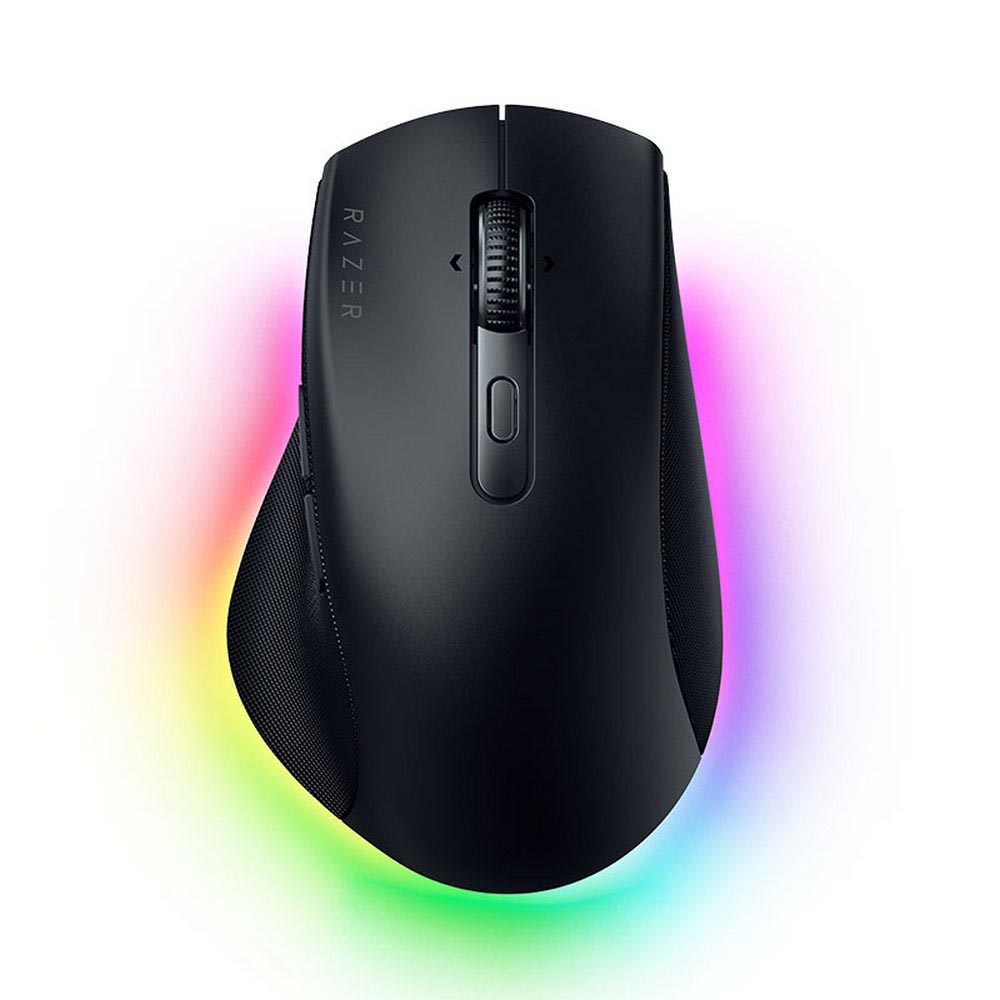
An ergonomic gaming mouse is built for right-handed users, and tends to feature an asymmetrical shape that includes a rest for the thumb, a palm-supporting rear section, and is elevated. This prevents the wrist from having to twist sideways. Symmetrical mouse often cause wrist strain. Ergonomic mouse may be a great option for users that have tried symmetrical mouse but are still experiencing fatigue. The category is also a great option for palm grip users that require a supporting area for their palm. Below I review five of the most popular gaming mouse models and rank them according to what grip style and hand size they best support.
Quick Review
To determine the most appropriate ergonomic gaming mouse for you, it helps to first understand your preferred grip style. If you use a “palm grip,” you should focus your search on ergonomic gaming mouse with a taller back section (like the G502 Hero and the Basilisk V3). “Claw grip” users will find greater utility in lighter gaming mouse, such as the Z1 V2 Ultimate+ (54 grams). The fingertip grip style is largely unsuitable for this mouse category. The Z1 V2 Ultimate+ sets itself apart in this category by marrying a lightweight 54g design with a highly responsive 8,000 Hz polling rate. The DeathAdder Essential is an excellent value offering.
At 54g, the Z1 V2 Ultimate+ boasts a PixArt PAW3955 sensor with 40,000 DPI and an 8,000 Hz polling rate.
The DeathAdder Essential costs $30, with 6,400 DPI, 96g weight, and 1,000 Hz polling rate.
Both the G502 Hero and Basilisk V3 feature 11 buttons and are wired. The Basilisk is 20g lighter (101g vs 121g).
The Superlight 2 Dex is wireless and supports both 1,000 Hz and 8,000 Hz polling rates, at 60g weight.
None of the 5 models have left-handed or vertical (as in some office mouse) versions, as all have right-handed, asymmetrical designs.
Ergonomic mouse are built differently from symmetrical mouse. A symmetrical mouse is equal on both sides so a left- or right-handed user is able to utilize it. These mouse are also more lightweight. There is a catch. With these mouse, the wrist must rotate to hold it and there is no palm support. This can result in some hand fatigue and typically affects users who prefer a palm grip more than others.
There are also solutions built to solve this problem. Ergonomic mouse have a sloping back, which supports the whole hand, an outstretched side, which supports the ring and pinky fingers, and a section for the thumb to rest on the side. With an ergonomic mouse, there is next to no wrist rotation. The only downsides are these mouse tend to be on the heavier side, they are usually bigger, and they typically are not manufactured in a left-handed version.
What most consider to be the most important part of a gaming mouse is not the sensor, but rather how much hand support the mouse offers. An ergonomic mouse is usually too big if you use a “fingertip” or “claw” grip. But if you have a “palm grip,” it’s going to make a world of difference. It lets you go through gaming sessions of any length with minimal need to re-position your hand.
How do ergonomic gaming mouse compare to vertical office mouse?
Both vertical mouse and standard gaming mouse may use the term “ergonomic,” but that’s as far as their similarity goes. A vertical mouse is designed to have your body sit upright. This forces your hand to be completely vertical. These mouse have much slower response times and lower polling rates compared to the horizontal design of gaming mouse.
All the gaming mouse listed here use a standard horizontal design with a tall profile, which helps your hand and provides enough speed for fast-paced, high accuracy shooters.
Size and grip selection guide:
If you are a palm gripper (rest your entire hand on your mouse), you should select a mouse with a long body and high rear profile. From the provided table, the G502 Hero and Basilisk V3 have the longest bodies. The Z1 V2 is the shortest, which makes the Z1 V2 the best option for people with smaller hands that are also palm grippers.
For claw grip (palm makes contact and the fingers are arched), pick a mouse with a moderate rear length, as a long rear pushes your hand too far, and avoid heavy mouse. For an ergonomic mouse in the weight class of the 54g Z1 V2, almost everything is significantly heavier (like the 96g DeathAdder Essential).
For fingertip grip, avoid ergonomic mouse because their high back usually pushes your hand forward. For those that use an ergonomic shape, the Z1 V2 Ultimate+ (54g) and Superlight 2 Dex (60g) are the lightest mouse in this category.
Hand Size: Hand length is a good metric to use for comparisons, as you can measure hand length from wrist to tip of middle finger and use this to find the mouse body length you prefer to use (palm vs claw). Ideally, a palm mouse length should be shorter than hand length, and a claw mouse should be of a length similar to hand length.
Comparison Table of Five Ergonomic Mouse
| Model | Form | Sensor | DPI | Polling rate | Weight | Dimensions | Connectivity |
| ATK Blazing Sky Z1 V2 Ultimate+ | Ergonomic, right-handed | PixArt PAW3955 | 40.000 | 8.000 Hz | 54 g | 122,5 x 66,8 x 42,4 mm | USB port, USB receiver |
| Razer DeathAdder Essential | Ergonomic | Optical | 6.400 | 1.000 Hz | 96 g | 127 x 61,7 x 42,7 mm | USB receiver |
| Logitech G502 Hero | Ergonomic | HERO | 100 to 25,600 | 1.000 Hz | 121 g | 131,2 x 75 x 40 mm | Wired USB |
| Razer Basilisk V3 | Ergonomic | Focus+ | Not listed | 1.000 Hz | 101 g | 130 x 75 x 42,5 mm | Wired USB |
| Logitech G Pro X Superlight 2 Dex | Ergonomic, right-handed | HERO 2 | 100 to 44,000 | 1,000 and 8,000 Hz | 60 g | 128,8 x 67,7 x 43,9 mm | Wireless |
The Models to Contemplate
ATK Blazing Sky Z1 V2 Ultimate+
- ATK Blazing Sky Z1 V2 Ultimate+ Wireless Gaming Mouse – White: Check Availability on Amazon
- ATK Blazing Sky Z1 V2 Ultimate+ Wireless Gaming Mouse – Orange: Check Availability on Amazon
Only one of the five models in this review, the Z1 V2, features both ergonomics and an 8,000 Hz polling rate. With dimensions of 122.5 x 66.8 x 42.4 mm, it is quite light at only 54 grams. It employs the PixArt PAW3955, an optical sensor with a maximum resolution of 40,000 DPI and an acceleration of 75 G. ATK Custom Optical Switches and a 500-hour battery are also included. Mac support for the ATK HUB software is also present. This device can connect either through a wired USB-C connection or with the included USB wireless dongle.
With a weight of only 54 grams, it is unusually light for an ergonomic gaming mouse; this weight class is generally only reserved for mouse with symmetrical designs. ATK notes the inclusion of a TTC Gold scroll wheel and a Nordic 54L15 microcontroller. If your priority is finding an ergonomic gaming mouse for competitive FPS gaming, this is the only model out of the five which will adequately suit your needs.
Razer DeathAdder Essential
- Razer DeathAdder Essential Ergonomic Wired Gaming Mouse, Black:Check Availability on Amazon
- Razer Deathadder Essential – Optical Esports Gaming Mouse- 6400 Adjustible DPI (Renewed): Check Availability on Amazon
- Razer DeathAdder Essential Ergonomic Wired Gaming Mouse, Kuromi Edition:Check Availability on Amazon
- Razer Deathadder Essential – Optical Esports Gaming Mouse- 6400 Adjustible DPI:Check Availability on Amazon
Of the selections in this list, the DeathAdder Essential is the most wallet-friendly and can be found most often at retailers. Dimensions are 127 x 61.7 x 42.7 mm. Its mass is 96 g. The DPI setting can reach up to 6,400 with its optical sensor and polling can go as high as 1,000 Hz. There are five buttons and a USB connection. A hallmark of Razer DeathAdder’s design is the ergonomically placed medium sized back. The DeathAdder Essential has a slight flare to the right, ideal for medium sized palms and grip style.
Consider these two points before buying: The 96g mouse will feel heavy to experienced FPS gamers as the industry standard is 60g or less. Also, for FPS players, the 6,400 DPI sensor is slow by today’s standards. This model will likely be perfectly adequate for first time buyers and casual players.
Logitech G502 Hero
- Logitech G502 HERO High Performance Wired Gaming Mouse, HERO 25K Sensor, 25,600 DPI, RGB, Adjustable Weights, 11 Programmable Buttons, On-Board Memory, PC / Mac (Renewed): Check Availability on Amazon
- Logitech G502 Hero High Performance Wired Gaming Mouse, Hero 25K Sensor, 25,600 DPI, RGB, Adjustable Weights, 11 Programmable Buttons, On-Board Memory, PC/Mac – Black (Renewed): Check Availability on Amazon
At 131.2 x 75 x 40mm and 121g, this mouse has the longest and largest design. The HERO 25600 DPI optical sensor is capable of a polling rate of 1000 Hz, has 11 customizable buttons, and is wired through a USB port. This multi-button style mouse features two buttons on each side, a scroll wheel adjustment button, profile adjustment button, and even a “trigger” button on the mouse.
RPG players will value the increased number of buttons, especially when it comes to customizing key binds. This style of mouse is not ideal for FPS gaming at 121g due to the rapid arm movements and wrist flicking required during competitive gaming. The weight difference from your first match will be extremely obvious to those who use a mouse that is 60g or lighter.
Razer Basilisk V3
- Razer Basilisk V3 Customizable RGB Wired Ergonomic Gaming Mouse, Black: Check Availability on Amazon
The Razer Basilisk V3 uses a similar button configuration to the Logitech G502. The Basilisk V3 measures 130 x 75 x 42.5 mm and weighs 101 g. The mouse comes equipped with a Focus+ sensor and has 11 programmable buttons, a 1000 Hz polling rate and a USB connection. It has a max DPI setting (though the manufacturer has chosen not to provide this information, we will leave it out here as well).
Unlike most gaming mouse, the Basilisk V3 comes with a scroll wheel with a “free-spin” feature that allows you to easily scroll through long pages or documents at a much faster rate. It fits medium to large hands quite comfortably due to its 130 mm size. Logitech G Pro X Superlight 2 Dex
This mouse is the priciest of the group, and also happens to be the lightest wireless ergonomic mouse in the group. At only 60g, it measures 128.8 x 67.7 x 43.9 mm. Its features include the HERO 2 sensor which supports between 100-44,000 DPI, has over 88g acceleration, and incorporates the use of LIGHTFORCE optical switches. It also has two polling rates of 1000 Hz and 8000 Hz, with a rated battery life of 95 hours.
The Dex model, by all metrics, takes a different direction than the other mouse listed. As mentioned previously, its 60g weight combined with an asymmetrical (right-handed) shape give it the same feel as other symmetric mouse. Its ergonomics are geared toward the claw and fingertip grip users with a spot to the right of the hand to rest, though it can also be used as an ambidextrous mouse. Its 1,000 Hz and 8,000 Hz polling rates are both quite unique among ergonomic gaming mouse.
There are also a lot of ways you can grip a mouse, so you should really consider your grip type when judging the mouse through photos. You can easily test ATK models. Although the five mouse models mentioned have an asymmetrical design, they feel quite different. Particularly the back section.
Which one should you pick?
| Need | Pick | Why |
| New to gaming, tight budget, wants to try an ergonomic shape | Razer DeathAdder Essential | Cheapest, a classic shape that’s easy to get used to, wired only |
| RPG player who needs plenty of shortcuts | Logitech G502 Hero or Razer Basilisk V3 | Eleven buttons each; the Basilisk is 20 g lighter |
| FPS player who wants hand support without the weight | ATK Blazing Sky Z1 V2 Ultimate+ | 54 g, PAW3955 sensor, 8,000 Hz polling rate |
| Claw grip, needs wireless with an 8,000 Hz mode | Logitech G Pro X Superlight 2 Dex | 60 g, wireless, runs at both 1,000 and 8,000 Hz |
FAQs
Can an ergonomic mouse be used for gaming?
Absolutely! The answer is yes. Gaming models (with higher end switches and sensors) should be chosen over office ones. All five models on this page (even the ones not gaming specific) come with game oriented sensors and horizontal designs. Gaming focused models such as the Z1 V2 Ultimate+ actually have a polling rate of 8,000 Hz.
What differentiates an ergonomic gaming mouse from a vertical office mouse?
The vertical style mouse keeps your wrist vertically oriented because it has a straight design. Vertical gaming mouse are usually right leaning, which means the design isn’t straight, so that the back part of the mouse can fit the palm of your hand, and most importantly, it has the right polling rate and the right sensors for gaming.
Can ergonomic gaming mouse be used with small hands?
Sure! Go for the mouse with the shortest body. With its 122.5 mm length, the Z1 V2 Ultimate+ is smaller than the G502 Hero and Basilisk V3, making it the perfect ergonomic gaming mouse for people with smaller hands.
Are there ergonomic mouse for left-handed people?
Unfortunately, no. All the ergonomic mouse options covered here are designed for right-handed users, or right-leaning asymmetrical designs. It is best left-handed users choose symmetrical mouse, rather than buying a design for right-handed people.
Related Posts


