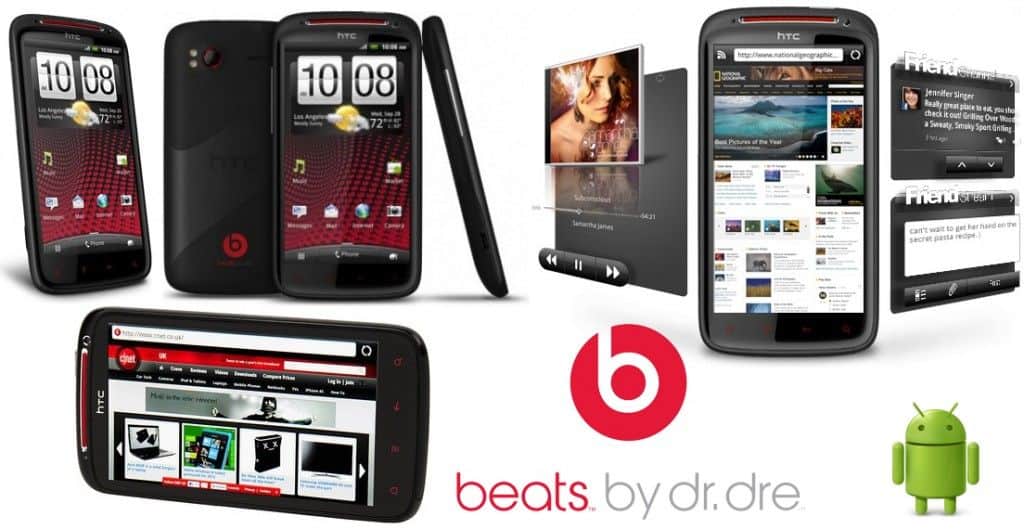
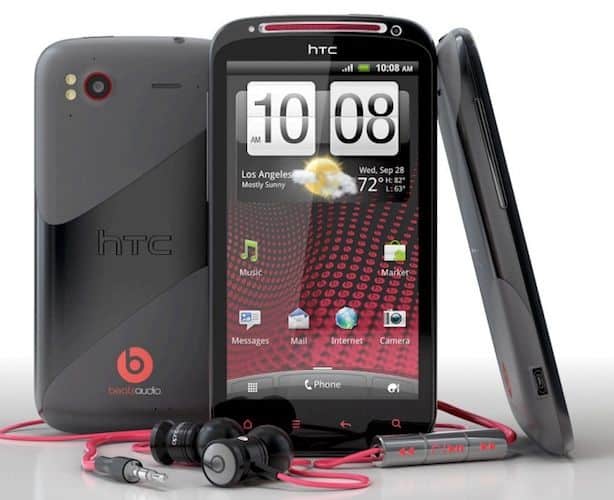
HTC Sensation XE has Android smartphones with dual core 1.5GHz processor and Beats Audio headphones.
HTC Sensation XE uses an upgraded processor and Beats Audio sound technology. Dual processor clocked at 1.5 GHz and the RAM 768M.
Sensation XE runs Android 2.3.4 with Sense 3.0 interface. When you plug headphones into the machine and to position the Sound Enhancer, you will see the option on or off Beats Audio.
External changes.
Underneath, Android 4 basic node is dyed red instead of white like version Sensation LCD format often. 4 This button will light and more red, more attractive while in operating mode, so that light below the keys light up. Painted metal frame and dark, color and shape metal.
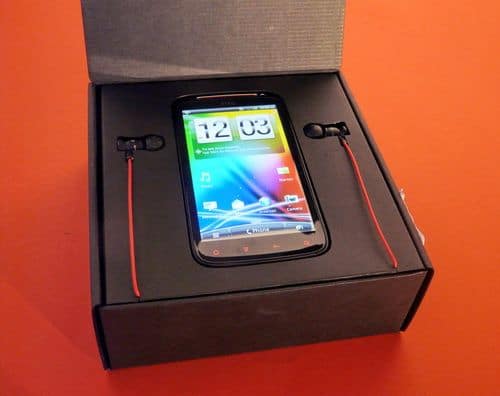
HTC Sensation XE Z715E with Beats Audio Unlocked GSM Android Phone – International Version – No Warranty – Black: Buy it now
HTC Sensation XE Z715E with Beats Audio Unlocked GSM Android Phone – International Version – No Warranty – White: Buy it now
Change the hardware:
HTC to upgrade the CPU speed, improve battery life and can be used other SLCD screen or color retouching.
The screen will be what you see the most impressive that you see, so bright colors are very bright and white and bluish white instead of yellow. Sensation XE color like the color on HTC Desize S, Sensation XE screen is 540×960, high and vertical than other high-end Android devices to view photos and text smooth, sharp.
1730mAh battery on the Sensation XE is higher than on the Sensation 1520mAh.
Yesterday I also try the Sensation XE camera but really not as impressive as those with good camera as Arc, N8 or iPhone 4S.
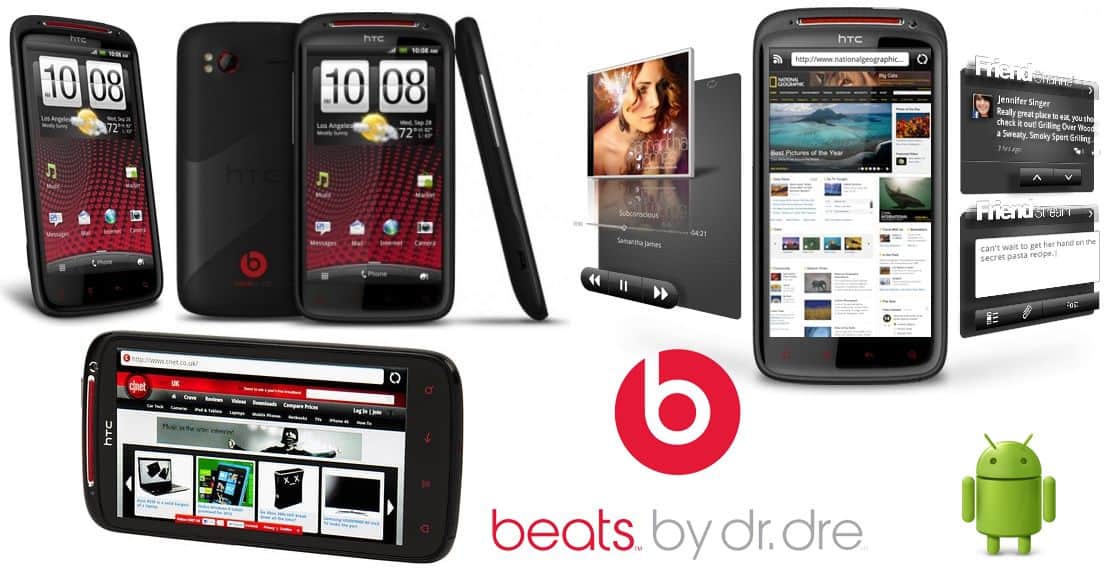
Design and Build Quality
Aesthetic appeal
The HTC Sensation XE was kind of a striking device back then, with a sophisticated look that mixed style with sturdiness, not just the usual shiny thing. It used a unibody aluminum construction and that gave the whole phone a premium feel , so it seemed different from a lot of plastic-bodied competitors. The matte black finish, plus red accents around the camera lens, and soft-touch buttons, and even the speaker grille… all of that created a distinct modern appearance, kind of in sync with the Beats Audio branding
Ergonomics and handling
In terms of size, it measured 126.1 x 65.4 x 11.3 mm and weighed 151 grams. So it was relatively slim and easy to grip. The curved back and rounded edges helped a lot, even if it was a bit larger than some other smartphones from that era. The thing is, the unibody design improved durability, but it also meant the back cover was non removable, and that part was basically the trade off for getting such a solid feel in daily use.
Display
The Sensation XE showed off a 4.3-inch S-LCD capacitive touchscreen, with a resolution of 540 x 960 pixels , giving a pixel density near 256 PPI. The glass layer was Corning Gorilla Glass, which basically helped with scratches and small bumps. Honestly the display felt like one of the better parts of the whole device, colorful visuals, decent brightness , and viewing angles that were pretty good. Still, looking at it today, the resolution and color accuracy feel old school, but back then it did deliver a solid visual experience, in a very straightforward way.
Hardware and Performance
Processor and Memory
Inside the HTC Sensation XE, there was a Qualcomm MSM8260 Snapdragon chipset. It ran a dual core 1.5 GHz Scorpion processor alongside an Adreno 220 graphics chip, and honestly it felt more like an actual shift rather than a minor tweak compared to the original Sensation. Because the older model had a 1.2 GHz CPU, so that change wasn’t just a small deal. The extra clock speed brought clearer performance gains, especially when it came to multimedia, and yeah also gaming where responsiveness matters.
As for memory, it included 768 MB of RAM, and that amount was enough for many day to day tasks at the time , though it lagged behind a few competitors like the Samsung Galaxy S II which had 1 GB. Even so, the Sensation XE handled multitasking in a mostly reliable way, but it could get a bit strained with heavier apps, or more demanding games, especially later on when Android and app requirements kept moving forward.
Storage
The Sensation XE came with 4 GB of internal storage, but honestly only around 1 GB was actually there for the user to use for installing applications and keeping media files. So yeah it was kinda limiting, especially because apps and media content keep getting bigger, without really asking anyone first. Still, HTC included a microSD card slot, so you could extend the storage up to 32 GB. That part felt necessary, because the internal space was just not enough for most people.
Battery Life
The HTC Sensation XE used a 1730 mAh Li-Ion battery which was slightly bigger than the 1520 mAh cell in the original Sensation. Even with that increase, battery performance stayed a worry, particularly for heavy users. The dual-core processor plus the high-resolution display were the classic power-hungry combo, and with moderate use, then definitely with heavier use, the phone would often have trouble making it through the entire day on one charge.
Then there’s Beats Audio, which was kinda two sided. Ya sure, the audio upgrade sounded and felt like a real selling feature, but if you used Beats headphones, or kept the audio enhancements turned on, the battery drained noticeably faster… like, pretty much immediately.. If you were a light to medium user, the results were usually “fine” or at least workable. But for people who leaned on the device constantly for gaming, video watching, plus always-on connectivity, it was common to need a charger along, or even carry a power bank just in case.
Camera
So the HTC Sensation XE had this 8 MP rear camera , with autofocus and a dual-LED flash and it could also record 1080p video at 30 frames per second. Overall the camera was pretty solid for the time, you’d get decent image quality with nice color reproduction and decent clarity, mostly when the light was good. But yeah, just like a lot of phones from that era it kind of fell apart in low light, the pictures showed obvious noise and the sharpness would drop , sooner than you’d expect.
The camera setup itself felt uncomplicated and it had a bunch of modes, HDR , panorama , and even macro. Video recording was honestly one of the better parts of the whole thing, capturing Full HD footage was pretty impressive in 2011, and it still felt smoother than what some competitors managed back then.
Now the front-facing camera was VGA (0.3 MP), mainly for video calls not really for selfies, because selfies weren’t as big back in the day. The results were mediocre, yet it worked well enough for its purpose.
Audio and Beats Integration
One of the more noticeable features of the HTC Sensation XE was the Beats Audio integration , kind of a HTC x Beats by Dr. Dre partnership, and it was pushed hard in the marketing. The box typically included Beats-branded in-ear headphones, and these delivered better sound than the usual basic earbuds you’d find with most smartphones.
When those headphones were plugged in , the phone switched into Beats Audio mode automatically, boosting bass and improving the overall sound signature. If you like music this was a pretty big deal, and the Sensation XE managed to feel more full and immersive , especially with tracks where extra bass actually matters, you know, those genres that benefit from a heavier low-end.
However, the Beats Audio integration was mostly a software-based sort of enhancement, so the audio quality jump was honestly more noticeable when you used the included Beats headphones. If you used other headphones, the impact was less obvious, yet the whole sound experience still landed above average compared with a lot of other smartphones back then.
Software and User Interface
Android Operating System
Android 2.3.4 Gingerbread was a pretty steady operating system, but it did miss some of that extra refinement, polish and overall functionality you got with newer Android releases. When Ice Cream Sandwich arrived, users seemed pretty happy about it, because it gave the phone a more modern look and feel, and it also improved steadiness, along with additions such as face unlock, data usage monitoring ,and updated notification handling.
HTC Sense UI
HTC’s own custom interface, Sense UI ,was one of the more praised Android skins during that era. The Sensation XE ran HTC Sense 3.0, and it was often called out for its good-looking layout, smooth animations, and a bunch of useful widgets, plus customization choices you could actually play with.
Sense UI 3.0 brought things like a 3D carousel for flipping between home screens, lock screens you could tweak, and a weather widget that ended up being one of HTC’s trademarks. The interface was usually responsive, but sometimes it could feel a bit heavy—mainly because of the extra animations and visual effects, especially if the device was running on hardware that wasn’t as capable as some later models.
Sense UI also had a bunch of apps already on it, some were genuinely handy, like HTC s weather and calendar tools, while a few felt more like digital clutter. I mean not everyone cared, but overall Sense UI 3.0 still gave a fairly distinct feel, so HTC phones didn’t really blend in with other Android smartphones. Most users seemed pretty positive about it, at least in general.
Multimedia and Entertainment
Video Playback
On the HTC Sensation XE the 4.3-inch screen worked pretty well for watching video, it kind of hit that sweet spot between something big enough and still easy to carry. The S-LCD display was bright, the hues looked lively, and the contrast was decent, so basically video looked enjoyable to see. The phone could handle several common video formats then, such as MP4, H.264 and WMV.
That said, the built in video player didn’t cover all of the more popular codecs, for example DivX and Xvid, so people often had to lean on third party players just to open certain files. Even with that limitation though, the whole playback experience still felt solid, with steady frames and clean audio timing, particularly when using the Beats headphones.
Gaming
So, with a dual-core 1.5 GHz processor and an Adreno 220 GPU, the HTC Sensation XE could handle most games that were on the Android platform back then. Stuff like Angry Birds , and Temple Run ran pretty smoothly, and even heavier games such as Asphalt 6, or Dead Space could be played , though you might see frame rate drops in the more intense scenes. It was basically a decent balance between everyday play, and the more demanding experiences, without always staying rock steady.
Also, the 4.3-inch screen gave enough space for comfortable gaming, and the touchscreen felt responsive enough so control was not a hassle. Still, the limited RAM , and storage capacity could become a snag for games that were more complex. In practice, users often had to keep an eye on what was taking up space , to stay at a good performance level.
Music
As I said earlier, the music experience really stood out on the HTC Sensation XE , largely because of Beats Audio integration. The music player app looked carefully designed, and it had a user-friendly setup that made it easy to move through playlists, albums, and genres without much fuss.
Sound quality was strong too, especially when using the included Beats headphones. You got better bass, and pretty clear audio, which made listening more enjoyable. Plus, the device handled various music styles well, from upbeat tracks to calmer stuff. There was also an FM radio included, which was a nice little extra, giving people another route for music and entertainment when they didn’t want to rely on streaming.
Connectivity and Networking
Call Quality
The HTC Sensation XE, in general, gave decent call quality, you know clear voice delivery and pretty solid noise cancelling. For most places the earpiece stayed loud enough, and the speakerphone was fine too, just not as strong as a few other phones around the same range. What really stood out was the dual microphones, they seemed to cut down on the background rumble during calls, which was honestly a useful perk for people who call a lot in busier, louder spots.
Messaging
When it came to messaging the Sensation XE handled it without fuss, and it offered a bunch of ways to communicate. Regular SMS and MMS worked as expected, and there was also HTC’s own messaging app, which blended nicely with the rest of the Sense UI. That app used threaded conversations, so you could follow a chat history without it turning into a confusing mess.
The virtual keyboard itself felt roomy, and it responded quickly too, likely helped by that 4.3-inch display. HTC also gave customization options, like turning on predictive text or auto-correct, and that kind of thing can really help with both speed and accuracy while typing. If someone preferred a different setup, the Android platform made it easy to get other keyboards, you could just download and install third party keyboard choices from the Google Play Store.
Email was another part where the Sensation XE did well. It supported multiple accounts, including Gmail, Yahoo Mail, and Microsoft Exchange, so it was flexible for personal and work use. The email application had a clean, straightforward interface, with useful options to arrange and manage messages. And push email was included, so new emails came in close to real-time which matters a lot for business users and professionals, especially when delays are annoying or costly.
Internet Browsing
The HTC Sensation XE gave a pretty solid internet browsing experience , mostly because of its dual core processor and a capable GPU, or so it felt. The built in Android browser was quick and responsive, it handled most websites with a kind of calm ease. Pages showed up fast, and it had the usual things, pinch-to-zoom, double tap to zoom, plus smooth scrolling which made moving around the web… honestly just enjoyable.
On top of that, the device also supported Adobe Flash, and at that time it was still needed for quite a few web pages. So users could open Flash based content, like videos or interactive bits, straight within the browser. Still, the Flash itself could be a little heavy, which meant sometimes it slowed down, and yeah it could also drain the battery more than expected.
If someone wanted extra features, third party browsers were there too, things like Google Chrome and Mozilla Firefox, available via the Play Store. They brought things such as tabbed browsing, stronger safety options, and syncing that felt closer to the desktop versions of the browsers.
Connectivity Options
In terms of connectivity , the HTC Sensation XE was pretty well covered for different kinds of users. It supported 3G HSPA+ networks, with download speeds up to 14.4 Mbps and upload speeds up to 5.76 Mbps. Today that might sound small, but back then it was competitive enough , and it worked well for browsing plus streaming on mobile networks.
It also included Wi Fi 802.11 b/g/n, so you could hop onto home networks, office setups, or public hotspots. Wi Fi performance was generally dependable, good signal strength, and connections stayed stable. The phone even supported Wi Fi Direct, which makes it possible for devices to link up directly, peer to peer, without needing a router in between.
Bluetooth 3.0 was there, for wireless file transfers and for getting peripherals working too, like headsets and speakers, etc. The device also had A2DP , which is for streaming higher quality audio over Bluetooth, that part was especially nice when it was paired with wireless headphones or even car audio systems.
Then there was GPS with A-GPS support, and that mattered more than people think, because it helped location tracking feel steadier for navigation apps such as Google Maps. The Sensation XE seemed to lock onto GPS signals fairly quick, so directions for driving, walking , or public transportation usually came through in a way that felt reliable.
For physical connections, the phone included a microUSB port used for charging and also for data transfer. That same port supported USB On-The-Go (OTG) , so users could plug in USB peripherals like flash drives or keyboards directly to the device. Honestly it was a handy addition if you needed extra storage, or when you just wanted to use the handset as a kinda makeshift computer, for a bit.
The Sensation XE also came with a 3.5mm headphone jack. It was important for using the included Beats headphones, but also for any other wired audio device. That jack was pretty standard back then, still it’s kind of interesting now, considering how newer smartphones gradually removed it.
Camera and Multimedia
Rear Camera Performance
The 8 MP rear camera on the HTC Sensation XE was a decent performer in its day, giving good image quality overall, and it handled details pretty well. In bright lighting it could turn out sharp photos with accurate colors and a solid amount of detail. The dual-LED flash helped bring extra light into darker scenes, although , like a lot of smartphone cameras from that era, it still had trouble with noise and the image could look less crisp in low-light environments, especially at night.
The camera app kind of offered a set of different shooting modes and options, so users could kind of tailor their photography experience, a bit. Things like autofocus, face detection, and touch focus made it easier to get cleaner looking shots. There was also burst mode, which let people take several pictures one after the other, pretty quick, and that helped when the subject was moving fast.
Now one of the more noticeable parts of the Sensation XE camera was that it could record 1080p Full HD video. In general the video quality was good enough, motion looked pretty smooth and the audio capture was decent too. On top of that, the dual-LED flash could also be used like a video light, which is handy when you’re recording in darker rooms. Still, the phone didn’t include truly advanced stabilization, so if you held it by hand the footage could end up a little shaky sometimes.
Front Camera
The front-facing VGA camera on the HTC Sensation XE worked, but it was limited. It felt more meant for video calls than for actual photography, and the low resolution shows right away in the grainy images, with not much fine detail. For video calling it was basically fine, especially with apps like Skype, but it wasn’t a good choice for high quality selfies or anything that needs sharper detail.
Multimedia Playback
The HTC Sensation XE turned out to be a pretty solid multimedia device, with a specific advantage for audio playback because of Beats Audio. The music player app itself was kind of well put together, with support for lots of different audio formats like MP3 , WAV and AAC. People were able to make playlists, sort by artist or by album ,and also catch the album art, so the whole music experience felt more complete, even a little richer in practice.
When you used the bundled Beats headphones , the sound was really a step up from most other smartphones back then. The beefier bass along with that extra clarity made everything feel more wrapped up, like you where right in the track, especially with hip-hop, electronic, and pop. And even if you weren’t using Beats, the built-in speakers still sounded pretty okay , just not as deep, not as full bodied as the Beats enhanced setup.
Video time on the Sensation XE was also pretty enjoyable. It had a big 4.3-inch display and it could handle common formats such as MP4 and H.264. The screen resolution , 540 x 960 pixels , looked crisp and clean which meant it was decent for movies and TV episodes while you where moving around. When it came to high-definition files, it did well too—playback stayed smooth and buffering was minimal.
If you liked streaming, the Sensation XE also worked with familiar apps like YouTube and Netflix. Streaming was mostly steady, as long as you had a reliable Wi-Fi link or a decent 3G connection. Still, the internal storage was kind of limited, so a lot of users ended up depending on streaming more often, or using expandable microSD storage if they wanted to keep their own multimedia.
Software and User Experience
HTC Sense UI 3.0
The HTC Sensation XE shipped with HTC’s custom Sense UI 3.0, sort of layered on top of Android 2.3.4 Gingerbread. HTC Sense itself was really widely viewed as one of the best custom Android interfaces around that time, it managed to keep a decent middle ground between function, personalization, and looks.
With Sense UI 3.0, HTC added a bunch of things that felt a bit different, like a 3D carousel for flipping through home screens, plus lock screen controls you could change pretty easily and a set of interactive widgets. The lock screen in particular was, in practice, a standout. It let you reach your favorite apps right from that locked state, basically dragging an app icon into a ring to do the unlock, not sure why but it felt oddly intuitive.
Another kind of signature thing was the weather widget. It had animated weather effects so you were getting real time weather updates but… you know, shown in a more attractive sort of way than a plain list. Overall Sense UI looked kind of slick, modern and it did those smooth movements and transitions that made the phone feel quicker and more responsive. Even when you were just scrolling around, everything still felt snappy and quick, like it was responding faster than you’d expect.
Still, Sense UI wasn’t perfect. Those extra visuals and extra features made the interface feel heavier, and in some cases it could run a bit slower than stock Android. This often showed up later, as the device aged, and newer apps demanded more ,then the small performance gap became more noticeable.
Software Updates
The HTC Sensation XE kind of launched out of the box with Android 2.3.4 Gingerbread , but later it was updated up to Android 4.0 Ice Cream Sandwich , also called ICS. That ICS release brought a lot of new stuff and betterments, including a redesigned user interface, better multitasking, improved notification handling , and just overall smoother performance.
Honestly, the shift to ICS felt like a big step forward for the Sensation XE. It gave people a more modern, polished daily experience. The updated UI bits like the Roboto font, a more refined settings menu , and an improved browser , made the phone feel refreshed. Plus the update had things such as face unlock, data usage monitoring, and an app drawer that was more streamlined than before.
Still, the device never got official updates after Android 4.0 ICS , which left it lagging while newer Android versions rolled in with more features plus extra security upgrades. That sort of long term software support gap was pretty common back then across many Android models, and over time it made the Sensation XE seem less important in a market that kept moving fast.
Customization and Personalization
One of Androids key strengths, and this applied to the HTC Sensation XE too, was that you could actually customize it in ways that matched personal tastes. Sense UI 3.0 offered a variety of customization options, like changing home screen layouts , adding widgets, and applying different themes, so the whole look and feel could be tuned by the owner.
Users could also download and put in third-party launchers straight from the Play Store, which kinda meant even more tweaking for the interface. Plus, the fact that live wallpapers were there, custom icons too, and a mix of widgets, made it possible for people to shape the overall look and vibe of the device so it fits their own style… or at least their mood.
Along with the visual stuff, the Sensation XE came with practical options for personalization. Like, the phonebook was tied into social media accounts, so users could see their contacts’ latest posts or updates right from inside the contact list, which was neat. The messaging app, meanwhile, supported personalized notifications for different contacts, so everything didn’t just ping the same way. And the camera app let users save custom preferences, so getting back to preferred shooting modes was faster, not a big hunt every time.
Conclusion: A Look Back at the HTC Sensation XE
The HTC Sensation XE was basically a flagship phone that really stuck in people’s minds back when it was in the spotlight. It was a handset that mixed strong hardware, an attractive look, and some forward-feeling features, all while also pushing a cleaner audio experience because of the Beats Audio partnership.
A major win for the Sensation XE was how even and steady it ran day to day. The 1.5 GHz dual-core processor and Adreno 220 GPU helped it manage most tasks and the games around at the time, without too much drama. Then HTC’s Sense UI 3.0 brought a user-friendly interface that was functional and also good-looking, and honestly the build quality plus design gave it that more premium kind of feel.
The Sensation XE ‘s standout thing, uh, was really the audio performance. Somehow the whole Beats Audio setup, plus the Beats headphones in the box, made it feel like a pretty direct win for music fans, giving a deeper, more enveloping sound than most other smartphones around that time.
Still, there was the other side. The Sensation XE wasn’t exactly perfect, not even close. For example the VGA front camera kind of dragged, and this became more noticeable as front cameras, you know, became way more important for selfies and video calls. On top of that, long-term software support was kind of shaky, because it only got official updates up to Android 4.0 Ice Cream Sandwich. And then there’s storage, the internal 4 GB (even if you can expand it with microSD), could feel limiting if you were trying to keep big libraries of media, or lots of apps, all in one place.
Battery life was… decent, in a reasonable way for its day, but it wasn’t outstanding. Power users often ended up plugging it in by the end of the day, especially if you used it pretty hard. The removable battery, though, gave people a bit more room to manage things, like swapping or carrying extras.
Looking back, the HTC Sensation XE felt like a notable turning point for HTC, showing they could still push things forward and deliver a pretty convincing smartphone experience. It seemed to fit both the tech crowd and the more everyday users, but especially the people who cared about good audio quality, like genuinely cared.
Even if the Sensation XE can feel sort of outdated, by todays standards, it still counts as this real piece of HTC history in the smartphone world. You know it was one of those devices that helped lock in HTC’s image as a maker of premium Android phones, and it kinda set the tone for what would come next, for future advancements in mobile tech.
If you had the HTC Sensation XE back then, it probably still brings nostalgia. Like, it was a well-rounded, easygoing smartphone that delivered a very enjoyable experience when Android was just really climbing in popularity. And when people look back at the full timeline of smartphones, the Sensation XE shows how HTC contributed to the industry, and how mobile technology kept evolving, step by step, without needing to be too dramatic about it.
Related Posts



Tech Reviewer & Product Analyst
Định Bia has spent over 10 years testing consumer electronics with a focus on smart technology. He work as a product advisor at Biareview where he helped customers find the right devices for their needs. He personally tests every product featured on this site using a consistent evaluation framework covering quality, durability, and value. All reviews are based on experience, not influenced by the manufacturer.