
Design
From sleek appearance to the plastic shell is grinding lumpy, LG Optimus 4X HD seems to be designed based on inspiration from the fashion phone LG Prada 3.0. However, compared to LG Prada 3.0, we see the Optimus 4X HD pleasingly superior.
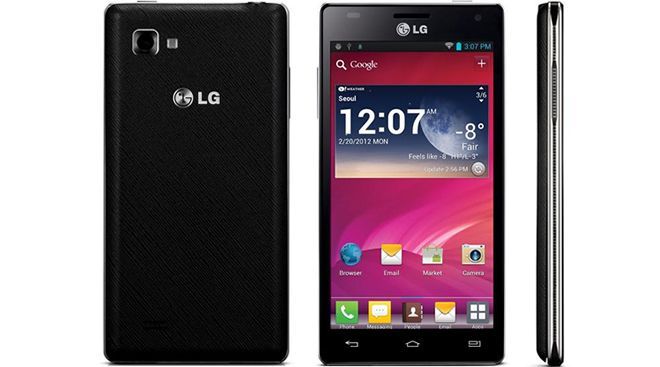
With only 8.9 mm slim and weighing 133g. In addition, the location of the physical buttons are also designed reasonable, allowing users to easily manipulate. Designed power button at the top, the volume rocker on the left side and the micro USB port is placed at the bottom of the machine.
Similar to the HTC One X, Optimus 4X HD smartphone is equipped with 4.7-inch touch screen resolution of 1280 x 720 pixels. In addition, the machine also uses technology True HD IPS display (like the iPhone 4S) for the ability to display detailed, vivid.
Below the back cover is a 2,150 mAh capacity battery, SIM card slot and microSD card. Optimus 4X HD comes with 16GB of internal memory, expandable up to 32GB possible through the slot. On the imaging system, the machine is equipped with a main camera on the back 8 MP with LED flash support and a secondary front camera 1.3 MP.
Display
One of the more stand out things about the LG Optimus 4X HD is how the display looks. I mean, it really does. You get this 4.7 inch True HD-IPS LCD screen, with a resolution of 1280 x 720 pixels , and it works out to around 312 PPI pixels per inch. Back in 2012 this sorta mattered a lot, because the image stayed sharp enough for daily use, yet it still looked vibrant, so multimedia, gaming, and browsing all felt pretty smooth on it.
The display uses True HD-IPS tech , so color output stays more precise, and you also get pretty wide viewing angles. Basically, the screen doesn’t completely fall apart when you tilt it, it still looks good from almost any angle. The colors look natural and the brightness is solid, like enough for comfortable outdoor viewing, even when the sun is right there and being annoying. On top of that, the contrast ratio is pretty decent as well , with deeper blacks and brighter whites so the whole visual experience feels more alive, honestly.
Since the screen is big, and the resolution is HD, the Optimus 4X HD is great for watching videos and playing games. People seemed to like the screen size too. It hits a nice compromise between having extra space to work with and not being a total handful all the time. Still, if someone has smaller hands, the phone may feel just a bit too large for comfortable one hand handling, and that’s probably where the complaints started.
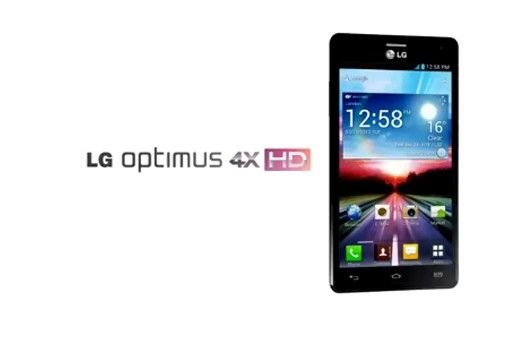
LG Optimus 4X HD P880 16GB White Factory Unlocked International Version: Buy it now
Function
Rather than keep what is available in Ice Cream Sandwich, LG seems to have imitated Samsung in “Gingerbread” of the operating system of the Optimus 4X HD. App switcher button (to open the application is running) LG has been replaced Menu button and button to switch applications to be accessed by holding down the Home button once.
In addition, the Optimus 4X HD also features QuickMemo as in Samsung Galaxy Note. However, the only drawback is that users have to use your fingers to note because the machine is not equipped with touch pen.
The video playback feature of the machine is enhanced with thumbnail display mode when performing zoom, helping users to quickly move to the next clip. In addition, the machine also allows users to browse other videos while viewing the current clip.
Performance
Optimus 4X HD works quite smoothly with chip Tegra 3 quad-core processor clock speed of 1.5 GHz. However, the machine has not satisfied the requirements on the battery capacity.
Time use only lasted from about half a day until the day (depending on use).
However, LG has also announced it will soon release a software update to the new
Talk feature, the machine does not have any problems with call quality. Speaker volume large enough so that users do not miss the message tone, as well as other notifications.
Software and User Interface
The LG Optimus 4X HD first rolled out with Android 4.0.3 Ice Cream Sandwich, and on top of that there was LG’s own Optimus UI layer. Basically, the Optimus UI is that LG proprietary skin, meant to make their devices stand out from other Android smartphones, with a bunch of extra bits and a kind of distinct look.
A big part of Optimus UI is all the customization, you know, where people can tweak the home screen. You can change things like icons and widgets, plus swap wallpapers, in a more personal way. On top of that, there are themes too, so you can adjust the overall vibe of the interface with just a few taps, pretty quick and easy, or at least that’s how it’s presented.
There are also several LG exclusive apps and features packed in. QuickMemo is a good example, it lets you jot down notes or draw right on the screen using your fingers. This came in handy when you wanted to scribble something fast, or annotate screenshots without much fuss. Then there’s SmartShare, which helps you pass media files around to other DLNA compatible devices, over the same Wi‑Fi network.
Still, the Optimus UI didn’t get a perfect response, it was more like mixed feelings from both users and critics . Some folks liked the extra features and the freedom to customize, but others thought it felt cluttered and it added unnecessary bulk into the Android experience. There was performance side as well, a number of users noticed occasional slowdowns, maybe some lag, especially when the phone was under a bit of stress.
LG eventually rolled out an update for the Optimus 4X HD , to Android 4.1.2 Jelly Bean, and it came with a bunch of nice tweaks that are hard to ignore. One highlight was Project Butter, which made the UI feel a lot more fluid, smoother in practice and more responsive, not just “better” on paper. Another part of the update was Google Now, that sort of intelligent personal assistant thing, and honestly users seemed to like it quite a bit.
Camera
For the camera, the LG Optimus 4X HD has an 8-megapixel rear unit, with autofocus and an LED flash. It can capture shots at 3264 x 2448 pixels and it also records 1080p Full HD video at 30 frames per second which is kinda solid for its time.
As for picture quality, the Optimus 4X HD does reasonably well, mainly if we mean a smartphone camera from 2012. In decent lighting you get sharp enough details, colors look pretty accurate, and the dynamic range is actually fairly good. Autofocus is pretty quick , but when you drop into low-light it can occasionally feel a little uncertain or slow, like it’s thinking too long before deciding.
The camera app itself includes a handful of features, and multiple shooting modes. You get options like panorama, burst shot, and HDR , (High Dynamic Range) . The HDR mode is especially handy for scenes where the contrast is high, like bright highlights next to darker areas , because it helps balance exposure and makes the overall image look more evenly lit.
Low-light performance is, well, kinda a mixed bag. The LED flash can do enough to brighten up subjects in near-darkness, yet the camera usually has trouble pushing through noise, plus you end up losing a bit of detail when lighting gets bad. This kind of problem shows up a lot on smartphone cameras, and especially some models from the early 2010s, since sensor tech just wasn’t as refined back then as it is now.
As for the front-facing unit, it’s a 1.3-megapixel shooter. It’s mostly built for video chats and selfies, not exactly for any fancy imaging. Picture quality is average at best, with noticeably less resolution and fine detail when compared to the rear camera. That said, it works well enough for casual needs, like hopping on video chatting through apps such as Skype, or quick face photos now and then.
Battery Life
LG Optimus 4X HD is powered by a 2,150 mAh removable battery, and yeah that was a pretty standard capacity for phones back then. In terms of battery performance, it’s decent not really standout or anything. If you’re using it in a moderate everyday kind of way, like web browsing, social media scrolling, and maybe some occasional gaming, then it can usually last until the end of a full day on one charge.
Still, people who are heavy users and who are constantly into gaming, video streaming, or relying on GPS navigation may end up needing to recharge their phone before the day is truly done. The Tegra 3 chipset is undeniably strong, but it also tends to be a bit power-hungry, in particular when you’re running graphically demanding apps.
Also, the battery is removable so, you can stash a spare battery and swap it in if you somehow expect the hours to run past what’s usual. Honestly, this was becoming less of a thing on top-tier smartphones, because a lot of manufacturers have been shifting to batteries that cannot be taken out, mainly to keep the body slimmer.
On top of that, the phone comes with a power-saving mode, which can help stretch battery life by dialing down the processor performance, turning the screen brightness lower, and limiting background data. It’s sort of a lifesaver when you want to wring out a few more hours of use, especially when the battery is getting low , fast.
Connectivity and Call Quality
The LG Optimus 4X HD basically brings a pretty solid mix of connections, like 3G HSPA, Wi‑Fi 802.11 a/b/g/n, Bluetooth 4.0, NFC (Near Field Communication), plus GPS. There is also a microUSB socket for charging and moving files, and yep, a 3.5mm headphone jack too.
In day to day calls, call quality feels pretty good. You get clear voice audio, and the signal reception seems strong, generally speaking. There is noise-canceling tech built in, so background sounds get pushed back a bit, and the talk stays understandable even when the environment is kinda noisy. The speakerphone is decent as well, though not truly amazing. It’s loud enough for hands free chats in a quiet room, but in louder places it can feel a little weaker. All in all, the Optimus 4X HD does well for regular phone duties, and it matches what people expected back in its era.
Storage
The LG Optimus 4X HD comes with 16 GB of internal storage, which back then was pretty normal for top tier smartphones around 2012. When you first boot it up, about 12 GB is actually usable, because the remaining part is held by the system software plus pre installed applications. If you need more space though, the phone has a microSD card slot and it supports memory cards up to 64 GB. That is a handy upgrade, so you can grow your collection for apps, music, video, and other files, without getting stuck in too much hassle.
Having expandable storage stands out too, especially when you compare it to some rivals such as the HTC One X, which didn’t really offer that option. This kind of added flexibility makes the device more adaptable, for people who like keeping a lot of media right on the handset.
Multimedia Experience
The LG Optimus 4X HD feels pretty well set up for all kinds of multimedia , mainly because it has a big HD screen and the hardware is quite capable. That 4.7-inch display, set at 720p, works as a solid base for watching clips, running games, and even flipping through photos. The colors look faithful , and the viewing angles are also quite wide so you dont really lose the picture even when youre not straight in front of it. Overall, its enjoyable, like when you try to watch movies or TV shows while youre moving around.
On the format side, it supports a broad set of multimedia types , so you are not constantly stuck checking compatibility. You get video support for common formats such as MP4 , DivX, and Xvid, and for audio it handles MP3, AAC, and FLAC too. Because of that, most people can play their own media library without too much fuss.
The preloaded music player is also easy enough to use. It comes with handy extras, like an equalizer, playlist organization, and album art on display. When you connect headphones through the jack, the sound comes out good, with a reasonable amount of bass and treble that stays pretty clear. The built-in loudspeaker is a different story though, it lands in the average range. There isnt much depth or that richer texture some users expect from a more premium device. So for a better listening session, it’s best to go with decent headphones or a separate pair of speakers.
Software Features and Customization
Like earlier, the LG Optimus 4X HD comes with Android 4.0.3 Ice Cream Sandwich, and LG adds the Optimus UI layer on top. That interface adds a few own touches compared to stock Android, so the phone feels a bit more personal, while also staying functional for day to day use.
One of the key features, is the customizable lock screen… it lets users reach their favorite apps right from the lock screen, by dragging little shortcut icons into the unlock ring. Honestly it’s pretty convenient for launching the stuff you use all the time , like the camera, messaging, or the phone dialer, without much fuss.
Another pretty visible thing is the LG QuickMemo app being included. QuickMemo lets people take notes or do some quick doodles on the screen whenever they want , even while they’re in the middle of a phone call. That turns out useful for jotting down that small piece of info fast, rather than having to open a separate notes app first. The note can be saved, shared, or even displayed over what you’re doing, so it stays there for reference.
The Optimus UI also comes with a bunch of themes and customization choices. So, users can shift the overall vibe of the device so it matches their preference. The home screen, icons, and widgets can all be adjusted , and people can pick from several pre-installed themes, or grab more through the LG SmartWorld store. It’s like, a “make it yours” kind of deal.
Still, it’s worth saying, the Optimus UI can come with a lot of bloatware. There are multiple pre-installed apps that can’t really be removed in an easy, straightforward way. That might be annoying if you want a cleaner, leaner experience. Also the custom interface can feel a bit heavy at times, which may cause occasional sluggishness or lower performance, especially later on as the device ages and newer apps start pushing harder.
Software Updates
When it first came out, the LG Optimus 4X HD ran Android 4.0.3 Ice Cream Sandwich, later it got pushed to Android 4.1.2 Jelly Bean. That Jelly Bean update brought a handful of changes, like Project Butter, which improved how fast the UI felt, and how smooth everything looked . It also added Google Now, basically an intelligent personal helper, giving you useful info , plus predictive suggestions based on what you usually do and what you tend to prefer.
That said, the Optimus 4X HD didn’t really get any bigger updates after Android 4.1.2. And yeah, this sort of long-term software support shortage was pretty typical back then, since a lot of Android brands were more into launching new devices, rather than keeping older ones updated for the long run. So people who expected newer Android versions like KitKat or Lollipop ended up pretty let down.
In the end, the limited software support counts as a real downside for the Optimus 4X HD, especially if you care about the newest features, and security fixes too. The phone was still usable on Android 4.1.2, but without later updates users were kind of stuck, missing improvements and extra functions that newer Android releases later added.
Competitors
The LG Optimus 4X HD had some pretty stiff competition, from other flagship phones that showed up in roughly the same window. You could see a few big names pop up a lot, not just “similar phones”, but real alternatives. For example, Samsung, HTC , Sony, all had models that pulled attention.
Samsung Galaxy S3: The Galaxy S3 was super popular in 2012, mainly because the hardware felt strong, the software support kept expanding, and the features felt very “there”. It had a similar 4.8-inch HD display, plus a quad-core Exynos processor. On top of that, the experience was wrapped in a highly customizable user interface, which a lot of people seem to like. And then there is the brand side of things—Samsung was already everywhere in marketing, so the phone turned into a go-to option for many consumers.
HTC One X: The HTC One X was another main rival, usually described for its premium construction and a really impressive display. It used a 4.7-inch Super LCD2 screen with a 720p resolution, and inside it ran a quad-core Tegra 3 processor, the kind of match-up that’s often compared to what the Optimus 4X HD had. The One X also went for a unibody polycarbonate layout, so it felt more “refined” than the plastic build of the Optimus 4X HD, at least from the way people talk about materials.
Sony Xperia S: the Sony Xperia S showed up from Sony’s newer Xperia lineup, and it kind of offered a 4.3-inch HD display, along with a dual-core processor. The 12-megapixel camera was the big point, too. It didn’t come with quad-core muscle like the Optimus 4X HD, but it still received praise for photo results that stayed reliably strong, and also for its distinctive looking design, which felt a bit more premium than expected. One feature people noticed was the transparent strip near the bottom of the device, which kind of handled the antenna area in a more visible way.
Google Nexus 4: Released a bit later in 2012, the Google Nexus 4 basically gave people a “pure Android” feel with no extra custom skin, not like some others, and also no real bloatware, which made it kind of appealing for Android purists . It came with a 4.7-inch HD screen, a quad-core Snapdragon S4 Pro chip, and it got software updates on time, straight from Google , so that part felt simple and direct. On top of that the Nexus 4 cost less than a bunch of other flagship phones, so it turned into a pretty tough competitor in the market , even if it wasn’t trying to be flashy.
Legacy and Impact
The LG Optimus 4X HD mattered in LG’s ongoing push to sort of reestablish itself as a major smartphone name. Sure, it might not have reached the same spotlight as some rivals, but it still showed that LG could craft higher-end handsets with fresh, advanced tech . In a way it was like a proof of capability, and that legacy helped set the stage for what came next.
The Optimus 4X HD was also one of the first folks to try quad-core processors in smartphones, kind of helping to set things up for the faster, performance driven devices that came after. Even if the phone had its flaws it still felt like a step in LG’s path toward being more competitive, and a bit more inventive, in the smartphone world.
After the Optimus 4X HD showed up, LG kept polishing its mobile lineup, and slowly that led to launches that people actually remember like the LG G2, LG G3 , and LG G4. Those later models got strong praise, mostly for their look, their speed ,and what they offered, so LG could get a sturdier position in the market.
Conclude
Overall LG Optimus 4X HD looks like a solid choice if you want a quad-core smartphone running ICS. That said, it kind of stumbles with battery capacity and camera performance, and these are the points that are the most concerning for many users.
Related Posts



Tech Reviewer & Product Analyst
Định Bia has spent over 10 years testing consumer electronics with a focus on smart technology. He work as a product advisor at Biareview where he helped customers find the right devices for their needs. He personally tests every product featured on this site using a consistent evaluation framework covering quality, durability, and value. All reviews are based on experience, not influenced by the manufacturer.