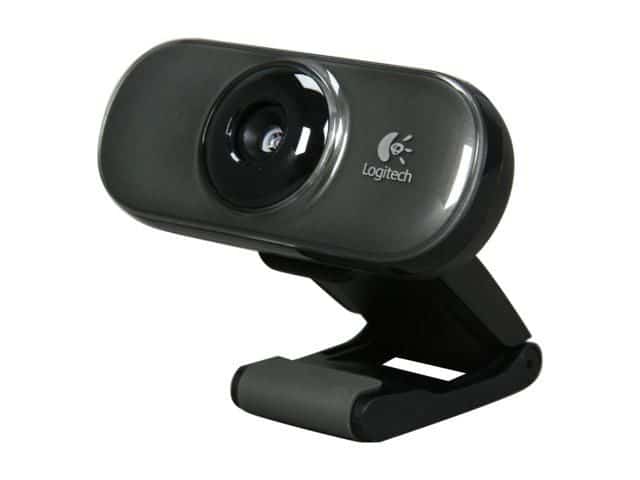
The Logitech C210 has a nice design, supports up to 640 x 480 pixels and up to 1.3 MP (with software included).
Front Logitech C210 Webcams print fancy textures on a glossy gray plastic mouse base, clamped base with soft non-slip rubber feet.
The Logitech C210 can be placed on a desk, on any type of monitor or laptop.
Included accessories include a CD and instruction manual.
1. Design and build quality
The C210 is small — about 3.5 x 1.5 x 2 inches — and mostly disappears once it’s clipped onto a monitor. Matte black plastic, a glossy ring around the lens. Nothing fancy, but nothing that looks cheap from three feet away either.
The plastic body holds up fine day to day, though you can tell the difference if you’ve used a pricier webcam first. The mounting clip has a rubberized grip and stays put once attached. The hinge is stiffer than it needs to be — adjusting the angle takes more force than expected, and after enough adjustments that stiffness might turn into wobble. There’s also a tripod thread on the bottom for anyone who wants a different setup than clip-to-monitor.
2. Specs
Resolution tops out at 640 x 480 (VGA) at 30fps, well below the 720p or 1080p you’d get on any current webcam. Fine for a small chat window. Not something you’d want to look sharp in.
The lens has fixed focus, so no adjusting for close-ups or specific framing. In a well-lit room it does okay. Low light is where it falls apart: noisy, smeared, the kind of image that makes you want to turn your camera off.
The mic works, but it’s basic — picks up whatever’s in the room along with your voice, no noise cancellation. Fine for a quick call, not something you’d want for anything you’re recording to keep.
It connects over USB 2.0 and works without installing drivers, on both Windows and macOS.
3. Using it
For a normal video call in decent light, it does the job — nobody’s going to comment on your webcam either way, which is really the goal here. Push it into worse lighting or a bigger screen and the resolution limits start to show.
Same story for streaming or recording: fine for casual use, not something to build content around. Works with Zoom, Teams, Skype, whatever, right out of the box — no companion app, no extra settings to dig through.
4. Pros and cons
Pros: cheap, dead simple to set up, small enough to travel with, flexible mounting (clip or tripod).
Cons: VGA resolution is dated, fixed focus limits framing options, weak in low light, mic is bare-bones.
5. Versus the competition
The C270, the Microsoft LifeCam HD-3000, and the Creative Live! Cam Sync HD all beat the C210 on the one spec that matters most here — they’re 720p with better mics, for not that much more money. If image quality matters at all to you, any of the three is the better buy.
Bottom line
The C210 is a webcam for someone who needs a webcam and doesn’t want to think about it further. It’s cheap, it works immediately, and it does the minimum a webcam needs to do. If you care about how you look on camera, spend a little more and get the C270 or similar — the resolution gap alone is worth it.
Logitech Webcam C210: Buy it now
Logitech- Webcam C210: Buy it now
Logitech C210 Webcam RED, Model: C210, Electronics & Accessories Store: Buy it now
Logitech C210 Webcam RED: Buy it now
Related Posts

Tech Reviewer & Product Analyst
Định Bia has spent over 10 years testing consumer electronics with a focus on smart technology. He work as a product advisor at Biareview where he helped customers find the right devices for their needs. He personally tests every product featured on this site using a consistent evaluation framework covering quality, durability, and value. All reviews are based on experience, not influenced by the manufacturer.