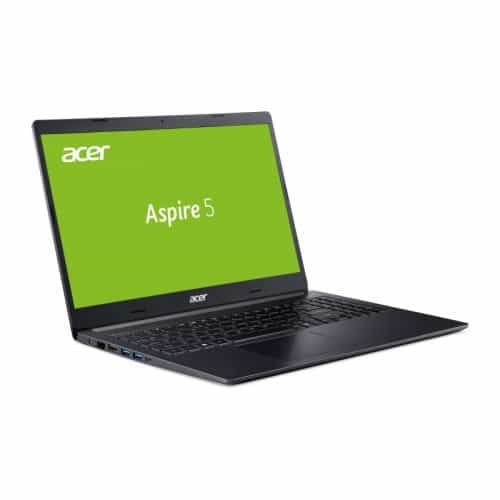
The Acer Aspire 5 A515-54-30BQ is a large-screen budget laptop that delivers a spacious 15.6-inch display, comfortable backlit keyboard, and horsepower for general productivity work – and even more and more. Our review unit is equipped with an 8th Gen Intel Core i3-8145U CPU with 4GB of RAM and an SSD boot drive, but its price is lower than the competition and it catches up with most entry-level machines and universal, including some machines that cost twice as much.
For the low price, expect a few downsides, such as a pile of bloatware and low build quality, which means that like most new laptops out there, this Acer Aspire 5 Slim has its exchange. It gets the job done much better.
Design
By 15-inch laptop standards the Aspire 5 feels pretty light, weighing just under 4 pounds or so. Most cheap machines are basically built around cheap heavy materials like molded plastic, and you can kinda tell. Here though the Aspire 5 outside is finished in silver aluminum, so it looks crisp and modern while staying feather-ish. It’s still not quite in the same world as the 2.2-pound Acer Swift 5, but you also won’t end up carrying a brick in your backpack every day.
Around the screen edges, there is some plastic but the keyboard deck and the rest of the interior surfaces are made of the same material used on the outside. Even with the improved dimensions and better materials, you will notice that the base of the device wobbles a bit, even when placed on a flat table. There is also some bend in the base, which does not make many people believe in the durability of the Aspire if the body is subjected to a lot of impacts.
Resolution
When you open the lid, you’re greeted by a 15.6-inch full HD (1,920 x 1,080) display, along with new standard LED backlighting and in-plane (IPS) technology. The screen is of excellent quality, with clear and vivid colors when the backlight is set to optimal levels. Better still, the display achieves this by using a matte finish to reduce glare from ambient light.
On the other hand, Acer doesn’t offer a touchscreen option, but this is a noticeable improvement over last year’s model. Above the screen, there’s a 720p webcam with decent video quality – but a bit noisy, lacking the IR sensor that lets you log into your Windows 10 account with facial recognition. After all, we did not expect such a feature on a cheap laptop.
Input
Another kind of interesting feature on the Acer A515-54-30BQ is that backlit keyboard, it sits just above the touchpad. It feels comfortable, kinda sturdy, and gives you that flexibility you may want during those longer, very intense typing sessions. Again, it is very little when you press the keys with some force, like they don’t really act weird. The keyboard also has a dedicated number pad on the right side, but unlike the main area, the keys there are not full sized.
As for the trackpad, it doesn’t come with a built in fingerprint reader, and it also misses the dedicated left and right click buttons. Instead, the whole surface is clickable, though it does bring that mushy feel every single time you tap or click. You kind of get used to it, but it’s still noticeable.
Then the connectivity, that’s really solid, especially if you hate software protection yet you have enough peripherals, and all those cables to plug in. On the left side you’ll find the power connector, full-size Gigabit Ethernet and HDMI ports, plus two USB 3.1 Gen 1 ports (one supports power off charging). On the other side there’s a Kensington style lock, two USB 2.0 ports, and a 3.5mm audio out. If you prefer wireless, you get Bluetooth 4.2 plus Wi-Fi 802.11ac, and it includes MU-MIMO support.
While you can’t create a custom-configured Aspire, there are variations to choose from, from the entry-level model to the top-end Core i7 model. Our review unit the Acer Aspire 5 A515-54-30BQ is basically the base model, you get an 8th Gen Intel Core i3-8145U processor, 4GB DDR4 RAM, 128GB NVMe SSD, the Intel UHD integrated graphics card Graphics 620, and Windows 10 S.
With Windows 10 S mode, you’re kind of stuck with the apps that come from the Microsoft Store, kind of like how Chrome OS keeps you inside Google Apps, but honestly this version still feels like a full lightweight Windows 10 setup. It really does make sense to have Windows 10 on this laptop, because it lets you do most everyday work with a bit more freedom, compared with the Chrome OS limits you’ll run into on similarly priced Chromebooks.
As configured, the 3.9 GHz Core i3-8145U processor used here is enough for web browsing, video streaming, word processing, and other productivity tasks you normally perform daily. That makes the Aspire 5 a perfect candidate for college or small home office use, especially when a Chromebook isn’t a viable option.
4GB RAM and 128GB SSD is kinda a bit too tight, but you can always change those parts later, with more storage too, and maybe even bump it up to 8GB of RAM if it gets necessary. Battery life though is excellent, the laptop lasted just a bit past 7 hours and 20 minutes on one charge, which is honestly pretty solid.
Conclusion
So overall, with that 8th generation Core i3 processor, plus a pretty quick SSD setup, the Acer Aspire 5 setup feels like it brings very good performance for a budget machine. The difference in what you can do with storage options and processor choices is especially noticeable. Also, the battery runtime and the slim body are sublime, and that’s basically what most users want at this price band.
Acer Aspire 5 Slim Laptop, 15.6″ Full HD IPS Display, 8th Gen Intel Core i3-8145U, 4GB DDR4, 128GB PCIe Nvme SSD, Backlit Keyboard, Windows 10 in S Mode, A515-54-30BQ: Buy it now
Related Posts

Tech Reviewer & Product Analyst
Định Bia has spent over 10 years testing consumer electronics with a focus on smart technology. He work as a product advisor at Biareview where he helped customers find the right devices for their needs. He personally tests every product featured on this site using a consistent evaluation framework covering quality, durability, and value. All reviews are based on experience, not influenced by the manufacturer.