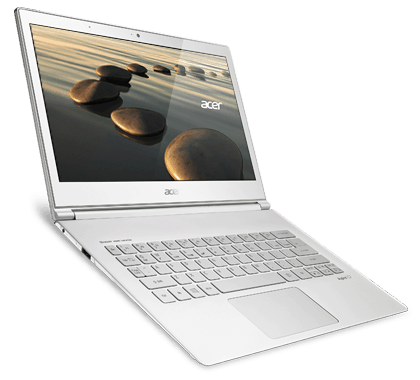
Acer Aspire S7 is one of the most noticeable Windows 8 ultrabook models on the market today with a slim design, equipped with a Full HD touch screen that gives users an enjoyable experience when interacting with the computer. .
The frame structure is made of aluminum and magnesium alloy is very light and durable. Compared with the Acer Aspire S5, Acer’s new ultrabook is not only lightweight but also significantly thinner (1.3 kg and 11.9 mm compared to 1.36 kg and 15 mm of S5). The S7’s exterior and surface have an additional layer of Gorilla Glass 2 resistant to scratches. Thus, the computer will be better protected with external forces.
The value of the Acer Aspire S7 is also demonstrated by the 13.3-inch multi-touch screen, with a resolution of 1,920 x 1,080 pixels (1080p HD). IPS panel technology makes the display capable of true color reproduction; Nearly equivalent to CRT monitors and wide viewing angles.
Theoretically, the 1080p HD screen will provide a wider work space as well as better mobile entertainment needs. However, the reality is that 1080p resolution is only suitable for laptops that are 15.6 inches or larger.
Similar to other ultrabook models, the size and weight limitations will significantly affect the port’s ability to support the port. Specifically, the S7 only supports HDMI micro video output, two USB 3.0 ports, a 3-in-1 card reader and microphone headphone jacks. It also comes with a number of connectivity enhancements such as “USB to LAN”, “micro HDMI to VGA” cable and wireless mouse.
The S7’s audio system is also more concerned with the high-quality 2.0 speakers and Dolby Home Theater audio technology. Though still prone to highs and lows, the majority of other laptops have better sound quality and detail.
Acer Aspire S7-392-9439 13.3-inch WQHD Touchscreen Ultrabook, i7-4500U Processor, 8GB RAM, 256SSD Drive (Crystal White): Buy it now
Acer Aspire S7-392-9890 13.3-Inch Touchscreen Ultrabook (1.8 GHz Intel Core i7-4500U Processor, 8GB DDR3L, 256GB SSD, Windows 8) Crystal White: Buy it now
Acer Aspire S7-391-9427 13-Inch Touchscreen Ultrabook (2.0 GHz Intel Core i7-3537U Processor, 4GB DDR3, 256 GB SSD, Windows 8) White: Buy it now
Acer Aspire S7 13.3-Inch Touchscreen Ultrabook (Intel Core i5-4200U Processor up to 2.6GHz, 8GB DDR3 Memory, 256GB SSD, FHD 1080P Touchscreen Display, Backlit Keyboard, 802.11AC WiFi, Windows 8.1, 0.5 inch thin and 2.9 Lbs) Crystal White (256GB): Buy it now
Acer Aspire S7-191-6447 11.6-Inch Touchscreen Ultrabook (Silver): Buy it now
Acer Aspire S7-392-6832 13.3-Inch Touchscreen Ultrabook (1.6 GHz Intel Core i5-4200U Processor, 8GB DDR3, 128GB SSD, Windows 8) Crystal White: Buy it now
Monitor, keyboard and touchpad
As mentioned above, the S7 is equipped with a 13.3-inch multi-touch screen, 1080p HD resolution, the display details will be smaller, new users will have difficulty and take time to Get familiar with the operation directly on the touch screen.
The actual test shows that the image quality displayed when used outdoors or in the office is good, the image is crisp, bright, showing two more standard black and white colors, giving a pleasant feeling to do work with text documents.
Compared to all-in-one desktop PCs running Windows 8 ever tested, the Aspire S7’s touch screen sensitivity is better than the smooth, low friction feel of the touchpad. The dual torque hinge holds the screen free from vibration when operated directly on the touch screen.
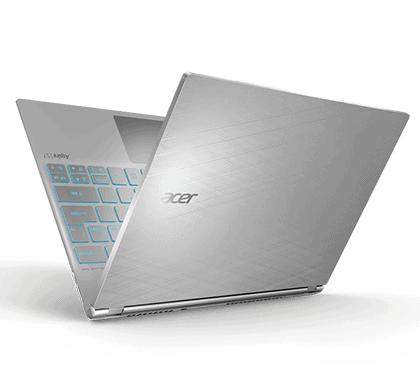
Similar to the Lenovo ThinkPad X1 Carbon, the S7 open angle is also 180 degrees (straight to the keyboard), combined with the wide viewing angle (easy viewing) makes it easy for users to collaborate, share the information displayed Display on the screen or use it as a tablet.
Chiclet keyboard with seamless design, short press keys and good sensitivity. Except for the navigation and page up, page down buttons are quite small, the large left click keys are large, giving you the comfort of surfing the keyboard without fear of confusion. Keyboard integrated LED backlight, easy to use even in low light.
Large touchpad, integrated mouse button (left and right), multi-touch support to simplify operation without mouse.
Display
The Acer Aspire S7 display is, honestly , one of those features that really stands out. The whole screen setup is a 13.3-inch IPS touchscreen, and it goes with a resolution of 2560 x 1440 pixels (WQHD). That higher resolution keeps text looking clean and images looking crisp, so it tends to feel like a solid pick for people who deal with graphics, photos, or video work most days. The IPS panel, with its wide viewing angles , helps the colors stay stable and vivid even when you’re not staring straight at it.
Touch control is where it feels especially natural, because the responsiveness is quick and pretty precise, so gestures work as expected. You can glide through the web, scroll around documents, and generally use touch-friendly apps without that annoying lag. On top of that, the display is backed by Corning Gorilla Glass , giving it a tougher skin against scratches and everyday bumps.
Brightness is another strong point here, the levels are high enough for different settings, even when you’re outside and the light is acting up. Color rendering is also quite impressive, with deep tones and accurate shades that make everything look more “alive”. The one tradeoff is the glossy finish: it looks premium, yes but it can also throw back reflections and glare, so it’s worth thinking about if you often work under direct light or near windows.
Performance
Under the hood, the Acer Aspire S7 kinda runs on Intel’s 4th generation Core i7 processors, which give you this decent balance between push and energy use, so it does not feel wasteful. The unit being looked at here comes with an Intel Core i7-4500U, 8GB of RAM, and a 256GB SSD. With that setup, it can tackle a lot of things, from normal day to day work to more demanding applications , without you constantly feeling stuck.
The Core i7-4500U is a dual core CPU running at a base clock of 1.8GHz, and it can turbo boost up to 3.0GHz when it needs extra bite. That translates into smooth and quick behavior for web browsing, streaming style multimedia, office tasks, and even light photo and video editing , so basic creative work is not a headache. As for the 8GB of RAM, it’s generally enough for everyday multitasking, meaning you can keep several apps open at the same time without huge slowdowns.
The 256GB SSD brings quick read and write performance, and that really helps the laptop feel snappy overall. Startup is fast, apps pop up almost right away, and the whole experience feels more responsive. Sure, the storage space can feel a bit tight if you plan to save big files or lots of media , but the speed plus dependability of the SSD makes that compromise feel pretty reasonable.
Battery Life
Battery life is kind of a big deal for any ultrabook, especially if you’re doing work on the road or, well, commuting a lot. The Acer Aspire S7 comes with a 4-cell lithium polymer battery, and it’s rated to last up to about 7 hours per full charge. Of course in the real world, results can shift around quite a bit, depending on what you’re doing, plus which settings are enabled at the time.
If we’re talking more normal stuff like web browsing, typing documents , and streaming media, the Aspire S7 usually hangs around 6 to 7 hours. If you jump into the heavier stuff, like video editing or gaming, that runtime can fall more near 4 to 5 hours, maybe even less. So yeah, the battery performance is solid, but for the folks who want all day use with out ever pluging in again, it can feel a bit cramped.
Good news though: the Aspire S7 includes fast charging, which is handy when you need to quickly add charge and move on. It can charge from 0 to 100% in roughly 2 hours, so you don’t lose much time waiting. The power adapter itself is also compact, lightweight, and easy to toss in a bag, which makes the whole setup more convenient for travel.
Connectivity
Even with its thin looking body, the Acer Aspire S7 still manages to bring a fair amount of connectivity. In the box, or rather on the side, there are two USB 3.0 ports, an HDMI output, a microSD slot, and one headphone microphone combo jack. The USB 3.0 ports are good for quick file moves, while the HDMI port makes it easy to link the laptop to extra screens, TVs, or those office projectors.
That said, there’s one kind of noticeable thing missing, a full sized SD card reader. For people who often pull photos and videos off cameras or other gear that still uses standard SD cards, this can feel kinda annoying. The microSD reader helps a bit, but it’s not the same level of convenience, especially if you happen to have lots of SD cards around.
Wireless connectivity is also covered. You get Wi‑Fi 802.11ac, and Bluetooth 4.0. The Wi‑Fi works well, it stays stable and fast even when the signal isn’t exactly at its best. Bluetooth 4.0 is there for connecting everyday wireless stuff like mice, keyboards, and headphones.
Software
The Acer Aspire S7 ships pre-installed with Windows 8.1, and yes it’s built to match the touch friendly vibe of the touchscreen display. Windows 8.1 brings a set of changes versus the older version, things like steadier speed, stronger protection, and a UI that feels more guided rather than random.
Acer also adds a bundle of helpful apps and utilities to round out the experience. Among the more visible pre installed software are:
AcerCloud: this is basically a cloud storage service for storing and grabbing your files from any device that has an internet connection. It works in a pretty seamless way with Windows, so file and document access feels kind of effortless , like you’re already there.
Acer Power Management: a kind of tool-utility that helps you steer the laptop power settings, so you can stretch battery life a bit and also keep performance in a good sweet spot. It includes several power profiles that you can set up to match what you actually need, daily routines or longer sessions.
Acer Recovery Management: a utility for creating recovery media, and then restoring the notebook back to factory state if something goes off track. It’s handy for troubleshooting and for ongoing upkeep, so the system doesn’t slowly feel worse over time.
Now, even though those pre-installed apps can be pretty useful, some users might see the extra stuff as unnecessary. In that case they may choose to uninstall them, to reclaim storage space ,and free up system resources.
User Experience
The overall user experience of the Acer Aspire S7 is pretty positive, with multiple points that really help it stand out. The laptop’s design along with build quality makes it pleasant to use, since it’s lightweight , slim, and therefore easier to move around or use on the go. The Gorilla Glass lid adds a clean kind of elegance , while the aluminum chassis gives durability , and you get that sturdy feel that matters.
The high resolution touchscreen display is kind of the standout thing here, it gives sharp and vivid visuals and it really makes the experience feel better when you’re using the laptop. The touchscreen itself is responsive and fairly intuitive too, so going through apps is easy, and you can just do touch gestures without much thinking or friction.
Also, the keyboard plus the touchpad feel well thought out, so typing and moving around is comfortable. The keyboard has backlit keys which helps a lot in dim light, and the keys have a solid amount of travel with tactile feedback, so yeah it feels good to type. The touchpad is large, it tracks well and it’s responsive, plus it supports multi touch gestures for quick navigation, which saves time most of the day.
On the performance side, the Aspire S7 handles everyday stuff without drama, everything feels smooth and quick. With the Intel Core i7 processor along with 8GB RAM and an SSD setup, multitasking is manageable, even with more demanding applications, and it doesn’t really bog down in normal use.
Battery life is decent, but it might not satisfy people who expect truly all day power, especially if you don’t want to plug in at all. That said, the fast charging feature helps, because you can top up the battery fairly quickly when you need it.
Conclusion
The Acer Aspire S7 is kind of a standout ultrabook, it brings together a sleek look, a high-res screen, and solid speed, which is nice because it does not feel overhyped. it’s lightweight, and that slim profile makes it really easy to carry around, but what surprised me is the premium feel. the aluminum chassis plus that Gorilla Glass lid just… feels durable, and also kinda elegant in a quiet way. The 13.3-inch WQHD touchscreen display gives sharp, bright visuals, so it works for everything from day to day browsing, to watching media and general entertainment.
On the performance side, the Aspire S7 handles the usual stuff without much drama. you get an Intel Core i7 processor along with 8GB RAM and a 256GB SSD, and together they keep things moving. The SSD is a big part of why boot times feel fast, and why the whole system feels responsive, plus the 8GB helps when you’re juggling multiple tabs, apps, or background tasks. Battery life is decent, but it might not last the whole day for everyone unless you’re okay with charging in between. still, the fast-charging feature helps, so you’re not stuck waiting forever.
For connections, it’s fine, but there’s a bit of a catch since there’s no full-sized SD card reader. it does include USB 3.0 ports, HDMI, and also a microSD card reader, so you’re not totally limited. However, some people will probably feel the lack of extra ports, depending on how you work. The bundle with Windows 8.1 and Acer’s software suite makes the experience smoother right out of the box, though some users might still prefer a cleaner Windows setup, or a more minimal install overall.
When you compare the Acer Aspire S7 to competitors such as the MacBook Air, Dell XPS 13, HP Spectre x360, and Lenovo Yoga 920 it really does hold its ground. In a way it keeps up with them in design, display quality, and performance. Of course each rival brings something a little different—like a convertible setup here, a different operating system there, and that kind of thing can nudge a buyer’s choice one way or another.
So, in the big picture, the Acer Aspire S7 comes off as a very capable ultrabook that does well across design, screen clarity, and overall speed. If you are the type that cares about easy portability, a sharp high-resolution touchscreen, and that premium build feel, then it’s a solid pick. Sure, other options exist with their own strengths, but the Aspire S7 manages to bundle those key features with strong day to day performance, which makes it a real player in the ultrabook market.
Pros:
Looks kinda sleek and light: that ultra thin shape, plus the lightweight build, makes it feel pretty easy to carry around.
Really solid build: the aluminum chassis, and the Gorilla Glass lid too, bring durability but also a kinda classy vibe.
Screen looks crisp: the 13.3-inch WQHD touchscreen gives sharp, vibrant visuals.
Plenty responsive: Intel Core i7, 8GB RAM, and a 256GB SSD should handle everyday tasks without much hassle.
Charging is quick: the battery recharges fast, so you get less downtime.
Battery is decent: it does provide enough power for a normal workday.
Cons:
Battery may be limited: for some people it might not cover an entire day unless you recharge.
Glossy screen issues: reflections and glare can show up, especially under bright light.
Ports are kinda restricted: no full sized SD card reader, and not many ports in general, could annoy certain users.
Stuff already installed: a few users might see the pre installed applications as extra or not really needed.
Overall, the Acer Aspire S7 feels like a strong blend of design, performance, and display quality, so it’s a solid pick for folks who want a high quality ultrabook.
Related Posts


Tech Reviewer & Product Analyst
Định Bia has spent over 10 years testing consumer electronics with a focus on smart technology. He work as a product advisor at Biareview where he helped customers find the right devices for their needs. He personally tests every product featured on this site using a consistent evaluation framework covering quality, durability, and value. All reviews are based on experience, not influenced by the manufacturer.