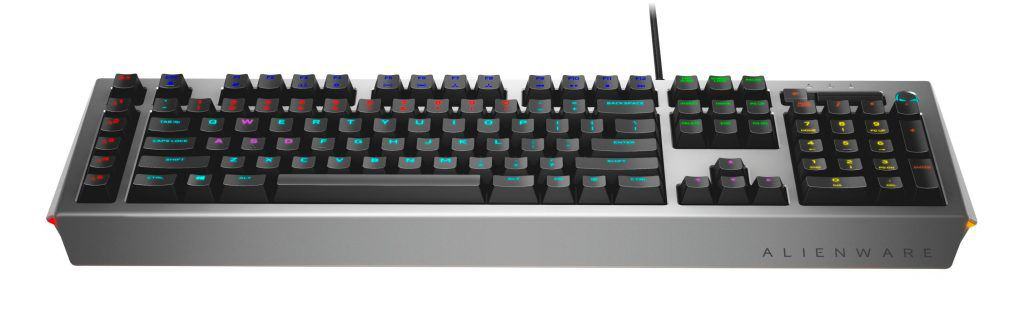
In the gaming peripherals market today, it’s hard to get a foothold for a young brand because the number of manufacturers involved in this market is ever greater. over. Therefore, amateur names occupy a very large number, so it will be very advantageous if developers who are already well-known and senior (not to mention own a large number of fans) will be more more attention.
Among the names that have become “emblems” are global gamers glorified when referring to something “specialized game”, sure everyone knows Alienware, a sub-brand of Dell boss has the number one in the market for the production of equipment “game”.
Yes, Alienware is like a “dream” that any gamer has to desire. Alienware as a symbol of power, of the breakthrough as if it belonged to a civilization outside of Earth. Recently, when the Dell boss has more strategic steps in the Asia market, Alienware is also more common in the Asia market with many unique products.
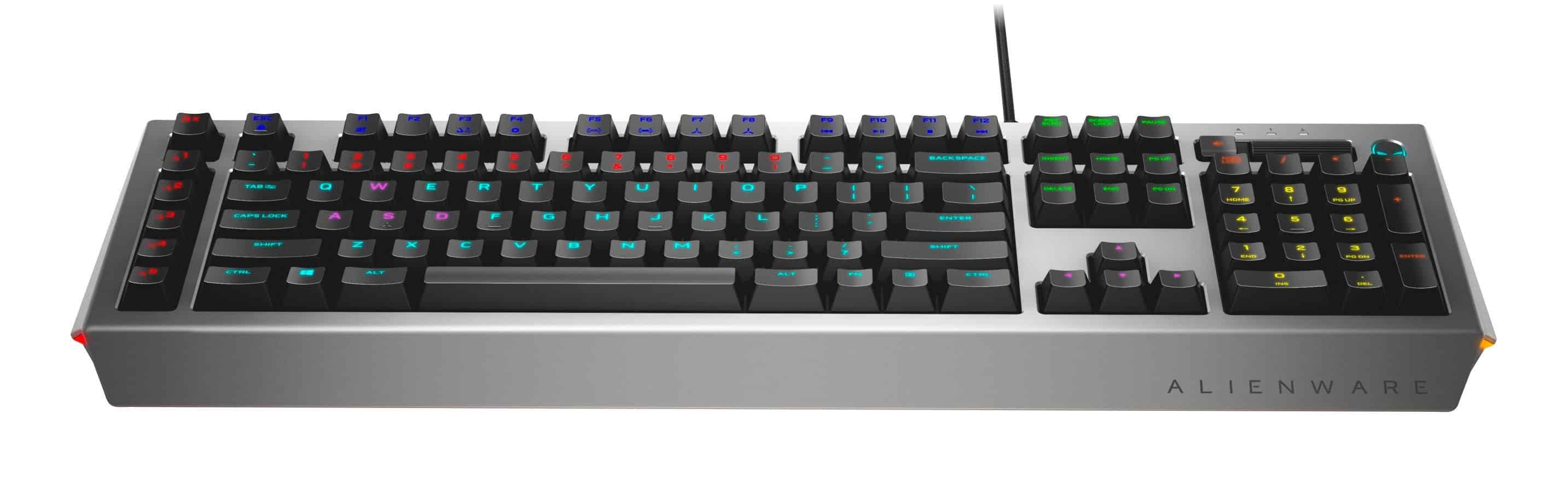
In the recently introduced series, the trio of screen products, mechanical keyboards, and next-generation Alienware gaming mice are also officially launched. Biareview will take you to the “Alien” branded products, and the first character in the article today will be the Alienware AW768 keyboard.
The points that made Alienware’s products more user-friendly are the professionalism of every detail, not just in product design but even in packaging, which is taken seriously. The look “expensive”, “genuine”, “professional” eyes suck.
Alienware AW768 too, because certainly the player will be surprised by the size of the box is quite “great” of it. The box size of the Alienware AW768 is very large, heavy, thick and extremely sophisticated. Decorative details are polished in glossy, impressive design with strong white and light gray tone, while details are very condensed, everything feels very cool. Compared to the box, the Alienware AW768 only less each ASUS ROG Claymore (fullsize) only.
Inside, the Alienware AW768 is wrapped in two additional protective plastic frames to prevent impact and a thin layer of foam to prevent friction with the plastic frame attachments. Oddly enough, the transparent plastic cover has a window open for those who want to try the Alienware AW768 switch, but it is mandatory to re-open the cover of the product.
One thing that many Alienware fans love about the brand is the consistency of the design language, yet each product is different but all have very common traits that are easily recognizable. They are born as one piece of a complete picture from a PC, monitor, mouse, keyboard or even the unsuccessful Steam Machine launched some year ago.
Alienware AW768 is inherited a modern design language, strong and the substance “Alien” is still very voluminous in every way out of his. However, the basic design of the Alienware AW768 is still symmetrical so it does not look too hilarious but more “hi-tech” quality.
Key Switches and Typing Experience
Mechanical Key Switches
The Alienware AW768 comes with brown mechanical switches , and honestly they’re known for having tactile feedback, without all that loud clickiness you get from blue switches. In most conversations brown switches are seen as a pretty solid middle ground for people who do both typing and gaming , there is a satisfying little bump when you actuate each key which kind of helps with typing accuracy, and it also supports quicker keypresses during games.
The actuation force on these is roughly 45g, which is pretty standard for most brown switches , and it lands in that balance between being quick to respond and still feeling a bit resistant. Because of that the AW768 feels workable for lots of gaming genres too, from fast-paced shooters to strategy titles that need precision and control, more than frantic spamming.
Typing and Gaming Performance
When you type on the AW768 it feels comfortable and also efficient, like you can settle in without fighting the keyboard. The tactile bump makes long sessions more engaging , and it can reduce fatigue over time. The keystrokes feel precise, and the key travel seems just right, so every press lands cleanly. It’s also good at registering inputs in a way that avoids ghosting, or at least doesn’t show missed presses when things get busy.
For gaming , the AW768 is strong at delivering a responsive and immersive feel. With N-key rollover and anti-ghosting in place, basically every keypress is tracked, even when you’re going through chaotic moments and multiple keys are pressed at the same time. The polling rate is 1000 Hz, which helps keep things ultra-responsive, reducing input lag, and giving gamers a real edge when timing matters, like during fast strafes or tight combos.
Those dedicated macro keys sitting on the left side of the keyboard are honestly a helpful extra for gamers who need fast access to complicated commands or in game abilities. You can program these buttons through the Alienware Command Center software , so the whole setup can be tuned to match how you actually play , which is kind of the point right.
AlienFX RGB Lighting and Customization
RGB Lighting
The Alienware AW768 really leans into its AlienFX RGB lighting system as one of the big highlights. With AlienFX you get 16.8 million colors and a bunch of lighting effects, so you can make your own lighting profiles , and if you want it, those can even sync with other Alienware gear. The keyboard uses zone based lighting too, meaning there are several zones you can tweak one by one from inside the Alienware Command Center software.
If you’re the type who likes options, the effects go from plain static colors to more lively wave and ripple styles. That gives you more than just “one vibe”, you can pick what fits your gaming space. Also, the RGB is bright and punchy, and the transparent keycap legends help the glow come through cleanly, even when the room is dim.
Customization Options
This is where the Alienware AW768 really starts to stand out. Using the Alienware Command Center, you can build and store multiple profiles, and each profile can include its own key bindings, macros, plus lighting settings. That’s especially handy if you bounce between different game styles, or if someone else uses your keyboard now and then.
The software interface feels kinda user-friendly, with a drag-and-drop system that makes assigning commands, and building macros pretty straightforward. People can also sync their lighting profiles with other AlienFX-enabled devices , which helps make a more cohesive and immersive gaming vibe in practice.
Software and Additional Features
Alienware Command Center
The Alienware Command Center is basically the center hub for all the customization and configuration of the AW768. It’s integrated well, and it includes plenty of options for tuning both the keyboard’s performance and how it looks. From remapping keys, to tweaking the polling rate, the Command Center gives you a lot of control over your keyboard… in a clean way.
One of the more standout parts is that you can create game-specific profiles. So when you launch a particular game, the keyboard can automatically jump into a pre-configured profile, tuned for that title. This kind of automation , and deep integration, tends to be really attractive for gamers who bounce between different games and want consistent results across the board.
Additional Features
Besides the strong performance and customization, the Alienware AW768 also brings in a handful of extras that improve day-to-day usability. The dedicated media controls, positioned at the top right of the keyboard, let you reach volume tweaks, playback shortcuts, and mute options fast, so you can manage audio quickly without dragging yourself out of the session.
The keyboard also has a USB passthrough port, which is a pretty convenient add-on for plugging in other peripherals like a mouse or even a USB drive without having to stretch behind your PC. That USB passthrough works with USB 2.0 , which should be enough for most devices, however some users might still want the higher transfer speed options of USB 3.0 or something beyond.
Performance in Real-World Scenarios
Gaming Performance
The Alienware AW768 is made mostly for gamers, and it really shows here with solid performance across different game types. In fast paced first-person shooters, the keyboard’s responsiveness , plus the accurate key actuation, helps you react quickly and keep your movements tight. The programmable macro keys come in especially handy for MMORPGs and MOBAs where those layered commands, and quick access to abilities can literally be the difference between winning, and getting wiped.
The N-key rollover makes sure that, no matter how many keys you press at once , every input still gets registered cleanly. That part matters a lot in competitive matches where basically every millisecond feels heavy. Also the tactile feedback from the brown switches helps keep you locked in during longer sessions, which means fewer accidental key taps and less random interference.
Typing Performance
The Alienware AW768 , despite being pushed as a gaming keyboard, it still handles everyday typing tasks pretty well. The brown switches give this kind of satisfying feel, a just right resistance and feedback balance, so typing becomes both smooth and quick. If you are juggling long documents, doing coding, or just messaging friends, the AW768 basically stays a comfy and steady typing companion.
The keyboard layout feels airy, and the keycaps are sized in a way that makes the shift from a typical office keyboard pretty easy. Plus, the media controls and macro keys sit close at hand, so it’s convenient to use the AW768 for things that are not purely gaming, like daily work too.
Durability and Longevity
The Alienware AW768 looks like it is made for the long run. It uses durable materials , and the key switches are rated for millions of keystrokes, so the whole thing should keep going without drama. On top of that, the metal top plate acts like an extra shield, reducing wear and tear, and helping the keyboard keep its good condition even after heavy sessions.
As for the keycaps , they’re made from ABS plastic. That choice is sturdy, although ABS is not quite as resistant to long term wear as PBT keycaps. Eventually you might notice some shine, but that’s a pretty common ABS behavior, and it does not really mess with the keyboard’s overall performance.
Table of Contents
where can you get a Alienware AW768 online
Alienware Pro Gaming Mechanical Keyboard AW768 – AlienFX 16.8M RGB 13 Zone-Based Lighting – 15 programmable Macro Key Functions: Buy it now
Alienware Pro Gaming Mechanical Keyboard AW768 – AlienFX 16.8M RGB 13 zone-based Lighting – 15 programmable macro key functions (Certified Refurbished): Buy it now
The all-encompassing Alienware AW768 will probably require some gamers to reconsider their desk space, with a new macro keybar on the left, while the upper left corner There appear to be function keys, including the volume scroll button and audio mute.
The Alien logo is no longer a standalone logo that will take the background light on / off or activate Alienware AW768’s “Game Mode” (customized via the Alienware Control Center).
The top of the Alienware AW768 is not made of heavy metal, instead the upper surface is made of plastic, lightly sanded to avoid fingerprints but still ensure good smoothness so as not to disturb the neck hand.
Speaking of backlighting, the Alienware AW768 does not offer much of the same fun as the majority of the other RGB-backlit keyboards on the market. Still, quite a lot of people like the Alienware AW768 backlight system thanks to the beautiful “roar”, shining down the table very miraculous. If you have a RGB portable table, then there is a shining light!
Alienware AW768 is a very American brand, but it is equipped with Kaihua-made switch, the version used by the Kailh Brown switch has a slightly heavier emphasis than the 45g, transparent switch cover increases light amplification capability.
The keycap is made of thin ABS plastic, UV-coated and laser-engraved characters are quite sharp, on some keycap macros, the extraterrestrial character is pretty cool, but the overall font on the keyboard be printed in popular form.
Finally, the Alienware AW768’s anti-break wire cloth is not equipped with a noise-canceling magnet, nor does the gold-plated USB interface.
Pros and Cons
Pros:
High-Quality Build The Alienware AW768 comes with a durable feel , built around a metal top plate and sturdy key switches, so it should last a long time.
Customizable RGB Lighting AlienFX gives you a lot of room to play around with colors and effects , meaning you can personalize the look without much fuss.
Mechanical Brown Switches The tactile brown switches strike a nice middle ground , for both typing and gaming, so it works for multiple day to day jobs too.
Dedicated Macro Keys Those extra macro keys are actually useful , especially for players who need fast access to complicated inputs, like in MMORPGs or MOBAs where you’re stacking more than one action at once.
Alienware Ecosystem Integration The AW768 fits right in with other Alienware stuff , so lighting can sync and profiles can stay consistent across devices which is pretty cool.
N-key Rollover and Anti-Ghosting You get accurate key registration even when several keys are pressed together, and that matters a lot in competitive matches.
Dedicated Media Controls There are dedicated media controls plus a volume roller, it’s handy since you can change playback or volume without fully stopping what you’re doing.
USB Passthrough The USB 2.0 passthrough port is a neat bonus, lets you plug peripherals through the keyboard directly, so your desk cables can look a bit less chaotic.
Cons:
High Price Point: The AW768 sits at a higher price than a lot of other mechanical keyboards, so it can feel like a barrier if you are , kinda budget-conscious.
Non-Detachable Wrist Rest: The wrist rest is fixed, yeah it is comfy, but it has not much padding and it cannot be removed, so people who like a more mod-able setup might not love it.
ABS Keycaps: Even though the ABS keycaps are durable, they can pick up shine after some time which might bug anyone caring about long term looks.
Limited USB Passthrough Speed: The USB passthrough only supports USB 2.0, so it could feel slower if you move files often , or use faster peripherals.
Bulky Design: The keyboard is kinda angular and has a bigger footprint, which may not fit every desk situation, especially if you have limited space or just want a cleaner , more minimal vibe.
Alienware Command Center Dependency: The Alienware Command Center is quite capable, but to do most of the deeper custom tuning you really need it, so some users might see that as annoying if they want simpler, software-free customization.
Comparisons with Competitors
Versus Razer BlackWidow Elite
The Razer BlackWidow Elite is another popular go-to for gamers who want a premium mechanical keyboard. It comes with a pretty similar set of stuff , like customizable RGB lighting, dedicated media controls, and it uses Razer’s own mechanical switches, which is kind of the point of it.
When you line it up beside the Alienware AW768 , the BlackWidow Elite feels more mainstream, with that detachable wrist rest too. Some players may end up finding that part more comfortable than the AW768 setup. In software terms the Razer Synapse is sort of comparable to the Alienware Command Center , in that both let you tweak the board , however Synapse can sometimes feel like it opens up wider integrations beyond just Razer gear, so it may have that extra reach.
Ultimately, picking between the AW768 and BlackWidow Elite might come down to loyalty to a brand, which switch style you like best, and the little design details you care about. Both do strong, responsive work , but the AW768’s ties to Alienware’s ecosystem may swing the decision for people already living in that Alienware ecosystem.
Versus Corsair K95 RGB Platinum
The Corsair K95 RGB Platinum is also a high-end gaming keyboard , and it leans hard into customization. You get per-key RGB lighting, dedicated macro keys, and a choice of Cherry MX switches, which many people treat like a safe bet. The K95 tends to be praised for build quality too, with an aluminum frame and PBT keycaps. Those PBT keycaps usually handle wear better than the AW768’s ABS keycaps , so there’s a durability angle there.
Like the others, the K95 includes a detachable wrist rest , which makes it a bit more adaptable for different hand positions and desk routines. On the software side, Corsair iCUE is widely liked for its level of control and for syncing across other Corsair peripherals , so if you already have Corsair stuff, it can feel more seamless.
But well, the K95 is usually pricier than the AW768, and honestly some people might feel the K95 design is just a bit too loud, too much, too over-the-top. Meanwhile the Alienware AW768, even if it brings fewer features, gives a more streamlined kind of usage… mostly centered around fitting nicely into the wider Alienware ecosystem. For certain users that “ecosystem” detail can be the deciding point.
Versus Logitech G Pro X
The Logitech G Pro X is a smaller, more portable mechanical keyboard, built with eSports professionals in mind. It uses hot-swappable switches, so users can tweak the keyboard’s feel by swapping out the switches themselves. That kind of direct switch replacement is not something you really get with the AW768.
Still, the G Pro X doesn’t include the dedicated media controls, nor the macro keys that you can find on the AW768. However, its reduced footprint is great for gamers who want more room on the desk for mouse movement, or for anyone who travels a lot. In terms of software, the Logitech G HUB is pretty similar to the Alienware Command Center in what it lets you do, but it’s tuned more toward professional gaming setups.
So if portability matters most, and the option to fine tune switches is a priority then the G Pro X might land better. Yet the AW768 stays the stronger choice if you want a fuller, more control-heavy keyboard, plus that extra advantage of working smoothly alongside other Alienware products.
Conclusion
The Alienware AW768 Mechanical Gaming Keyboard is kinda a solid, premium pick for gamers who want that mix of performance, personalization, and style. The mechanical brown switches give a satisfying feel for both typing and play, meanwhile the AlienFX RGB lighting system brings a lot of room for tweaking, so it can vibe with almost any gaming setup you got going on.
Yes, the AW768 does cost more than many rivals but honestly it kinda makes sense. The build quality, the feature bundle, and that smooth teamwork with the Alienware ecosystem feel like the justification. Also the keyboard’s ergonomic shape, paired with solid software support, makes it a pretty serious contender in the competitive keyboard space.
Still, it’s not perfect, because there are some no-go areas. The wrist rest stays fixed, the keycaps are made from ABS, and the price may sting, these could be deal-breakers for some people. And if you prefer something more minimal, or more portable, you might also notice the overall size is kind of bulky, so it won’t feel as convenient.
So, overall, the Alienware AW768 is a great choice for gamers who care about brand cohesion, deep customization, and a durable high-performance keyboard. There are other keyboards out there that offer similar things, sure. But the AW768’s integration with Alienware’s larger ecosystem makes it more compelling especially if you’re already in the Alienware world. Competitive or casual, the AW768 is ready to level up your gaming experience with its advanced features and dependable performance.
Related Posts


Tech Reviewer & Product Analyst
Định Bia has spent over 10 years testing consumer electronics with a focus on smart technology. He work as a product advisor at Biareview where he helped customers find the right devices for their needs. He personally tests every product featured on this site using a consistent evaluation framework covering quality, durability, and value. All reviews are based on experience, not influenced by the manufacturer.