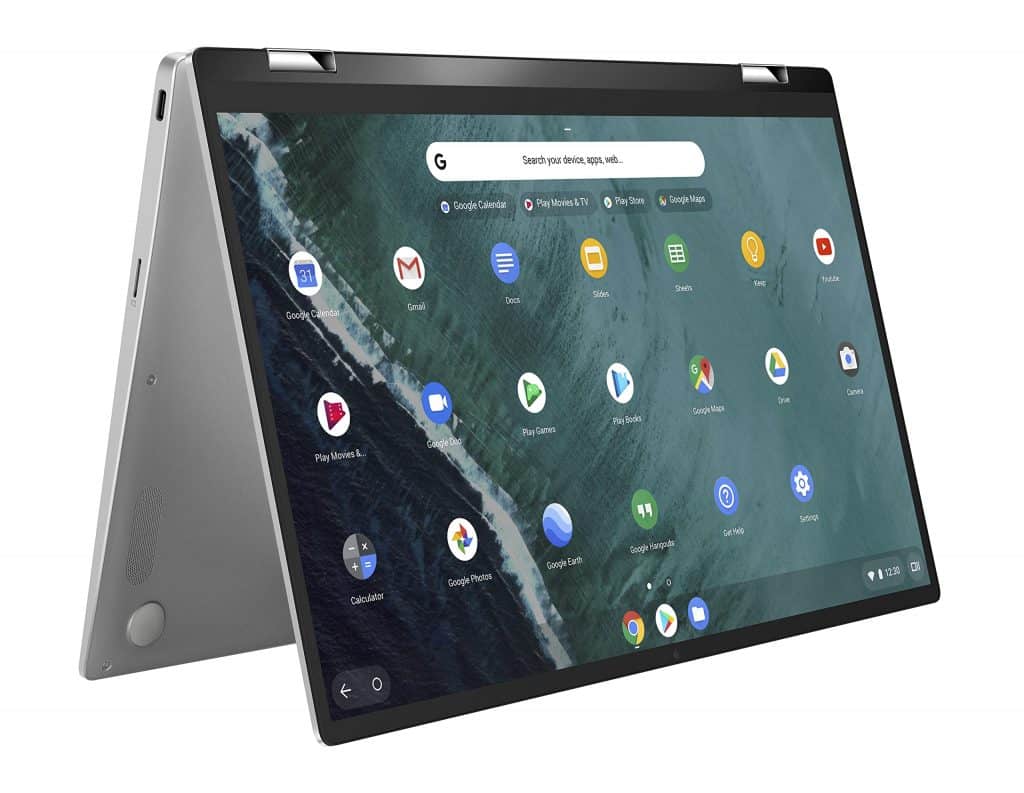
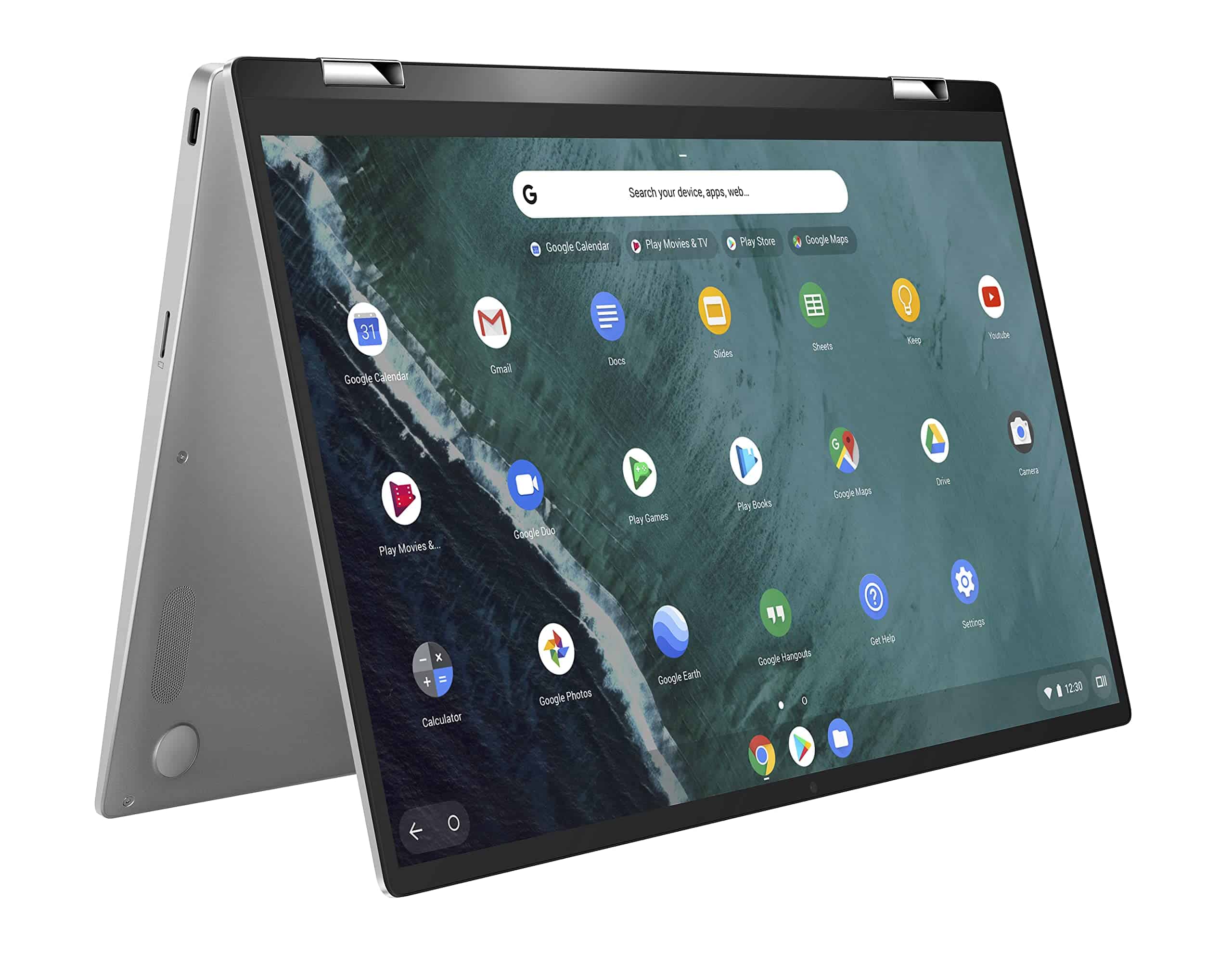
The Asus Chromebook Flip C302CA was, honestly, one of our favorite Chromebooks when it showed up back in 2017. Asus then finally swapped it out in 2019 with the Chromebook Flip C434 using smaller bezels, to fit the size up of a larger screen into something still reasonably compact. It also came with the newest guts they could reasonably fit in there, without going full flagship.
They sent us a mid-tier setup. You get Intel’s low-power 8th Gen Core i3-8100Y CPU, 8GB of RAM 64GB of eMMC storage, and a 14-inch 1080p display. The whole thing rings in at $570, which lands right in the middle of the current Chromebook pricing jungle these days.
And yeah, the Chromebook space, kind of like the Windows 10 ecosystem, is getting stuffed with 2-in-1 devices. So the real question is pretty simple does the Chromebook Flip C434 bring anything interesting to pull shoppers away from the crowd of competing options.
Build quality punches above the price
The Chromebook Flip C434 is a well-built machine for $570. Acer has put together a 2-in-1 aluminum alloy body, so it feels more than just sturdy, with structural rigidity that you’d normally expect from higher priced laptops , and it also has a sleek modern vibe. The hinge is a little stiff, you know the kind, like it needs two hands to open up comfortably, but once it’s there it keeps the screen steady in each of its four modes clamshell, tent, media, and tablet.
The chrome beveled edges give it a little flair , and the bottom of the chassis has corners in all the right places. Overall, the look is not really about bling , more like a kind of overt attitude, and yeah it works. Kudos to Asus for making a reasonably priced laptop that still feels put together.
We also spot that Asus kind of applied some of its bezel-less know-how to the Chromebook Flip C434, so it comes off as a more modern deal for a budget laptop. The 87% screen-to-body ratio isn’t quite at the level of 92% or higher seen on the most modern small-bezel Windows 10 laptops, but it’s still better than a lot of the field. That means the Chromebook Flip C434 ends up being smaller than other 14-inch Chromebooks like the Acer Chromebook 514 , plus it’s thin at 0.61 inches and on the lighter side at 3.1 pounds.
The C434 brings the standard Chromebook connectivity too, with two USB-C 3.1 Gen 1 ports , one USB-A 3.1 Gen 1 port, and a microSD card reader. For wireless, you get Wi-Fi 2×2 MU-MIMO 801.11ac and Bluetooth 4.0, which is pretty typical but solid.
Typing, swiping, and typing is a pleasure.
One component that’s often shortened on budget laptops is the keyboard, and the Chromebook Flip C434 is a welcome start. It enjoys an island keyboard with full-size keys that provide enough travel and flexible mechanics. All the usual five levels of Chrome OS backlighting are present. It’s not really the kind of keyboard you’ll find on those pricey Windows 10 machines like the HP Specter x360 13 or the Dell XPS 13, but honestly it’s more than decent for the cost , it beats a lot of laptops you end up seeing in this same price range.
Asus has applied some of its bezel-less expertise to the Chromebook Flip C434.
The touchpad is equally good. It’s smooth and comfortable, and it supports all of Chrome OS’s multi-touch gestures with reliability and precision — making it one of the best Chromebook trackpads around. Thankfully, the buttons also have a nice click without being too loud.
The touchscreen also works, like really well, so you can glide through those long web pages just using your thumb. Obviously you will still need that touch panel when you flip the display into tablet mode.
Still, the screen and the sound are kinda overwhelming, in a way.
The Chromebook Clip C434 comes with a 14-inch Full HD screen, and honestly, that’s pretty nice for the money. It’s sharp enough for almost everyone, except for the most dedicated, pixel peepers. It’s a 16:9 aspect ratio. Which is why we keep waiting for manufacturers to jump toward more productivity leaning aspect ratios like 3:2 or 16:10 across the whole lineup. The HP Chromebook x2 , on the other hand , has a 3:2 layout and we really like that approach, it feels a bit more sensible in day to day use.
We couldn’t test the Chromebook screen using our colorimeter, mainly because there was no compatible software. But we can still offer a subjective take. To us, the screen on the Asus Chromebook Flip C434 lands as just average. It’s not especially bright, and it doesn’t deliver strong contrast. The colors feel pleasant and look accurate enough for everyday work stuff, but people who do creative tasks might end up disappointed.
When we watched our Avengers test trailer during the battery test, we found the image to be a bit dark, implying that the gamma might be off a bit. It was still a pleasant enough experience. All in all, the display left us satisfied but not excited. The HP Chromebook x2, Acer Chromebook 13, and Google Pixelbook all have much better panels to put them in another class.
The sound quality is also average. The volume isn’t very loud but still has minimal distortion, making it unsuitable even for larger rooms. The mids and highs were present enough with the usual lacking bass. We recommend pulling out some headphones if you want to listen to some tunes or Bluetooth speakers to catch up on some videos with a few friends.
Great Chrome OS Performance for Productive Users
We couldnt really put the Chromebook through the exact same set of standards as Windows 10 and macOS laptops , but honestly we could still see a Chromebook holding up really well once it came from a device that fell behind. Right off the bat it is pretty obvious the Asus Chromebook Flip C434 has enough grunt to keep most Chrome OS productivity users satisfied .
The Asus Chromebook Flip C434s display was decent. It left us feeling ok, not overly thrilled .
Our review model came with a Core i3-8100Y, which is a dual-core low power CPU that might make you wish a Windows 10 laptop had more headroom. Still, Chrome OS handles things nicely, and we noticed little or no lag when we opened several Chrome browser tabs and ran a few Android apps at the same time . Its not going to feel as quick as the Acer Chromebook 13 with its full powered quad core i5-8250U CPU, but it holds its own against the HP Chromebook x2 , which uses that 7th gen Y series processor.
In Geekbench 4, the Chromebook Flip C434 scored 3,751 in the single core test, and 5,804 in the multi core test. That beats the HP Chromebook x2 which landed at 3,441 for single point , but the x2 pulled ahead in the multi core run with 6,685. The Acer Chromebook 13 was noticeably faster at 4,275 and 8,792, while the Acer Chromebook 514 (Pentium N4200) was behind at 1,556 and 4,837.
In the Speedometer 2.0 web benchmark, which is all about how quickly JavaScript apps can load, the Flip C434 got 71 , versus the Acer Chromebook 13s 88.6 . The HP Chromebook x2 was a tiny bit faster, at 75.1.
64GB eMMC storage does feel slower than the solid-state drives (SSDs) you see in other machines like the Google Pixelbook, or in Windows 10 laptops. Still, in real life use, we didn’t really catch any obvious slowdown, like not when opening apps ,or saving files. The Chromebook Flip The C434, overall seemed to just… go.
Bottom line , Chrome OS doesn’t ask for as much from the hardware as Windows 10 and macOS do. So yeah the Chromebook Flip C434 lands as fast enough for productivity workers, and during our testing we didn’t get any real complaints. Also, the 8GB of RAM on our review unit, means multitasking can become a bit sluggish, and once it does it drags everything down with it.
We tested a few Android games on the 2-in-1, and they pretty much matched the other Chromebooks we tried. You can definitely play games on this laptop, because the limited set of Android titles we checked out ran fast and smooth.
All-day battery life, as long as you work.
Asus packs a reasonable 48-hour battery capacity into the chassis of the Chromebook Flip C434. Coupled with Chrome OS’s low-power CPU and naturally efficient nature, we hope that the 2-in-1 can get us through a workday on a single charge.
When it turned out, although we had trouble getting started with testing. Normally, we use the Basemark web benchmark to test battery life under load, but the Chromebook Flip C434 wouldn’t complete the test.
We basically kicked off our web browsing test, going through a bunch of well known sites until the battery finally gave out. In that stretch, the Asus hung in there for a really solid ten and a half hours. That’s nicer than what the Acer Chromebook managed at eight and a half hours, plus the HP Chromebook x2 only managed about another hour. It kind of lines up against higher-end Windows 10 machines too, like the Dell XPS 13.
For the video looping test, where we let it run through the local Avengers trailer, right up until it shut down, the Chromebook Flip C434 pulled in over 11.5 hours. That’s nearly three hours more than the Acer Chromebook 13 and roughly two hours more than both the HP Chromebook x2 and the Google Pixelbook. Still, the pricier Windows laptop does win in this particular test , at least for the runtime numbers.
All things considered, you should be able to squeeze out a pretty solid day from the Chromebook Flip C434, provided most of what you do is the usual Chrome OS productivity stuff. But if you start turning on Android games, you’ll notice the battery draining much faster, like, noticeably quicker.
ASUS Chromebook Flip C434 2-In-1 Laptop, 14″ Full HD Touchscreen 4-Way NanoEdge, Intel Core M3-8100Y Processor, 4GB RAM, 64GB eMMC Storage, All-Metal Body, Backlit KB, Chrome OS- C434TA-DSM4T, Silver: Buy it now
ASUS Chromebook Flip C434 2 in 1 Laptop, 14″ Touchscreen FHD 4-Way NanoEdge Display, Intel Core M3-8100Y Processor, 4GB RAM, 32GB eMMC Storage, Backlit Keyboard, Silver, Chrome OS, C434TA-DH342T: Buy it now
Related Posts

Tech Reviewer & Product Analyst
Định Bia has spent over 10 years testing consumer electronics with a focus on smart technology. He work as a product advisor at Biareview where he helped customers find the right devices for their needs. He personally tests every product featured on this site using a consistent evaluation framework covering quality, durability, and value. All reviews are based on experience, not influenced by the manufacturer.