Introduction
The Asus U30SD is kind of mid range laptop, it came out to sort of cover people who want a mix of portability, performance, and also decent affordability. It sits in Asus’s U series, which is usually associated with sleek looks and hardware that feels well balanced. In this more in depth review, we’re going to jump into a bunch of things on the Asus U30SD, like its design, the build quality, the display, day to day performance, keyboard comfort, touchpad response, connectivity options, audio output, battery life, and finally whether it really feels worth the money.
Design and Build Quality
Aesthetics and Portability
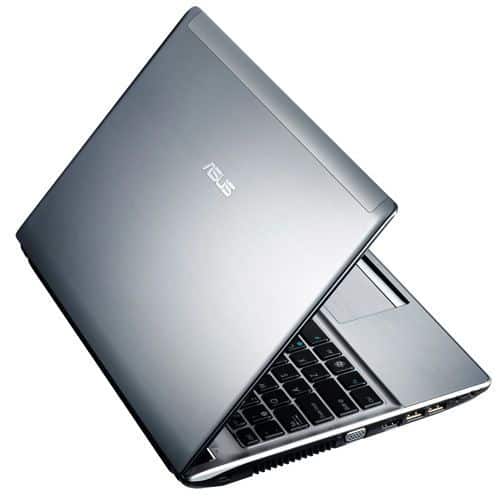
The Asus U30SD has a clean modern style, you can notice the brushed aluminum lid and the palm rest, they both give a premium vibe, while also improving durability, or at least that’s how it presents itself. The silver lid is paired with a dark grey interior, so overall it looks professional , and kind of elegant too.
In terms of size, it measures roughly 328 x 238 x 24.6-29.8 mm and it weighs around 2 kg. For a 13.3 inch model, that’s pretty portable. So if you’re the type to carry your laptop around, it works well, without forcing you to give up screen real estate or performance.
Build Quality
The build quality on the Asus U30SD is pretty solid, there’s minimal flex around the keyboard section and also the lid, it doesn’t feel like it’s going to wiggle too much when you type or pick it up. The construction uses aluminum, so you get that firm, confident vibe and the whole unit feels sturdy enough for everyday use and the usual little bumps. The hinge mechanism is strong too, the lid opens smoothly and stays put at a bunch of different angles, not with that loose, wobbly behavior you sometimes see.
The bottom panel is plastic, which helps keep the overall weight down, but still manages to hold up structurally. As for cooling, the vents are placed in a way that supports airflow, so the system stays reasonably cool even during longer sessions of use, you know, when it’s not just idle browsing.
Display
Screen Quality
The Asus U30SD comes with a 13.3-inch LED-backlit screen, running at 1366 x 768 pixels. Now, yeah, that resolution might sound a bit small next to the newer Full HD displays, but for daily stuff it works. It’s fine for web browsing, document work, and casual multimedia like watching videos or viewing photos.
Color reproduction and brightness are decent overall. The colors look fairly vibrant and they appear reasonably accurate, so it’s pleasant for films and for looking through pictures. Still, the glossy finish can be a double sided situation , it boosts perceived color pop but it also reflects more light and can create glare. In bright rooms or outdoors, that reflectiveness can become kind of annoying, especially if the screen catches overhead lighting.
Viewing Angles
The viewing angle setup on the U30SD feels pretty standard, like on most TN panels (Twisted Nematic), you know. When you stare straight at the screen it stays pretty crisp, and the picture looks clear. But once you move to the side, or you watch it from above or below, then you notice that color shift shows up, plus the brightness kind of drops too. So yeah basically, for the best visual experience you’ll be better keeping the laptop right in front of you , not kind of off to the corner too much.
Performance
Processor and Memory
The Asus U30SD comes with an Intel Core i5-2410M, it’s a dual core CPU from Intel’s second generation Sandy Bridge family. The base clock is 2.3 GHz , and it can turbo up to 2.9 GHz, so you get enough room for multitasking and more demanding tasks, that normal everyday “headroom” feeling.
For memory, it ships with 4 GB of DDR3 RAM. For a lot of people that’s enough for day to day work , and it’s also possible to upgrade it up to 8 GB if you want to go a little further. With this kind of RAM amount, multitasking tends to stay fairly smooth, and you can keep a few applications open at once without running into really obvious slowdowns.
Graphics
One of the more noticeable parts of the Asus U30SD is the discrete Nvidia GeForce GT 520M graphics card, paired with 1 GB of dedicated video memory. This GPU isn’t designed for heavy, high end gaming or anything like that. Still, it gives you a solid advantage over integrated graphics solutions, so it can manage light gaming and it generally works fine with graphics related apps, at least if you’re using it for casual stuff and moderate demands.
Storage
So the U30SD comes bundled with a 500 GB HDD, you know the usual 5400 RPM rotational kind of thing. There’s plenty of space for most folks, still the slower spin can mean longer load times and data moving a bit less snappily, especially when you compare it to newer SSDs. If you really care about speed, upgrading to a solid-state drive can help a lot, booting up faster and giving that general responsiveness, feels a bit more immediate, kind of what you’d expect.
Real-World Performance
In day to day use, the Asus U30SD turns in a pretty solid performance for a mid-range laptop. The Core i5 processor plus 4 GB of RAM is generally enough for regular tasks like web browsing , office work, and streaming or other multimedia playback. You also get a discrete Nvidia GPU, and that makes lighter gaming feel more comfortable, plus video playback stays smooth so it works well as a do-it-all machine for different routines.
Keyboard and Touchpad
Keyboard
The Asus U30SD has a full sized chiclet-style keyboard, with keys that are spaced out nicely and a decent amount of travel. Typing on it feels comfortable, and it has that responsive vibe that helps during longer writing sessions. The layout is pretty standard, no odd placements or weird shortcuts, so most users should adapt without much fuss.
A small highlight , and it’s a good one, is the keyboard backlighting. It helps a lot in low-light rooms, or if you use it at night. The lighting level can be adjusted across different brightness settings, or it can be fully disabled too which gives you flexibility depending on where you are and what you prefer.
Touchpad
On the U30SD the touchpad is pretty generous, you get multi-touch gestures like two finger scrolling , pinch to zoom, and even a three finger swipe. The surface feels smooth and it responds quickly, so the cursor stays pretty accurate. The mouse buttons are built in at the bottom of the touchpad, and each press gives a decent, reliable click. Nothing fancy, but it works in a calm way, if that makes sense.
There’s also a palm rejection feature, so when you type your hand doesn’t constantly mess with the pointer. That little bit helps the flow a lot because you avoid those annoying interruptions that happen when the cursor jumps around.
Connectivity
Ports and Slots
Asus U30SD gives you a lot of connection choices, it kinda covers the usual peripherals and then some. On the left side of the laptop you’ll notice:
VGA port for hooking up external monitors, or projectors in general.
HDMI port for HDTVs and other HDMI devices.
Ethernet port for a wired internet setup.
USB 3.0 port for quicker file transfers with supported gadgets.
3.5mm audio jack for headphones, or external speakers.
On the right side of the laptop:
Two USB 2.0 ports for extra accessories.
An optical drive, specifically a DVD-RW unit for reading and writing CDs and DVDs.
A Kensington lock slot, for locking it up in public areas.
Also, there’s a multi format card reader on the front edge. It supports SD, MMC, and MS cards, which is handy for moving pictures and documents off digital cameras and similar equipment.
Wireless connectivity
For wireless connectivity the U30SD has 802.11b/g/n Wi-Fi plus Bluetooth 3.0 , which should give you solid wireless internet access, and also makes it easier to pair with Bluetooth enabled devices like smartphones, headphones,and speakers. It’s basically there for everyday use, kind of dependable.
Audio
Built in speakers
As far as audio goes , the audio quality on the Asus U30SD is decent, especially for a laptop in this price bracket. There are built-in stereo speakers sitting above the keyboard, so the sound comes out pretty clear and it gets reasonably loud. For most multimedia, like watching movies, listening to music, or just casual gaming, the output is fine and it does what you’d expect.
Even though the built in speakers do work well, they dont really deliver the bass and overall depth you might get from external speakers, or a good set of headphones, like it’s more rounded with better low end. If your priority is richer sound during music sessions, or movie playback , then using external speakers, or going with high quality headphones can make the whole experience feel more immersive, even if the default audio is fine.
Audio enhancement
On top of that , the laptop includes Asus’s SonicMaster tech, which works to boost audio quality by adding better clarity and more sense of depth. And if you want to go beyond the speakers , the 3.5mm audio jack lets you connect external headphones or speakers, for stronger audio output with less limitation.
Battery Life
So the battery life, yeah, it’s kind of a big deal with basically any laptop and the Asus U30SD does pretty well. It ships with an 8 cell lithium ion battery rated at 5600mAh, and in practice that can mean around 8 hours per charge. But honestly it depends a lot on how you’re using it, and which power settings you choose.
For regular stuff like web browsing, using office apps, or streaming multimedia the U30SD usually keeps going long enough for a full workday without you having to go charger hunting. Still, the moment you start doing more serious workload like gaming or intensive video editing the battery drops quicker than you’d really want.
Power Management
If you wanna squeeze more time out of it, you can tweak the power settings and flip on energy saver modes when you actually need them, kinda. Asus also bundles this Power4Gear utility, it lets you check the battery condition and tweak power profiles in a way that can extend your total run time, even if only a bit really.
Cooling and Noise
Thermal Management
On the heat side, the Asus U30SD uses a cooling setup meant to handle temperatures across its internal components. There are vents on the bottom panel and also an exhaust vent on the left side so warm air can leave more effectively. In day to day use it stays fairly cool and quiet, with the fans running at low speed most of the time. That part feels nice, and it’s kinda unobtrusive not loud or distracting.
Once you start doing more demanding stuff like gaming, or editing video, the laptop temp can creep up , and then the fans might get a bit more noticeable. Even so , the cooling system, it really does a solid job keeping the inner bits inside safe temperature bounds. Still, a lot of people can hear the fan noise when the laptop is under heavy load. This happens quite often on laptops with discrete graphics plus a higher performance processor , so it’s not totally shocking , or unexpected.
User Experience
Overall Usability
In general, the Asus U30SD user experience feels pretty solid thanks to dependable performance , a comfy keyboard, and a variety of connection options. The Intel Core i5 processor, 4 GB of RAM, and the discrete Nvidia graphics card work together well enough for a big mix of tasks. Like productivity, watching multimedia , then some casual gaming , and even mild photo or video editing without too much drama.
The 13.3 inch display isn’t really top-shelf resolution compared with what you see nowadays, but it still pulls off decent color accuracy and brightness. So for everyday work it’s pretty easy to live with. Also, the keyboard and touchpad are designed in a way that feels kind of natural, they’re pleasant to use, and that definitely helps the laptop’s overall usability.
Software and Pre-Installed Applications
Operating System
Asus U30SD originally comes with Windows 7 Home Premium. Back when it launched, that was a pretty common pick for laptops. Windows 7 is pretty well known for being easy to navigate, with a friendly interface, and it tends to cooperate nicely with a wide range of software. That said, if someone is trying to get stronger protection, more modern capabilities , then an upgrade might be worth it. Options could include Windows 10 , or even Windows 11, as long as the hardware compatibility is there, of course.
Pre-Installed Applications
Asus usually throws in its own set of proprietary programs and handy little utilities meant to make the whole experience smoother. The U30SD really is not different, it comes ready with several Asus applications already loaded and working. For instance, you get things like Asus Power4Gear, which is basically there to help manage power settings and battery life, so you can move between power profiles to balance performance with battery endurance.
Then there’s Asus WebStorage, a cloud storage service that gives users some free online space for keeping backups and also sharing documents. Asus Live Update is another one, it checks for and installs updates for Asus software and drivers by itself, so the system stays relatively current. Asus Splendid Video Enhancement Technology rounds it out, this one lets you tweak display options aimed at nicer video playback, like sharper contrast and overall picture feel.
On top of those Asus, there are also a bunch of third-party applications, and these can shift a bit depending on where you bought the device, or which retailer handled the setup. You might see, for example, trial versions of antivirus tools, office style productivity suites, plus multimedia players that just work out of the box. Sometimes it’s sort of a mixed bundle, not always the exact same list, but the theme stays similar.
Pros and Cons
Pros
Solid Performance: With an Intel Core i5 in there and 4 GB of RAM ,the U30SD still feels pretty steady for a bunch of daily stuff and even some heavier chores.
Discrete Graphics: The Nvidia GeForce GT 520M is a genuine step beyond integrated graphics, so it can handle light gaming and multimedia pretty decently too.
Comfortable Keyboard: A full sized chiclet keyboard, plus backlighting, makes typing feel natural and also kinda fast.
Versatile Connectivity: It brings a handful of ports, HDMI, VGA, USB 3.0, and even keeps an optical drive around.
Decent Battery Life: The 8-cell battery can go up to about 8 hours, which is good for travel, errands, and that general on the go life.
Sleek Design: The brushed aluminum lid and palm rest look polished, and the whole machine gives off a bit of a premium vibe.
Cons
Lower Resolution Display: 1366 x 768 isnt anything mind blowing next to modern Full HD screens, and the glossy finish can bounce light back at you more than you’d like.
Limited Viewing Angles: Since it uses a TN panel ,you’ll notice color shifts and brightness drop when you look from the side, or even just slightly off center.
Fan Noise During Intensive Tasks: If you start pushing it hard ,the fan and cooling system can get loud enough to be annoying, especially in quiet rooms.
Older Operating System: Windows 7 pre installed might require an upgrade, mostly for stronger security and newer features.
Non-Upgradable CPU and GPU: The CPU and GPU can’t be upgraded, so you’re basically locked to whatever it shipped with , no add on rescue later.
Conclusion
Asus U30SD comes across as a pretty solid mid-range laptop , it really tries to land in that sweet spot between performance, portability and affordability. The chassis feels sturdy enough , the keyboard is genuinely comfortable , and the connectivity options are kinda flexible, so it ends up working for a lot of different folks. Like students and professionals , but also the more casual crowd and even light gamers who don’t demand miracles or high-fly benchmarks.
The lower resolution display and the fact that you can’t really upgrade the CPU or GPU are a couple of sticking points though. Still, the overall price value, plus the fact that you can do some upgradability in other areas helps smooth over those worries. Being able to upgrade the RAM and storage means the machine can stay useful for longer, and you can tune things later as your needs shift, kind of gradually.
If you want something dependable for everyday computing, watching media, and doing light gaming , the Asus U30SD is still a sensible choice even after a few years from launch. It has a durable build, performance that’s “good enough” for many jobs , and a price that usually looks attractive next to the alternatives. So yeah, it’s worth a second look for anyone shopping on a budget, even if you think you already decided.
In general, the Asus U30SD feels like a proof of concept for how Asus can deliver quality laptops that match a broad audience, and keep things enjoyable over time. Whether you’re a student, a professional, or just a casual user, the U30SD brings the right mix of features and power for handling everyday work without too much fuss, just with steady efficiency.
ASUS U31SD-DH31 13.3-Inch Thin and Light Laptop (Black): Buy it now
Related Posts




Tech Reviewer & Product Analyst
Định Bia has spent over 10 years testing consumer electronics with a focus on smart technology. He work as a product advisor at Biareview where he helped customers find the right devices for their needs. He personally tests every product featured on this site using a consistent evaluation framework covering quality, durability, and value. All reviews are based on experience, not influenced by the manufacturer.