Design and Build Quality
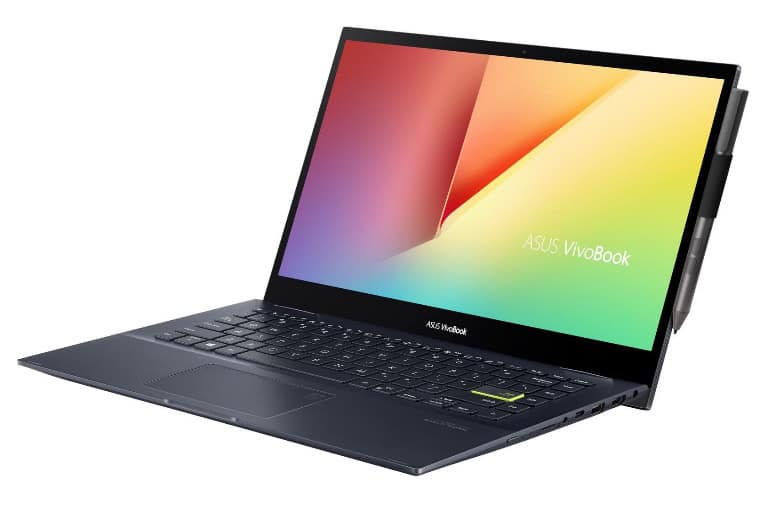
The ASUS Vivobook Flip 14 TM420 design is sort of modern yet practical , in a way that feels easy to live with. You get a slim sleek profile and a minimalist look that doesn’t shout, it just sits there. The body is built from a mix of aluminum and plastic, so it feels premium but it’s not crazy heavy. For weight it comes in at about 3.3 pounds, or 1.5 kg , and the size is roughly 12.8 x 8.7 x 0.7 inches (32.5 x 22.2 x 1.8 cm) so yeah it’s pretty portable , and not annoying to carry.
What really stands out is the 360-degree hinge on the Vivobook Flip 14. It lets the unit swing around, so you can use it in multiple positions, and that helps in a bunch of everyday situations. Like typing in laptop mode, sketching when it’s in tablet mode, presenting in tent mode, or watching videos while it’s set in stand mode. The hinge action feels sturdy and smooth, with a confident sort of click when you move between the modes, not wobbly at all.
Also the keyboard deck plus the palm rest area use a brushed metal finish, which kinda elevates the whole appearance. The keyboard has backlighting, and the keys are spaced out well, for comfortable typing over longer stretches. The touchpad is on the larger side too, and it supports Windows Precision drivers , which helps keep things accurate and responsive when you swipe or tap.
Durability
The build quality of the ASUS Vivobook Flip 14 TM420 is pretty commendable. In real life the laptop feels sturdy, there’s minimal flex around the lid and the keyboard area . The hinge mechanism seems durable, and it’s been tested for reliability, so it should handle frequent use without going weird over time. Also, the mix of aluminum and plastic in the construction gives a nice tradeoff between durability and weight, so it comes off as a dependable daily companion.
Portability
Because it’s got compact dimensions and a lightweight design, the Vivobook Flip 14 TM420 comes across as highly portable. It slips easily into backpacks and bags , which makes it a decent pick for students, busy professionals, and travelers who want something versatile on the move. The slim profile plus the light build doesn’t totally reduce its sturdiness either, so you get portability and durability at the same time, in a way that actually feels practical.
Sharply minimalistic look
Inheriting the design language of successive versions, the new VivoBook Flip 14 possesses an appearance that can be summed up in three words: Simple is beautiful. The metal back cover is a matte finish and is completely flat, with only slight curves at the four corners. The chrome-plated Asus VivoBook text on the side is deflected, creating a very “minimalism” appearance.
Open the lid, the simplicity is still present in the color, the layout and the highlight is the Enter key that stands out with the youthful neon blue border. Similar to the style shown by Asus in the lid, this dotted point erases the visual boredom, instead of a blend of minimalistic trend and personality full of emphasis.
The 14-inch NanoEdge touch screen is fully covered by tempered glass that is not only suitable for touch but also contributes to the premium, modern look on VivoBook Flip 14. When the screen lights up, it’s time You will be admired again by the impressive thin bezel, which makes up 82% of the display space.
Get rid of the traditional clamshell folding silhouette, this laptop is designed flexibly 2-in-1 style, can “transform” from a familiar laptop into a 14-inch tablet. The EgoLift hinge mechanism, which has undergone the test of more than 20,000 open/close cycles, is a solid support for adjusting the display to multiple angles, up to 360 degrees.
Asus VivoBook Flip 14 meets the ultrabook standard when it weighs only 1.5 kg, the ideal weight for you to comfortably pack in your backpack during school days In addition to the “Compact” measurement, this laptop also has enough necessary connection ports for students and the officer.
Especially with the TM420 version you also have the option of an Asus touch pen and a pen slot. This is the duo that promises to stir up the user experience when it optimizes the hardware and software power on the Asus representative.
Versatile user experience to change the way you communicate
The appearance of the Asus stylus that comes with the VivoBook Flip 14 TM420 has quickly shown the new face of the 2-in-1 laptop design that is full of fun, usefulness, and creativity.
The VivoBook Flip 14’s stylus does not compete for the divine pen & drawing combo position of those who study in the design and graphics field. Instead, this equipment is more “popular” when it is the necessary tool for Gen Zs to take the initiative in taking notes, expressing ideas in group study but typing on the keyboard is not conveniently equal.
The 14-inch touch screen is also an important component for you to get a “good” experience on the VivoBook Flip 14. Not only the thin bezel for the viewing experience more eye-catching, but the screen with FullHD resolution also creates a display space large enough for multitasking multi-window applications at the same time or simply reproduces images, videos to achieve the necessary sharpness.
The keyboard on the Asus VivoBook Flip 14 is another well-equipped device with an extra backlight for easy use at night. When you stay up late to study or do a thesis, you will soon appreciate the utility of this feature.
The key size is made slightly larger than usual by Asus to help those with big hands will operate correctly. Besides, the key travel reaches an ideal level of 1.4 mm, plus a relatively smooth typing feeling, creating a comfortable operation for a long.
VivoBook Flip 14’s Touchpad, supports the precision driver in Windows 10, so you can multitask more smoothly sort of without stutter. Number pad 2.0 is turned on by the touch button sitting on the top of the trackpad, and yeah that spot becomes a handy place to key in data, quickly.
Display
ASUS Vivobook Flip 14 TM420 comes with a 14-inch Full HD (1920 x 1080) IPS touchscreen screen. The NanoEdge design keeps the bezels pretty tight around the display , so you get an 82% screen-to-body ratio which makes the view feel much better. Colors look lively, details appear crisp, and the viewing angles stay wide , so it works well for all sorts of chores, from everyday productivity to multimedia watching.
Touchscreen Functionality
Touchscreen behavior on the Vivobook Flip 14 TM420 is responsive, and the tracking is accurate too. This display supports 10-point multi-touch, letting you do those everyday gestures with confidence. When you use it in tablet mode, or even just when you’re moving around applications in regular laptop mode, the touchscreen feels smooth and genuinely pleasant. The laptop also pairs with the ASUS Pen, for more precise input, like drawing , sketching, and writing notes.
Color Accuracy and Brightness
The Full HD IPS panel does a solid job with color accuracy and brightness level , so it is pretty good for tasks that need a careful eye like photo editing and content creation. The screen reaches about 45% of the NTSC color gamut, which is fair enough for a laptop at this price level. Brightness is fine for inside use, though outdoors in strong sunlight it can feel a bit underpowered , especially if you are in a very bright spot. In general, the display looks strong for both work stuff and casual entertainment.
Viewing Angles
Because of the IPS technology , the viewing angles on the Vivobook Flip 14 TM420 are really good. Even when you look from off to the side, colors and brightness stay fairly even, no big shift or dimming. That is helpful when you want to show something on the screen to other people, or when you use the laptop in tent or stand mode. So the picture stays sharp and readable , no matter the exact viewing angle you end up using.
ASUS VivoBook Flip 14 Thin and Light 2-in-1 Laptop, 14” FHD Touch Display, AMD Ryzen 5 4500U, 8GB DDR4 RAM, 256GB SSD, Glossy, Stylus, Fingerprint Reader, Windows 10 Home, Bespoke Black, TM420IA-DB51T: Buy it now
ASUS VivoBook Flip 14 Thin and Light 2-in-1 Laptop, 14” FHD Touch Display, AMD Ryzen 7 4700U, 8GB DDR4 RAM, 512GB SSD Glossy Stylus Windows 10 Home Fingerprint Reader TM420IA-DB71T (Renewed): Buy it now
Performance from the 7nm processor
Asus VivoBook Flip 14TM420 owns AMD Ryzen 5 4500U 6-core 6-thread CPU, AMD Radeon Vega 6 GPU, 8GB of RAM (Up to 20GB upgradable), and 512GB SSD. If you are a fan of computer news, you must have heard a lot about the impressive power of the new generation of 7nm process processors of “Red Team”.
With the Cinebench R20 test evaluating CPU power, the Ryzen 5 4500U chip in the VivoBook Flip 14 gives an impressive score of 2,220 points. This score surpasses many U series processors of Intel at the moment, even on par with the high-performance 6-core CPUs from the “Green team”.
Integrated GPUs have always been AMD’s strengths before and the Radeon Vega 5 is no exception. The graphic power shown in Asus home laptops is most clearly shown through the games. With League of Legends, at the highest setting, the camera can still maintain stability at 99 fps even in crowded combat. The temperature at heavy load is also maintained relatively cool, at 67 – 69 degrees C for the CPU.
Overall, with the advantage of AMD’s new generation 7nm processors, the Asus VivoBook Flip 14 can be considered a performance bargain in the same price range. The power of this laptop model is enough for you to confidently use multi-function tasks from making multi-effects PowerPoint files to watching movies, editing simple photos, videos, and playing popular games.
Battery Life
Battery life is one of the more important things if you’re carrying a portable laptop all the time, and the ASUS Vivobook Flip 14 TM420 does pretty well there, not perfect all the way, but decent. It comes with a 42Wh battery, so in practice you can usually make it through a regular work day on one charge. When you’re doing everyday stuff like web browsing, streaming videos, and writing or editing documents , it often lands around 7-9 hours total, though it really shifts with the workload, and also whatever power settings you pick.
Power management
ASUS includes a handful of power management options via MyASUS, so you can tweak the power profiles to match what you’re doing. These options can help squeeze extra runtime by adjusting performance and power draw, it’s kind of a simple way to be smarter about energy. Also, the laptop has fast charging, and that’s useful, because it can bring the battery up to 60% in about 49 minutes. So if you’re between meetings or classes , you can do a quick top up without waiting around.
Battery performance in different modes
Battery time on the Vivobook Flip 14 TM420 isn’t set in stone, it tends to vary depending on which mode you’re using, kinda. In laptop mode you usually see a longer runtime because the system uses power more efficiently, but when you switch to tablet mode, especially if you’re tapping around on the touchscreen a lot and brightness is turned up, the battery can drop sooner. Even so, the overall experience stays pretty balanced across modes, so you can still use it through most of the day, without constantly trying to chase a charger.
Connectivity
The ASUS Vivobook Flip 14 TM420 offers a comprehensive selection of ports and connectivity options, catering to various user needs. On the left side of the laptop, you’ll find:
- 1 x HDMI 1.4
- 1 x USB 3.2 Gen 2 Type-A
- 1 x USB 3.2 Gen 1 Type-C (with Power Delivery and DisplayPort support)
On the right side, there are:
- 1 x USB 2.0 Type-A
- 1 x 3.5mm headphone/microphone combo jack
- 1 x microSD card reader
Versatile Connectivity Options
This model includes a USB 3.2 Gen 1 Type-C port with Power Delivery plus DisplayPort support, so you get all sorts of options, for example charging , moving files, and also hooking up a separate display. There is an HDMI port too, so it feels pretty straight forward to plug in an external monitor or even a projector , and honestly that helps a lot when you’re doing presentations or if you’re aiming for an extended desktop kind of setup. On top of that the extra USB Type-A ports take care of the regular peripheral needs, so you stay compatible with a reasonable bunch of accessories.
Wireless Connectivity
For wireless connections, it uses Wi‑Fi 6 (802.11ax) together with Bluetooth 5.0, which should give you a quick , steady connection experience. Wi‑Fi 6 tends to bring better throughput, farther range, and higher efficiency than older Wi‑Fi versions, so it works nicely even when networks are crowded or when you’re doing heavier, high bandwidth tasks. Bluetooth 5.0 then handles wireless accessories in a stable way, like mice, keyboards, and headphones.
Audio
Audio performance is another spot where the ASUS Vivobook Flip 14 TM420 kinda does pretty well. You get stereo speakers, with Harman Kardon certification, so the sound comes out fairly clear and even. The speakers are down at the bottom of the laptop, and honestly that can make the audio feel a little muted when the device is resting on a softer surface, or like on a blanket, and stuff. Overall sound quality holds up for everyday use, whether it’s movies, music , or joining video calls.
Speaker Performance
The stereo speakers on the ASUS Vivobook Flip 14 TM420 give a pretty decent audio experience, specially for a laptop in this size and general category. There is Harman Kardon certification, so you get a steady level of sound, with clear mids and highs. Still the bass can feel a bit thin , mostly because the speakers are compact and don’t really have room to breathe. For everyday stuff, like casual listening, video streaming , or conference calls, everything works fine enough. But if you want a more immersive audio feel, mainly music fans or gamers, then external speakers or better quality headphones are the safer bet.
Microphone and Audio Input
The built in microphone array on the Vivobook Flip 14 TM420 is made to capture clean input, so it fits video meetings and voice commands without too much hassle. Its noise canceling features also help reduce background sounds, which makes your voice sound more present. On top of that, the 3.5mm headphone and microphone combo jack adds flexibility if you like wired headsets , or you want to connect an external mic for better results.
Comfortable battery life for a lesson
Asus equips this laptop with a 42 Whrs battery, combined with a 7nm process processor, has brought an impressive duration of use. Using the mixture open multiple tabs on the web browser, office suite, you can use the device for more than 6 hours continuously after each full charge. That should be long enough for you to finish your entire class in school without worrying about running out of battery in the middle.
Recharge doesn’t waste too much time as the VivoBook Flip 14 supports fast charging. Use with the compact 45W adapter included, the machine takes less than 50 minutes to charge 60% and fully after 1.5 hours.
The harmonious combination of design elements, smart features to powerful performance at a comfortable price has created a unique appeal for Asus VivoBook Flip 14 TM420, is the ideal companion to help Gen Z presents himself in a new way.
Related Posts

Tech Reviewer & Product Analyst
Định Bia has spent over 10 years testing consumer electronics with a focus on smart technology. He work as a product advisor at Biareview where he helped customers find the right devices for their needs. He personally tests every product featured on this site using a consistent evaluation framework covering quality, durability, and value. All reviews are based on experience, not influenced by the manufacturer.