Design
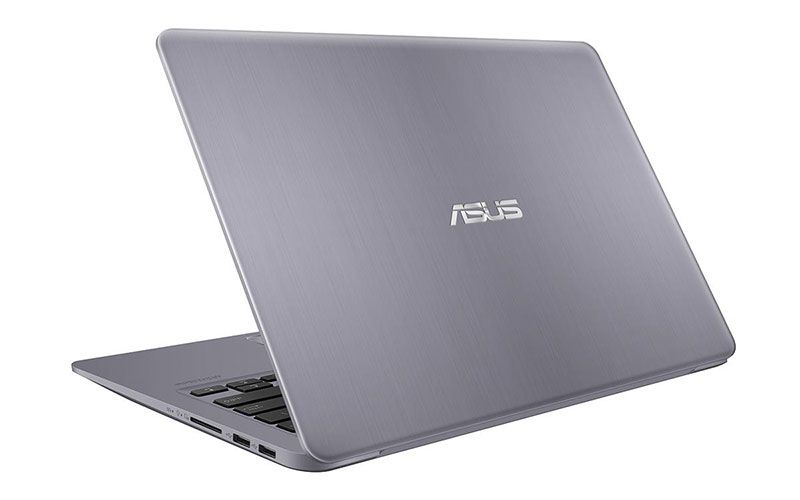
The exterior of the S410 is made of aluminum with a scratch-resistant finish, inside the top of the keyboard, and aluminum armrests. Of course, due to the high-end machine does not own a monolithic metal design, still the plastic part as the screen border. The machine only has one option yellow color.
Overall, the S410 is quite thin (at the thickest of 18.8mm and tapered) and lightweight (1.3kg) should remain a suitable device for travel. The frame structure is firm, the hinge is long and holds the screen firmly, not shake when used but the angle is only 135 degrees.
The keyboard of the machine is sure, no subsidence when typing fast and strong, the key is also reasonable with a thin device, generally feel good typing is not excellent. The keypad also has a backlight, which lets you see and distinguish keys when you work in the evening.
The touchpad on the S410 is a bit larger than average, feels sleek and responsive. The tablet also supports full-fledged transfer, drag-and-drop, or browser-based operations. At the right corner, you will see the fingerprint sensor. Sensor sensitivity and fingerprints are very fast, making logon to the computer is much simpler.
The S410 has a slim bezel, measuring only 8 mm. The upper edge of the screen is a bit thicker, offset by Asus can put the camera and sensors on the top, affecting the image when the webcam needs. Thanks to thin borders, the size of the S410 is only equivalent to the 13.3 inch widescreen laptop.
USB 3.0, USB Type C, HDMI output, memory card reader and mic / headphone jack are all included. These ports are suitable for those who have a need for work or leisure.
Screen
Beside the thin bezel, one plus with the S410 is that it does not use mirrors, so you get the freedom to work in any space without having to fret about reflections or sunlight. Max brightness, around 270 nit, usually does the job for outdoor use, especially when there isn’t much sun around.
The wide viewing angle on the S410 is good for the IPS LCD, but the display color is not exactly accurate. The color of the screen in the direction of blazing, heat yellow color suitable for office work or watching movies, also want to edit photos, graphics with standard color you will have to weigh again quite hard. If the display quality is high, displaying the correct color, the UX430 will be a more reasonable choice.
Experience battery performance
In this article, the version they describe comes with an Intel Core i5-8250U, 4GB RAM and a 256GB SSD. For the wireless side, the S410 uses a WiFi dual band setup (dual band) , plus a Bluetooth 4.2 module. Overall, this combination can feel somewhat overloaded in terms of sheer processing horsepower, since the 4-core 8-thread CPU reaches up to 3.4GHz, and it should manage image editing software, plus those big yet lightweight excel spreadsheets without much drama. You can even get by when working with clips in Premiere, as long as things stay reasonable. However, the 4GB of RAM is still a little tight when the workload gets heavy , or if you start opening several browser tabs at the same time. So it’s really worth considering a RAM upgrade, something more balanced for everyday multitasking.
The S410’s upgradeability is good: it has two LDDR4 memory slots, one 2.5-inch slots, and an optional M.2 slots to accommodate SSDs (but supports only SATA3). So, if you buy a regular hard disk drive, you can still fit the standard M.2 SSD to both speed and storage.
Configuration of the machine can also meet popular online games such as DOTA 2 or LOL, the basic set of graphics, or offline games do not require high graphics like PES 2018 at low graphics settings.
CUK ASUS VivoBook S410 Slim Compact Laptop (i7-8550U, 8GB RAM, 256GB SSD + 1TB, NVIDIA Geforce 940MX 2GB, 14″ Full HD, Windows 10 Home) – Thin, Light, Portable, Metal Finish Notebook Computer: Buy it now
CUK ASUS VivoBook S410 Slim Compact Laptop (i7-8550U, 24GB RAM, 512GB NVMe SSD + 1TB, NVIDIA Geforce 940MX 2GB, 14″ Full HD, Windows 10 Home) – Thin, Light, Portable, Metal Finish Notebook Computer: Buy it now
CUK ASUS VivoBook S410 Slim Compact Laptop (i7-8550U, 16GB RAM, 256GB NVMe SSD + 1TB, NVIDIA Geforce 940MX 2GB, 14″ Full HD, Windows 10 Home) – Thin, Light, Portable, Metal Finish Notebook Computer: Buy it now
CUK ASUS VivoBook S410 Slim Compact Laptop (i7-8550U, 16GB RAM, 512GB SSD + 1TB, NVIDIA Geforce 940MX 2GB, 14″ Full HD, Windows 10 Home) – Thin, Light, Portable, 3.2 lb Metal Finish Notebook Computer: Buy it now
2018 Premium ASUS S410 14Inch FHD Thin and Portable Laptop, Intel Quad Core i7-8550U, NVIDIA GeForce 940MX, 8GB DDR4 RAM, 256GB SSD, Backlit Keyboard, Bluettoth, Narrow Bezel Design, Win 10- Gold: Buy it now
In the process of using it, even when it is heavily loaded with benchmarking applications, the rest is cool. The hottest part is the bottom of the machine, but when the heat is only at the level of warm, not too hot should be placed on the thigh and use.
With a 42-pin WHr battery, the S410 usually lasts more than 3 hours with my usual needs, set in High Performance mode, with 100% brightness. The usage time can be increased significantly if you switch to Balance mode or reduce the brightness a bit (60% is comfortable in the cafe, daytime).
Use the camera to watch a Full HD resolution movie, 70% brightness screen, 70% audio through headphones, the S410 runs over 5 hours. For the PC Mark 8 Home screen battery test (110 nm screen brightness , running simulations using a home computer) I get 2 hours 50 minutes. Honestly the S410’s battery life isn’t that impressive in general.
Asus says the compact charger comes with a fast rechargeable battery, reaching 60% after 50 minutes. Actual test, after 50 minutes of charging under shutdown conditions, the battery has been charged up to 68%, after 60 minutes is 82%. Fully charged battery after 1 hour 45 minutes. But if you want to protect your battery for longer, Asus also offers Battery Health Charging software, which caps the charge, to extend battery life a bit more. This is essential software if you regularly plug the charger for the machine.
This laptop uses a version of Windows 10 Home 64 bit, in addition to preset many other services such as office software WPS Office, McAfee … If not used then you can delete all the software to save memory.
Summary
The VivoBook S410 is a lightweight mid-range laptop designed for mobility, with good performance for the job. The thin bezel design, the fingerprint sensor, is inherited from the more advanced UX series. The biggest minus is battery life is not long, but fast charging also makes use more comfortable. Asus also offers various S410 variants with different configurations and prices to suit different users: students and office workers.
Related Posts


Tech Reviewer & Product Analyst
Định Bia has spent over 10 years testing consumer electronics with a focus on smart technology. He work as a product advisor at Biareview where he helped customers find the right devices for their needs. He personally tests every product featured on this site using a consistent evaluation framework covering quality, durability, and value. All reviews are based on experience, not influenced by the manufacturer.