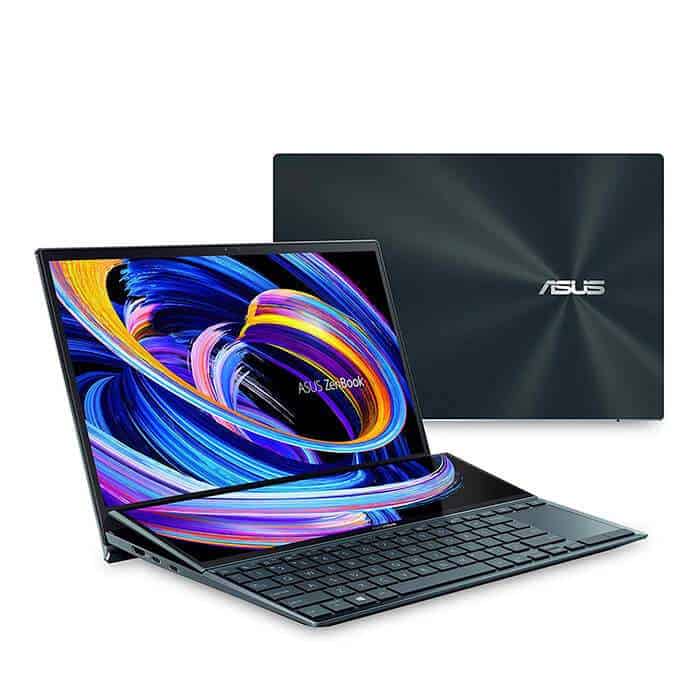
Weigh just 1.6kg, and this laptop becomes the ultimate tool for content creators to take everywhere to work.
ASUS, a brand that’s no longer surprising for people when they are looking to buy a laptop, has just rolled out another product, that can be called sort of unique in the world: ZenBook Duo 14 UX482. So lets see what actually makes it special, and why it stands out a bit from the crowd.
At first glance at the UX482, you can immediately recognize the features of this ZenBook series. The first is the case covered with glossy metal, with dark blue tones and unmistakable concentric circles.
It can be said that you will not find a fancy point in this exterior; it will even be easy to mistake it when placed next to other ZenBook products. The gem will appear every time you open the lid.
The part that makes anyone looking at it also gasps is this: the screen suddenly “grows” one more in the keyboard area? That is an extremely bold idea of ASUS for a completely different design from all other products on the market: an extra screen to make the workspace more spacious.
The main screen of this laptop uses a Full HD IPS panel, with the two side edges cut to create better visual effects and make the appearance of the machine much neater. This monitor supports a 100% sRGB color range , 72% NTSC, 77% AdobeRGB, and 77% P3 which generally helps users a lot, especially when they make content or do photo post-production.
The secondary display on the ASUS ZenBook Duo 14 UX482 is named ScreenPad Plus, and it comes with a Full HD resolution as well. One more special thing is the raised hinge, it forms a good viewing angle so users can see what’s on the screen comfortably, while also reducing the glare , from the ceiling light bulbs.
This hinge automatically lifts every time the user opens the machine. Besides raising the secondary screen, it also helps better airflow in and out, thereby dissipating heat more efficiently than other products. That is also where Harman Kardon’s external speaker system is located; through experience, the volume and sound quality are quite good.
Although equipped with two screens, the weight of this laptop is quite light compared to what it is “carrying.” Specifically, it weighs only 1.6kg and so users can carry it to work anywhere, different from before when wanting a large screen laptop or strong configuration must trade-off with carrying weight every day.
The keyboard is collapsed to the left corner; the right is the mouse pad. However, the size of the keys is still quite large, the typing operation is comfortable, accompanied by key travel of up to 1.4mm, so the overall evaluation is very good.
In terms of configuration, this laptop is equipped with the latest 11th generation Intel Core i7 processor with the highest Turbo clock speed of 4.7GHz (TDP pushed to 28W) with 16GB RAM and discrete Nvidia Geforce MX450 graphics. Bringing Powerful performance for multi-tasking and content creation, image, or video editing can’t make the UX482.
As a highly portable product, users will, of course, care about impact resistance, so ZenBook Duo 14 UX482 also meets the MIL-STD 810H military durability standard, going through 29 tests. Strictly tested in different environmental conditions from altitude, temperature, humidity, pressure.
Battery Life
Battery life is one of the most crucial things when you’re moving around with a portable laptop, and the ASUS ZenBook Duo 14 UX482 does pretty well here overall. It comes with a 70Wh battery, so in practice you can usually make it through a typical workday on a single charge. In real life usage, think browsing the web, streaming videos, and handling documents, the system tends to last something like 8-10 hours, though it really depends on what you’re doing and which settings you keep turned on.
If you’re the type of user who needs that extra bit of stamina, the laptop also includes a few power management options that help stretch battery longevity. ASUS’ MyASUS software shows battery health in detail, and it lets you tailor power plans so the machine behaves the way you want.
There’s also fast charging to consider. According to the specs, you can get the battery up to 60% in about 49 minutes, which is handy when you need a quick top up right before a meeting or between classes.
Connectivity
The ASUS ZenBook Duo 14 UX482 offers a solid set of ports and connection options that cover different kinds of daily tasks. On the left side you’ll see:
1 x HDMI 1.4
1 x USB 3.2 Gen 2 Type-A
On the right side, the laptop includes:
2 x Thunderbolt 4 USB-C (Power Delivery and DisplayPort supported)
1 x USB 3.2 Gen 1 Type-A
1 x 3.5mm headphone/microphone combo jack
1 x microSD card reader
Putting two Thunderbolt 4 USB-C ports in the mix, complete with Power Delivery and DisplayPort support, makes the whole connectivity thing feel kind of flexible, as in you can charge up, move data, and also hook an external screen without much fuss. Then there is the HDMI port, which is handy for plugging into monitors or projectors, so for presentations or that extended desktop setup it tends to work out nicely.
On the wireless side, Intel Wi-Fi 6 (802.11ax) plus Bluetooth 5.0 covers the bases, and overall it should keep things quick and steady. Wi-Fi 6 brings better throughput, longer reach and more efficient use of the airwaves compared to older Wi‑Fi versions, which is especially useful if you’re in a crowded network area or you’re running high bandwidth apps
Audio
Audio is another spot where the ASUS ZenBook Duo 14 UX482 doesn’t really fall behind. You get stereo speakers, and they come with Harman Kardon certification, so the output tends to sound clear and fairly balanced. The catch is the speakers sit on the bottom of the laptop, and yes, if you place it on a soft surface, like a bed or blanket, the sound can get a bit muted. Still, for everyday stuff it’s good enough, movies, music, or even video calls.
If you want something more tailored, there’s a 3.5mm headphone jack that makes connecting headphones and external speakers easy. Also, the built-in array microphones are tuned for crisp voice pickup, so voice calls and video conferencing should come through in a solid way.
Security and Privacy
Security and privacy are really big deal for business users, and the ASUS ZenBook Duo 14 UX482 has a bunch of options to help with that. It has a fingerprint reader , actually built right into the power button so it feels like a fast shortcut, for biometric verification. The reader is quick and precise, which makes signing in without typing a password way more convenient then it would be otherwise.
On top of that, there is an IR camera for Windows Hello , for face-based recognition. This is another simple and secure log in method, because you’re not juggling codes or guessing timings. The camera also comes with a privacy shutter, so you can physically cover it when you are not using it. That little switch gives peace of mind, especially if you’re concerned about unwanted camera access.
Also, beyond those biometrics, the ZenBook Duo 14 includes a Trusted Platform Module , TPM 2.0. This helps encrypt sensitive information and adds an extra layer of protection to the whole system. For people handling confidential files, this matters a lot, because it’s not just about convenience , it’s about keeping data under control.
User Experience
The ASUS ZenBook Duo 14 UX482 feels good to use overall. The experience is mostly positive, thanks to a mix of performance, design, and those practical included features. The keyboard is comfortable for typing, with backlit keys that make it easier in darker rooms. The keys also have a nice amount of travel and tactile response, so longer writing sessions don’t feel as tiring , at least not in the same way.
The touchpad is responsive and supports multi touch gestures, giving smooth navigation and a fairly natural feel. Everything flows pretty intuitively, so day to day tasks don’t end up feeling like a chore.
The ScreenPad Plus adds this new dimension to multitasking, so you can keep multiple apps and windows open, at the same time, kind of like without thinking too much about it. ASUS has also developed a bunch of custom utilities and features for ScreenPad Plus, like App Switcher, Task Group, and Quick Key, which in practice make it easier to work faster and keep your flow, streamlined. Creative people can even get more out of it with the ASUS Pen, since it gives a very precise input for drawing, sketching and for note-taking , too.
Software
The ASUS ZenBook Duo 14 UX482 comes with Windows 10 Pro already installed, so you get a familiar interface that feels kinda easy from day one, and you also have access to a broad set of apps and services. ASUS additionally packs in its own little software helpers, like MyASUS and ScreenXpert, which are basically just sitting there waiting when you need them.
MyASUS handles system health info, software updates, and settings you can tune, while ScreenXpert brings a bunch of tools and quick jump shortcuts for getting more out of the ScreenPad Plus. In other words these utilities support the overall day to day feel, and they add extra options for dealing with that dual-screen arrangement.
So sure, even if the pre installed stuff is mostly helpful, some people may think that third party bloatware is just extra noise they never asked for. The good side is that those apps can be removed pretty easily, so you can free up resources and get your storage back, without too much fuss.
“Don’t judge a book by its cover,” and honestly this saying fits the ZenBook Duo 14 UX482 pretty well. The laptop looks nothing special from the outside, but when you peek inside, the content is surprisingly “rich” with several new technologies, plus that distinct 2-screen design. It’s basically a book any content creator would want to flip through, pause, and rethink , then go back again. So, you, do you want to flip it out and actually experience it?
ASUS ZenBook Duo 14 UX482 14” FHD NanoEdge Touch Display, Intel Core i7-1165G7 CPU, NVIDIA GeForce MX450, 16GB RAM, 1TB SSD, Innovative ScreenPad Plus, Windows 10 Pro, Celestial Blue, UX482EG-XS74T: Buy it now
ASUS ZenBook Duo 14 UX482 14” FHD NanoEdge Touch Display, Intel Evo Platform, Core i7-1165G7, 8GB RAM, 512GB PCIe SSD, Innovative ScreenPad Plus, Windows 10 Home, Celestial Blue, UX482EA-DS71T: Buy it now
Related Posts

Tech Reviewer & Product Analyst
Định Bia has spent over 10 years testing consumer electronics with a focus on smart technology. He work as a product advisor at Biareview where he helped customers find the right devices for their needs. He personally tests every product featured on this site using a consistent evaluation framework covering quality, durability, and value. All reviews are based on experience, not influenced by the manufacturer.