amazon Brother MFC-J6510DW reviews
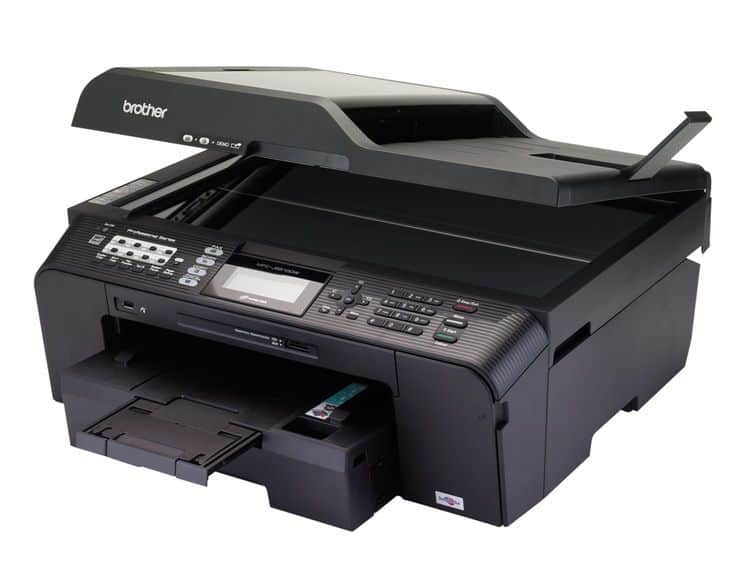
Brother MFC-J6510DW is a versatile A3 color inkjet printer with duplex printing function, wireless printing, direct printing from camera, memory card, USB stick. The Brother MFC-J6510DW delivers brilliant prints, copies and scans with fast scanning speed.
Setting up printing over an intranet or wireless network on the Brother MFC-J6510DW is easy, the simple installation process takes about 3’36” when connected directly to the computer via the USB interface.
Print function
The machine has 64 MB of memory, print resolution up to 6000x1200dpi maximum with 1.5 picolitres per inch (CMYK) ink drop promising to produce beautiful photo prints.
In order to meet each printing need, the MFC-J6510DW’s drivers have different quality levels for each type of paper.
With regular paper, the machine has four print quality levels: Fast, Normal, High, and Best. With Inkjet Paper, the machine has two levels of print quality: Normal and Photo. With Glossy / Photo Paper, the machine has three print levels: Fast, Photo and Best. In particular, the machine can be printed on silkscreen or transparent paper when Transparencies are selected.
At each level of quality, users can choose from natural colors or vibrant colors as well as color or grayscale options.
The driver also allows the user to fine-tune the smoothness, brightness balance, sharpness, contrast, red, green and blue tones.
Drivers also have pre-set settings (Profiles) for various print jobs.
In addition, the machine supports multi-page printing (16 pages) on one side of the paper, prints in poster format (3×3), printing in book form, foot supplements and printing ink savings.
The Brother MFC-J6510DW delivers beautiful prints with consistent color tones, too bright or too dark areas with no loss of focus. When printing on plain paper, in Fast mode, the text prints are still beautiful, though the text is still jagged. In Normal (normal) circular and seamless. In Best mode, the characters are clear even in small letters. The quality of printed charts, graphics and images on paper is usually clear, soft colors, smooth prints, although there are still some stripes in Normal and Fast.
On special paper for inkjet paper and glossy / photo paper, Best in Best Printing, Excellent Printing, Full Color, Smooth and natural, Fast print mode is equally sharp.
where can you get a Brother MFC-J6510DW online
Brother MFCJ6510DW Business Inkjet All-in-One Printer with 11-Inch x 17-Inch Duplex Printing and 11-Inch x 17-Inch Scan Glass: Buy it now

Scan function (Scan)
The machine exhibits color scanning with a maximum optical resolution of 2400x2400dpi on flat glass and 2400x1200dpi on ADF, which interpolates up to 9600x9600dpi.
It supports scanning and creating image data in BMP, JPEG, TIFF, PNG, PDF formats. When scanning multiple pages in PDF format, the machine automatically merges into a file, which supports password generation for PDF prints if Secure PDF is selected.
The machine can scan and open directly through the viewer software available on the machine.
The machine can also scan and identify and save as TXT, HTML, RTF, XLS, WPD or send mail, fax directly.
On each resolution, the camera driver allows scanning of color images (24-bit), grayscale or black and white. Users can also adjust brightness, contrast and size to get the best scan results.
The MFC-J6510DW delivers excellent scanning quality, true color reproduction. At the lowest resolution of 100dpi, the image is still crisp and full color, text is slightly blurry but the text is clear and easy to read. At 300dpi resolution, scans can be used in design. Time to preview the image takes about 12″. Scanning speed of the machine relatively fast.
Copy function
Copier at 1200x1200dpi resolution. In general, the copy quality in the modes (Fast, Normal and Best) are beautiful, full color, smooth color transitions. Own copy quality in Best mode is equivalent to the original print, especially the star on photo paper. The speed of copying machine is only average.
Fax function
The Fax and PC-Fax functions are optimized thanks to the integrated 33.6Kbps moderm with memory that can store up to 400 pages. You can fax from the actual source or from the data available in the computer with a resolution of 200x200dpi (default), 100x100dpi or 150x150dpi. The machine fully supports a fax machine such as sending, receiving, dialing, saving, error correction and many other features.
The Control Center 4 software comes with support for most printer functions as well as customizable brightness and contrast to give users the best print quality.