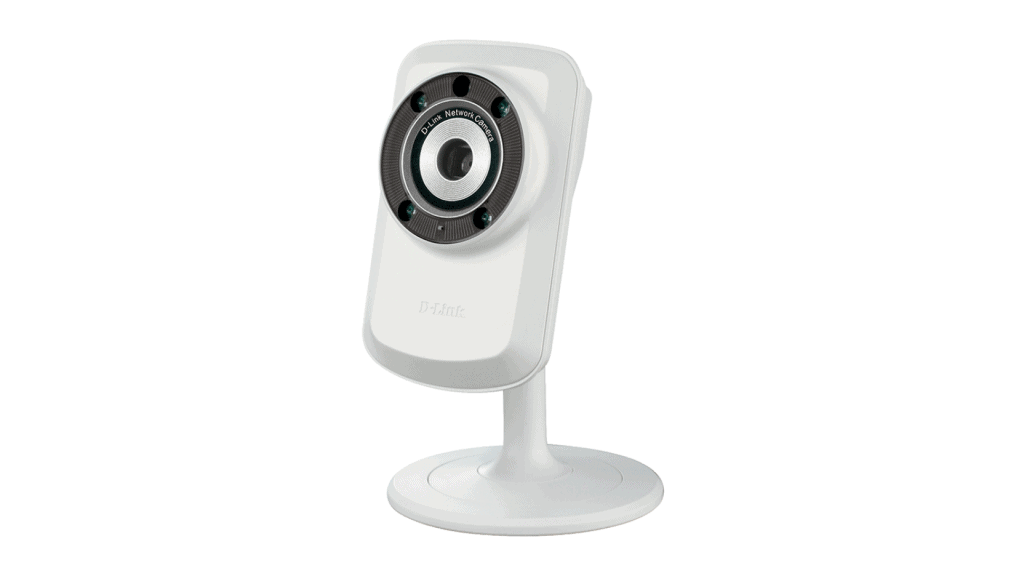

Camera IP D-Link DCS-932L is compact, easy to use, suitable for home or small office.
Camera IP DSC-932L is a slim, sleek bar design with a glossy white finish.
The DCS-932L is 27x60x96mm, weighs 76.9g (without stand).
The stand of the device is detachable, convenient for mounting on the ceiling or wall.
The DSC-932L front lens assembly has a fixed focus of 5.01mm, F2.8 aperture autofocus; Surrounded by four infrared lights (5m operating range) with light sensor, built-in microphone and status LEDs.
The DSC-932L supports IEEE 802.11g / n wireless connectivity. The back of the device also has an RJ-45 port for 10/100 Fast Ethernet connection, a power port (5V adapter included), a Reset button, and a Wi-Fi Protected Setup (WPS) enable button. Fast wireless connection to Router with WPS function.
The D-Link DCS-932L Internet Camera offers medium, easy-to-set image quality and settings, suitable for home or small office surveillance both day and night.
Setup was mostly painless. The one thing that surprised me: the camera has 802.11b/g/n Wi-Fi, but I still had to plug it into the router with an Ethernet cable the first time. Once it was on the network, D-Link’s Setup Wizard found its IP address, and I did the rest from the camera’s web interface.
Or install by step-by-step instructions – simpler with the accompanying CD.
D-Link Day & Night Wi-Fi Camera with Remote Viewing (DCS-932L): Buy it now
2 Pack D-Link DCS-932L Wireless Day/Night Cloud Network Camera w/ Remote Viewing: Buy it now
Configuration interface DCS-932L through a simple web environment, the layout of the card quite intuitive. Live Video cards allow viewing images directly through the web interface. By default, the resolution is set to 320×240 pixels, supports 4x digital zoom, turns off recording.
Built-in motion detection allows the user to select directly without drawing. However, this setting only works with Internet Explorer (with Java preset).
You can easily set up each time motion detection, DCS-932L send images via e-mail (Gmail service).
You can configure the WiFi connection manually or from the D-Link Setup Wizard interface. The DCS-932L supports 802.11b / g / n wireless networking, WPA2 / WPA / WEP encryption.
The DCS-932L supports JPEG capture, up to a maximum resolution of 640×480 pixels. Try shooting at medium details in bright light conditions, though the image details are not high, the colors are slightly pale, but full and distinct.
With motion images (when viewed with D-ViewCam software), no blur or ghosting occurs.
Instead of setting up DDNS, you can use D-Link’s mydlink service to view and configure the DCS-932L from anywhere. It gets set up when you install the camera from the CD. The catch is that viewing through a web browser needs Java and an ActiveX control installed.
D-Link also includes its D-ViewCam software, which handles up to 32 cameras. For a single DCS-932L that’s far more than you need, but it’s useful if you’re setting up several cameras in a shop or office. You can adjust each camera’s settings and schedule recordings from one screen. Recorded footage can be played back or exported as AVI or ASF video, or saved as JPEG snapshots.
Size and build
It’s small, roughly 5.8 x 3.5 x 3.3 inches and about 0.2 pounds. It sits fine on a shelf or a desk, or you can mount it on a wall. Nobody will pay it much attention.
Getting it connected
The camera uses Wireless N and supports WEP, WPA and WPA2. Pick WPA2. WEP has been easy to break for years and there’s no good reason to use it. If the Wi-Fi signal is weak where you want the camera, there’s an Ethernet port too.
Setup is easy. The Quick Installation Guide gets it onto your network step by step, and the mydlink app handles most of the rest. Someone with no networking background should manage it without calling for help.
Picture quality
Video is 640×480 at up to 20 frames per second. In daylight the colors are accurate and the image is clear enough to see who came into the room and what they’re doing. Detail drops off quickly with distance, though. A face a few meters away turns to mush, and reading a license plate is out of the question.
At night the camera switches to black and white and turns on its infrared LED. Inside the rated 16 feet the picture is usable, which covers a bedroom or a small office. It won’t light up a big living room or a warehouse.
Motion detection
You can adjust the sensitivity and choose which parts of the frame to watch. The zones matter more than the sensitivity setting: masking out a window or the street cuts most of the alerts from moving shadows and passing cars.
When something moves, the camera can email you a snapshot or upload it to an FTP server. The email with a photo attached is the useful bit, because one glance tells you whether it’s an intruder or the cat.
Remote viewing
Through mydlink you can watch live video and recorded clips in a web browser or in the app for iOS and Android. One account holds several cameras, which helps if you’re keeping an eye on a home and a shop, or more than one room. The app is simple to find your way around.
Where it makes sense
At home, point it at the front door, a hallway or the garage. You’ll see who comes and goes, and you can check in while you’re away.
In a small shop or office, the obvious spots are over the till and in the stock room. Night vision keeps it useful after closing, as long as the area is within range. Be realistic about image quality, though, if you might ever need the footage as evidence.
For pets, put it wherever the dog spends the day. A motion alert will tell you if it has gotten somewhere it shouldn’t be, or if something looks off.
Strengths and weak spots
On the plus side you get a low price, easy setup, workable night vision, motion alerts you can limit to certain zones, and a decent app for remote viewing.
The weak spots are the VGA resolution and the short infrared range. It also lacks things you now find on many cameras in this price bracket, such as HD video, pan and tilt, and smarter video analytics.
How it compares
D-Link DCS-8010LH. D-Link’s own step up. It shoots 720p, adds sound detection and a wider field of view, and costs a little more. If image detail matters to you, the extra money is worth it.
TP-Link Tapo C100. 1080p video plus two-way audio, so you can talk to whoever is in front of the camera. Its motion alerts are customizable as well. It usually costs more than the DCS-932L.
Nest Cam Indoor (2023). This is the premium pick. You get 1080p, activity zones, better night vision and Google Home integration, and you pay a lot more for it. If your house already runs on Google Home, it fits right in. If all you want is to see who’s at the door, you’d be paying for features you won’t use.
Security and privacy
WPA2 protects the wireless link, and mydlink asks for a login before anyone can see the feed or recordings. Pick a strong password for that account and turn on two-factor authentication. Also change the camera’s default admin password. Default passwords for most devices are easy to look up online, so it’s the first thing an intruder on your network will try.
Keep the firmware up to date as well. D-Link’s updates fix security holes and improve performance. Once a fix is out, the flaw it covers becomes public knowledge, which makes an unpatched camera an easier target. If your router lets you see connected devices or traffic, check it occasionally for anything you don’t recognize.
Support and warranty
D-Link offers support by phone and email, and its website has troubleshooting guides, FAQs and manuals. The camera normally comes with a one-year limited warranty covering materials and workmanship. Skim the terms when you buy it and keep the receipt.
Verdict
For a basic, cheap indoor camera, the DCS-932L does the job, provided VGA is enough for you. Setup takes little effort, night vision holds up in a small room, and the app does what it should. It falls short when you need to identify a face or a license plate, or cover a large space. For that, the DCS-8010LH or the Tapo C100 are better choices.
Related Posts

Tech Reviewer & Product Analyst
Định Bia has spent over 10 years testing consumer electronics with a focus on smart technology. He work as a product advisor at Biareview where he helped customers find the right devices for their needs. He personally tests every product featured on this site using a consistent evaluation framework covering quality, durability, and value. All reviews are based on experience, not influenced by the manufacturer.