Table of Contents
Canon PowerShot S100
The Powershot S100 offers better low-light shooting performance than its predecessor, the S95, which appeals to high-end users at the lens aperture of up to F2, wider-angle lens, and camera-like controls loose lens. However, the full-HD video recording mode of the S100 is still flickering, and GPS functionality is limited.
Design and Build Quality
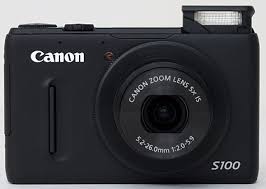
Canon released the PowerShot S100 in 2011 as a compact for people who want more than a basic point-and-shoot. It’s 99.8 x 59.0 x 26.7 mm and about 198 g with the battery and card, and the body is metal.
Image Quality
The sensor is a 12.1MP 1/1.7-inch CMOS, paired with the DIGIC 5 processor. That’s about half again the area of the 1/2.3-inch sensors in most point-and-shoots, which helps in dim light and gives you a little more room in the highlights and shadows. Daylight shots are sharp with good color. Indoors, noise shows up fast, and I stop trusting it above ISO 800.
Lens and Zoom
The lens is the best part of the S100. It’s a 5x zoom, 24-120mm equivalent, at f/2.0-5.9. The f/2.0 is only at the wide end, and by 120mm you’re at f/5.9, so the low-light advantage shrinks as you zoom in. Background blur is limited too, because the sensor is small. It’s still a wide, bright lens for a camera this size, good for indoor snapshots and landscapes.
Performance
Fast operation and autofocus are ensured with the performance end, while the DIGIC 5 processor maintains the impressive start-up time, negligible shutter lag, and even continuous shooting at 9.6 fps being High-Speed Burst HQ mode. It means the camera can capture fast-action scenes and sudden moments without losing a shot.
Recording Videos
Full HD 1080p video recording is achieved at frame rates of 24 and supported by stereo sound by the PowerShot S100. It also has the option of recording in 720p HD format at 30 frames per second. Optical zoom during video recording is also available, which means smooth and silent zooming while recording videos. Optical image stabilization can also be employed to reduce camera shaking during recording.
Display and Controls
This camera offers a 3.0-inch PureColor II G widescreen LCD display with approximately 461k dots resolution. This display is pretty much viewable while composing shots, reviewing images, and videos or navigating through menus. The PowerShot S100 is an old-school style with a mode dial and a control ring around the lens that can be programmed to quick adjust aperture, shutter speed, and ISO speed.
Connectivity and Storage
The S100 has a USB port for moving photos to a computer and a mini-HDMI output for a TV, so you’ll need a specific cable for the second. There’s no Wi-Fi. Cards can be SD, SDHC, or SDXC. The connectivity feature worth mentioning is the built-in GPS, which geotags your photos as you shoot, so you can map a trip afterward.
Battery Life
The PowerShot S100 uses a rechargeable NB-5L lithium-ion battery pack. Canon rates the battery life for approximately 200 shots on a charge. This is fairly regular for cameras that come under the subcompact range. Carrying extra batteries is advised, especially if one intends to perform long shooting sessions while traveling or out on photography trips.
Software and Features
Shooting Modes
The S100 has manual exposure, aperture priority, and shutter priority. The creative filters (Toy Camera, Miniature, Fish-eye) apply effects in the camera. I’d try them a few times, then go back to shooting RAW.
Usability and Handling
The Control Ring around the lens is my favorite thing about this camera. Assign it to aperture, shutter speed, or something else, and you can change settings without opening a menu. The body fits in a pocket. There’s no viewfinder, so you frame everything on the screen, and in bright sun it’s hard to read.
Conclusion
The Canon PowerShot S100 is a pocketable compact with a bright wide-angle lens, a sensor bigger than most point-and-shoots, and real manual controls. You’ll actually carry it, which is most of the reason to buy it. The costs are a small 12MP sensor that gets noisy fast when the light drops, a lens that slows to f/5.9 when zoomed in, and no viewfinder. Since it’s old, price a used one against newer compacts before you commit.
Canon PowerShot S100 12.1 MP Digital Camera with 5x Wide-Angle Optical Image Stabilized Zoom (Black) (OLD MODEL): Buy it now
Fujifilm FinePix X10
This one needs a single fix, and it’s a mistake I introduced last time. I contrasted the X10 as “a zoom compact” with the X100 as “a fixed-lens body,” but the X10’s lens is fixed too. The real difference is a zoom versus a fixed prime, and a smaller sensor versus APS-C.
Only one thing is left to fix: “2011” appears twice, once in the opening sentence and again in the Design paragraph.
Fujifilm followed the X100 with the FinePix X10 in 2011, another retro-styled camera arriving alongside the Olympus Pen E-P3. It borrows the X100’s look, but it’s a different camera: a compact with a zoom lens and a much smaller sensor, where the X100 has a fixed prime lens and an APS-C sensor. Its rivals are the Olympus XZ-1, Canon PowerShot S100, and Panasonic Lumix DMC-LX5.
Design and Build Quality
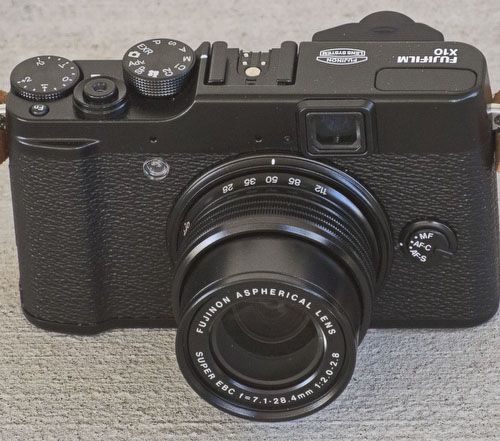
The X10 is a premium compact aimed at enthusiasts. It looks like a classic film camera and measures about 117 x 69.6 x 56.8 mm. With the battery and card it weighs about 350 g. The body is metal and plastic, and it feels substantial.
Image Quality
The sensor is a 12MP 2/3-inch EXR CMOS, paired with Fujifilm’s EXR Processor. That’s roughly twice the area of the 1/2.3-inch sensors in most compacts, so it copes better in dim light. Detail is good and colors are rich. Noise stays reasonable at higher ISO, but it’s still a compact-camera sensor, so don’t expect APS-C results.
The Lens and Zoom Capabilities in Detail
Among the FinePix X10 camera’s starring features is its lens system. It features a bright Fujinon 4x optical zoom lens with a focal length range of 28-112mm equivalent in 35mm format. This lens advertises a pretty fast maximum aperture of f/2.0-2.8, giving it an edge when shooting in low light and achieving shallow depth of field effects. The zoom barrel is manual; it has zoom and focus rings for tactile control of these two variables.
Performance
In terms of performance, it can be said that the FinePix X10 will respond quickly and focus speedily. A hybrid autofocus system melds contrast detection with phase detection autofocus to maintain fast accuracy in focus, even in awkward lighting situations. The EXR Processor lends itself to minimize shutter lag and provides fast startup, along with continuous shooting at 7 frames per second at full resolution, thus well-suited for the capture of fast-action scenes and candid shots.
Recording Video
The camera allows Full HD 1080p video recording at 30 fps with stereo sound through the FinePix X10. Users are free and encouraged to use the optical zoom lens and manual focusing capabilities for video recording, as this will allow for much creative input into composition and focus. The FinePix X10 offers optical image stabilization, which keeps camera shake to a minimum and guarantees smooth footage, especially while walking or in movement.
Viewfinder and Display
For compose shots, FinePix X10 sports a 2.8 inch, higher resolution LCD, 460K dot monitor. The monitor is used for clear viewing of images, navigating menus, and setting changes. Along with the LCD, it also sports an optical viewfinder with 85% frame coverage to offer a bit of conventional shooting, including composing and framing in real-time.
Controls and Customization
FinePix X10 is designed with the particularity of manual control freaks: a traditional mode dial, manual control dials to be set for aperture, shutter speed, and exposure compensation. The camera has function buttons and a quick menu interface, both of which are customizable and setup for frequently used settings and actual shooting parameters. For taking an actual shot, it is good to have these manual rings for focus and zoom in the barrels: more tactile precision.
Connectivity and Storage
It connects via a USB port for data transfer and charging, and through HDMI for output, allowing one to view photos/videos in compatible TVs/monitors. For storage, the camera uses SD/SDHC/SDXC memory cards, with adequate space for storing very high-resolution images and videos.
Battery Life
An NP-50 lithium-ion pack recharges the FinePix X10 camera. So pretty much operating on a full charge, a battery can last 270 shots, which is good, maybe for a day of shooting under usual conditions. Users may be able to carry an extra battery, especially when traveling or doing a long photo shoot.
Software and Features
To accommodate different styles and preferences in photography, a variety of shooting modes and creative filters are incorporated within the FinePix X10 selection. Set manual exposure parameters for experienced photographers, giving them great control over the camera. It also allows semi-automatic modes, including aperture priority and shutter priority. Creative filters such as Toy Camera, Miniature, and Dynamic Tone all spice-up photos without the need to finish editing on the computer.
Usability and Handling
The X10 is small enough to hold in one hand, and its physical controls are what make it worth using. The zoom ring around the lens is manual and doubles as the power switch, so turning it on and framing a shot are one motion. A mode dial and an exposure compensation dial handle the common settings without a trip into the menu. If you have larger hands, the controls will feel cramped.
Conclusion
The Fujifilm FinePix X10 is an old, almost cult-compacted, extremely versatile digital compact, loaded with superb image quality, glory, and usability. From a high-resolution sensor, fast processors, and versatile lens system to intuitive controls, it manages to gain brilliance in a good variety of shooting situations. Whether it would have trials and tribulations for everyday photography, travels, or even works as a second camera for professionals, the FinePix X10 would remain one of the better choices any user would want when searching for image quality and manual control in a pocket-sized body.
Fujifilm X10 12 MP EXR CMOS Digital Camera with f2.0-f2.8 4x Optical Zoom Lens and 2.8-Inch LCD: Buy it now
Canon PowerShot G1 X
Nikon has the 1 series with its small CX sensor, and Sony has the NEX line with APS-C. When the G1 X arrived in 2012, Canon still hadn’t launched a mirrorless camera. Its answer was a compact with a big sensor, slightly larger than the Micro Four Thirds sensors in Olympus and Panasonic bodies.
Design and Build Quality
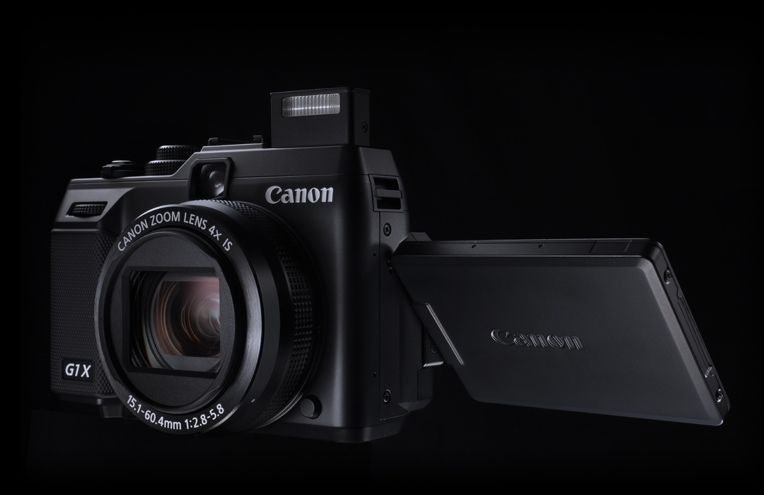
The Canon PowerShot G1 X is a high-end compact aimed at enthusiasts. It’s 116.7 x 80.5 x 64.7 mm and about 534 g with the battery and card, which is heavy for a compact. The body is metal and plastic.
Image Quality
The sensor is a 14.3MP CMOS, 1.5-inch type, paired with the DIGIC 5 processor. It’s many times the area of the 1/2.3-inch sensors in ordinary compacts, so you get cleaner shots in dim light and more dynamic range. That’s the reason to buy this camera. The lens is fixed, so it sets the limit on what that sensor can deliver.
Lens and Zoom
The lens is a 4x zoom, 28-112mm equivalent, at f/2.8-5.8. The f/2.8 only applies at the wide end, and by 112mm you’re at f/5.8, so the sensor’s low-light advantage partly disappears as you zoom in. The stabilizer is rated at 4 stops, which helps at the long end.
Performance
Autofocus is contrast-detect, which is fine for stills and slower than a phase-detect system on moving subjects. Continuous shooting is 4.5fps at full resolution. That’s enough for casual action, not for sport.
Video
The G1 X is capable of Full HD 1080p recording at 24 fps, stereo. The optical zoom lens, in addition to manual focusing during recording, offers an opportunity to create compositions and decide focus. The Movie Digital Zoom feature enables an enhancement of the optical zoom during video shooting, thus giving an option to frame a subject from afar.
Viewfinder and Display
In terms of shot composition, the G1 X has a 3.0-inch Vari-angle LCD monitor, resolving at about 922,000 dots. Thanks to its articulating nature, the display can tilt as well as swivel to allow for compositions at high or low angles or simply capturing a self-portrait or group shot. Apart from the LCD monitor, the camera is endowed with an optical viewfinder providing a traditional way of shooting as it allows answering the composition of frame in real time and framing. The optical viewfinder, however, offers a frame coverage of about 77%.
Controls and Customization
The PowerShot G1 X is oriented towards manual controls; it includes a mode dial and a control ring that is customizable, located around the lens, which can be used to set either aperture, shutter speed, or ISO sensitivity. Customizable function buttons and a quick menu can be set up on the camera so one can access various shooting parameters and settings frequently used in camera operation. Full Manual Control settings and Semi-Automomatic shooting modes are incorporated by Canon so as to allow different styles and preferences of photography.
Connectivity and Storage
The G1 X has a USB port for moving photos to a computer and a mini-HDMI output for a TV, so you’ll need a specific cable for the second. There’s no Wi-Fi. Cards can be SD, SDHC, or SDXC.
Battery Life
Canon rates the NB-10L at about 250 shots per charge, which is low. Using the LCD heavily or shooting video will cut that further. A spare battery is worth buying.
Software, and Features
The PowerShot G1 X from Canon offers a variety of shooting modes and creative filters to suit different styles and scenarios of photography. There are manual exposure controls for advanced users as well as semi-automatic modes such as aperture priority and shutter priority. Creative filters include Miniature Effect, Toy Camera Effect, and Monochrome, giving users the ability to add effects to their images right in the camera.
Usability and Handling
The PowerShot G1 X is a highly user-friendly camera, constructed for easy operation, equipped with an uncomplicated control system, and with an interface suitable for any newbie. With a compact, ergonomic design, it sits comfortably in the hand, whether for much shooting or travelling about. The manual control rings and dials, along with the Vari-angle LCD monitor, offer wonderful tactile sensation and can be finely adjusted without having to take one’s eye off the subject.
Conclusion
The Canon PowerShot G1 X is a highly versatile and capable compact digital camera that gives due importance to image quality, performance, and usability. With a large sensor, fast processor, and optically brilliant lens system having simple-to-master controls, it is capable of delivering great results in varied situations. Whether used for commercial work, creative work, or everyday shooting, the PowerShot G1 X remains a viable option for those who desire a portable yet robust camera that offers exceptional image quality and manual control.
This review presented a detailed overview of the Canon PowerShot G1 X design-wise, image quality-wise, performance-wise, feature-wise, usage-wise, and value-wise.
Canon PowerShot G1 X 14.3 MP CMOS Digital Camera: Buy it now
Olympus XZ-1
Panasonic’s high-end compact camera market has been around since launching the LX3 in 2008 and continues to dominate the LX5 lineup announced. Other camera brands like Canon and Nikon have tried to overthrow the LX with high-end cameras, such as the Canon PowerShot S95 and the Canon Coolpix P7000, respectively, but Lumix still holds the upper hand. However, all that can change with the Olympus XZ-1 with its unique lens, good image quality, and elegant features that camera enthusiasts or professional photographers take desirable.
Design and Build Quality
The Olympus XZ-1, launched in 2011, is positioned as a premium compact digital camera tailor-made for the enthusiast and professional who hanker after superb imaging abilities in a highly portable form factor. It has been ergonomically designed to ensure graceful handling, with its dimensions measuring in at 111.5 x 64.1 x 42.3 mm, and the weight is approximately 275 grams (with the battery and memory card). The body is a dual combination of metal and high-grade plastic, ensuring that it feels solid and well-built.
Image Quality
The XZ-1 packs an image sensor of 10 megapixels of 1/1.63 inches and uses Olympus’s TruePic V image processor. Though the sensor is larger than those in most compact cameras, it chiefly helps the XZ-1 excel as a light-gatherer; it yields images full of rich detail and colors that are true to life whilst keeping an average dynamic range. It performs equally well through decent to moderate light conditions and gives sharp images good enough for printing and online sharing.
Lens and Zoom Performance
One of the finest features in the XZ-1 is the high-quality lens system it sports. The bright Zuiko 4x optical zoom glass carries a focal length ranging from 28 mm to 112 mm (35mm equivalent). The lens is speedy, with an aperture of just f/1.8-2.5, great for low-light scenarios and for producing nice shallow depth of-field effects. Olympus has provided for Dual Image Stabilization (mechanical and digital) to lessen the impact of camera shake, whilst ensuring that images are nice and sharp either when handheld or at long focal lengths.
Performance
The XZ-1 provides a great deal of responsiveness operation-wise and rapid autofocus. It has Olympus’s AF Tracking system for accurate subject tracking and face detection autofocus for portraits. Thanks to the TruePic V processor, shutter lag is minimal while startup time is swift, making the camera handy for the capture of spontaneous moments and fast-action scenes.
Video Recording
Video recording on the XZ-1 supports HD720p format at 30fps with stereo sound. It does not have a Full HD movie mode but will allow casual users to shoot high-definition videos for offline recording and sharing online. Olympus intends manual exposure control and white balance adjustments for the video recording, giving all creative control to the user when adjusting exposure and color accuracy.
Viewfinder and Display
For composing shots, it has the XZ-1 3.0-inch OLED monitor with a resolution of approximately 610,000 dots. OLED display, with vivid colors and high contrast, is equally visible under varying lighting conditions, perfect for image review and menu navigation. The camera misses out on any optical viewfinder but makes up for it with an excellent OLED monitor for composition and framing accuracy.
Controls and Customization
With manual controls truly in mind, the XZ-1 offers a choice of manual modes via the Mode Dial, the so-called Function button to which the user can assign the most-useful functions for fast access, and the control ring around the lens for a manual set of aperture, shutter speed, and other options. The Olympus offers Art Filters and Scene Modes to boost artistic possibilities; for example, a user may wish to apply some sort of artistic effect, or choose settings optimized for an indoor shooting environment from a different set of options.
Connectivity and Storage
In terms of connectivity, the XZ-1 camera provides a USB port for data transfers and charging, along with an HDMI output for the direct display of images and videos on a TV or monitor supporting HDMI. Groups XZ-1 SD and SDHC are supported by the camera for the purpose of holding memory cards with sufficient space for the purposes of filing high-resolution images and video clips.
Battery Life
The XZ-1 camera uses a rechargeable LI-50B lithium-ion battery pack. The Olympus company specifies a battery-life rating of approximately 320 shots per charge, which is given under normal conditions for use. The users can carry spare batteries or opt for external power supplies to prolong their shooting life, mainly during traveling and extended photo sessions.
Software and Features
Olympus ensures the presence of various shooting methods and Art Filters in the XZ-1 for different styles and preferences in photography. It permits manual exposure control for users having advanced knowledge of exposure, along with the semi-automatic modes of aperture priority and shutter priority. Art Filters such as Pop Art, Grainy Film, and Pin Hole give an opportunity for some creative effects to be applied in-camera, hence important for artistic expression and variety in composing the photograph.
Usability and Handling
Designed for easy usage, the XZ-1 benefits from an intuitive layout and user interface. The compact and lightweight construction fits firmly into the palm and is an ideal camera to take on any adventure or for everyday snaps. Manual control rings, dials, and a high-resolution OLED monitor altogether make the camera well suited for use, particularly when cutting precise adjustments might require keeping focus on the subject.
Final Verdict
The Olympus XZ-1 is that very versatile and capable charming small camera that puts perhaps the most accurate fingerprint on image quality, being placed in performance and usability. A fast lens, a responsive processor, a stone set monitor, and controls that make you really enjoy clicking photographs- the Olympus XZ-1 fulfills or exceeds expectations in any shooting condition. Therefore, as an everyday camera, for artistic work, or simply to be a very competent secondary camera for professionals, the XZ-1 will always remain a solid option for those wanting a good performance camera with manual controls in the same compact and portable body.
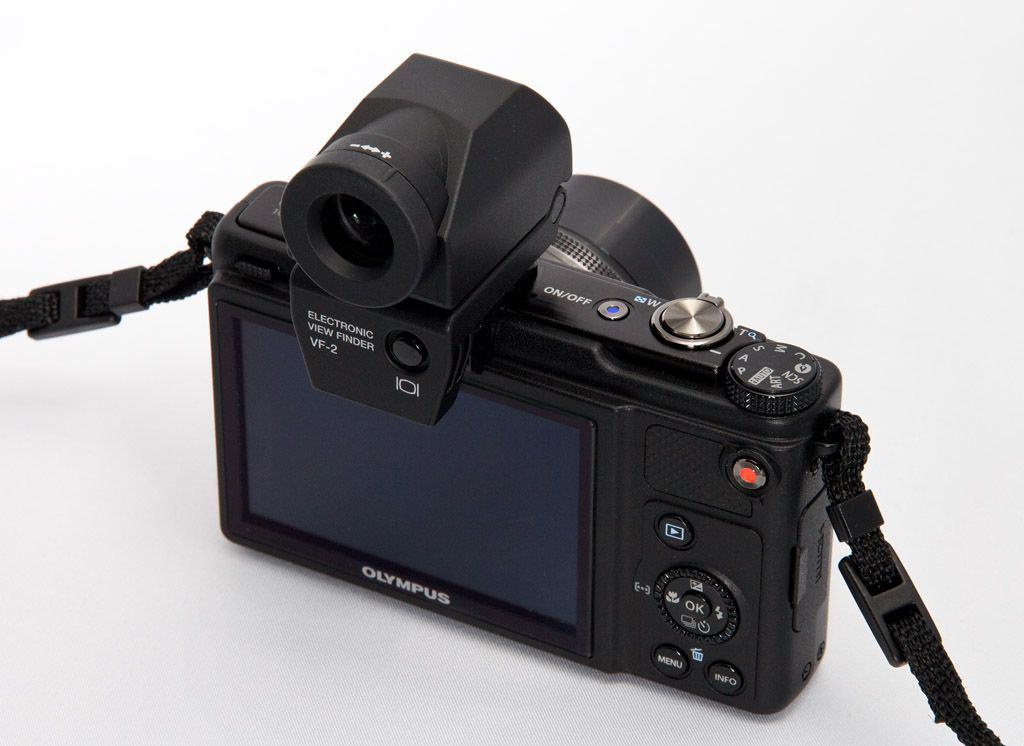
Olympus XZ-1 10 MP Digital Camera with f1.8 Lens and 3-Inch OLED Monitor (Black) (Old Model): Buy it now
Canon Ixus 220 HS
Canon has failed a bit with the ultra-compact Ixus series. Not only for image quality but also features capture performance and overall value. However, in 2011, Canon was back in a good way thanks to the back-illuminated CMOS sensor for all new Ixus models. Even Canon changed the naming system, removed the SD, IS, and instead of HS. The reason is that all new Ixus cameras support the SD memory card format and are equipped with image stabilization features, so the SD, IS characters are no longer needed. Meanwhile, the HS character set depicts a camera equipped with Canon’s HS system, incorporating the above sensor with the Digic 4 image processor, which allows for better quality images at capture. Under low light conditions and faster shooting performance.
Design and Build Quality
Canon released the IXUS 220 HS in 2011 as a slim pocket compact. It measures 92.2 x 55.9 x 19.5 mm and weighs about 141 g, so it slips into a jeans pocket and you barely notice it. The body is metal.
Image Quality
The sensor is a 12.1MP 1/2.3-inch CMOS, the standard size for compacts, paired with the DIGIC 4 processor. In good light, photos are detailed with vivid colors and fair dynamic range. Indoors or at dusk, expect noise. This sensor is no bigger than the one in most point-and-shoots, so it doesn’t have a low-light advantage over its rivals.
Lens and Zoom
The lens is a 5x zoom, 24-120mm equivalent, at f/2.7-5.9. The f/2.7 is only at the wide end, and by 120mm you’re at f/5.9, so low-light help fades as you zoom. Don’t expect much background blur, since the sensor is small. Optical image stabilization helps at the long end and in dim rooms.
Performance
IXUS 220 HS offers responsive, autofocus-fast-op system performances. Faster and accurate focusing is made possible by Canon’s High-Speed AF system, so it is ideal for random moments and fast subjects. DIGIC 4 provides for enabling continuous shooting at 3.4 frames per second so that a user is able to take a series of shots in quick succession.
Video Recording
IXUS 220 HS supports Full-HD 1080p video recording with 24 frame rate per second and stereo sound. The camera also allows 720p HD videos at 30 frames per second for high-quality video recording. Dynamic Image Stabilization is provided during video recording to reduce the jitters and provide smooth footage, particularly when shooting on hand or on the go. The camera features optical zoom during video recording, giving the user more flexibility for framing shots.
Display and Controls
For framing and review, the IXUS 220 HS features a 2.7-inch LCD monitor with a resolution of approximately 230,000 dots. These dots aren’t the best resolution, but the LCD monitor allows clear visibility for framing shots, navigation through menus, and reviewing captured images. The camera carries an intuitive button layout with dedicated controls for essential functions, such as selecting shooting mode, playback, and menu navigation.
Connectivity and Storage
In terms of connectivity, there is a standard USB port for data transfer and charging, whereas picture viewing and video mode has an HDMI out to be rendered on a compatible TV or monitor. Storage-wise, the camera supports SD, SDHC, and SDXC types of memory cards, with plenty of capacity to house higher-res images and movies.
Battery Life
The IXUS 220 HS uses a chargeable lithium-ion battery pack NB-4L. Canon rates the general battery life at 220 shots per charge. For extra shooting hours, maybe while traveling or during long sessions, the user can source another battery pack to go with or use an external power source.
Software and Features
Canon provides various shooting modes and creative filters in the IXUS 220 HS, targeting different styles of photography and user preferences. Smart Auto mode is provided by the camera to enable scene detection and optimization, thereby allowing beginners to capture great shots in an instant. Creative Filters include Fish-eye Effect, Miniature Effect, and Toy Camera Effect; these serve as great ways to apply a unique artistic flair to photos within the camera itself.
Usability and Handling
The IXUS 220 HS was made for maximum ease of use with its compact, lightweight body small enough to be comfortably held in the palm of one’s hand. Ergonomically designed and having a simple interface, the camera is built for all levels of users. Due to the camera’s compact small size and simple-to-use controls, most people use it with only one hand and focus on framing and remembering moments for life without any kind of distraction.
Conclusion
It’s a compact digital camera that offers versatility and capability in getting an image with great sharpness, quickness, and, finally, usability. Equipped with state-of-the-art high-resolution sensors, fast processors, quality lens systems, and intuitive controls, it provides satisfactory results in almost every scenario. Whether it is for daily-family-life type photography or for capturing life from one stage of an adventure on the road, the IXUS 220 HS is a great small camera for those with an urge for simplicity, portability, and image satisfaction.
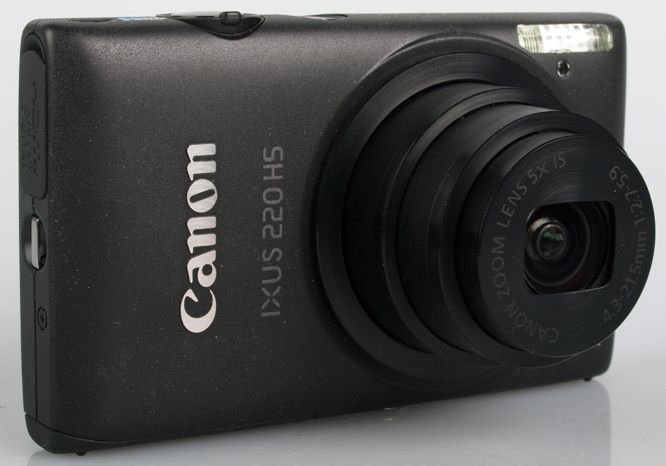
Compact Digital Canon Camera – Ixus 220 Hs – RED: Buy it now
Related Posts


Tech Reviewer & Product Analyst
Định Bia has spent over 10 years testing consumer electronics with a focus on smart technology. He work as a product advisor at Biareview where he helped customers find the right devices for their needs. He personally tests every product featured on this site using a consistent evaluation framework covering quality, durability, and value. All reviews are based on experience, not influenced by the manufacturer.