Table of Contents
ASUS PadFone 2
Design and Build Quality
The ASUS PadFone 2 was an astonishing innovation for its period, going beyond the extant paradigm of a mere smartphone to include docking station capabilities for the tablet. The smartphone was kind of an epitome of elegance and modernity, with that all-polycarbonate or similar material unibody type design. It felt pretty light, and it also gave you a comfy grip, keeping that premium feel even though the body was plastic. Meanwhile, the docking tablet would allow the smartphone to dock in and then offer a larger screen, so the whole immersive experience kind of feels more real.
Display Quality
On the smartphone side of the ASUS PadFone 2, we had the Super IPS+ LCD capacitive touchscreen measuring 4.7 inches with a 720×1280-pixel resolution, with great crispness and color vibrancy, levels of viewing angle and visibility under sunlight being pretty decent. This display would further be extended in size by the tablet docking station (usually about 10.1 inches) while keeping the same resolution and quality. This dual display set-up was very convenient for users itching for a larger screen to sit back and enjoy watching videos or browsing the Internet.
Performance
And, speaking of performance, it came along with a quad-core Qualcomm Snapdragon S4 Pro processor and 2GB of RAM. It was really competitive during its time and provided rather smooth performance for everyday tasks like browsing the web, social media, e-mail and multimedia consumption. Abilities for multitasking were decent-too, but it probably would do a bit of struggling when heavier applications or games come around, especially when asked by modern-day smartphones.
Storage Options
For the ASUS PadFone 2 the storage options went with 16GB, 32GB or 64GB of internal memory, depending on which variant you got. There was not really any microSD expansion available either, so if you started running low on space for media files, apps , or documents it could feel like a drawback.
Camera Quality
For its day, ASUS PadFone 2 housed a pretty good 13 Megapixel camera at the rear, coupled with autofocus and LED flash, capable of snapping sharp images and Full HD 1080p video. These cameras were well capable back then; color reproduction and low light were well within acceptable limits. There was also a 1.2 MP front camera, good for video calling and a selfie or two.
Battery Life
Battery life on the ASUS PadFone 2 felt like one of its strong points, mostly because it had big capacity batteries sitting in both the phone part and in the tablet dock too. In practice the smartphone battery capacity was 2140 mAh, while the tablet dock added another 5000 mAh. These big capacities offered long usage hours to let users stay connected and productive through the day without having to top up much often.
Software and User Experience
The Android 4.0 Ice Cream Sandwich, later upgradeable to Android 4.4 KitKat, formed the operating system with which the ASUS PadFone 2 was originally released. They included their proprietary software additions, such as the PadFone Station interface, which would smoothly transition user experience from smartphone mode to tablet mode. This integration was intended to improve productivity and usability but at the same time gave an additional hurdle of having developers optimize their applications for the dual nature, which is a hard one in the Android ecosystem.
Connectivity
For connectivity, complementary features of Wi-Fi, Bluetooth, GPS, and NFC (in some regions and dependent on the model) were there. The PadFone 2 would support 4G LTE network for the fastest mobile data connectivity, thereby raising the appeal for users who needed rock-solid internet access on the go.
Conclusion
ASUS PadFone 2 was an ambitious set about merging the smartphone and tablet experience into a single-purpose cohesively designed device. It offered novel features with the docking station and the extended battery life. It had drawbacks such as app compatibility and developers needing to optimize their software for dual-mode functionality. However, beside these difficulties, the PadFone 2 provided an attractive choice for people who appreciated flexibility and efficiency in their own mobile devices.

HTC Butterfly
Design and Build Quality
The HTC Butterfly was kind of known for this sleek , premium look and feel, with a unibody construction that was usually crafted from polycarbonate or aluminum, depending on the specific variant. The build quality felt solid, the lines were smooth, and it had this comfortable, easy grip in the hand. Overall the design language came off elegant and minimalistic, and you could tell HTC really kept a laser focus on the little things both for how it looks and for how it sits in the hand , ergonomics wise.
Display Quality
Now the highlight really was the display of the HTC Butterfly. It had a 5-inch Super LCD 3 capacitive touchscreen, with a resolution of 1920 x 1080 pixels (Full HD). That setup translates to roughly 441 PPI, so text and images looked sharp, bright even, and the colors stayed accurate with wide viewing angles too. It also included Gorilla Glass protection, which helps with that kind of sturdiness against small scratches, and those minor bumps or impacts, not the big ones of course.
Performance
On performance, the phone was powered by a quad-core Qualcomm Snapdragon S4 Pro processor (APQ8064) running at 1.5GHz, plus 2GB of RAM. In day to day use it stayed smooth and responsive, for things like web browsing, using social media, multitasking, watching videos, and similar routine habits. Most apps and games from that era ran fine , but when you compared it to heavier, more demanding applications, especially newer ones, it could start to struggle, like the pace would drop or feel less capable.
Storage
For the HTC Butterfly, storage options were pretty much in line with what you’d expect: 16GB or 32GB of internal space. There is also the ability to expand using a microSD card, roughly 32GB or more depending on the specific variant and the place it was sold. So basically, there’s enough room for apps, media, pictures, and documents, but yeah some people were still, kind of, hoping for an even larger setup.
Camera Facilities
On the camera side the HTC Butterfly includes an 8 MP autofocus camera with an LED flash, and it can capture 1080p Full HD video. HTC’s ImageSense tech is also there, and it boosts the camera features like HD video and photo capture at the same time , plus HDR and a bunch of shooting modes. The front camera clocks in at 2.1 MP, and that is fine for video calls, plus for selfies that look decent in everyday lighting.
Battery Life
Battery life felt a little “so so” on the HTC Butterfly, since it ships with a non-removable Li-Po 2020 mAh battery. In practice, it handled moderate use okay—web browsing, social apps, and the occasional video or music session. Still, if you’re a heavier user, you’d probably need to find a charger by around midday, maybe sooner. That said, battery time could be stretched out further through later software improvements, and also by changing how someone uses, the phone day to day.
Software Details
The HTC Butterfly came with Android 4.1.1 Jelly Bean preinstalled, and later on it could be upgraded up to Android 4.4.2 KitKat as well . On top of that it ran HTC Sense UI , which was basically a layer that brought more tweaking choices, plus extra features inside the Android operating system. You’d see things like BlinkFeed, a home screen you can customize that also collects news and social media updates, then Zoe for making and sharing short videos, plus various multimedia optimizations.
Connectivity
For connectivity it offered 4G LTE which is for a quicker mobile data connection, and beyond that there was Wi-Fi 802.11 a/b/g/n. You also got Bluetooth 4.0, NFC (Near Field Communication), and GPS with A-GPS assistance . Taken together those options made the device more flexible for wireless communications, file exchanges, and location based applications.
Audio Quality
When it comes to sound, the HTC Butterfly leaned on HTC BoomSound, which included dual front-facing stereo speakers . Those speakers kinda, filled up most of the room with a rich, immersive sound, and honestly it helped make the multimedia feel sharper, when you watch videos or listen to music, or even play games. You didn’t really need extra external speakers or headphones either.
Conclusion
The HTC Butterfly was like a flagship phone, it had that premium look and feel, plus a high-resolution screen , and camera functions that were pretty innovative for the time. Even if it doesn’t really compete with current flagship smartphones when it comes down to technical specifications, it kinda leaned into other strengths. You get solid features and a smooth everyday experience, which ended up appealing to tech buffs and people who mainly consume multimedia.
So this review kind of gives you a contrastive main structure for the HTC Butterfly , showing where it really stands out design, screen quality, camera, and multimedia. It also goes into battery endurance and the overall software experience.
HTC Butterfly X920D Unlocked GSM 4G LTE Android Smartphone w/ Beats Audio Sound, 8MP Camera, Quad-Core Processor- Black: Buy it now
HTC One X
Design and Build Quality
The HTC One X was well-known for its sleek and premium design, incorporating polycarbonate unibody construction with a matte finish. It sported smooth curves and fitted well with the palm of your hand-lofty under HTC’s vision of artisan and aesthetic charm. The minimalistic and very elegant design language gave this phone some character among the competing devices.
Display Quality
The HTC One X had a 4.7-inch Super LCD 2 capacitive touchscreen, with a 1280×720 Pixel ,(HD) resolution, which worked out to a pixel density around 312 PPI. So yeah it delivered sharp , vivid visuals with solid color accuracy, and also pretty wide viewing angles. For extra durability, Corning Gorilla Glass was put in place, giving the screen more resistance against scratches and small impacts.
Performance
The HTC One X was basically run on the quad core Nvidia Tegra 3 processor (AP37), clocked at 1.5 GHz, with a backup of 1GB RAM. Somehow this arrangement delivered smooth and really quick reactions for almost all tasks- like web browsing, social networking, multitasking, and even casual gaming. It could run any heavy app and games of those days, though it might not guarantee a smooth performance for resource-heavy apps in the present.
Storage Options
It was typical for storage options to have 32GB internal storage for the HTC One X, which meant that users could not further enhance their internal storage capacity with a microSD card. This was ample room for apps, media files, photos, and documents for those who desired more than sufficient storage capacity without relying on externals.
Camera Capabilities
The One X was kinda a marvel with its 8-MP rear camera, having autofocus and that LED flash thing, plus it could record Full HD 1080p video too. The picture skill got a boost thanks to HTC’s ImageSense, which basically let you do simultaneous HD video and image recording, there was HDR (High Dynamic Range) as well, and even a bunch of distinct shooting modes. Meanwhile the front camera came in at 1.3 MP , so it was okay for video calling and selfie takes , nothing super impressive.
Battery Life
An attention to battery life endowed the HTC One X with a huge non-removable 1800 mAh Li-Po battery. While this battery would likely last through a period of average use, such as clicking through a few dozen websites or exchanging messages on social media, or maybe even playing a few songs, the heavy user might never make it to bedtime without giving the phone a good rest on its charger. Though new updates have brought much power-saving optimization, along with some old user’s tips, it could make the usage time even longer.
Software Experience
The HTC One X shipped with Android 4.0 ICS at the start and later got updated to Android 4.2.2 Jelly Bean with HTC Sense UI 4. During that whole process, it basically brought in stuff like HTC Sense 4.0, this kind of extra layer over Android that gives more tweaking and nicer features for the operating system. HTC Sense enhancements included HTC Watch for renting or buying movies, Dropbox integration for extra cloud storage, and Beats Audio for superior audio output.
Connectivity
The HTC One X Connectivity kind of comprised of a 4G LTE network , (mostly depending on the region) for high mobile data speeds, plus WLAN 802.11 a/b/g/n, Bluetooth 4.0, NFC technology (Near Field Communication) and also GPS supported by A-GPS. These connectivity options made things feel flexible for the wireless communication, helped with quick data transfer, and deliver a little more for location service.
Audio Quality
HTC One X delivers brilliant quality sound with the presence of Beats Audio enhancements, furthering the sound quality via headphones or external speakers. While it was not equipped with front-facing stereo speakers as later HTC phones were, a really commendable front speakers of certain sorts were present, thus making for a good multimedia experience in watching videos, listening to music, and gaming.
Conclusion
The HTC One was considered the flagship phone that stood higher than the others in terms of design, display quality, camera output, and multimedia. While today, it might not boast the specifications that the flagship smartphones do, back in the day, it was the pack of features and offered a nice user experience that really attracted techies and multimedia-consuming folks.
This review serves as a comprehensive and insightful overview of the HTC One X, covering its great strengths in design, display quality, camera capabilities, and user experience, while pockets of consideration exist, such as battery life and software enhancements.
HTC One X Unlocked Gsm Phone, 16GB, Gray: Buy it now
HTC One X +
Design and Build Quality
The HTC One X+ mostly kept that old-school sleek, kinda premium look from the original One X, you know. It had a polycarbonate one-piece build with a matte surface, which really helped with rigidity and that solid, reassuring feel, but it still stayed comfortable in your hand. The overall appearance felt like a mix of minimalism and refined elegance, basically pushing HTC’s philosophy about workmanship and aesthetics, a bit too much perhaps. It also carried on the previous generation’s soft curves and ergonomics that a lot of people actually enjoyed.
Display Quality
The HTC One X+ stuck with the One X’s 4.7-inch touchscreen, Super LCD 2 capacitive panel, and an HD 1280×720 pixel resolution, around 312 PPI. In daily use it was pretty good for multimedia stuff, with sharp visuals, vivid scenes, true color accuracy, and decent viewing angles for films, web browsing, and even games. Corning Gorilla Glass was there too, bringing protection against everyday scratches and minor, light hits, so the screen stayed looking presentable longer than expected.
Performance
While it was at the 1.7Ghz speed, it was powered by the quad-core CPU, which made it a step above the 1.5Ghz Tegra 3 found on the original One X. With an adjustable 1GB RAM, it brought in better performance reward multitasking, going on activities, and playing game. It discriminated between the applications and games that required higher performance, and smoother, more unresponsive interaction, and gave the user experience fairly across a range of tasks.
The Storage Options
As per the usual configuration, the HTC One X+ mostly offered 64GB of internal storage options, well able to provide a safe place for apps, media files, and photos to be saved, without any need for expandable storage via microSD card. This generous storage space was meant for users who needed huge storage for their digital content and who preferred to have everything stored locally in the device.
Camera Capabilities
The HTC One X+ held on to the 8 MP rear camera set up from its predecessor, with autofocus, an LED flash, and Full HD 1080p video recording. The performance got a boost thanks to HTC’s ImageSense technology, which gave it more capable things like capturing HD video and still images at the same time. It also supported HDR (High Dynamic Range) , plus a bunch of shooting modes, so the photos look clearer and a bit more colorful, in general. For the front facing camera, it used a 1.6 MP sensor , which was good enough for video calls and selfies that were still acceptable in everyday use.
Battery Life
Battery life factored into the design choices behind the One X+ smartphone. The One X+ came with a 2100 mAh non-removable Li-Po battery. It offered enough endurance through moderate to heavy usage, including web browsing , social media activity, media playback, and gaming even when time passes pretty fast.
Software Experience
The HTC One X+ shipped with Android 4.1 Jelly Bean along with the HTC Sense 4+ UI overlay. In essence, this setup included several new features and customizations brought in through HTC Sense 4+. The HTC Sense allowed features such as HTC BlinkFeed (a customizable home screen for news aggregation and other social media content), superior camera features through HTC ImageSense, and integration with Beats Audio for the best sound quality.
Connectivity
The HTC One X+ can, in certain places and depending on the carrier, come with 4G LTE support, which in a way boosts mobile data speed when it’s available. It also includes Wi‑Fi 802.11 a/b/g/n, plus Bluetooth 4.0, NFC , or Near Field Communication , and GPS that comes with A‑GPS help. Connectivity options available provide solutions for wireless communication, data transfer, and location-based services to satisfy the needs of people in various situations concerning connectivity.
Audio Quality
HTC One X+ continued to offer great audio quality with a bit of Beats Audio enhancements, for better sound output through headphones or external speakers. The One X+ didn’t bring an array of stereo speakers positioned upfront like later HTC devices, but this audio enhancement technology really raised the bar on multimedia experience, be it video watching, music listening, or gaming.
Conclusion
HTC One X+ was a much more refined version of the original One X, but it upgraded on it, in terms of processor, storage space, and continued the philosophy of design and multimedia. Literally, maybe not high in the specification department as of today standards of flagship phones were, but it arrived with a very good set of features and smooth working that gave the techies and multimedia folks something to appreciate back in those days.

Huawei Ascend D Quad
As one of the more advanced smartphone things Huawei showed at CES 2013, the Ascend D Quad, and the Ascend D Quad XL also, uses Huawei’s quad-core K3V2 processor that runs around 1.2GHz or 1.5GHz depending on the setup. Totally designed by Huawei, the K3V2 has four ARM Cortex-A9 cores, and honestly it feels pretty straightforward, but still powerful. In addition, the K3V2 also comes with a graphics core that Huawei says delivers true 32-bit color, which gives users a higher quality image and more realism. Using a special algorithm, this chip will save 30% of battery life by maintaining a low core temperature.
Design and Build Quality
The Huawei Ascend D Quad, it kind of aimed at being sleek and durable, with that unibody look, mostly done in polycarbonate or related material choices. It was really the vibe of modern minimalism, smoothly curving along its edges and slipping into a more comfortable hand-grip. Because the build quality was genuinely strong, it felt premium too, fitting the branding, like a flagship device inside Huawei’s own lineup.
Display Quality
For the Ascend D Quad, Huawei went with a 4.5-inch IPS+ LCD capacitive touchscreen, at 1280×720 pixels, also known as HD. That works out to roughly 326 PPI, so the visuals came off razor sharp, plus the colors looked lively. The color accuracy felt good, and the viewing angles were also quite wide, in a way you’d notice if you tilt it. On top of that, a scratch-resistant Gorilla Glass layer shielded the screen, giving solid protection for day-to-day rough use.
Performance
The Huawei Ascend D Quad offered performance courtesy of Huawei’s own 1.5GHz K3V2 quad-core processor and 1GB of RAM. This was enough to give serious processing power for all multitasking, app usages, and gaming, ensuring smooth, responsive performances. It handled demanding applications and graphics-intensive games well, rewarding the user with an experience of satisfaction on a daily basis.
Storage Options
Usually, the storage options for the Huawei Ascend D Quad would include 8, 16, and 32GB internal storage with further external expansion through microSD cards from 32GB up to possibly more, depending on model and region. This option or provision made it possible for users to expand storage capacity when in need for more storage for any apps, media files, photos, documents, and so on, as per their choice of usage.
Camera Capabilities
The Huawei Ascend D Quad had rather impressive camera hardware; 8 megapixel autofocus rear camera with an LED flash, and support for Full HD 1080p video compression recording. Huawei proprietary camera technology works to improve image quality, with abilities like HDR (High Dynamic Range) panorama mode and also several other shooting modes, to get detailed and vivid pictures. The front camera was 1.3-megapixel for reasonable-quality video calling, and selfies were usually fine.
Battery Life
Battery life was, on the other hand, rated as strong, with the Huawei Ascend D Quad having its removable Li-Po 1800 mAh battery. It’s a good capacity that can last up to mediocre or heavy use such as for web browsing, social networking, watching videos, and playing games. Heavy users would have to recharge by the end of the day, but power optimization plus user strategies may well keep usage adequately extended.
Software Experience
The Huawei Ascend D Quad originally shipped with Android 4.0 Ice Cream Sandwich overlaid by Huawei’s Emotion UI (later renamed EMUI). This user interface layer distinguished itself by providing extra opportunities for customization and presents additional features to the stock Android OS, to give a clean and intuitive user experience. Some of Huawei’s enhancements include themes, system optimizations for improved performance, and longer battery life, besides some proprietary apps for productivity and entertainment.
Connectivity
The connectivity options supported in Huawei Ascend D Quad included 3G and, in some models, 4G LTE (depending on regional and carrier availability), so you could do fast data transfer when it was supported by local operators. It also setup connections over Wi-Fi 802.11 b/g/n, Bluetooth 3.0 and , NFC, plus GPS with A-GPS supports. Such connectivity options ensure ample possibilities for wireless communication, data transfer, and location-based services according to the connection needs of users, acquired in different scenarios.
Audio Quality
The Huawei Ascend D Quad provided decent audio quality for multimedia consumption and voice calls, without advanced audio enhancement found in flagship phones of other brands. It had a regular audio jack for headphones or external speakers, providing an alternative for those who really care about their audio experience.
Conclusion
This smartphone was one of flagship class and performed in converse to the high-performing ones present at the highest echelon of Time, rated by aesthetic design, display quality, camera, and user interface. Although it does not have winning specs against current flagship phones, it had a feature set good enough to keep any tech enthusiast occupied and carry the multimedia consumer quite diligently.
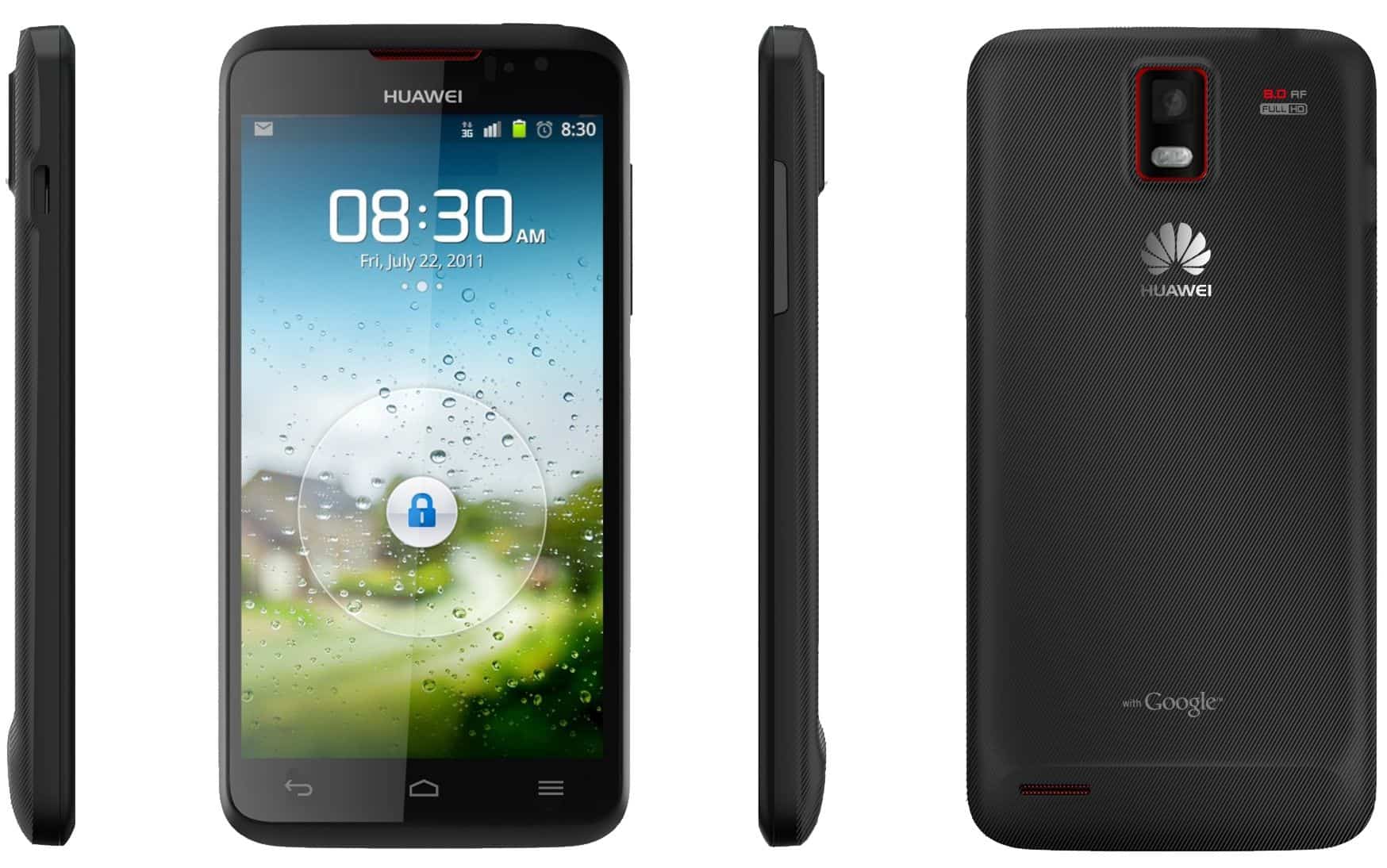
Huawei Ascend D1 Quad XL
Design and Build Quality
The Huawei Ascend D1 Quad XL comes with a slim yet sturdy body, and it feels built as a single piece , mostly with polycarbonate or some related material. It blends a modern look with ergonomics , so you get that comfortable grip and an overall elegant feel. The design language is minimalistic, but in a kind of charming way, you can still spot small design choices in the technique, that Huawei sort of proudly carries around. It’s one of those phones where the construction seems simple, but not cheap.
Display Quality
On the front, the Huawei Ascend D1 Quad XL flaunts a capacitive touchscreen that measures 4.5 inches. The panel uses IPS+ LCD tech and manages a resolution of 1280×720 pixels (HD). This ends up delivering 326 pixels per inch (PPI) , so images look crisp and really clear. Colors appear so vivid it’s easy to get absorbed, plus the viewing angles are extremely wide , which helps when you’re showing something to someone. Also, the screen includes Gorilla Glass scratch resistance, so you avoid unnecessary wear and tear during everyday life.
Performance
For performance this model is run by Huawei’s K3V2 quad-core processor at 1.5 GHz, teamed up with 1GB RAM. With that kind of arrangement you get a decent multitasking ability, and apps plus games usually work with almost no real interruptions, while the animations feel pretty slick. Even if you add more demanding applications into the mix, the phone keeps things moving and doesn’t cause too much hassle. For graphics-focused gaming, it can manage pretty smoothly too, giving a satisfying experience across a range of daily activities.
Storage
The usual internal storage capacity of the Huawei Ascend D1 Quad XL is 8 or 16GB and upgradable through microSD card support of up to 32GB or above, depending on the model and country. This option affords the user flexibility in expanding storage further as per the need for application installation, media files or photo storage, and document storage, depending on the user’s capacity and taste.
Camera Capabilities
The Huawei Ascend D1 Quad XL really comes with that newer 8-megapixel back camera, it has autofocus, a LED flash too , and it’s able to record Full HD 1080p video as well. Huawei then tuned the image processing side with HDR, panorama views, and several capture modes, so the results look more vivid, in a kind of natural way. The front camera is a pretty normal 1.3-megapixel unit, nothing fancy, but it’s still fine for video calling, plus the usual low-end selfies people take when they’re just, you know, checking in.
Battery Life
On the endurance side, the Huawei Ascend D1 Quad XL comes with a non removable Li-Po 2600 mAh battery cell. In practice, that amount of capacity should give you plenty of stamina for medium to heavier usage, like web browsing , social networking, multimedia playback, and even gaming. Still, that “heavy charge” has a real chance of needing a refill by the end of the day, at least. Then again, if the power management is treated well and the user habits are decent, it can go a bit longer than that.
The Software Experience
Preloaded with Android 4.0, Ice Cream Sandwich, and Huawei’s unique version of the UI overlaid on the OS, the Huawei Ascend D1 Quad XL offers the customizations and functionalities of the standard Android operating system, providing the clean and intuitive user experience the company had initiated. Huawei has added customizable themes, system optimizations for performance and battery life, and proprietary applications for productivity and entertainment purposes.
Connectivity
Connectivity features for the Huawei Ascend D1 Quad XL cover 3G, and in a lot of the versions, 4G LTE too (which depends on the region and the mobile operator) so you can get quick mobile data access wherever it’s actually available. Alongside that, it offers Wi-Fi 802.11 b/g/n, plus Bluetooth 3.0. There’s also NFC, meaning Near Field Communication, plus GPS and A-GPS. All of these options create a variety of wireless pathways for communication, exchanging data, and location oriented services, so it can match different user situations.
Audio Quality
The Huawei Ascend D1 Quad XL provides medium-grade audio for watching media and taking phone calls , though it never reaches cinema-level improvements that some other brands include in certain flagship devices. You get a standard headphone port as well as an external speaker output, which should keep things flexible for people who care about how music and voices sound.
Conclusion
The Huawei Ascend D1 Quad XL, as a kind of flagship device, really thrives in the way it looks, the display quality, day to day performance , camera features, and the whole general feel you get when you use it. It might show a lower spec sheet compared to today’s flagships, but somehow it still brings an alluring feature set and a user interface that pulls in tech enthusiasts and multimedia consumers almost instantly.
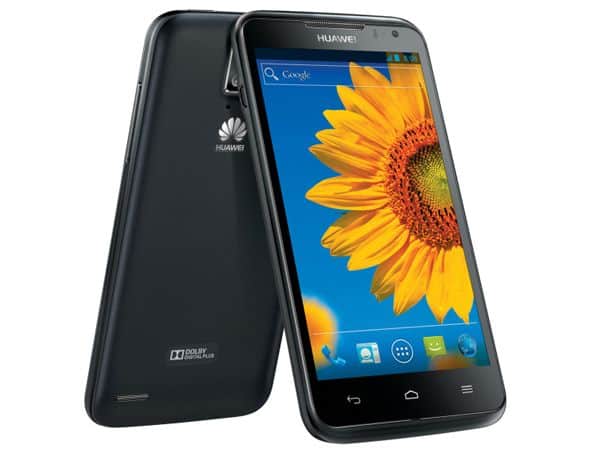
LG Google Nexus 4
Design and Build Quality
The LG Google Nexus 4 really had the kinda luck of grabbing the “beauty” title in 2012, thanks to a look that felt kind of sleek, with a minimal approach toward simplicity and plain old sheer functionality. On the front and back, the glass was broken up by a plastic rim that wrapped around the edges, giving the whole device that Premium kind of finish. It came in at 133.9 x 68.7 x 9.1 mm and it weighed 139 grams which felt pretty comfortable, like it was naturally, gently supporting the owner’s hand for easy, pleasant use. On the back there was a clean setup, camera module included and a bit of Nexus branding too, while the front basically got swallowed by the display and that big earpiece grille.
Display Quality
The Nexus 4 came with a 4.7-inch True HD IPS Plus capacitive touchscreen , sporting a WXGA resolution of 1280×768 pixels. In practice, that translated to roughly 318 pixels per inch (PPI) , and it made everything look crisp, bright , and kind of “alive” in a good way. Color reproduction was solid and the viewing angles were pretty decent too. For extra peace of mind, the display had Gorilla Glass 2 added on, so scratches and light scuffs didn’t have that much chance, or at least not as much as you’d expect. All in all, the screen quality was top-tier for its era, it kept content clean and readable, and watching videos on it felt like a genuine treat.
Performance
On the performance side , the Nexus 4 used a Snapdragon S4 Pro quad-core chipset (APQ8064) running at 1.5 GHz , paired with 2 GB of RAM. This setup meant daily use stayed fluid , with apps launching quickly and multitasking feeling pretty effortless. It could handle everyday tasks with ease and run almost any app and game from the time, even if some applications that were remotely demanding might not feel as satisfying as what you’d get from today’s smartphones.
Storage Options
In terms of storage configurations, the Nexus 4 came with the option of 8 GB or 16 GB, and there was basically no thought given to expandable storage using a microSD card. For someone who really needed storage for media files and apps, this limitation was kinda pain, but then again it suited people who leaned on cloud storage and Premium streaming content online quite a bit.
Camera Capabilities
There was an 8 MP autofocus camera on board with an LED flash, and it did take decent photos plus Full HD 1080p video. It looked surprisingly good in decent lighting, however it struggled more in low light compared with the rear cameras you’d get on newer smartphones. The 1.3 MP front camera, was okay for video calls and selfies but it did not offer the kind of resolution and features that better front cameras bring to the table now days.
Battery Life
Battery-wise it was one of those, almost average kinda situations for the Nexus 4: Li-Po, nonremovable, 2100 mAh. If you used it moderately it was standing fine, yet for heavy use it would ask for a recharge by mid-day, more or less. Still, with some software tweakings and user adjustments, the real life usage time could be stretched out a bit longer.
Software Experience
At launch, Nexus 4 ran Android 4.2 Jelly Bean and later received updates, eventually reaching Android 5.1.1 Lollipop officially. Since it’s a Google Nexus phone, the experience felt clean, like no extra manufacturer clutter or weird add-ons, and it also got updates directly from Google. That meant a smoother, more responsive UI with the newest Android features, and improvements in tow sort of, all the way through.
Connectivity
On the Nexus 4 the whole connectivity situation was mostly about 3G and HSPA+ (up to 42 Mbps), plus Wi‑Fi 802.11 b/g/n, Bluetooth 4.0, and NFC (Near Field Communication) going on in the background. For location, it used GPS , with A‑GPS support which helped out a bit, in a sort of uneven way. There wasn’t any 4G LTE connectivity on board though, and honestly that limitation mattered more than you’d think, especially when you were sitting in areas where LTE networks had already been widely adopted.
Audio Quality
The Nexus 4 could still deliver a pretty reasonable audio output from its one rear-firing speaker, it was loud enough for media and for speakerphone calls. Still, it didn’t bring any fancy audio innovation, or those stereo speakers you later saw in some subsequent flagship devices. Yet somehow it managed to do the job in its era.
Conclusion
Back then it was kinda a hit among the big-name devices, it mixed together design, display quality, and that software vibe people were chasing. Even if it felt smaller in dimensions compared to today’s modern flagships, many users kept it as a favorite. It was one of those phones that delivered a pretty pure Android experience, with updates that showed up when they were supposed to, and it gave the impression that this is what a lot of people wanted, whether you were a die-hard techie or just an everyday buyer looking for a simple flagship smartphone he could keep.
LG Nexus 4 E960 Phone 16 GB – (GSM Unlocked) – Black: Buy it now
LG Optimus G
Build and Design Quality
Launched in 2012, the LG Optimus G arrived with a chic, modern look basically pushing simplicity and function. It mixed glass and plastic materials — glass on the front, while the rear leaned on textured plastic. With 131.9 x 68.9 x 8.5 mm dimensions, and about 145 grams, it felt solid enough and kind of comfortable in my hand, not overly heavy really. The whole design vibe was minimalism, thin bezels around the screen, and a quietly etched LG logo that shows up on the front and also the back.
Quality of Display
The Optimus G came with a 4.7-inch True HD IPS Plus LCD capacitive touch screen , and yeah it was that kind of “you just scroll and it works” display. The resolution clocked in at 1280×768 pixels (WXGA). All that together delivered roughly 318 PPI so images looked crisp, plus videos looked clean enough too, with color that was pretty accurate. Viewing angles were also wide, which helps when you’re watching from the side. The screen was covered by Corning Gorilla Glass 2, basically a glass layer meant to resist scratches and smaller bumps. In general the display specs were tuned for clear multimedia enjoyment, and even for a smoother gaming feel.
Performance
Inside, it was powered by this quad core Qualcomm Snapdragon S4 Pro processor (APQ8064) running at 1.5 GHz, and paired with 2GB RAM. That whole setup kinda gave it solid capability for multitasking , app management and gaming too, so in a sense you can manage everyday chores without too much fuss, honestly. In other words, most applications and games should run in a fairly smooth way. The Snapdragon S4 Pro chipset was also considered efficient in power, and that helped support a better overall user experience, less stutter more flow.
Storage Option
The Optimus G would generally come with 16GB or 32GB internal storage and no microSD card slot for expandable memory. Hence, a bit of a drawback for a user with expansive storage needs for media files and apps. Although, the given storage options were good for average usage and could store enough apps, photos, videos, and documents.
Camera Specification
The Optimus G was sporting a really capable 13 MP back camera, with autofocus and an LED flash, it was able to capture pretty detailed photos and handle Full HD 1080p video recording too. LG camera software also brought along extras, like HDR, the panorama mode, plus various shooting modes, kinda helping to improve image quality depending on the scene. Sometimes you just feel it does better in low light and other uneven situations. The front-facing camera provided typically 1.3 MP for video calls and selfies with an acceptable level of quality but probably not to the standards of front cameras on new-gen smartphones.
Battery Life
The battery life from the Optimus G was all right, featuring a fixed Li-Po 2100 mAh battery. Such battery capacity granted fair endurance time with medium use of the phone; browsing, social media, playing multimedia, and gaming. Heavy users could have easily recharged the phone around the end of the day, depending on phone use and screen-on time. With good power management and prompt software updates, battery life could have been much improved.
The Software Experience
The LG Optimus G originally shipped with Android version 4.0.4 Ice-Cream Sandwich and received updates until version 4.4.2 KitKat. Lying on top of these versions was LG’s own Optimus UI. The UI made things a bit more customized with added features and enhancements to the stock Android experience. LG also included optimizations in software that actually improve performance, additional gesture controls, multitasking features for productivity, and convenience.
Connectivity
As far as connectivity options are concerned, the Optimus G was supposed to provide 3G access and a 4G LTE access for some models (depending on the region and carrier), thus allowing you to have the fastest mobile data wherever available. Wi-Fi was also handed out as 802.11 a/b/g/n ; at the same time the devices had Bluetooth 4.0, NFC ( Near Field Communication ) and GPS , with A-GPS support . These connectivities basically gave users a choice between wireless interaction, data transfer, or location based services, whenever they needed it, across different scenarios.
Audio Quality
On the Optmus G, audio quality was decent, and its single speaker was placed at the back of the device, rendering sound clearly for media playback and speakerphone purposes. It did not have the high-end audio enhancements and stereo speakers oftentimes found in flagship smartphones of later years but instead accommodated the user with acceptable sound quality for its time. There was also an audio jack provided for headphones or external speakers, leaving room for users who consider audio to be of utmost importance.
Conclusion
NFL flagship models i.e LG Optimus G excelled as the finest design, display, performance, and camera-ready user experience. While with current-class flagship Smartphones this might not stand for specifications, yet it had all the big features and friendly UI that even tech geeks and general users could appreciate.
LG Optimus G E970 16GB Unlocked GSM 4G LTE Quad-Core Android Smartphone w/ 8MP Camera – Black: Buy it now
Samsung Galaxy S III LTE
Design and Build Quality
The Samsung Galaxy S III LTE, was released in 2012 and it came with this sleek , almost ergonomic feel with rounded corners and a thin profile. For the back cover, polycarbonate plastic is used which helps keep it lightweight but still durable, you know. The phone size was 136.6 x 70.6 x 8.6 mm and it tipped the scale at about 133 grams, so it was genuinely easy to hold , even during longer use sessions. On the front, it has a physical home button placed at the bottom, and next to it you get capacitive touch buttons on both sides, for back and menu functions.
Display Quality
On the Galaxy S III you get this 4.8-inch Super AMOLED capacitive display, and it runs an HD resolution of 1280 x 720 pixels . With that setup you end up with about 306 pixels per inch (PPI), and yeah, with the usual AMOLED tech it brings vibrant shades, deep blacks, and sturdy contrast. The screen kind of works in your favor for bright visuals, and surprisingly it handles outdoors fairly well also, with wide viewing angles. It’s pretty good for doing videos, web browsing, or game time when you want the picture to stay crisp even when you look from the side.
Performance
Powered by the Qualcomm Snapdragon S4 Plus processor (MSM8960) clocked at 1.5 GHz, the Galaxy S III LTE came with 2GB of RAM underneath the hood. The configuration offered smooth and glitchless multitasking, app usage, and gaming. Not really code for newer smartphones that we have today, but back then, it was an easy butter performance-wise, and reliable and efficient in performance.
Storage Possibilities
Generally, the internal storage capacity on the Galaxy S III LTE could be 16 GB, 32 GB, or even 64 GB, while the memory could be extended through a microSD card with a capacity of up to 64 GB. This external storage alternative ranked highly just because it gave users considerable freedom to store various apps, media files, photographs, or documents of their own choice, duly keeping in mind diverse storage scenarios.
Camera Features
So the Galaxy S III LTE had this rear camera, like 8 megapixels with autofocus , an LED flash, and also full HD 1080p video capture at 30 fps. And Samsung’s camera software, honestly it brought some enhancements for photo quality, kind of like HDR, panorama, burst mode, plus different shooting modes that were suitable for various environments. Overall it felt kind of adaptable, in that simple way. The front camera was a 1.9-megapixel shooter good enough for video calls and selfies of reasonable quality, albeit it probably could not match the resolution of a new smartphone’s front camera.
Battery Life
Battery life on the Galaxy S III LTE was pretty decent, like it had a removable Li-Ion 2100 mAh pack. That battery capacity would handle ordinary use without too much trouble web browsing, social stuff, multimedia playback and even light gaming. If you’re more on the heavy side though you might need a top up by the end of the day, this kinda depends on your usage pattern and the screen-on time. Still, there were power management tweaks, plus a few software updates, that could help stretch out the battery life, bit by bit.
Software Experience
It first came out with Android 4.0.4 Ice Cream Sandwich, and then it was pushed forward to Android 4.3 Jelly Bean. After that, Samsung’s TouchWiz UI got layered on top. TouchWiz made it easier to personalize and polish the Android operating system with a range of fairly approachable additions such as Smart Stay , which keeps the display awake only while you are looking at it, and S Voice, plus Pop-up Play where video runs in resizable little windows. The later Android versions weren’t officially supported beyond Android 4.3, but in practice that meant the phone still delivered a solid, stable, and fully usable interface on the Galaxy S III LTE.
Connectivity
Connectivity options on the Galaxy S III LTE included 4G LTE for mobile data very fast for browsing and streaming, wherever available. There is Wi-Fi 802.11 a/b/g/n, Bluetooth 4.0, NFC (Near Field Communication), and GPS with A-GPS and GLONASS. Therefore, the connectivity options allow wireless communication, data transfer, or any other location-based services in while catering to the connectivity needs of the user in every scenario.
Sound Quality
The sound quality on the Galaxy S III LTE was basically adequate, with one downward firing speaker that put out clear audio for media and speakerphone calls. It didn’t have the more refined audio know how and stereo speaker setup you can see on newer, higher end models today, but honestly it sounded fine for everyday use, most of the time. The handset, on the other hand, came with a standard audio jack, thereby offering flexibility for those who do consider audio.
Conclusion
At the time of its launch, the Samsung Galaxy S III LTE was considered, a flagship that really did stand out through design , display-quality, performance, camera chops , and user experience. While it cannot quite measure against the technical prowess of present-day flag bearers, the Galaxy S III LTE did offer a fairly strong spine of software features and a user interface that tech nerds, as well as casual users enjoyed, interacting with it.
Samsung Galaxy S III / SGH-i747 16GB GSM Unlocked LTE Android Smartphone Blue: Buy it now
Samsung Galaxy Note II LTE
Design and Build quality
The Samsung Galaxy Note II LTE, released back in 2012, had a kind of unique design where style sort of mashed into productivity and a big central form factor… not too subtle. With measurements of 151.1 x 80.5 x 9.4 mm and a weight of 183 grams, it was clearly bigger and more substantial than your typical smartphone, yet it felt manageable because of that ergonomic design. The device featured plastic constructions with a textured rear cover providing good grip and durability. Beneath the display lay the physical home button for which Samsung is much renowned, together with the capacitive touch buttons on the left and right for back and menu options.
Display Quality
The Galaxy Note II LTE carried within itself a splendid 5.5-inch Super AMOLED capacitive touchscreen display with a resolution-standard of 1280×720 pixels (HD). Bearing in mind a standard pixel density of around 267 pixels per inch (PPI), it rendered amazing colors and true blacks with good contrast probably the best among AMOLED displays. The display presents a sharp view with clarity in direct sunlight with large viewing angles, making it suitable for multimedia consumption, web browsing, and productivity tasks.
The Performance
In terms of performance , depending on the regional markets, it was powered either by a quad-core Exynos 4412 processor (1.6 GHz Cortex-A9) or by a quad-core Qualcomm Snapdragon S4 processor (1.6 GHz Krait) , with 2GB of RAM. This sort of setup basically gave enough horsepower to push through multitasking, regular app use, and even gaming pretty smoothly. The main scenarios were heavy workloads and multitasking, and in that context it delivered excellent performance, with a good level of smoothness and quick responsiveness during that period.
Storage Options
The Galaxy Note II LTE offered typical internal storage options of 16GB, 32GB, or 64GB, with flexibility for more storage via microSD card, up to 64GB. Such expandable storage sufficed for storing apps, media files, photos, and documents of any sort as per the user’s requirements and wants, greatly accommodating every kind of storage need.
S Pen and Productivity Features
Arguably one of the more notable and distinctive things about the Galaxy Note II LTE was that it came integrated with an S Pen styler, and it did this whole precise input thing which helped with note-taking, sketching, or just navigating around the device, mostly. The S-Pen could be slipped away inside a dedicated slot within the phone and it was kinda handy. It also included more advanced features, like Air View , where if you hover the S Pen above what you’re looking at, you get a quick preview. There was also Quick Command, which let you launch apps or do certain actions using gestures, and then S Note too, basically an upgraded note-taking app. These kind of productivity hangouts, helped place the Galaxy Note II above regular handsets, and it would appeal to people who wanted extra instruments for their everyday work and also their creativity.
Camera Capabilities
It was very well fitted with a good 8 MP back camera with autofocus and LED flash, allowing Full HD 1080p video recording at 30 frames per second. The Samsung camera design could include HDR (High Dynamic Range), panorama, burst mode, and shooting modes to enhance photo quality in different situations. The front-facing camera mostly was 1.9 MP and was probably good for video calling and selfies, if not to the same resolution as the front cameras on today’s smartphones.
Battery Life
The Galaxy Note II LTE held in high regard for battery life, with its removable Li-Ion battery of 3100 mAh capacity. This capacity ensured great endurance for moderate to heavy usage, web surfing, social media, multimedia, and productivity. With utmost facilities for power management and keeping in view all performance enhancements made in updates, battery life extended well enough for anyone who needed to trust it throughout the day.
Software Experience
Galaxy Note II LTE shipped with Android 4.1 Jelly Bean at first , and then it kept receiving updated builds from time to time , up through Android 4.4.2 KitKat. Along the way Samsung brought along its TouchWiz layer UI thing, like an add on on top of the base Android OS. TouchWiz basically works by tuning things, customizing controls, and adding extra features so it feels more friendly to use, and then there are also those enhancements like Multi Window, which lets you run two apps side by side , Smart Stay where the display keeps on as long as you are looking at it, and Pop-up Play for a video that shows up in a smaller resizable pop-up window. Although newer Android versions were never officially catered for beyond Android 4.4.2, the Galaxy Note II LTE still offered a comfortable and nice user experience.
Connectivity
On the Galaxy Note II LTE, connectivity options were pretty inclusive of 4G LTE where it was available, which meant high speed data service for browsing, streaming, and downloading. You also got Wi-Fi 802.11 a/b/g/n, along with Bluetooth 4.0 and NFC (Near Field Communication) , plus GPS supported by A-GPS and GLONASS trackings. These connectivity options provided versatility so wireless communication, data transfer, and location service options could be offered according to the user’s connectivity requirements in various situations.
Audio Quality
Audio quality on the Galaxy Note II LTE was decent, just right with a single speaker on the back emitting sound for media and speakerphone calls. However, this device lacked any enhancements in high-definition audio or stereo speaker arrangements, unlike the present-generation smartphones, but the audio performance was fine enough for casual listening purposes. It also had a 3.5mm jack, available for headphone sets or external speakers for those who do put an emphasis on audio quality.
Conclusion
The Samsung Galaxy Note II LTE presented itself as a flagship smartphone that offered wonderful design, display quality, performance, S Pen functionality, camera features, and a superior user interface. It targets users that desire a generalized device for productivity, entertainment, and creative endeavors, offering a myriad of features and a straightforward interface.
Samsung Note 2 I317 16GB Unlocked GSM 4G LTE Quad-Core Phone – White (International Version): Buy it now
Sony Xperia Z
Sony kinda put all it has into making the hardware for the Xperia Z. This thing runs on a Qualcomm Snapdragon S4 1.5GHz processor, and it has shown its real power through devices such as the Nexus 4 or even the Xiaomi MI-2. On top of that, it also includes 2GB RAM and LTE connectivity so the whole experience feels smoother , and web surfing stays really fast on the Xperia Z.
The quad core chips are there to manage the huge amounts of pixels coming from the 1080p display. Also, the newest Mobile Bravia Engine 2 tech brings sharper, clearer visuals. Even if it only has a 5 inch screen, the pace people move with it one hand , it really does not feel slowed down.
Design and Build Quality
Sony Xperia Z, released in 2013, came with a beautiful and premium design featuring minimalism and craftsmanship. It was among the few whose front and back were glass, complemented by a coated frame-all surfaces made of shatterproof glass fiber polyamide. It measured 139 x 71 x 7.9 mm; amazingly thin and lightweight at just 146 grams, it gave a very solid feeling when held. The design was further complemented by the dust-and-water-resistant body, graded IP55/IP57-that could take splashes and immersion into water for about 30 minutes at 1 meter.
Display Quality
The 5-inch full HD TFT capacitive touchscreen on Xperia Z comes in at 1920×1080 pixels. About 441 pixels per inch, the pixel density is way more than enough to paint every visual that shows up on the screen with full details and crispness, plus flashy colors and decent viewing angles. The screen was set up with Sony’s Mobile BRAVIA Engine 2, for a deeper, kind of carefully tuned color view, it really wakes the whole thing up, it feels immersive when you’re dealing with multimedia, gaming, and also just normal web browsing.
Performance
The Xperia Z relied on a 1.5 GHz quad-core Qualcomm Snapdragon S4 Pro processor (APQ8064), along with 2GB RAM, a setup that granted it solid power for multitasking, normal app use, and gaming. This setup ensured somewhat smooth and responsive performance in its prime days. It may not, however, attain that of a newer flagship processing power but has solid reliability when used in everyday tasks or multimedia applications.
Storage Options
The Xperia Z generally came with 16 GB of internal storage, with further storage enhancement through a microSD card up to 64 GB. This allowed users to store applications, media files, photos, and documents to their liking, accommodating all varieties of storage requirements and preferences.
The Camera
On the back end, the Xperia Z had a 13.1-megapixel camera with autofocus, plus an LED flash too. It could record in Full HD 1080p, running at 30 frames per second. Basically, the Sony Exmor RS sensor tech inside the phone, helped it handle dim environments much better, and you’d get images that looked sharp and kept decent color, even when the lighting was kinda rough, or not really helpful at all. Camera software features HDR, panorama mode, burst mode, and various scene modes to facilitate taking of quality photos and videos. The front camera spec is generally 2.2 megapixels, good for video calling and selfies of reasonable quality, unlike the front cameras on several of the competitors.
Battery Life
The battery life on the Xperia Z was pretty respectable, with a non removable 2330 mAh Li-Ion battery in place. That amount of capacity likely would have covered moderate use, you know, web browsing , social media checking, multimedia playback, and even some gaming sessions. The phone also brought a Stamina Mode power saver, which kind of extends endurance by getting apps to stop running in the background and by switching off connectivity while the screen was dark; the power management was tuned toward longer usage, so it should last a bit more.
Software Experience
The Xperia Z launched with Android 4.1 Jelly Bean , then got further updates up to Android 5.1.1 Lollipop, with Sony’s own customized Xperia UI sitting on top. That interface gave it a modern kind of look and feel , yet it also blended in some extra bits to match Sony’s broader ecosystem, like the Sony Entertainment Network content integration for music, films, and gaming. Since there wasn’t any official upgrade path beyond Android 5.1.1, the Xperia Z still felt pretty solid , as in it stayed a stable everyday tool and a workable base for core apps and services.
Connectivity
The Xperia Z is a 4G LTE phone, so in areas where that coverage exists , it can use quicker mobile data speeds for browsing, streaming and downloading. It also shipped with Wi‑Fi 802.11 a/b/g/n, Bluetooth 4.0 , NFC (Near Field Communication), plus GPS with A‑GPS and GLONASS options. Basically, you get a good setup for wireless communication, data sharing, and location centered services, depending on what you need at the time.
Audio Quality
On the Xperia Z, music and anything else were best served by Sony’s Clear Audio+ technology for a truly clean and balanced audio for multimedia playback and speakerphone calling. The device also offered an audio jack for headphones and external speakers to support hi-res audio formats for true music lovers and audiophiles.
Conclusion
The Sony Xperia Z was a flagship smartphone excelling in design, display quality, performance, camera capabilities, and user experience in its time. It targeted users who considered good design with some toughness, an immersive display, advanced camera technology, and water-resistant feature as a bundle of complete features and functionalities.
Sony Xperia Z C6606 16GB T-Mobile GSM (Not Unlocked) Ultra-Slim WaterProof Smartphone w/ 13MP Camera – Black – (Certified Refurbished): Buy it now
Sony Xperia ZL
Like the Xperia Z brother, the Xperia ZL is also well-furnished. Customers will enjoy high-speed processing from Qualcomm Snapdragon S4 Pro quad-core 1.5GHz processor with 2GB RAM and LTE connectivity.
In terms of design, although smaller in size, the ZL still owns a 5-inch screen and is as beautiful as the Xperia Z. Both have Sony’s Mobile Bravia Engine 2 imaging technology.
Design and Build Quality
The Xperia ZL design, and construction style from 2013 felt a bit more compact, and chic, like it was trying to be practical while still looking refined. Overall usability and ergonomic features were kind of the whole point, at least it reads that way. Compared with its sibling Xperia Z, the Xperia ZL went with a more classic, straightforward form factor, and it didn’t include any water-resistant features. It measured 131.6 x 69.3 x 9.8 mm, and weighed 151 grams so yeah, it was slightly thicker but still comfortable in hand .
Most of the device was made from plastic, with that matte finish, for a cleaner, handsome look and a firm, solid feel. The overall design stayed minimalist too, with a physical power button on the right, a volume rocker on the left, and then a dedicated camera shutter button, that made photo access feel immediate and quick.
Display Quality
With a 5-inch display, the Xperia ZL was never exactly lacking tunefulness; well, technically speaking, it had a TFT capacitive touchscreen display, with a pixel resolution of 1920×1080, which could so to speak be called full HD. The pixel density showed up at about 441 pixels per inch (PPI) so it was one screen that really contrasted colors that kinda screamed, and the view from an angry angle, wasn’t all that flattering. Sony also armed the mobile with the Mobile BRAVIA Engine 2, which kinda boosted contrast and color rendition, and the overall crispness too. The screen looked good indoors as well, and it even stayed really usable in direct sunlight outdoors, so overall it felt pretty suited for multimedia moments, playing games, or even doing office work in a day to day way.
Performance
On the performance side the Xperia ZL was powered by a quad core Qualcomm Snapdragon S4 Pro processor (APQ8064) ticking at 1.5 GHz, along with 2GB of RAM. That whole setup gave plenty of breathing room for multitasking, quick app hopping, and gaming, so responses felt smooth and fast during its release time, which is the part you notice most. It may not prove as much of a swift behemoth nowadays with new flagship phones on the roll but, for any kind of activity, it could stand its ground and occasionally outlast the demands of heavy apps and games.
Storage Options
The Xperia ZL got the more internal storage on the economy at 16GB, which could be furiously extended via microSD card up to 64GB. Featuring this option for expansion gives high flexibility for storing apps, media files, photos, and documents on an as-needed basis; thus, it caters to a vast spectrum of requirements and preferences.
Camera Features
The rear camera for the Xperia ZL was a 13 Megapixel unit with autofocus and a single LED flash. The camera could also record Full HD 1080p videos at 30 frames per second. The Exmor RS sensor by Sony gave the best low-light performance and enhanced the generation of images to become detailed, vivid, and colorful even in very tricky lighting. The camera software offered the user functions such as HDR, panoramic view, burst mode, and several scene modes to help the user take attractive photographs and videos. The front camera normally was about 2 MP in resolution, which sufficed for video calls and selfies but perhaps may not offer the resolution of more recent smartphones.
Battery
Regarding battery life, the Xperia ZL kind of really showed very good performance with a non-removable Li-Ion 2370 mAh battery. That battery capacity should be able to give enough staying power for moderate use, like browsing, social networking, listening to music, and a bit of gaming too. The ZL also included Stamina Mode which would stretch the battery life further by muting background apps and connectivity whenever the screen was off, so it helps with power management in a more efficient way and lets the user make it through longer stretches.
Software Experience
The Xperia ZL shipped with Android 4.1 Jelly Bean and then got later updates up to 5.1.1 Lollipop with Sony’s own Xperia UI sitting on top. The overall interface felt pretty clean and approachable, with a handful of extra features and refinements added for the Sony ecosystem, including an integration with Sony Entertainment Network for content around music, movies, and gaming. Newer Android versions beyond 5.1.1 weren’t officially backed, but honestly that doesn’t stop the Xperia ZL from still delivering decent functionality, plus a reasonable user experience, along with support for the usual important apps and services.
Connectivity
Major connectivity options on the Xperia ZL included 4G LTE (where applicable), enabling high download and upload speeds for browsing, streaming, and downloading. Other options included Wi-Fi 802.11 a/b/g/n , Bluetooth 4.0, NFC, and also a GPS setup with A-GPS plus GLONASS. These kinds of connectivity made certain the handset covered wireless communication, data transfer needs, and location services, helping users in almost any scenario.
Audio Quality
Enhancing the audio quality of the Xperia ZL was Sony’s ClearAudio+ technology that ensured clear and balanced sounds for multimedia playback and hands-free calls. Other than that, the handset also included a dedicated audio jack for headphones and portable speakers, capable of high-resolution audio formats for the satisfaction of audiophiles and music lovers.
Conclusion
The Sony Xperia ZL was a flag-bearer phone and indeed any flagship; it excels most during the release period in design, display quality, camera performance, and user experience. It was targeted at users who look for compact and ergonomic design and an immersive display along with cutting-edge camera technology and reliable performance, basically offering a value proposition and comprehensive set of features and functionalities.
This review serves as a general overview of the Sony Xperia ZL while doing justice to the strengths in design, display quality, performance, camera, and software experience; the battery life and connectivity options are also worth considering.
Sony Xperia ZL LTE C6506 Unlocked Android Phone – US Warranty – (Red): Buy it now
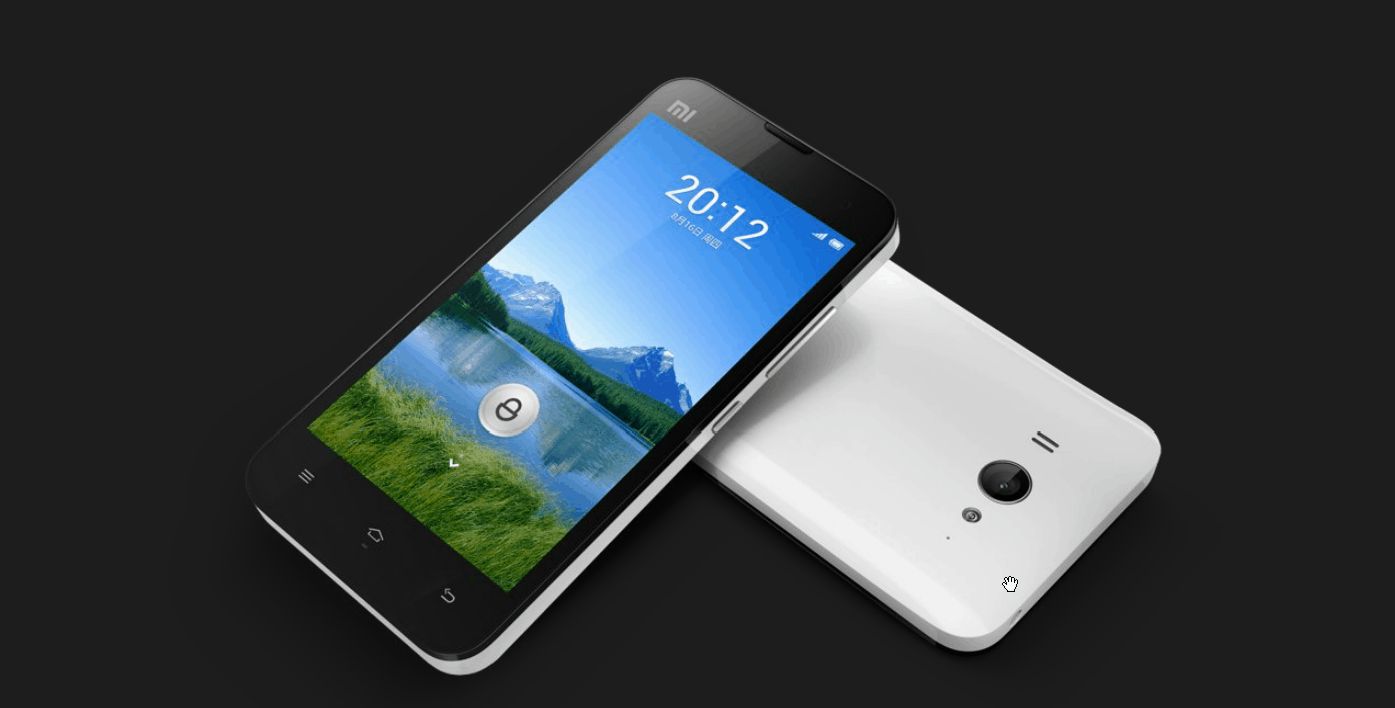
Xiaomi MI-Two
Design and Build Quality
Design and Build Quality
The Xiaomi Mi-Two, launched in 2012, came with a kind of design goal, trying to reach that “perfect balance” between practicality and minimal look , a bit like, not too much , not too little. It was sized at about 126 x 62 x 10.2 mm and weighed roughly 145 grams, so it stayed compact but still light enough for day to day routines. The body was a plastic-body type build, and it used a matte finish back cover, which gave a solid grip and helped with everyday wear too. For navigation convenience , it included capacitive buttons just under the display. On the side, you also got a real physical power button along with a volume rocker.
Display Quality
On the front , the Mi-Two used a 4.3-inch display with an IPS LCD touchscreen panel. The resolution was 1280×720 pixels (HD), and that worked out to near 342 pixels per inch (PPI) , so text and visuals looked sharp, with crisp detail and lively colors plus strong viewing angles. It did not include AMOLED technology, unlike some competitors, but the IPS LCD panel basically compensated with more faithful color output and reasonable outdoor visibility. That made it pretty suitable for multimedia, light gaming, and web browsing, even when the light situation wasn’t ideal.
Performance
Since it was released at the time, a much sought after-and-used-in-serious-testing processor, a quad-core Qualcomm Snapdragon S4 Pro (APQ8064) processor operating at a clock speed of 1.5 GHz, was assigned to the task. A pair of RAM options, of 1GB or 2GB, is available for Mi-classification. Bestowing crest-grade power to seamlessly juggle video apps and word processors alike, this Microphone offers smooth service in all user activities. The S4 could take care of hard computing tasks, verified with tests. It is an excellent choice for its time in speed and reliability.
Storage Options
Generally interally, the Mi-Two will be packing 16 GB or 32 GB of storage, with no room for microSD expansion. This storage capacity can allow users to stock several applications, media files, photos, and documents based on their preferences, but the absence of an expandable storage option really punishes users with big storage requirements.
Camera Capabilities
The Xiaomi Mi-Two arrived with an 8 MP autofocus rear camera , plus an LED flash, and it can capture Full HD 1080p video at 30 fps. In terms of the camera software you get HDR (High Dynamic Range) , panorama mode, burst shooting, and a bunch of scene modes that sort of helps improve picture quality across different surroundings. The front cameras are usually around 2 MP, good enough for video calls and selfies with decent results, even if they do not quite measure up to the resolution of more recent smartphone front cameras.
Battery Life
The Xiaomi Mi-Two came with decent battery life. A non-removable Li-Ion battery judgment capacity was of 2000 mAh. The battery capacity was good enough for moderate use with some level knob on browsing, social networks, listening to music, and gaming. Top-tier users must recharge after a day if anything, with usage patterns and screen-on time changes. Power management optimization and software updates can effectively prolong the battery life.
Software Experience
The Xiaomi Mi-Two arrived with MIUI V4 atop Android 4.1 Jelly Bean, being updated subsequently to newer MIUI versions, presenting, hence, a heavily customized interface. Such MIUI environment provided for abundant customization, themes, and useful features not present in stock Android for a richer user experience-notably with its own unique set of applications, gestures, and system optimizations. Although MIUI was vastly different from stock Android, the user experience was albeit smooth and intuitive and in favor with Xiaomi fanatics.
Connectivity
Connectivity options in the Xiaomi Mi-Two included support for WCDMA networks, Wi-Fi 802.11 b/g/n, Bluetooth 4.0, NFC (Near Field Communication), and GPS/A-GPS. The device lacks 4G LTE-the fastest mobile data standard-made a bit of a drawback for those who wished for giddier mobile internet! Conversely, in areas where 4G LTE was out of the question, the device assured proficient wireless communication, data transfer, and location services.
Audio Quality
Audio quality offered by the Xiaomi Mi-Two was simply satisfactory, with a single rear speaker emanating clear sound for multimedia playback and speakerphone calls. It did not have the enhanced audio enhancements or stereo speakers of the later flagship phones, but it still gave decent quality audio for your everyday enjoyment. The device also had the standard audio jack for headphones and external speakers, capable of handling common audio file formats for diversified media usage.
Conclusion
At the time of its launch, the Xiaomi Mi-Two was one of the mid-tier smartphones, with strong points in design, display quality, and performance, camera options, as well as the software experience. Its target market consisted of users who wanted a compact device that was fully functional, could be customized on the software side, and had a trustworthy performance for day-to-day tasks and multimedia activities.
This review comprehensively covers the Xiaomi Mi-Two, wherein the key strengths discussed are design, display quality, performance, camera, and software experience, alongside some other relevant points and concerns such as battery life, connectivity options, and value-for-money in its competitive landscape.
ZTE Grand S
ZTE is the second Chinese phone maker after Huawei to announce a premium product, and it’s Grand S has a slim design and a quad-core processor.
The ZTE smartphone has a nice design. Although it does not have the same solid aluminum frame as the Ascend D2, the plastic back of the Grand S is still pretty smooth and simple. However, there is also a version equipped with a sleek back cover of this device, and it gives the impression of bad use.
Design and Build Quality
In 2013, the ZTE Grand S got launched with a sleek and pretty much slim exterior, built to go up against the other flagship phones of that era. It measures 142 x 69 x 6.9 mm and comes in at 126 grams. At that time it was viewed as one of the thinnest along with the lightest phones, like it was really something special. It is constructed of a combination of plastics and glass, which affords the phone a premium feel. Some design features include minimalistic capacitive touch buttons for navigation and a really physical power button as well as a mute rocker placed on the side for easy access.
Display Quality
With the Grand S, you get a 5-inch TFT LCD capacitive touchscreen screen working at a full 1920×1080 pixel spread. This ends up giving you a pixel density around 441 PPI, so you see sharp detail, pretty solid color reproduction, and a decent, even optimum viewing angle. The brightness turned out alright in both inside and out settings, so it felt like a reliable multimedia wingman , and basically a near perfect companion for gaming plus productivity stuff.
Performance
The ZTE Grand S pulls its performance from the quad-core Snapdragon S4 Pro chipset (APQ8064) running at 1.7 GHz , joined with 2GB RAM. That processing muscle was honestly more than enough for multitasking, opening apps, and playing games. At the time of launch it felt smooth and snappy in normal day to day use. Sure, it didn’t stand toe to toe with newer flagship handsets when it came to raw processing power, but it really handled everyday routines and heavier apps pretty well , especially for what people actually did most of the time.
Storage Options
Storage-wise, the Grand S generally came with 16GB of internal storage and had the capability of further expanding storage via a micro SD card up to 32GB. In this way, the expandable storage option offered flexibility to users, who then would be free to store apps, media files, photos, and documents according to their wishes-for storage needs in all scales.
Camera Capabilities
The ZTE Grand S had 13 MP autofocus and an LED flash equipped back camera(s) that could handle Full HD 1080p video capture at 30fps. The camera app or software also came with HDR, panorama mode, burst mode, and a few other scene settings, to help boost the overall image quality in different situations. The front camera was usually 2 MP for video calling and selfies with decent quality, though it might fall short when compared with the front cameras of newer generation smartphones.
Battery Life
Battery life on the ZTE Grand S was fair, consisting of a casing Li-Ion 1780 mAh non-removable battery. This battery capacity provided enough endurance for moderate use of web browsing, social media, checking out multimedia, and gaming. However, heavy users would have needed to plug it by the end of the day, depending on the usage pattern and screen-on time. Power-management optimizations and software updates could thus prove useful in increasing battery life.
Software Experience
The ZTE Grand S arrived with Android 4.1 Jelly Bean, and later it got upgraded to newer Android versions too, using a custom user interface from ZTE. That interface looked pretty clean and yes it felt intuitive at first, while also bringing in extra little options and performance tweaks, aimed more at practical day to day usability. ZTE’s UI wasn’t overly, heavily redesigned though compared with some other brands. Still, it managed to stay fairly functional and user friendly, so getting to apps, settings , and even multimedia content felt straightforward enough, most of the time.
Connectivity
Connectivity options include 4G LTE , (depending on availability) so you can get a quick mobile data speed for things like browsing, streaming, and downloading. It also had Wi-Fi 802.11 a/b/g/n, Bluetooth 4.0 , NFC Near Field Communication, and GPS / A-GPS. These connectivity options gave a wireless communication mode for data transfer and location-based services depending on what connectivity a user requires in different situations.
Audio Quality
The Grand S by ZTE had decent quality audio, with a single rear speaker that was clear enough for multimedia playback and speaker calls. It didn’t come with premium audio or stereo speakers as in some recent flagships, but it did provide sufficient audio for daily needs. The device also carried the usual audio jack for headphones and external speakers, supporting common audio formats that made for flexible media consumption.
Conclusion
This ZTE Grand S was kind of a flagship smartphone, it was excellent in design, display, performance, camera, and the overall user experience around the time it showed up. The Grand S seemed to be aimed at folks who wanted something ultra-slim and chic, but still with competing specifications and features, for multimedia consumption and also gaming stuff, plus productivity tasks.
ZTE Grand S Smartphone – 5 Inch FHD 1920×1080 Gorilla Glass Screen, Android 4.2 OS, Quad Core 1.5GHz CPU: Buy it now
ZTE Nubia Z5
ZTE’s new Z5 is sort of a high-end device that hopes to outpace other manufacturers , mostly on low prices. Also the whole machine is packed with “nice” specifications like a quad-core Qualcomm 1.5GHz, a 5 inches 1080p screen , and a 13MP camera that uses a Konica Minolta sensor.
Unlike the earlier versions, the ZTE Z5 has kind of caught up with the current smartphone trend, the one with high-resolution displays. It runs Android 4.1 Jelly Bean, plus 2GB RAM, which means if you’re only focused on specs, yes this is the device for you. Still, it has more, especially that 13MP camera sensor from Konica Minolta, which is one of the main things people notice.
Design and Build Quality
Back in 2012, ZTE redesigned and developed the Nubia Z5 to get that sleek , premium chassis, the kind that can sit next to flagship-class phones. It comes with dimensions of 138 x 68.8 x 7.6 mm , so it stays slim and lightweight at around 126 grams, and that makes it comfortable, like actually comfortable, to hold and easy to carry. The body is made from metal and glass , and it looks and feels like a premium product in the hand. There was a clean design goal here, with capacitive touch buttons for navigation , while the physical power button and volume rocker are placed along the sides so your fingers can reach them without thinking too much.
Display Quality
The Nubia Z5 was featuring a 1920×1080 pixels ( Full HD ) resolution, 5-inch IPS LCD capacitive touchscreen display. This is supposed to land around 441 pixels per inch, PPI density, so you get this very crisp yet vibrant look, with decent color reproduction and wide viewing angles too. The contrast and color accuracy also get a further boost from ZTE’s proprietary display processes, so it’s more immersive while watching movies or streaming TV, playing games or even for working.
Performance
A Snapdragon S4 Pro (APQ8064) quad-core chipset was used in powering the ZTE Nubia Z5, running at 1.5 GHz. These specifications and hardware combinations greatly contributed toward in this situation smooth multitasking, app usage, and gaming. It could support other intensive applications and console-type graphics-intensive games, so it showed dependable operation.
Storage Options
Depending on the model, the ZTE Nubia Z5 shows up with either 16GB or 32GB of internal storage, and it did not come with any external microSD card expansion slot for additional storage room. That storage amount can be decent enough for people who want to keep apps plus media files photos, and documents all together, based on what they actually need. Still, for users with higher storage needs, this restriction may feel a bit annoying.
Camera Functionality
On the Nubia Z5 you get a 13-megapixel autofocus rear camera setup, and it includes an LED flash too. It could record 1080p full HD video at 30fps. In terms of camera software tools, there were options like HDR, panorama mode, burst mode, and several scene modes, meant to help image quality in different surroundings. The front camera was probably 2 megapixels, being good for video calls and selfies at an acceptable level but lacking the resolution of higher-end smartphone front cameras.
Battery Life
Battery life on the ZTE Nubia Z5 was kind of decent ish , with a built in Li-ion battery holding 2300mAh capacity. In practice, that juice could stretch for a day if you were doing moderate things like web browsing, social networking , media playback and a bit of light gaming. If you were more heavy duty about it , you might need to plug in by evening, depending on your habits and how much time the screen was on . Also, power management tuning and software updates helped to squeeze out even more endurance.
Software Experience
The ZTE Nubia Z5 originally shipped with Android 4.1 Jelly Bean, then it got updated later , to reach newer Android versions with a ZTE skin layered on top. So the interface ended up feeling clean and straightforward, plus it brought a few extras and usability improvements for smoother performance. ZTE’s UI also provided customization for theme, icons, and gestures, thus enhancing user interaction and personal flair. The UI was not much skin-and-bone heavy like the one from competitors, but the ZTE Nubia Z5 presented a clean and functional environment through which users could readily access their apps, settings, and multimedia content.
Connectivity
Connectivity on the ZTE Nubia Z5 came as 3G networks, Wi‑Fi 802.11 b/g/n , Bluetooth 4.0 , and NFC (Near Field Communication) as well as GPS with A‑GPS support. Not having 4G LTE support was a bit of a blocker, mainly because it limited people who wanted to tap into the quickest mobile data speed that those networks can provide. However, this ensured smooth connectivity winds for wireless communication, data transfer, and location-based services in places where 4G LTE was not much of a necessity.
Audio Quality
The audio output of the ZTE Nubia Z5 was just fine. A loudspeaker was fitted on the back and gave out clear enough audio for multimedia playback as well as speakerphone calls. The device did not have the enhanced audio features and stereo speakers that arrived later with flagship devices, but the output certainly had acceptable quality for everyday use. Another plus was that there was also a standard 3.5 mm audio jack for wired headphones and external speakers , while on the software side, it supported common audio formats for flexible media consumption.
Conclusion
The ZTE Nubia Z5 was the flagship smartphone set, that sort of defined excellence in design, display quality, performance, camera capabilities and overall user experience during its release period . It targeted users who loved stylish and premium-looking devices having competitive specifications and features, useful for multimedia, entertainment and productivity tasks.
This review presents a complete snapshot of the ZTE Nubia Z5 featuring the good points of design, display quality, performance, camera capabilities, and software experience, as well as some considerations such as battery life, connectivity options, and value for money in a somewhat competitive landscape.
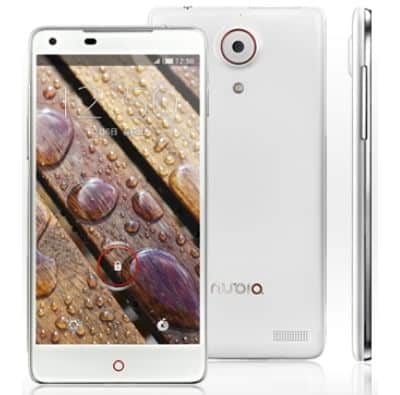
Related Posts


Tech Reviewer & Product Analyst
Định Bia has spent over 10 years testing consumer electronics with a focus on smart technology. He work as a product advisor at Biareview where he helped customers find the right devices for their needs. He personally tests every product featured on this site using a consistent evaluation framework covering quality, durability, and value. All reviews are based on experience, not influenced by the manufacturer.