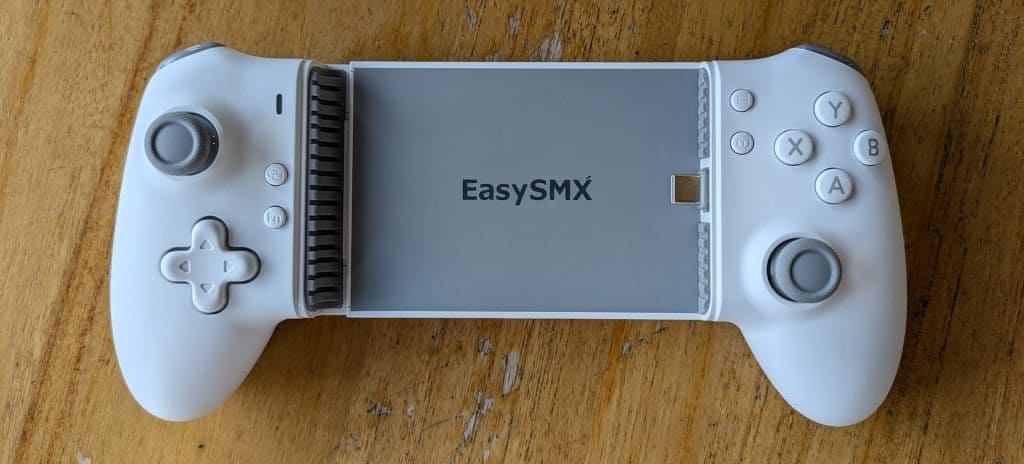
Mobile platforms now provide better controller support because modern smartphones have gained enhanced processing capabilities since multiple games became available for these devices.
Mobile gamers have two controller options to choose from when they use their phones: one option includes a traditional “monolithic” controller which works through wireless connection while the phone displays separate content and the other option features a “phone clip” controller which combines various functions into a small gaming device.
The EasySMX M15 controller was introduced to address the market need for affordable “phone clip” controllers because it provides multiple distinctive capabilities along with contemporary technological components which enhance the overall gaming experience.
What surprises and limitations will the EasySMX M15 mobile gaming system present to gamers according to its attractive price? Let’s find out with Biareview.com!
EasySMX M15 – A Stable Experience at a Reasonable Price
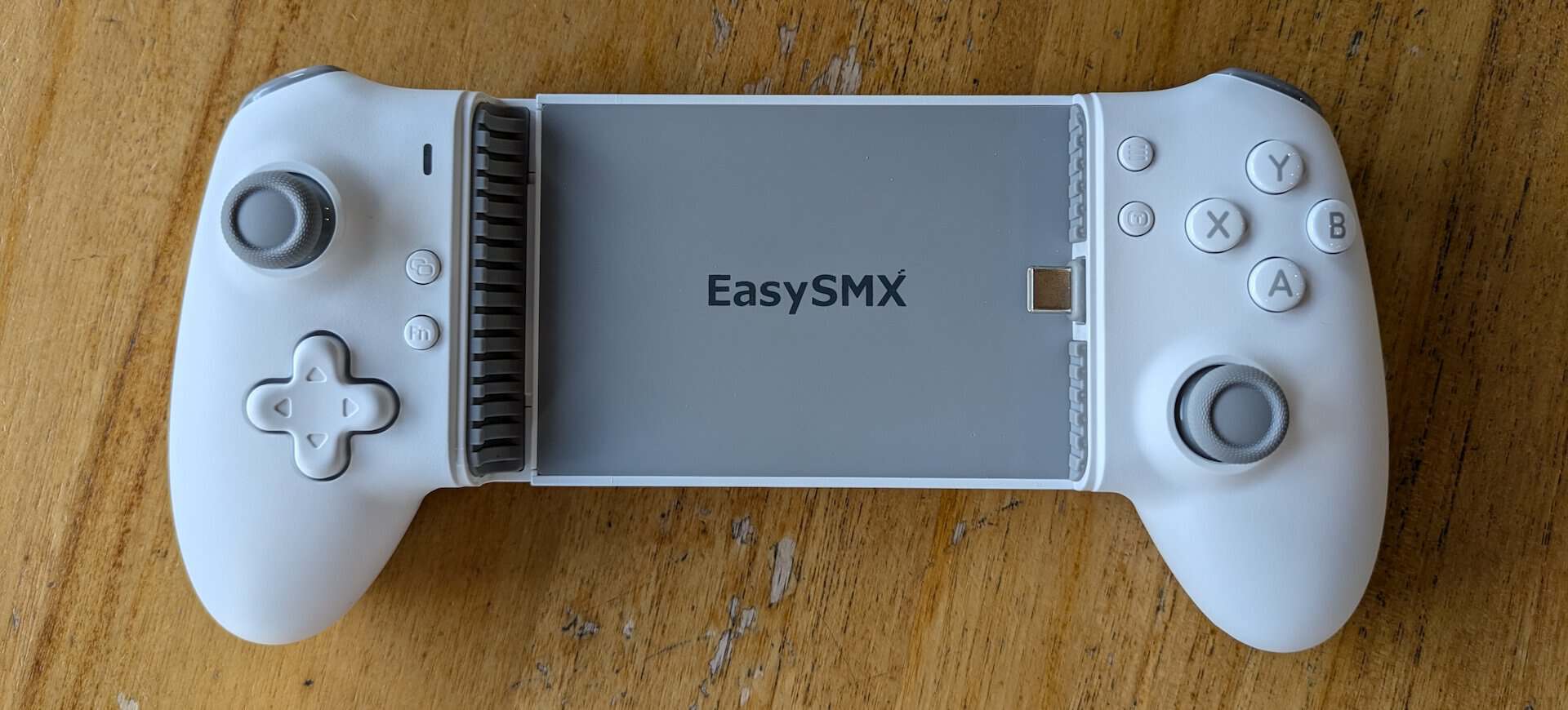
The EasySMX M15 demonstrates complete functionality through its basic packaging combined with its ability to support cloud gaming services and its user-friendly design which displays controller functions through printable graphics.
On the back, a complete list of the controller’s hardware features is revealed, including a Hall sensor control system, “Mecha-Tactile” mechanical buttons, vibration support, and a pair of customizable back buttons.
Unboxing the EasySMX M15 reveals only a multilingual user manual and the controller itself, unlike most previous EasySMX controllers which came with a range of additional accessories.
Compared to full-sized mobile gamepads “defined” by large buttons, original joysticks, and traditionally designed handles like the Razer Kishi Ultra, the EasySMX M15 easily “meets the standard” with certain differences, consisting of attractive improvements and some trade-offs due to its low price.
Similar to other EasySMX models, the M15 is equipped with full Hall sensors from the joystick to the shoulder buttons – a feature rarely seen in “phone clip” gamepads – aiming to provide a more premium experience through minimal “dead zones,” reduced drift, and increased durability compared to traditional analog joysticks.
However, the joystick on the EasySMX M15 suffers from a smaller-than-usual movement area and lower build quality, along with two shoulder buttons that aren’t very deep, resulting in a somewhat less detailed control experience.
Next, the same “clicky” mechanical buttons as the EasySMX X10 are also featured on the four ABXY buttons and Dpad, with the slight difference being a lighter button activation and smoother buttons, similar to those on the Xbox Series X/S controller.
EasySMX M15 Mobile Gaming Controller Suit for Android/iPhone 15 Series,Android Controller with Hall Trigger for Play Minecraft,COD:
Modded Tablet Controller Easy SMX M15 Bluetooth (Controller + Expansion kit already installed + Case) It can hold tablets with screens up to 15 inches. (Extended Range 4 to 13.4 inches) (Control+Kit):
Modded Tablet Controller Easy SMX M15 Bluetooth (Controller + Expansion kit already installed + Case) It can hold tablets with screens up to 15 inches. (Extended Range 4 to 13.4 inches) (Control+Kit+Case):
On the back, the EasySMX M15 is equipped with two easily activated back buttons that can be remapped to the mechanical buttons on the controller.
Instead of using spacers of varying heights like the Razer Kishi series to address the issue of phone size, the USB-C port on the EasySMX M15 is designed with the ability to move up and down via angle adjustment, partly to provide an easier connection experience and increase compatibility with a wider range of phones.
However, due to the use of a “two-piece” clamp design with a large contact surface area, its ability to securely hold phones equipped with “huge” camera systems like the iPhone 15 Pro and Samsung S23 is limited.
Offering high compatibility, the EasySMX M15 features multiple connection modes for two mobile platforms, including three modes (HID, XInput, and virtual touch) for Android, and a customized mode specifically for iOS.
While equipped with a relatively large number of customizable features on paper, such as button settings, response speed, and layout changes, the EasySMX M15 suffers from a similar problem to the company’s cheaper controllers like the EasySMX X05: the lack of in-app customization, making customization difficult to implement and less flexible compared to using the Razer Nexus app.
As a result, the controller offers quick button activation suitable for mobile games while maintaining a certain level of grip, simultaneously reducing the pressure required for a more comfortable gaming experience in various environments.
In addition, the EasySMX M15 can connect wirelessly via Bluetooth using XInput mode to multiple platforms, although users still need to attach it to their phone to connect to the phone itself or plug in a separate power cord to connect to a PC or gaming console.
When calibrating the joystick in the PPSSPP emulator on Android, the EasySMX M15 delivers fast connection and impressive accuracy thanks to the Hall sensor used, with four axes of motion providing instant feedback even on the smallest movements.
Using the Steam Link application to remotely play PC games, the EasySMX M15 still fully supports the features of a regular gamepad with decent vibration feedback.
In summary, the EasySMX M15 easily meets the needs of handheld gaming, with some trade-offs in its limited customization options, not-so-great build quality, and its clamping capability not being as secure as that of high-end phones with large camera systems.
Related Posts

Tech Reviewer & Product Analyst
Định Bia has spent over 10 years testing consumer electronics with a focus on smart technology. He work as a product advisor at Biareview where he helped customers find the right devices for their needs. He personally tests every product featured on this site using a consistent evaluation framework covering quality, durability, and value. All reviews are based on experience, not influenced by the manufacturer.