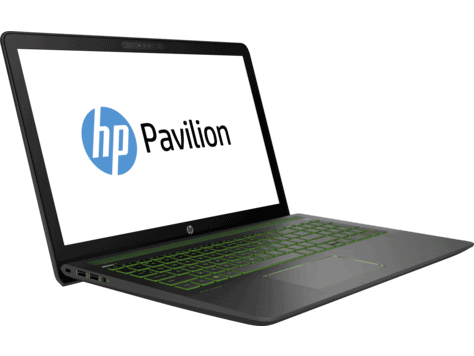
When it comes to HP’s gaming laptops, it is impossible not to mention Omen – the name is not too unfamiliar to the majority of gamers. But in order to serve customers who are slightly above the mainstream, while still maintaining strong gaming performance, HP recently released the HP Pavilion Power 15-cb504 TX Laptop.
The HP Pavilion Power 15-cb504 TX has better hardware and design than other products in the same price range. To better understand this Pavilion laptop, we invite you and Phong Vu to review its technical specifications!
Basic parameters:
CPU: Intel Core i7-7700HQ (4 cores, 4 threads; 2.80GHz – 3.80GHz)
– Ram: 8GB DDR4 -2400
– Hard drive: SSD 128GB + HDD 1TB
– GPU: NVIDIA Geforce GTX 1050 4Gb + Intel HD Graphics
– Screen: 15.6 ″ FHD
– Weight: 2.21kg
– Available Operating System: Win 10
– Battery: 4cell.
Design overview:
The HP Pavilion Power 15-cb504 TX has a very familiar appearance following the simple – square motif of the Pavilion office laptop line, but it still has a distinctive and strong gaming focus. The first impression is the fanciful black-turquoise color scheme (bold Razer). The lid has a rather bulky appearance compared to a gaming laptop, when it has only its logo in the middle of the black background. On the contrary, the base, which few people pay attention to, is stylized very beautifully and reasonably. 4 long blue base bars pointing towards each other and its X-shaped will provide stability and good slip resistance.
The HP Pavilion Power 15-cb504 TX feels kind of smaller than a lot of other gaming laptops in its category. The dimensions are 37.8 x 25.22 x 2.41 cm and it weighs just 2.2 kg , so you get this easy freedom to take it along to work or school, or just run around the house with it.
Display
The HP Pavilion Power 15 includes a 15.6-inch Full HD 1920 x 1080 IPS screen, and honestly it looks pretty solid. The panel delivers vivid colors, plus it has wide viewing angles, so it’s useful not only for office tasks but also for entertainment. There’s also a matte finish on the screen, that does a decent job cutting down glare and those annoying reflections, which is pretty helpful when you’re using it in rooms with bright lighting.
On top of that, the max brightness is around 250 nits so it’s fine for indoors, but in direct sunlight you might notice it getting harder to see clearly. Color accuracy and contrast are acceptable for everyday needs, though if you’re a creative professional who needs very precise color—say photo color grading or video editing—then it could feel a bit behind compared to higher-end displays.
So basically the Pavilion Power 15 display gives a nice viewing experience for daily work, movies or music, and casual gaming. Still, it doesn’t fully reach the level you see on more premium laptops, the kind made for creative work in mind, more or less.
Product performance:
Inside, the cooling system of the HP Pavilion Power 15-cb504 TX consists of two fans located within the cooling copper rods. However, such a cooling effect still hasn’t proved to be very optimal. Since there is a design of two fans located on the same side, right next to the CPU, the one who enjoys the “wholehearted service” of the heatsink is the CPU, and the other components like Ram – HDD … have to sit next to “electric fan” instead of “air conditioner”.
The ports on the Laptop are similar to other products in the same segment, including:
USB 3.3 TypeC Gen1 port (output high-quality images);
– USB 3.1 Gen1 x3 port;
– RJ 45 port
– HDMI port;
– SD card slot
– Headphone / microphone jack
If you buy a laptop in the same price segment, you will only have a FullHD screen with a panel with TN technology. As for the HP Pavilion Power 15-cb504 TX, we will have an anti-glare IPS screen with a 15.6 ”Full HD resolution, for extremely sharp images – wide viewing angles and high brightness.
The keyboard is still very traditional and has a backlit system. Backlit can be disabled by function key. The key experience is nothing new, but you shouldn’t be asking for more because the quality of this keyboard model has been verified through many generations of HP machines from past to present.
Finally, the HP Pavilion Power 15-cb504 TX offers excellent storage capacity with 1Tb HDD. Besides, the 128Gb SSD comes with the machine, helping to boost your gaming and working performance significantly. At the same time, it also saves you a great amount of money, instead of having to spend money on upgrading the SSD after buying other popular models.
Keyboard and Trackpad
The keyboard on the HP Pavilion Power 15 feels made for productivity and comfort, like it was thought out pretty well , even if you just type normally. It uses a full sized chiclet style layout, the keys sit with good spacing and you get about 1.5mm of travel distance. That means the buttons move enough to feel tactile, but they also come back quickly, so the whole typing vibe stays responsive for longer sessions, not just short bursts. The numeric keypad is there too, which is a handy addition if you work with numbers a lot, spreadsheets stuff, budgeting, that kinda thing.
There’s also backlighting, so typing in low light doesn’t feel like a gamble or, you know, some sort of luck based thing. You can set the illumination to various levels or switch it off completely , depending on what you prefer. All in all, the typing experience on the Pavilion Power 15 is quite excellent, with a layout that feels comfy and effective, not cramped or awkward, at least for me.
The trackpad is large, and it reacts nicely, especially when Windows Precision drivers are involved. The surface is smooth, so your fingers glide without much friction, and the built in click buttons have that satisfying sound and feel. Multi touch gestures like pinch to zoom, plus three finger swipes are supported pretty well too, which makes the day to day usability a lot easier.
Audio
The audio quality on the HP Pavilion Power 15 is pretty impressive, honestly, it’s due to the dual speakers tuned by B&O (Bang & Olufsen). Those speakers sit up on top of the keyboard deck, so the sound kinda points right at you, for a more immersive vibe . Out of the box the audio output sounds clean and loud , with decent low end and mids plus highs that feel pretty well balanced.
Also there’s HP Audio Boost, it bumps up both the sound quality and the overall volume. So it works nicely for watching movies, streaming music, and even gaming. Sure, the built in speakers are already satisfying, but if you’re the kind of person who cares a lot about sound, you might still want external speakers, or at least good headphones for an even nicer listening result.
Connectivity
The HP Pavilion Power 15 offers a good selection of connectivity options, catering to a wide range of needs. The laptop includes:
- 1 x USB 3.1 Gen 1 Type-C (Data transfer only, 5 Gb/s signaling rate)
- 3 x USB 3.1 Gen 1 Type-A
- 1 x HDMI 1.4b
- 1 x RJ-45 Ethernet port
- 1 x Headphone/microphone combo jack
- 1 x SD card reader
Having a handful of USB Type-A ports, plus one USB Type-C port really helps with compatibility for different peripherals and other accessories, so you are not stuck. The HDMI port makes it simpler to connect an extra display or projector, and the RJ-45 Ethernet port gives you a steady, quick wired connection for internet. Also there’s an SD card reader, which is pretty handy for photographers and videographers who need to move media files from cameras, without extra fuss.
On the wireless side, connectivity feels solid too, since it supports Wi-Fi 6 (802.11ax) along with Bluetooth 5.0. Wi-Fi 6 brings quicker and more reliable performance even when there are lots of other networks around. Meanwhile Bluetooth 5.0 makes it easier to pair with wireless devices, headphones, mice, that sort of thing.
Battery Life
Battery life matters a lot on any laptop and the HP Pavilion Power 15 does a decent job here. It includes a 52.5Wh battery, and in general it can last roughly 8 to 10 hours per charge, depending on what you’re doing and how you use it. So for most people, it should cover a full day of classes work or similar tasks without needing to plug in.Having more than one USB Type-A port along with a USB Type-C port, kind of guarantees compatibility with lots of peripherals and little accessories, even when you are not sure what you will need. The HDMI port makes it straightforward to plug into external monitors or projectors , and the RJ-45 Ethernet port brings a steadier, quicker wired internet connection. Also there is this SD card reader, which is pretty helpful for photographers and videographers, who need to move media from cameras over to the laptop, real quick like, in a sort of timely way even.
For wireless connectivity, things are also pretty solid , with Wi‑Fi 6 (802.11ax) and Bluetooth 5.0. Wi‑Fi 6 seems to help with faster and more steady connections, particularly when the area gets busy or maybe kinda crowded . At the same time Bluetooth 5.0 makes it easier to pair with wireless gadgets, you can link up headphones, a mouse, and similar gear without too much hassle.
Battery Life
Battery life matters a lot on any laptop, and the HP Pavilion Power 15 does fairly well here too. It comes with a 52.5Wh battery, and that usually translates to about 8-10 hours of use on one charge, based on what you are doing and how you tend to use it. It can handle a full day of work , classes, or study, without constantly thinking about recharging.
For users who need even longer battery endurance, HP also has a bigger 70Wh battery available as a optional upgrade. With this higher capacity option the laptop can stretch its runtime to roughly 12-14 hours, which makes it a pretty solid pick for people who are always on the move, like travel days or long workdays where outlets are not that common.
The Pavilion Power 15 is also built with fast charging support, so the battery can go up to 50% in about 45 minutes or so. Honestly this is one of those handy things when you only have a short pause between meetings, classes, or any kind of quick schedule shuffle.
Software and Features
The HP Pavilion Power 15 ships with Windows 10 Home already installed. That means you get a familiar, pretty friendly operating system, plus access to a broad set of productivity and entertainment tools. On top of that, HP throws in a number of proprietary software utilities, aimed at improving day to day usability and also helping keep performance more consistent.
HP Command Center is one of those utilities. It lets you see how the system is behaving, tweak fan speeds, and fine tune power profiles depending on what you’re doing. Because of that, it gives useful visibility into performance and helps users keep the laptop in a good operating rhythm.
Then there’s HP Audio Switch. It makes it easier to handle multiple audio devices and jump between speaker output, headphone output, and even Bluetooth options. Basically it reduces the hassle when you’re switching setups and it keeps the audio experience smoother, less fiddling.
HP also includes a set of security related protections, including HP BIOS Protection and HP Secure Boot. These are designed to help guard against malware and unauthorized access. In practice, it’s there to help protect user data and keep the system integrity more secure overall.
Gaming Performance
The HP Pavilion Power 15 has this kinda standout thing going on with gaming. Basically , with a dedicated NVIDIA GeForce GTX 1050 or GTX 1650 graphics card , it’s able to push through a decent range of newer games. Most of the time you can expect medium to high settings and reasonably smooth frame rates, not some choppy mess. Stuff like Fortnite, Apex Legends, and Call of Duty: Warzone runs quite well , and you typically won’t run into big performance problems. So if you’re a casual player, the Pavilion Power 15 feels like a viable pick.
Now, it’s not meant to bully those expensive, high-end gaming laptops. Yet, for the price bracket it lands in, the gaming performance is honestly pretty impressive. You get a solid mix of capable CPUs plus that dedicated graphics power, and that means gamers can still have a satisfying experience without, you know, going broke.
Cooling and Thermals
Good cooling is pretty essential in a laptop, especially if you’re running demanding software and games for longer sessions. The HP Pavilion Power 15 uses an efficient cooling approach, with dual fans and big vents meant to vent heat out quickly.
When you’re just doing normal stuff, like browsing , or basic office work, the machine stays fairly cool and keeps quiet. But once you start launching heavy applications, or hop into gaming, the fans tend to get more noticeable. Still, even with that extra noise, the cooling system does its job well enough to manage temperatures and helps stop thermal throttling, so performance stays steadier over time.
The vents positioned on the sides and toward the rear of the laptop sort of help push heat away from the user, keeping a comfy typing feel even when you’re stuck in long stretches. In general, the cooling setup and the whole thermal management for the Pavilion Power 15 seems well-thought-out, and yes it works.
Summary:
All in all, the HP Pavilion Power 15-cb504 TX is, honestly a great fit for people who want a thin and light laptop that still has serious hardware. The 15.6-inch anti glare IPS display produces super striking visuals, and it stays stable even when you throw heavy stuff at it, like gaming, and also graphics work.
HP Pavilion Power 15-inch Laptop, Intel Core i7-7700HQ , AMD Radeon RX 550, 12GB RAM, 1TB hard drive, Windows 10 (15-cb071nr, Black), Gaming: Buy it now
Related Posts

Tech Reviewer & Product Analyst
Định Bia has spent over 10 years testing consumer electronics with a focus on smart technology. He work as a product advisor at Biareview where he helped customers find the right devices for their needs. He personally tests every product featured on this site using a consistent evaluation framework covering quality, durability, and value. All reviews are based on experience, not influenced by the manufacturer.