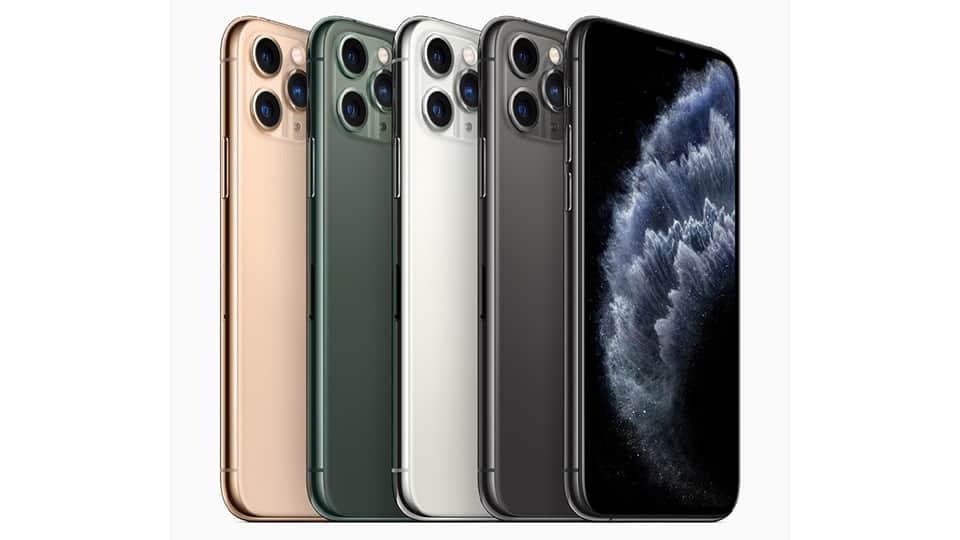
If you want kinda the best smartphone photography, then you can stop looking and just grab the iPhone 11 Pro. Honestly there’s no other flagship phone I’d point to if you want something better, right now.
It feels like the most put together iPhone I’ve personally used, with really solid battery life, and a camera that’s top-tier.
That whole vibe is so different.
The front of the iPhone 11 Pro looks basically like the iPhone XS, same notch situation up top, and those thick bezels around it. Yet the second you have it in your hand, you’ll feel it right away , it’s clearly not the same.
The first thing I noticed, weight and overall thickness. It feels kind of chunkier, more substantial , like a thicker heavier iPhone, and yeah that’s exactly what it is. The iPhone 11 Pro is 11 grams heavier than the Apple iPhone XS. It doesn’t feel awkward by itself, and I got used to it pretty quickly after a few minutes. Also, that claimed four-hour battery bump is sort of because there’s more room inside, larger battery space, you know?
If you’re into compact phones, then this is the model. The 5.8-inch screen size helps it sit in the palm of my hand pretty naturally, and I don’t have to extend my fingers just to reach parts of the display. It’s great.
The next thing you’ll notice is the frosted glass back that’s less prone to fingerprints, the smooth and focused Apple logo, that giant camera mound. Apple wants you to know there are three cameras on the back, which is why each camera is not only individually raised by metal bezels, but the mound that houses them is also raised, carved from the same piece of covering the entire back of the phone. It’s not particularly good-looking, but you quickly get used to the look.
Even so, there are curious omissions, the most annoying being the lack of a USB-C port. That means carrying one cable to charge all of our devices. We’re all ready for it, Android phones have been using it for years, and Apple knows it’s inevitable – look at their laptops. So why not add it to this device Pro as it did with the most recent iPad Pro?
The next omission is 3D touch. I’ll admit, I think I’ve never used 3D touch, but after losing it, I’ve learned how often I do. Force-pressing the camera and flashlight shortcuts on the lock screen take you directly into the app with a relatively strong click.
I’m sorry I gave you the 3D touch. RIP.
Long-pressing to open these shortcuts via Haptic Touch, first introduced in the iPhone XR, not only takes longer, but it also feels like a step down – a strange feeling found on the first iPhone. I’m sorry I gave you the 3D touch.
Apple says the removal of 3D touch adds more battery capacity, and although I would lament the loss, I think many people will appreciate the battery gain.
A great screen
With a name like “Super Retina XDR,” the screen enhancements on the iPhone XS are significantly better – and they are. The iPhone XS’ OLED display is already impressively balanced and vivid, but the iPhone 11 Pro doubles the contrast ratio, improves HDR, and boosts maximum brightness to a peak of 1,200 nits.
Normally you’ll only get up to 800 nits since that’s 1,200 nits when watching HDR content. But all this adds up to a screen you can easily view indoors and outdoors and adjust flexibly to bring out the best highlights and the hardest blacks to see. The colors appear vivid but accurate, giving it a little pop on the impressive Samsung Galaxy Note 10, which seemed a bit oversaturated in my eyes.
It’s nice to see and sort of a pleasure to watch videos, thanks to that sharp 2,436 x 1,125 resolution. If you end up watching tons and tons of movies or videos on your phone, it’s worth thinking about the Apple iPhone 11 Pro Max, it has a bigger 6.5-inch display, but honestly I’m fine with the screen size here.
Killer performance and dark iOS
Apple tells us the new A13 Bionic chip brings up to 20% faster CPU and GPU performance, and sure, the benchmarks seem to back it up. This is, basically, the fastest phone we’ve ever tested, so gaming, getting work done, or just scrolling through music and social media stays smooth on the iPhone 11 Pro.
Here are a couple benchmark results:
AnTuTu 3DBench: 455.778
CPU Geekbench 5: 1,323 single core; 3,503 multi-core
That AnTuTu score is the top number we’ve ever seen on a smartphone, it beats phones like the Samsung Galaxy Note 10 Plus.
iOS 13 finally gives us the long-awaited dark mode, plus privacy-minded stuff like Sign in with Apple, where apps can get location access on a per instance basis and there are other features as well. There are more new ideas, and little upgrades too. Check out our iOS 13 in-depth renders for the full picture, but for the iPhone 11 Pro specifically, the operating system feels smoother than it ever has.
Three threats to reclaim the camera crown
Nearly a year after introducing Night Sight’s magical night vision mode on the Pixel 3 (and several manufacturers releasing their versions in the interim), we’ve finally got it. Apple, with this desirable feature, along with the new ultra-wide-angle lens – another piece of Apple’s camera game has fallen behind the competition.
Another new feature that was announced is called Deep Fusion. That means for medium to low-light photos, machine learning algorithms run pixel-by-pixel analysis on photos taken in this range, optimizing detail, color, and sharpness. Sounds great, but unfortunately, we’ll have to wait and see how well and fast this works.
Apple now has its facilities covered to regain the dominance of photography, and I can confidently say that this group of three 12-megapixel dreams is the best camera system available today. Is it perfect? No. In the flagship smartphone camera arena, every camera has its moments where competitors’ shots come out better or more to your liking. With the iPhone 11 Pro, those cases are less common.
Let’s get this over with pretty quick, the iPhone 11 Pro can shoot really solid photos in daylight. It uses Improved Smart HDR which kinda applies exposure tweaks to parts of the scene it recognizes , like the sky or a few flowers, and things like that. When you press the shutter button , get the photo you actually want, then do the one overshoot afterward, so you end up with a result that has the best possible detail and the least amount of noise.
Overall, the iPhone 11 Pro makes some of the best daylight shots you can really get from a phone. You know night mode isnt really mandatory after dark ,and the same goes for its sharp exposure and pretty solid detail capture. Still , some noise can show up , and it may creep higher than you expect.
(Refurbished) Apple iPhone 11 Pro, US Version, 64GB, Midnight Green – Unlocked: Buy it now
Simple Mobile Prepaid – Apple iPhone 11 Pro (64GB) – Midnight Green [Locked to Carrier – Simple Mobile]: Buy it now
Night mode
Also, enter Night mode. This automatic feature enables itself when the iPhone recognizes a scene that is dark enough to warrant. With Night mode turned off on the Pro and compared to the iPhone XS, the result is a slightly brighter and better-looking picture.
You can adjust the aggression of Night mode by setting the exposure time to the maximum, auto, or off, but this can only be adjusted within the parameters the iPhone sees fit. For instance, some scenes may be bright enough that it only allows a maximum exposure time of one second, even if that is also the auto setting. You can stretch up to 10 seconds or more in much darker scenes, while auto can choose two or three. Most photos taken in automatic mode seem to fall into the one to two-second range.
The main exception to this is when you’re taking pictures of the stars – something very few smartphones can do. For this, you’ll want to increase the exposure time to the maximum and enjoy the snapshots that iPhone users once thought were possible only with DSLR cameras. They’re not DSLR quality and have a significant amount of noise, but long exposures produce nice portraits of the stars without brightening the sky so much that there’s a gray or blue streak.
However, adding some foreground to this equation tends to make the sky look artificially blue and gray. In this regard, Huawei P30 Pro can still win awards for such photos for now, but further comparison is needed, and I don’t forget about the upcoming Pixel 4 astrophotography mode.
In terms of functionality, once I started taking photos at night, I never cared that Night mode couldn’t be manually turned on. Being automatic, you end up disallowing it in a situation where you force it to cross its limit and thus create a worse picture than being enabled. That is a common issue I’ve noticed with Night Mode on the Galaxy Note 10; for example, sometimes you need to shoot in both modes to find out which mode is needed.
As with all its camera features, Apple’s goal with Night mode is, to give you the best chance at capturing that perfect shot without having to think much at all , and in most cases. In almost every case, I’ve seen the iPhone 11 Pro do deliver on that promise. Compared to Google’s Night Sight on the Pixel 3, the iPhone 11 Pro’s Night mode felt more photographic in how it interpreted lighting while also pulling in a bit more fine detail than the Pixel 3.
The iPhone’s Night Mode makes scenes look like a photographer’s professional studio setup. It gives a more even light across the entire scene, while intentionally emphasizing certain areas in your photo and keeping bright highlights under control, so it comes off more natural, and yes, more aesthetically pleasing.
Google’s night vision does a lot of that work really well. However, it tends to fall behind fast when the scene gets tricky with highlights, especially in dynamic moments, which often leads to those parts getting overexposed and The photo ends up looking too bright, kinda artificial , compared to the iPhone. That’s a difference you can spot right away in the background of the two photos.
While both expose and blur the flowers and grass, the iPhone still prioritizes the foreground with the light, making the subject (flower) stand out. At the same time, Pixel’s algorithm can’t take your eyes off the flowers by an extremely bright background area. That is the difference that the iPhone 11 Pro makes: creating a night photo that is brighter and better.
Samsung still has grounds for compensating both Google and Apple, as its night mode is the least practical and likely to make worse shots better when it’s not an absolute necessity.
A variety of possibilities
Taking photos with the iPhone 11 Pro’s new ultra-wide-angle camera is a joy and offers the versatility I’ve enjoyed on flagship Android phones for several years now. As always, Apple’s rollout at this late stage means the company has done it a little differently and better than the competition.
Starting with distortion correction, the iPhone 11 Pro does enough to correct the curvature of the edges of images commonly found on ultra-wide-angle cameras without making the shot look awkward. It also maintains the elongation that makes ultra-wide shots fun to shoot, creating a balance that inspires the continued use of this camera.
Especially in larger landscapes and large subjects, an ultra-wide-angle lens is a must, even for scenes where it is unnecessary; switching to this camera after capturing the original image becomes necessary to see how great it looks on super wide.
The solid, kind of unification between all three cameras (telephoto wide-angle and ultra-wide) it also kind of shifts attention, less about the sheer quality of the photo you want to capture and more about the overall style.
There’s a slight but noticeable drop in quality with the ultra-wide lens, especially in low-light situations, mainly because of the slimmer f/2.4 aperture. Compared to f/1.8 and f/2.0 on the main and telephoto cameras, respectively , these settings let in more light and they usually give you better detail plus tighter control over dynamic range.
Aside from that, my only other gripe is that fixed focal length lens, which only focuses properly when the subject is at least a meter away. Most smartphone ultra-wide cameras have this limitation, but it’s nice that Apple’s launch a bit later makes more sense with a changed focus. On photos like one of the cars, I’m forced to take a step back or use the prime lens when all I want to do is get up close and stretch the car for a unique look. Unfortunately, that means getting shot with only a very small portion of the vehicle barely in focus and the rest blurred.
Improved Portraits and Selfie!
The iPhone 11 Pro takes better portraits than ever, accurately blurring the background of a subject while making it look natural (like from a DSLR). You won’t get this high precision with factories and other objects, but it still works pretty well.
One new addition is that you can now take Portrait mode photos using the main lens, not like before where you had to lean on the telephoto lens only . So portrait quality has improved quite a bit especially at night, because the main f/1.8 lens lets in more light, which leads to cleaner exposure photos.
Also, with the upgraded front facing camera, the new 12-megapixel sensor boosts the sensor size compared to the old 7-megapixel setup, but portrait selfies still land in a cropped 7-megapixel mode . You can rotate the phone into landscape, or you can hit the zoom out button while in portrait, to open the scene up to the wider 12-megapixel format, though that doesn’t work from within Portrait mode itself.
For selfie portraits, as usual, it applies blur in a smart way, and it also captures more fine detail while using less smoothing.
Then there’s the new Slofie (slow motion selfie) feature. It’s genuinely fun, slowing down both you and the background using 120 frames per second 1080p video, and it looks great when you want to show where you’re at.
Two things to keep in mind: you can’t zoom in on a wider view the same way you can with normal selfies, and you also can’t really fix overexposed backgrounds after the fact. You can, however, record regular selfie videos up to 4K at 60fps if that’s your thing , which is a first for the iPhone lineup.
Improved cinematic stability
Speaking of smooth videos, the iPhone 11 Pro really makes you feel a bit like a pro, when you watch the clips you can shoot on this device. Shooting in 4K 60 FPS is incredibly smooth, and with the iPhone 11 Pro’s improved cinematic stabilization it feels steady, like it doesent wobble as much.
Plus, the smooth zooming and those relatively stable, high-quality images across different lenses make it pretty easy to record a stunning video on the iPhone 11 Pro, day or night.
Batteries get you into a second day.
Our standard screen-on test puts the phone at full brightness and plays 1080p video on Wi-Fi, where the iPhone 11 Pro scored 12 hours on the dot, with the Max clocking in at over ten and a half hours. While these tests are not a perfect indicator of daily use (our iPhone 11 lasted about five hours in the same test but easily lasted for a day of use), the data This data combined with my usage shows strong battery life for the iPhone 11 Pro.
Finally, we have an 18-watt charger in the box. While the charging speed is much improved compared to the 5-watt charger, which takes about three hours to charge the XS from 0 to 100, it still takes about 2 hours to charge the iPhone 11 Pro fully. That falls behind most Android flagships, fast charging almost 90 minutes or less.






Tech Reviewer & Product Analyst
Định Bia has spent over 10 years testing consumer electronics with a focus on smart technology. He work as a product advisor at Biareview where he helped customers find the right devices for their needs. He personally tests every product featured on this site using a consistent evaluation framework covering quality, durability, and value. All reviews are based on experience, not influenced by the manufacturer.