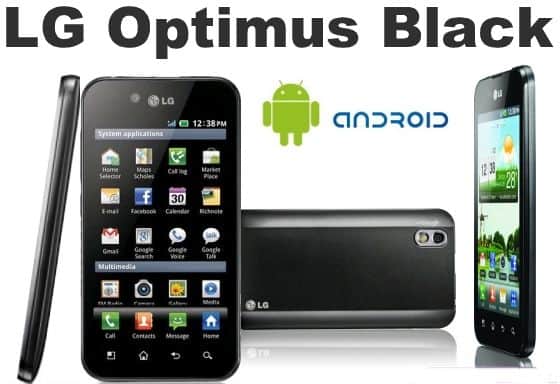
Design
In terms of design, the LG Optimus Black is not too particular with strong rigid contours, which has become a tradition of the current smartphone. Machines covered by black plastic, 4-inch touchscreen and the usual buttons like other Android phones. The back of machine is coated shiny eye catching and a 5 megapixel camera.
LG Optimus Black is one of the thinnest smartphone with a thickness of 9.2mm and can be tucked comfortably with pocket. The weight of the machine weighs only 111g due to the plastic shell. LG Optimus Black has overcome fashion handset Apple iPhone 4 thickness 9.3mm and weighs 137g.
Screen
LG Optimus Black’s screen is extremely bright and clear, good contrast can display clear text. We can say that owns Optimus Black screen brightness better than current smartphones. However test screen outdoors under strong sunlight, anti-glare capabilities of Optimus Black is not really as good as the advertisement. For comparison with other products, the Optimus Black “decent” a bit more, but still not enough to impress the users.
Display resolution of Optimus Black is 480×800, but could not match the Apple iPhone 4’s screen 640×960, but visibility was still very sharp and precise. However LG adjust the color contrast on the Optimus Black is slightly larger, making images and videos rather garish colors and unnatural. White on the Optimus Black slightly yellowing and if put together iPhone 4 will easily see the screen of the Apple subdued and more natural, realistic colors.
Can not deny that the screen of the Optimus Black is very good, bright and deep color range. Although intensity light better, but the of the color visibility not good equal Apple iPhone 4.
Display Technology: The NOVA Display
One of the headline things about the LG Optimus Black is its 4-inch NOVA display, which LG basically pushed as the brightest display you could get on a smartphone back then. At launch, it was marketed as the brightest display available, and you know how that goes, bright sunlight is always a bit of a problem for phone screens. So, LG said this panel could hit up to 700 nits, meant to make outdoors viewing feel way more manageable.
On the spec side, the display runs at 480 x 800 pixels. That works out to a pixel density of about 233 PPI, so yeah, it might look kind of modest compared with what we see today. But in 2011, that was pretty normal for a mid-range handset. Color-wise, it looks lively, with solid contrast and deep blacks, which makes the whole setup pretty friendly for video watching and photo browsing, not just text.
Another big upside that gets repeated is the energy efficiency. LG claimed the screen used around 50% less power than older LCDs when showing white. And white is kind of the usual “everything” color, since it shows up a lot in web pages, menus, and other daily stuff. LG attributed that efficiency to tuned backlight tech along with software tweaks that cut consumption, without really dropping brightness or the color feel.
In real life use, the NOVA display seems to match most of the hype. The brightness is high enough that the screen stays readable even in direct sun, which is a huge deal if you end up outside often. Also, the viewing angles are really good , you don’t get much annoying color shifting and the brightness doesn’t collapse too quickly when you look from the side. So it’s easier to show things to other people or just check the screen from different angles without things turning dull or washed out.
However, there are a few trade-offs tied to the NOVA display technology. While the screen is bright and vibrant, it doesn’t really reach the deep blacks and full-on punchy colors you’d see on AMOLED displays , which were starting to get real popular around that same time . Also the resolution, although fine enough, doesn’t quite have the same “needle sharp” sharpness that higher-resolution screens would later become more common in the years that followed.
All in all, the NOVA display is one of the standout bits on the LG Optimus Black, giving you a bright, energy-efficient screen that works well across different lighting scenarios. It kind of shows off LG’s push for new display ideas and it helped the Optimus Black separate itself from the competition.
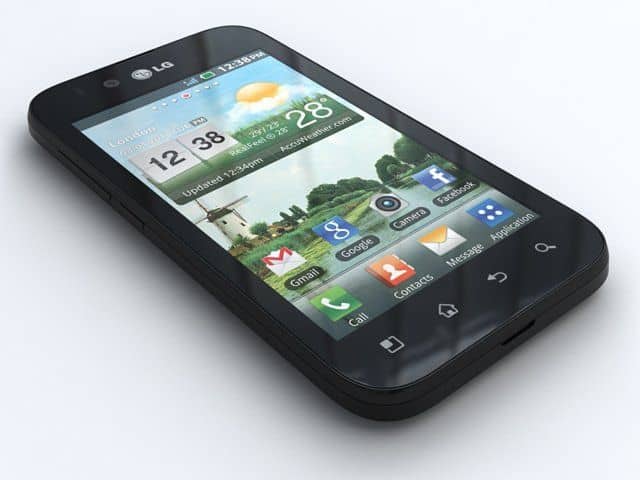
LG-P990h optimus 2X Black ANDROID 8MP Camera Smart phone Unlocked GSM Quad Band phone: Buy it now
Performance and Hardware
Inside, the LG Optimus Black runs on a 1GHz single core TI OMAP 3630 chipset, and it sits with 512MB of RAM, more or less. When it first came out, this kind of setup felt fairly standard for mid tier phones , so for daily stuff it worked well, yet it didn’t really shine when you push things harder.
In actual use, the Optimus Black deals with routine activities like web browsing , social networking, and messaging without too much struggle. The interface stays fairly fluid, and most applications open fast enough that most people won’t complain. Still, once more demanding apps and games started appearing, the weak spot of that single-core processor plus the limited RAM showed up, sooner than you’d like.
You can technically do multitasking on it, sure but it can feel kinda less seamless than what you get on stronger devices. Switching from one app to the next sometimes causes those visible pauses , and if the memory starts running low the phone may reload an app. That can be really annoying, especially if you’re already used to how newer phones behave in a more fluid way.
When it comes to games the Optimus Black is kind of mixed. It can handle less demanding games, yet more graphically intensive ones tend to struggle to keep things steady. You might see frame drops , and load times end up taking longer than on more powerful smartphones. If you’re the type for casual play you may still tolerate it, but if you want a more durable gaming experience then yeah, you’d probably end up disappointed.
Storage wise the Optimus Black includes just 2GB of internal space, which was pretty cramped even around 2011. Still there’s a microSD slot , so users can stretch things up to 32GB. That’s an important advantage because it gives enough room to stash apps photos videos and music without constantly thinking about storage limits.
For connectivity it supports 3G, Wi-Fi 802.11 b/g/n, Bluetooth 2.1 and GPS. The lack of 4G LTE is pretty understandable considering the release timing , but it also means mobile data speeds are slower than what people often expect from newer models. Wi-Fi performance seems solid with decent coverage and steady connections, while Bluetooth and GPS do what you’d hope, for connecting with accessories and using maps for navigation.
One of the more innovative hardware bits in the Optimus Black is that it comes with a Gyroscope along with the usual accelerometer and proximity sensor, sort of like extra sensing where you need it. The gyroscope helps with motion based input and makes movement tracking feel more precise, especially in games or apps that actually support it. Back then, in 2011, this seemed like a pretty advanced add-on for a mid-range phone , so it kinda gave the device a bit of future proofing , even if only partially.
In general, the performance of the LG Optimus Black is decent for its era, but it doesn’t really match the high-performance scores from flagship devices. The single-core processor plus the limited RAM are fine for straightforward tasks, yet they tend to buckle when you throw heavier applications at it, or when multitasking gets going. If your usage is more moderate, you’ll probably get a satisfactory experience, but if you’re more of a power user you might feel it’s lacking , after a while.
Operating system
Optimus Black is equipped with Android 2.2 Froyo operating system rather than the latest version of Gingerbread. But there is not too much difference between the two versions, but unknown the reason that LG products installed for their son an old operating system. Anyway LG has promised to update the Gingerbread when Optimus Black officially sold.
One of the features of the Optimus Black is a button located at the far left. Users can hold the key and tilt the machine to switch to other pages instead of using your finger to switch every single page. While viewing photos, pressing this button will have a zoom function. This button may seem redundant because it no faster than your finger on the touchscreen.
Camera and battery life
With a 5 megapixel camera, LG Optimus Black for photos with pretty good quality, smoother video capture and can be compared with the tourist camera midrange. Front Optimus Black also has a 2 megapixel camera for video telephone to a friend (and also has the function of photography).
Battery life of the Optimus Black inadequate. Fortunately, although the screen brightness without consuming too much power, but if you are constantly playing games and downloading data, the Optimus Black hard to “use” for a day.
Software and User Interface
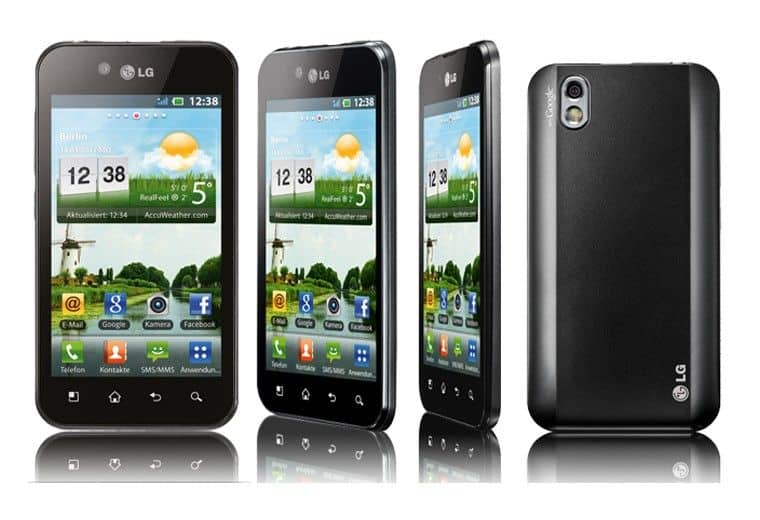
The LG Optimus Black came out originally with Android 2.2 Froyo , and later it could be upgraded to Android 2.3 Gingerbread . If you think about it, Android 2.3 wasn’t just a little patch, it was a pretty notable shift, bringing extra refinements in speed , the user interface feel , and battery management so overall the handset felt more capable, also more user-friendly.
Now LG did its usual thing by tweaking the Android experience with their own custom user interface . It had this set of features and visual upgrades that were kind of its own style. The Optimus Black’s interface was made to be sort of intuitive and simple to maneuver through, with the aim to make everyday actions easier to reach. LG’s custom skin included stuff like resizable widgets , flexible home screens, and a bundle of pre-installed applications , which basically made the “right out of the box” experience feel more valuable.
On the lock screen, you got a straightforward slider to unlock , plus little shortcuts for the phone and the messaging apps so quick access was there when you needed it . The home screen layout was pretty typical, multiple pages for widgets and app icons, those could be tuned to match whatever the user wanted. And the notification bar up top helped too, it gave quick switches for Wi-Fi, Bluetooth , and screen brightness, so people could tweak settings without having to dig around inside menus.
One of the software features that LG kind of really put forward was the “Gestures” functionality . The LG Optimus Black came with a bunch of gesture based controls, meant to make the whole user experience feel more intuitive maybe even slightly more engaging . Like for instance , people could answer a call just by flipping the phone over, or silence an incoming call by laying it down face, of course . Those gestures were kind of new-ish back then and they added a small extra layer of convenience for everyday use, but still, the results weren’t always perfect. Some users said it could be hit or miss, like the performance didn’t always behave the same way.
There was also that other interesting thing, the ability to customize the on screen buttons. Users could rearrange the order of the capacitive buttons under the display, or they could change what those buttons do, to match their own preferences . That kind of customization was pretty uncommon at the time, and it let people sort of tune the interface so it felt more “theirs” rather than just generic.
The overall visual style of LG’s custom UI was clean and modern, though it didn’t really wander too far from the usual Android look and feel of that era. Some users liked the added features and the customization options, but others leaned toward the more stock Android approach, which they considered quicker and less bloated , with fewer extras getting in the way.
One downside to the whole software experience on the Optimus Black was this kinda slower pace when it came to updates. The phone did get an upgrade to Android 2.3 Gingerbread, but it was also one of the last among its peers to reach that point. For a lot of people, LG’s update schedule became a regular annoyance, since they really wanted the newest features plus those security enhancements. And because the rollout was so slow, the Optimus Black started feeling outdated pretty quickly once newer Android releases were out there.
On top of that, the custom interface plus the pre-installed apps left it with a noticeable amount of bloatware. This didn’t always help performance, even if things were mostly usable. Sure, you could disable many of the built in apps, but you generally couldn’t get rid of them in any easy way without rooting the device, and well rooting tends to void the warranty, so that was a big deal for some users.
Battery Life
The LG Optimus Black ran on a 1500mAh removable battery , which was pretty normal for smartphones from that time. Battery life was basically a key concern, and LG tried to manage power draw, especially thanks to the energy efficient NOVA display.
In real day to day use, the battery life was fine, just not something that felt amazing. If usage was moderate, like web browsing , social media, texting, and the occasional call, the phone could usually stretch to a full day on one charge. Still, if you pushed it, like streaming videos, playing games, or using GPS navigation, the battery would drop faster, and you’d often need a top up before the day ended.
One of the benefits of the Optimus Black ‘s design, was the removable battery . In a way it let people carry a spare battery and swap it out if they needed more juice on the go. I mean, it was pretty handy for power users or travelers who not always have a charging outlet nearby.
The phone also came with the usual kind of battery-saving bits , things like lowering screen brightness, restricting background data, and switching off the non-essential connections, such as Bluetooth and Wi‑Fi, when you were not using them. These settings did help stretch the battery life when it mattered, but yeah they did ask for a bit of manual nudging from the user.
Charging the Optimus Black was fairly fast, mostly because it supported ordinary micro‑USB charging. Still, the device did not have any advanced charging tricks, like fast charging or wireless charging. Those options were not really a thing in many mid-range smartphones back then.
All in all, the battery life of the LG Optimus Black was usable, but it wasn’t really a standout. Most users could get through a typical day, but heavier users likely had to keep an eye on power usage, or just bring an additional battery along.
Epilogue
Except the screen is very bright, and the rest do not have too many good points on the LG Optimus Black distinctive enough to beat its rivals. This is a product with features pretty comprehensive and will be a bad choice for those who are new to the Android.
Related Posts



Tech Reviewer & Product Analyst
Định Bia has spent over 10 years testing consumer electronics with a focus on smart technology. He work as a product advisor at Biareview where he helped customers find the right devices for their needs. He personally tests every product featured on this site using a consistent evaluation framework covering quality, durability, and value. All reviews are based on experience, not influenced by the manufacturer.