Table of Contents
amazon Netgear NightHawk Pro Gaming XR700 reviews
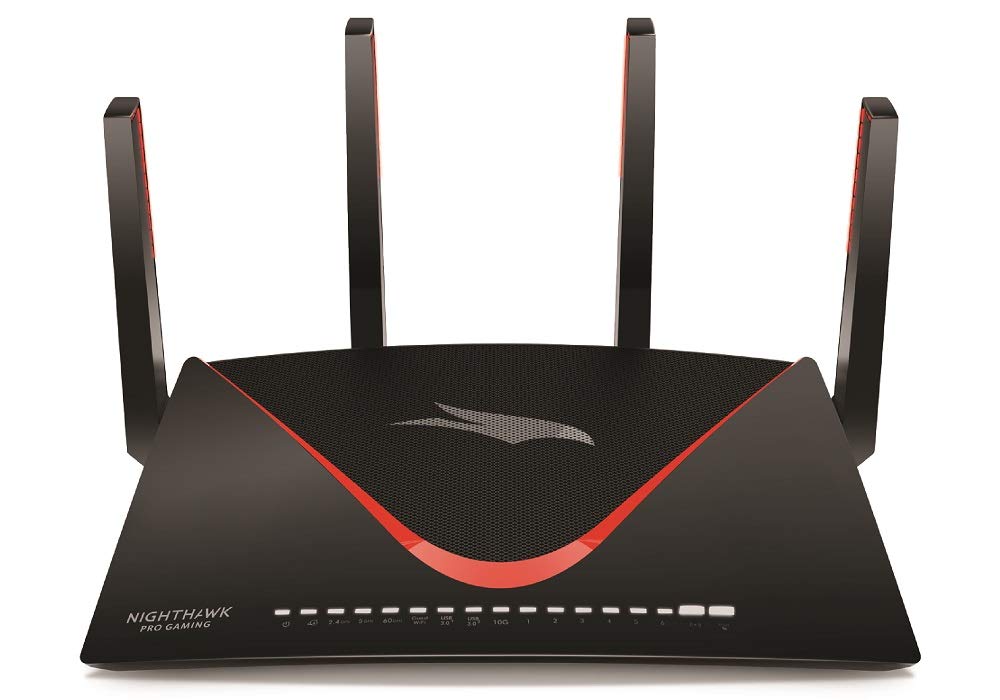
The newest addition to Netgear’s line of WiFi routers, the NightHawk Pro Gaming XR700, is a great tri-band router at a comparable price point. Like the Nighthawk X10 AD7200 Smart WiFi Router (R9000) we reviewed last year, the XR700 supports 60GHz 802.11ad WiFi technology. It also offers 10Gb Ethernet connectivity and link aggregation, six LAN ports, and powerful gaming controls.
Gamer-friendly design and features
The XR700 clearly is a gamers’ edition: with a sleek black case, red bezel, and mesh see-through top. Measuring 2.5 x 9.6 x 12.7 inches, it is bigger than both the TP-Link Archer C5400X and Asus ROG Rapture GT-AC5300 dimensions, hence will sit large on your desktop.
I/O ports are very comprehensive, including one gigabit WAN port, one 10Gb SPF+ LAN port, meant for a speedy 10Gb switch or to be connected to a 10Gb network, and six gigabit LAN ports (two of which can be configured for link aggregation). Along one edge of the case are two USB 3.0 ports. Internally, the router has four non-moving amplified active antennas and a row of fifteen LED indicators, which include power, internet (WAN), the three radio bands (2.4GHz, 5GHz, 60GHz), USB (two ports), 10Gb ports, six LAN ports, and guest WiFi. To the right of these LEDs are the WPS button and the WiFi On/Off button.
The XR700 has a quad-core CPU clocking at 1.7GHz, 512MB of flash memory, and 1GB of RAM. The AD7200 Router title is because of its data rate capability of 800Mbps on 2.4GHz, 1,733Mbps on 5GHz, with a whopping 4,600Mbps on 60GHz. The XR700, like the Nighthawk R9000 and TP-Link Talon AD7200 Multi-Band WiFi Router, supports 802.11ad networks working on the 60GHz band, commonly known as WiGig. WiGig can deliver throughput rates far faster than you’ll ever see on the 5GHz 802.11ac band, but it can’t penetrate walls and thus communicates only within the same room. To avail these speeds, all clients have a WiFi chip supporting 802.11ad networks.
The XR700 supports Multi-Input Multi-Output (MU-MIMO) streaming, transmitting data to the client simultaneously instead of sequentially. But again, client devices must support MU-MIMO to take advantage of the enhanced throughput. It also supports beamforming, direct signal transmission to clients, and Smart Connect, allowing the Router to select the best radio band based on traffic and signal strength. Like the X10 Router, the XR700 supports 160MHz WiFi, doubles the 80MHz channel width on the 5GHz band for faster throughput, and supports automatic backups to Amazon Drive, a storage service. It’s cloud-based and lets you manage and share photos, videos, and audio files using the Plex Media Server app.
The XR700 uses the same great web-based interaction management system as the NightHawk XR500. Powered by Netduma’s DumaOS, it allows you to monitor network activity, configure network settings, allocate bandwidth, optimize your network for gaming, and more. The dashboard displays CPU and bandwidth usage graphs, guest network status, WiFi and internet status, and installed apps. On the left is a menu containing tabs for accessing Geo-Filter, QoS, Device Manager, Network Monitor, Hybrid VPN, System Information, and Settings.
Geofilter settings can help reduce latency by limiting the distance to the hosts you’re connecting. Just put your home location on the map and a distance to prevent Gamers and servers outside that area from entering and hosting your game. You can customize the geofilter configuration for each system on your network and assign different ranges for different games. QoS settings allow you to limit upload and download bandwidth rates for each connected device by clicking on the device name and using the slider to change the percentage of bandwidth. You can prioritize laggy games and use the Anti-Bufferbloat setting to ensure smaller applications get enough bandwidth even if they are not prioritized.
Device Manager shows a network map showing all connected devices. Click on any device on the map to access its IP and MAC address settings and block or allow access to the network. The Network Monitor tab allows you to see a graphical graph of the upload and download bandwidth usage for all devices on the network, and the System Info tab opens a screen with statistics about the usage. CPU, RAM, and flash memory usage allow you to see what kind of network resources your application uses.
Under the Settings tab, you can adjust basic parameters related to Internet, Wireless, LAN, and Guest Network interfaces. Content Filtering settings allow you to block access from certain sites, set a schedule for visits, and enable email alerts when an attempt is made to access a blocked site. That said, it will lack the ability for stronger age-specific parental controls like the TP-Link Archer C5400X. You find more advanced settings used for setting Port Forwarding, Port Enabled, VPN Service, Remote Management, and Static Routing. Missing are options for malware and virus shield, available with the Asus ROG Rapture GT-AC5300.
Keeping up with the competition
To begin with, installing XR700 required me to power-cycle my cable modem by unplugging it. It was to allow me to connect the XR700 to the modem and the host computer. The Router was started, and www.routerlogin.net was typed into the URL bar of my browser to open the Setup Wizard. I selected my LAN port type (1Gb or 10Gb); then, I waited around one to two minutes for the wizard to detect my connection and test my internet speed. I proceeded to create an Administrator account, answer two security questions, and give names for 2.4GHz and 5GHz bands. Then came a firmware upgrade, and it’s done.
The XR700 delivered some all-around good results in our performance tests. It scored 101Mbps in the 2.4GHz proximity test (in the same room), just above the Netgear NightHawk X10 and just behind TP-Link Archer C5400X. Asus Rapture GT-AC5300 led the way by scoring 128Mbps. At 30 feet, the XR700 quite perfectly scored 75Mbps that was equal to that of the Rapture GT-AC5300. Nighthawk X10 scored 73Mbps, while Archer C5400X scored 76Mbps.
In our 5GHz proximity test, the XR700’s 539Mbps score was slightly slower than the Archer C5400X and NightHawk X10. The Rapture GT-AC5300’s 601Mbps is still the fastest we’ve come across. At 30 feet away, the XR700 delivered speeds of 308Mbps, beating the Archer C5400X, but not the Rapture GT-AC5300. NightHawk X10 took the top honors with a score of 392Mbps.
To test the XR700’s MU-MIMO throughput performance, we used three identical Acer Aspire R laptops equipped with Qualcomm’s QCA61x4A MU-MIMO circuitry. On the MU-MIMO near test, its score of 157Mbps was nearly identical to the NightHawk X10 (156Mbps) but significantly slower than the Archer C5400X (220Mbps) and Rapture GT-AC5300 (225Mbps). On the 30-foot test, the XR700’s 104Mbps score was only a few points behind the Archer C5400X and NightHawk X10. Rapture GT-AC5300 leads the way with 135Mbps.
For file transfer testing purposes with a 4.9GB folder containing a mixture of office and multimedia files for speed testing, the XR700 had a write speed of 42MBps, a score that was better than Archer C5400X and Rapture GT-AC5300 but not the NightHawk X10, which scored an impressive 77MBps. The reading test results were quite similar with the XR700 achieving 44MBps, a bit faster than Archer C5400x and Rapture GT-AC5300, yet not as fast as NightHawk X10’s 89MBps.
Everything High-End Gaming
The Netgear NightHawk Pro Gaming XR700 comes with features geared toward gamers and the latest wireless technology, such as an enthralling 60 GHz spectrum channel for 802.11ad WiFi, a dedicated 10Gb SPF+ LAN port, and wireless streaming of MU-MIMO data. The stylish DumaOS-powered management console lets you keep an eye on network traffic and allocate bandwidth for online gaming to cut down latency when games connect to servers. It does, however, miss out on the anti-malware and parental controls that other top-end gaming routers possess.
where can you get a Netgear NightHawk Pro Gaming XR700 online
NETGEAR Nighthawk Pro Gaming XR700 WiFi Router with 6 Ethernet Ports and Wireless Speeds Up to 7.2 Gbps, AD7200, Optimized For The Lowest Ping: Buy it now