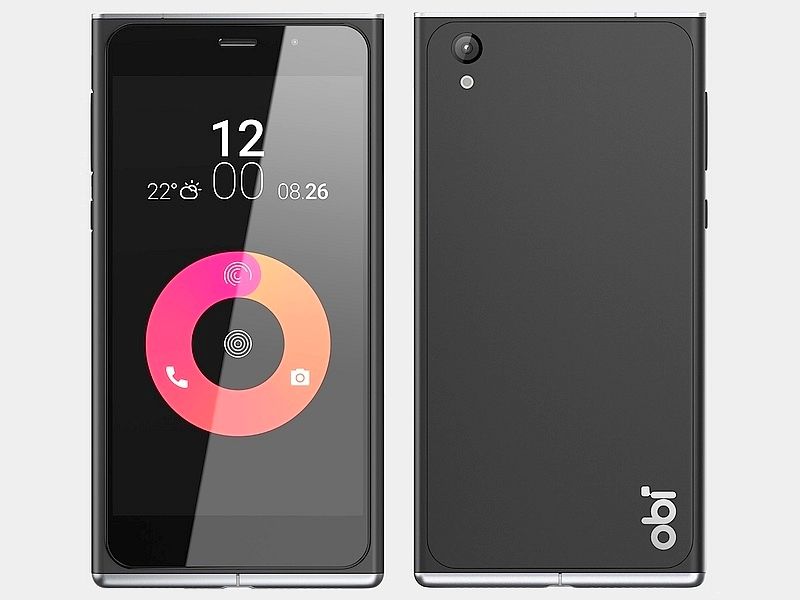
Obi SF1 product box, there are similarities with Apple’s iPods box: the phone is placed in transparent plastic frame, accessories, located in the lower part of the box. The supplied accessories include rechargeable bulbs, wire MicroUSB, SIM poked sticks and paper manuals. The manufacturers are not equipped with headphones is probably to reduce costs. Department of machine charging fast charging standard support QuickCharge 1.0, 3000 mAh battery fully charge takes about 3 hours.
If the machine box same iPod box, then key the Obi SF1 has many design features reminiscent of the Nokia Lumia 925, especially details the screen bezel and standing out. Many other phones have curved glass and a “2.5D”, but the SF1 screen standing out from the body that looks fancy but a bit rough, not smooth feeling and lack of seamless. If the less convex screen, it would greatly improve the aesthetics of the product.
Praiseworthy point in this phone is the material used in the product. The chassis feels quite rugged, two upper and lower edges with metal materials and different colors. The back side, smoother, less fingerprints, and looks quality, like the casing material on the Lumia 925.
5-inch screen of the phone has a resolution of Full HD, use IPS panels provided by the JDI company. The screen has a high brightness, wide viewing angle, but the contrast does not seem high. Due to the design of the machine should be pretty thick contour display, create impressive screen is too small compared to the machine. Ratio screen / front of the machine is only about 64%, quite low when many current smartphones have this rate of approximately 67-70%, even the Sony Xperia C5 Ultra is 76%.
Obi said this screen is coated with anti-fingerprint and equipped with Gorilla Glass toughened glass 4 promises to have good resistance to scratched.
SF1 parameters of the camera is quite impressive: after using the camera Sony Exmor IMX214 sensor 13MP resolution, aperture f / 2.0; also front camera 5MP resolution with flash. When taking the test a few initial experience unimpressive. Focusing and Brightness slower.
Performance, configuration SF1 equipped midrange Qualcomm Snapdragon 615 processor eight-core (4 core 1GHz and 4-core 1.5GHz), graphic 405. The 32GB version have 3GB RAM, and 16GB version have 2GB RAM. The configuration of the machine theoretically could say quite high. But in actual use, I noticed the machine was not really smooth when switching between tasks or when using the applications. With the game N.O.V.A 3, which automatically adjusts graphics based on the configuration of the machine SF1 also quite poor, when players feel the jerky picture. Cause PC’s performance is not impressed by the software is probably not optimized well and this will be improved in the next version of the software. Moreover, the current 615 Snapdragon chip has limited power when the graphics processor to Full-HD resolution.

Obi SF1 uses Android version 5.0.2, with customizable interface only slightly, while applications such as photography, libraries are similar to Google’s original software. The only difference lies in the machine’s screen rotation lock with quite spectacular style.
Battery Life
The Obi SF1 comes with a non-removable 3,000mAh battery, pretty much a common thing for smartphones in this category. Battery life on the SF1 is one of its standout points, it gives steady and reliable performance so most people should be able to make it through the whole day with normal use, and well, without stressing.
Day to day, like web browsing, social media scrolling, messaging , and the occasional bit of media, the battery behaves nicely, it keeps enough charge to take you from morning into evening without a recharge. If you start doing more demanding stuff, say gaming or long streaming sessions, then yes the battery runs down faster. Still, the SF1 manages in those moments too, in a pretty reasonable way.
It also supports Qualcomm’s Quick Charge 1.0. It’s not quite as aggressive as the newer versions you see in recent phones but it does charge quicker than regular charging. With Quick Charge, you can get a decent lift in power after a short plug-in session, which is handy when you are moving around and you don’t have time to wait.
For real life results, the Obi SF1 can land around 4 to 5 hours of screen time, depending on how you personally use it. That’s a solid outcome for a mid-range phone, and it should be enough for most users. Unless you are doing heavy, nonstop tasks on your phone all day.
The phone also comes with a battery-saver mode which you can tap into to extend battery life, especially when you’re running kinda low. It does this by limiting background activity and dialing back performance a little, so the device can stay efficient and you can squeeze out a few extra hours when it matters.
One possible downside is that the battery is non-removable, so once it starts to degrade over time, (which every battery does, eventually), you can’t just swap it out quickly. Instead you’d need to go to a service center, rather than doing a simple exchange. Still, this is pretty normal for most modern smartphones and the 3,000mAh capacity should hold up well for a while before you see any obvious decline.
All in all, the battery life of the Obi SF1 is more than enough for the majority of users. You get dependable day-long usage, supported by solid day to day performance, and the inclusion of Quick Charge adds that extra bit of convenience.
Software and User Experience
The Obi SF1 runs on a custom build of Android 5.0.2 Lollipop, and Obi Worldphone layers its own proprietary user interface on top. That interface is called “Obi Lifespeed”, and it’s meant to feel clean and straightforward, while also bringing in a few small touches that make it different from stock Android, you know.
Lifespeed UI uses a flatter design language, kind of emphasizing simplicity and fast, easy interaction. The icons look modern and they’re visually pleasant, plus the rest of the interface stays approachable even if you’re not really tech minded. It’s also fairly responsive, with smooth transitions, slight animations, and those little responsiveness cues that make everything feel more polished than you’d expect.
One of the main things about the Lifespeed UI is this Quick Access menu, it gives you this sort of adjustable space where you can pin , basically, the apps, people, and settings you use all the time. It’s pretty handy, because you can open it fast by swiping down from the top of the home screen. Then you’re not hunting around, you can just jump into your most used stuff or do common tasks, pretty much right away.
The Obi SF1 though , also throws in a few extra software perks. There’s a theme engine for the interface, which lets you change the vibe , like how the whole system looks and feels. You can pick from a bunch of pre-installed themes, or you can grab more from the Obi Store. Honestly it feels like a small but thoughtful touch, because it gives users room for personalization instead of “one look for everyone”.
When it comes to what’s already installed, the SF1 keeps it fairly light. That’s kind of refreshing, compared to other phones that show up packed with what people call bloatware. You still get the usual Google suite, and then there are a handful of extra utilities, like Truecaller for call handling and SwiftKey for typing. Those options tend to be practical, and if you don’t want them, you can generally remove them without too much hassle.
One possible catch is the Android version. The SF1 shipped with Android 5.0.2 Lollipop, and at launch it was already a bit dated. Even if the Lifespeed UI does a solid job of making things feel more current, some users who really care about the newest Android features might see this as a downside. And as of now, it seems unlikely that the SF1 will get big upgrades to newer Android releases, which could matter for anyone who likes staying current on software updates.
Despite this, the overall user experience on the Obi SF1 is, like in general, positive. The Lifespeed UI is well designed , and sort of easy to navigate, giving a unique take on Android, which makes the SF1 stand out compared to other mid-range phones. The software feels stable and it performs well, with no huge problems or obvious bugs, so nothing really drags the experience down.
Connectivity and Network Performance
The Obi SF1 supports several connectivity options, including 4G LTE, so in supported regions you can get quick mobile data speeds. This matters a lot for users in emerging markets, where access to high speed mobile data is getting more and more important by the day.
On network performance, the SF1 generally does its job well, with good signal reception and steady connectivity. The phone also has dual SIM functionality which is actually handy for people who need multiple phone numbers, or just want to hop between carriers for better coverage or pricing. The dual SIM setup is straightforward to switch between, and both slots handle 4G connectivity, which is a pretty nice detail overall.
The Wi-Fi performance on the SF1 is also pretty solid, with support for Wi‑Fi 802.11 b/g/n. Now, it doesn’t include the faster 802.11ac standard that you might see on some higher end phones, so speeds are a bit more “regular”, but for most stuff it’s enough like streaming video and downloading large files, you know the usual. There’s Bluetooth 4.0 too, for linking up wireless accessories, headphones and speakers type things, and it also has GPS for location services.
But one spot where the SF1 kinda slips is the lack of NFC ( Near Field Communication ) . NFC is used for contactless payments and also quick device pairing, and even if it doesn’t feel like a dealbreaker for everyone, it’s showing up more and more on smartphones across basically every price range. No NFC means people can’t use things like Google Pay or pair with certain compatible accessories as fast as they otherwise could.
When it comes to call quality, the Obi SF1 does okay, with clear voice transmission and volume levels that are easy to work with. The built in microphone and speaker are average, meaning they’re fine for regular phone calls and hands free use. The speakerphone mode works, but it’s not super loud or super sharp, so it’s better in quieter situations.
Overall, the connectivity and network performance of the Obi SF1 are strong, with dependable 4G support and decent dual SIM functionality. NFC being missing is a small downside, still for most users the SF1 should cover their connectivity needs without too many problems or major headaches.
Conclusion
The Obi SF1 is a mid-range smartphone, it kind of delivers that “pretty but practical” feel ,with a noticeable emphasis on design and the day to day user experience. The floating glass display helps it look more special than a lot of competitors, plus the solid build quality and the Lifespeed UI (that unique little interface vibe) makes it feel more personal. So if you care about aesthetics and you like a customized look, this one stands out.
On the performance side, the SF1 does what it should with everyday tasks pretty smoothly. Still, it may not be the best pick for power users, or for anyone hunting for the newest, cutting edge features. As for the camera, it is decent when lighting is good, but in low light it tends to fall short. Also, the lack of NFC is a small downside, and honestly it’s becoming more and more expected in this connected world.
That said, the SF1’s weaknesses are kind of balanced out by its strengths. The battery life, the display quality, and the overall value for money pull a lot of weight here. You’re basically getting a premium style experience, at a price that feels more approachable. For budget minded buyers who don’t want to drop style or basic usefulness, it feels like a strong option.
So yeah, in conclusion the Obi SF1 shows that mid-range phones can do more than only “basic features.” They can still deliver a premium feel and some genuinely distinct user experience. If you’re looking for an affordable yet stylish smartphone, the Obi SF1 is worth a look, especially when design and usability come up high on your priority list. Even if it doesn’t chase the latest and greatest, it remains a well made device with good value and a distinctive presence in the crowded mid-range space.
Related Posts

Tech Reviewer & Product Analyst
Định Bia has spent over 10 years testing consumer electronics with a focus on smart technology. He work as a product advisor at Biareview where he helped customers find the right devices for their needs. He personally tests every product featured on this site using a consistent evaluation framework covering quality, durability, and value. All reviews are based on experience, not influenced by the manufacturer.