The premium segment is always the segment that helps build a brand of gaming gear that has a certain position in the eyes of gamers world. High-end products, advanced configurations, modern design and solid texture … are always something that many gamers dream about. Of course, going with a superior quality is always a very pricey proposition. And the choice of the majority of gamers is always the model of high-performance gaming mice. That’s why high-end products get the word out, but it’s hard to get the “middle” of the mid-range product line, and that’s why the mid-range segment becomes a “matrix”. Gaming gear of all kinds come from manufacturers all over the world.
Ozone Gaming – the brand name of gaming gear from Spain is no longer a name unknown to Asia gamers because many of its products are competitively priced, good quality has soon made a good impression on the fans. Among them is the Ozone Neon gaming mouse line.
Ozone seems to be very psychological when it comes to creating neon lines with two completely different nature products. The Ozone Neon 3K with optical sensor, aimed at a highly demanding gamer, and the Ozone Neon with a laser sensor aimed at a fast-paced, mid-range segment – something that no manufacturer has ever done before.
Although possessing a laser sensor, the Ozone Neon is a cheaper product, so the packaging of the mouse also shows the cheap. Paper boxes are shaped personality and red-black color is quite eye-catching, the front of the main character and some basic features are introduced on the side. The back as usual is still more introspective than the main focus of the product. However, the information on the box is still very sketchy, not really detailed.
The Ozone Neon package is more complete than the Ozone Neon 3K with a manual, an Ozone Gaming Sticker and finally a software installation disk. However, with the trend of “download” as the present, the appearance of a software installation disk is quite excess.
Design and Aesthetics
The Ozone Neon comes with a modern , kind of ergonomic design that looks good and also feels practical . You get sharp lines and a smooth finish, plus customizable RGB lighting which adds this small , nice layer of personalization for your gaming setup . The main design stuff is basically like this :
Ergonomic Shape: The mouse is shaped to sit comfortably in your hand, which can help reduce strain during long sessions. It supports different hold styles too, so you can use palm, claw or fingertip grips , depending on what feels right .
RGB Lighting: The Neon has customizable RGB lighting, letting you set it to a whole spectrum of colors. It’s mostly visually striking of course , but it can also be synchronized with other RGB parts so everything matches in a cohesive way.
Build Quality: Made with durable materials, the Ozone Neon feels sturdy and robust. The build quality helps it stay reliable over time, even when the games get intense or you’re using it a lot .
Sensor and Performance
Under the surface, the Ozone Neon relies on advanced sensor technology that is really important for precise, responsive performance. The key points are :
Optical Sensor: It uses a high-precision optical sensor, and the DPI can be adjusted for different gaming needs. This gives accurate tracking and quick reactions, which is critical in competitive play.
DPI Settings: You can customize DPI levels, often from 100 up to 16,000 DPI. That flexibility means you can jump between sensitivity levels fast, so you adapt to different situations or game types .
Polling Rate: The Neon includes a high polling rate , which helps cut down input lag and improves how responsive the mouse feels. That matters most in fast-paced games, where quick reactions, are basically everything .
Ozone Neon Black Precision 6400Dpi Laser Ambidextrous Gaming Mouse: Buy it now
Ozone OZNEONWH Neon White Precision 6400Dpi Laser Ambidextrous Gaming Mouse: Buy it now
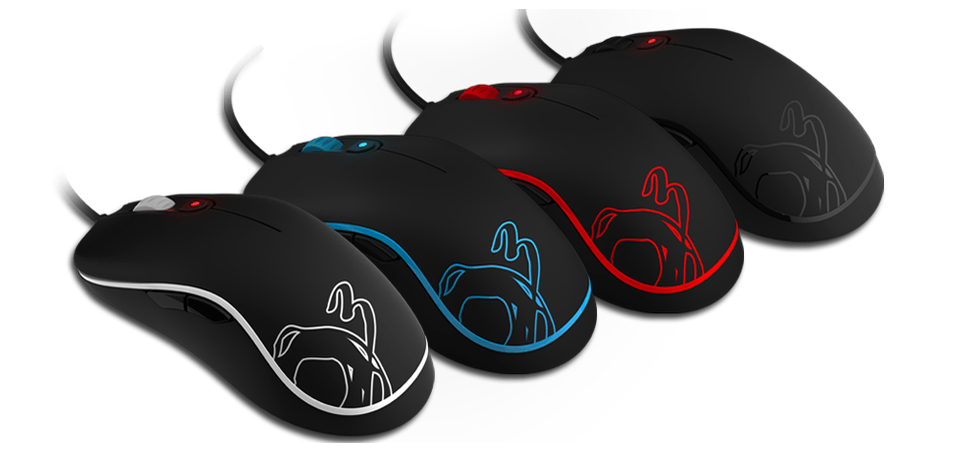
In general, compared to Neon Ozone 3K, Neon Ozone design is almost identical to Ozone Neon 3K, both in size and material used. The basic design is symmetrical, which can fit both left and right handed people. The ergonomically designed hem and palm rests are palm-like and lightweight, suitable for a variety of palm / finger / claw-grip types. The size of the Ozone Neon is a little more than the Rocco Kiro mouse once introduced by Biareview. Both products are equipped with four basic buttons: left, right, scroll and DPI, and four programmable buttons located at the sides of the mouse (up to 8 programmable buttons).
Other than Ozone Neon 3K, Ozone Neon is not equipped with backlight, the back is only printed logo Ozone familiar with prominent colors (blue / black / red / white) to highlight the main along the bottom and the line green running along the mouse body. The only “light” of the Ozone Neon is the DPI button.
As mentioned above, the 3K Ozone Neon is equipped with optical sensors, so the DPI ratios will not be impressive, stopping at 3500 DPI. With the Ozone Neon, which is equipped with a laser sensor, the resolution of the mouse is also impressive, reaching 6400 DPI, enough to meet the gaming needs of most gamers in the mid-range and high-end segment.
Compared to many laser mouse on the market, the DPI level that Ozone Neon owns can be compared to many products in the premium segment of other brands. This difference in sensitivities also shows that ozone know clearly different needs of gamers in different genres.
Ozone Neon cable braided fabric, USB interface is also gold plated to increase the maximum signal transmission capacity and full noise filter, standard cable length 1.8m. Add to that the ability to “plug and play” without the need to install a cumbersome driver, plus a lot of gamers want to bring their gaming gear to “play – fighting”.
Performance in Gaming
Honestly, the real measure for any gaming mouse is how it behaves while you’re actually in the matches, not just on paper or in a lab. The Ozone Neon seems made to keep up in real-world gaming conditions across lots of different genres , it feels like the whole point is steady performance.
a. FPS (First Person Shooter) Games
In quick, aggressive FPS games, you really need precision plus instant reaction. The Ozone Neon handles this well thanks to its high DPI settings and a dependable optical sensor.
Tracking Accuracy: With that high DPI along with steady optical tracking, every small motion shows up properly on your screen, so aiming stays clean and your reactions can stay quick. It’s basically, smooth 1-to-1 movement, which matters when you’re flicking targets.
Button Responsiveness: The programmable buttons are placed where your fingers naturally land, and they respond quickly. That makes it easier to fire off commands and macros without delay, something that’s pretty much required for serious competitive FPS play.
b. MOBA (Multiplayer Online Battle Arena) Games
For MOBA games, there’s a constant stream of inputs. You’re juggling multiple abilities, timing, and quick actions, so having flexible controls matters a lot. The Ozone Neon helps with that through its programmable buttons and customizable profiles.
Macro Support: Being able to map complex actions and macros onto the mouse buttons helps a lot. Instead of juggling everything manually, you can trigger combinations faster, which improves flow and efficiency when you’re managing several skills and commands at the same time.
Comfort: The ergonomic shape keeps things comfortable during longer sessions. That’s important, because MOBA matches can drag on, and you still need your grip to feel stable even after extended play.
c. RTS (Real-Time Strategy) Games
In RTS games, precision , and overall control are basically the deal. The Ozone Neon with its customizable DPI options and the weight adjusting system kind of feels made for RTS players, especially when actions have to be smooth and fast.
Precision Control: Being able to dial in the DPI settings finely gives players more controlled movement of units and actions, and yeah that really matters when you’re handling intricate tactics, and you know, those big scale brawls where everything happens at once.
Weight Customization: Changing the mouse weight helps you land on a kind of balance that matches your playing habits, which also supports comfort while you’re playing for longer sessions.
Software and Configuration
The Ozone Neon also includes dedicated software, and honestly it becomes a big part of how you personalize and configure the mouse so it matches what each person wants.
a. Software Interface
Ozone’s software is meant to be accessible and pretty broad in what it offers, so users can tweak their settings without too much hassle.
Customization Options: Through the software, users can set different DPI levels, attach specific functions to programmable buttons , and even build custom macro sequences. The interface feels straightforward , so navigating around and adjusting things is easier, as in you can adapt it based on personal preferences.
Profile Management: Users can set up multiple profiles, and each one can hold a different configuration. This is useful when you want to switch between various gaming routines or even between applications quickly, without redoing everything each time.
b. RGB Lighting control
The software also adds some options for customizing the RGB lighting on the Ozone Neon, and yeah it is pretty flexible. Users can pick a bunch of colors, and also choose effects, plus patterns so they can get the look that fits their own style, rather than just that default vibe.
Lighting Effects: There are several kind of lighting effects available, like static colors, breathing effects , and color cycling. People can tweak the brightness level and speed for those effects so it matches their preferences, basically whatever feels good at the moment.
Synchronization: If you also have other RGB components, the software may include synchronization features. That helps make a more coherent and visually pleasing gaming setup, instead of everything looking random.
Conclusion
The Ozone Neon really stands out as a high performance gaming mouse that blends precision, customization, and comfort. Its sensor tech is advanced, the features are adjustable, and the ergonomic design feels right during longer sessions. So even if the price is a concern for some users , the overall performance and feature set can make it feel worth it for people chasing a top tier gaming mouse.
In summary, the Ozone Neon is strong at delivering a better gaming experience, and it includes a suite of features aimed at different gaming needs. The combination of accuracy, comfort, and personalizable options makes it a serious option in the high end market. Whether you’re a competitive gamer or more casual, the Ozone Neon gives you the tools to sharpen your play and improve your overall experience.
Related Posts

Tech Reviewer & Product Analyst
Định Bia has spent over 10 years testing consumer electronics with a focus on smart technology. He work as a product advisor at Biareview where he helped customers find the right devices for their needs. He personally tests every product featured on this site using a consistent evaluation framework covering quality, durability, and value. All reviews are based on experience, not influenced by the manufacturer.