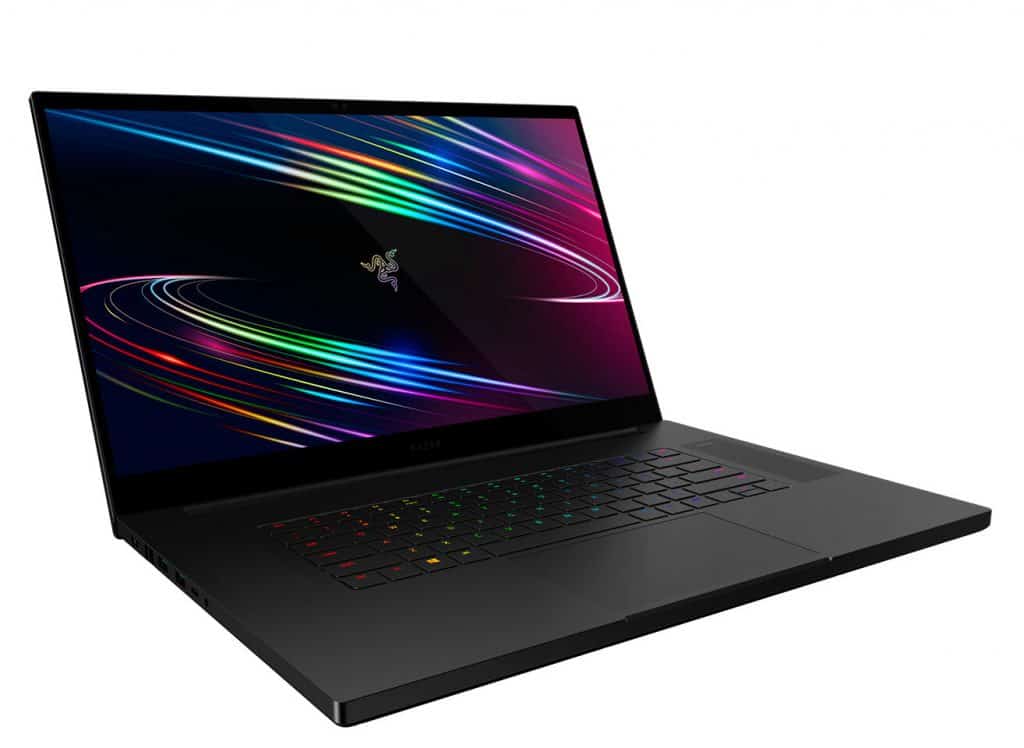
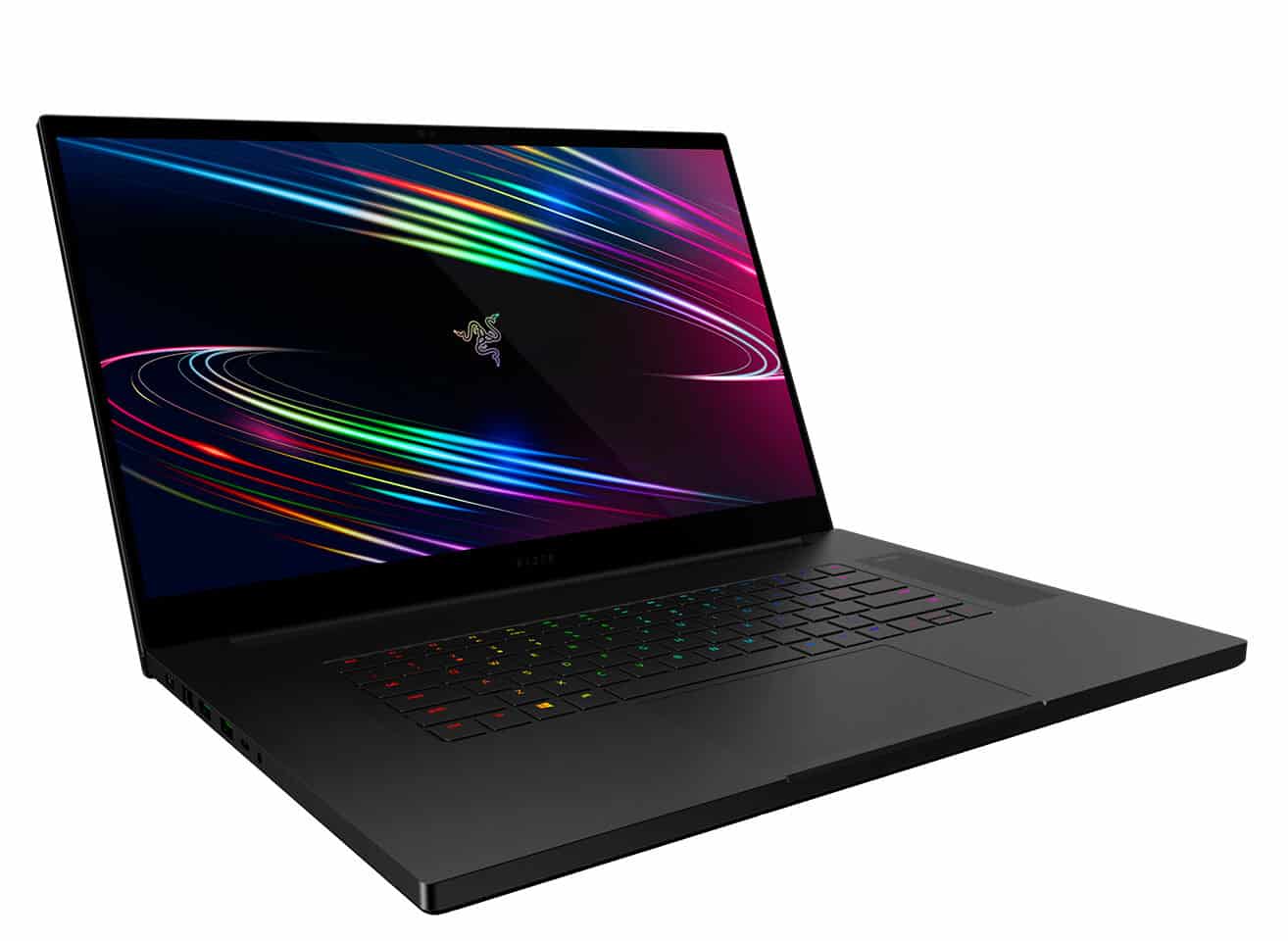
The Razer Blade Pro 17 laptop is a product that meets the gold standard for gaming laptops with high configuration, stable performance, and eye-catching design, which can run even games with high bandwidth. The weight is not inferior to today’s PCs.
We’ve been impressed with the previous Razer Blade Pro models, and they often appear on best laptop lists, and with this latest release, Biareview can confidently affirm that the Blade Pro 17 is One of the best Gaming Laptop devices currently on the market in the same price segment.
Blade Pro 17 2019 is the third generation model in Razer’s line of 17.3-inch gaming laptops. This is a complete redesign of Blade Pro 2016 and 2017 with many new features to give users a better experience. It is also the first to introduce narrow bezels to the Blade Pro series with many unique elements upgraded from the 15.5-inch version.
Specifications
CPU: 2.6 GHz Intel Core i7-9750H (Hexa core, 9 MB cache, up to 4.5 GHz)
Graphics: Nvidia GeForce RTX 2080 Max-Q (8GB GDDR6 VRAM)
RAM: 16GB DDR4 (2,667 MHz)
Display: 17.3-inch, Full HD (1,920×1,080) TFT (144Hz refresh rate)
Storage: 512GB M.2
PCIe SSD ports: 1 x USB 3.2 (USB Type-C), 1 x USB 3.2 + Thunderbolt 3 (USB Type-C), 3 x USB 3.2, 1 x HDMI 2.0b, headphone jack, 2.5Gb Ethernet LAN, UHS-III SD card reader
Connectivity: 802.11ax Wi-Fi, Bluetooth 5.0
Camera: HD webcam (720p)
Weight: 6.06 pounds (2.75kg)
Dimensions: 15.55 x 10.24 x 0.78 inches (39.5 x 26 x 1.99cm; W x D x H)
Product design
With a fairly simple but still unique design and a tough, sturdy design, it certainly enhances the product’s durability thanks to the eye-catching aluminum frame. At the same time, compared to the 15-inch version, this version has sturdy square corners instead of rounded corners, giving Blade Pro 17 a much more luxurious and eye-catching design.
In addition, as noted by BiaReview, the thickness of the product is also greatly reduced compared to the 15-inch version, about 25% thinner than the 15-inch version.
Operational performance
It features Nvidia’s mobile RTX 2080 Max-Q graphics card and 9th Gen Intel Core i7-9750H processor with a base clock speed of 2.6Ghz; It has 16GB of RAM which gives users the ability to run heavy games efficiently and stably. Blade Pro 17 basically sails through every benchmark and the usual real world tests, no matter if you’re cutting 4K videos or gaming with graphics that need a fairly demanding setup.
The Razer Blade Pro 17 is starting around $2,499, for the 9th Gen Intel Core i7-9750H , 16GB RAM, 512GB PCIe NVMe SSD, and a Nvidia GeForce RTX 2060. The $2,799 configuration goes a bit further, landing an RTX 2070 Max-Q, and yeah it’s honestly a pretty noticeable step up.
Screen
The Blade Pro 17’s 1920 x 1080 display looks great with Full HD resolution delivering sharp images. Surely you will be impressed with the color of the image displayed by Blade Pro 17. Everything is clear, and sharp with anti-gloss,…
The sound of the product
The Blade speakers are loud – definitely loud enough to fill my small living/dining room. You can hear the sound with great bass. I tried to listen to the sound of the product when playing the Dota 2 game, the sayings of the generals are great and clear.
To get the most out of the speaker, I recommend the Dolby Atmos software and its six settings. I found Dynamic to be the best fit for my needs. Otherwise, the usual parameters are more than enough for you to get the best experience.
Keyboard
Razer has lifted the Blade 15 keyboard and applied it here on the Blade Pro 17 to replace the mechanical switches on the Blade Pro 2017. Therefore, all of our existing reviews of the Blade 15 keyboard apply here including very shallow travel, slight feedback, and general noise.
The keyboards on the competitive MSI GS75 and Asus ROG GL704 feel deeper and firmer than what’s offered here on the Blade Pro 17. Though we’d have liked more flexibility on the alternatives aforementioned, we’ve also talked to gamers who find the Razer Blade keyboard to be good. It’s something worth trying out in person before committing to a purchase.
We appreciate the fact that the F and Arrow keys are the same size as the main QWERTY keys for an even response. These same keys tend to be smaller and therefore more spongy on most other laptops. However, we can’t shake the fact that the per-key RGB-backlit keyboard feels very solid on the Blade Pro 17. Previous Blade Pro models have had a volume wheel, RGB keyboard lighting, and keys dedicated sub for a more unique experience. Perhaps a minimalist approach is the best.
Touchpad
The large touchpad is the same as on the Blade 15 in terms of texture, very quiet feedback, and even dimensions (13 x 8 cm). The glass surface is completely smooth when lightly gliding regardless of travel speed, and the 144 Hz screen refresh rate provides a better overall sense of responsiveness.
Our main complaint is that the built-in mouse keys continue to be soft with a spongy click and are unsatisfying to press. Razer could also go all the way and mimic the MacBook Pro clickpad for future iterations of the Blade line.
Connector
For such a thin laptop (19.9mm thick) it’s kind of crammed with ports, including three USB 3.2 Type-A Gen 2 ports two on the left , and one on the right. There’s also a USB-C 3.2 Gen 2 port sitting on the left, and one Thunderbolt 3 port on the right. Then you get the HDMI port, the headphone jack, Ethernet, plus, a spot for Razer’s proprietary power plug.
Razer laptops usually bring along some totally undeniable perks like Thunderbolt 3 ports and really impressive designs. That’s nice, but what honestly gives me the biggest nod is the SD card reader, it supports super fast UHS-III transfer speeds which is pretty sweet.
Battery life
Just like the Blade Pro, it endures the heel of any gaming laptop – battery life is short. The laptop lasted just 3 hours and 12 minutes on the test, which involves continuous web surfing over Wi-Fi at 150 degrees of brightness.
The Blade’s time is a few minutes shorter than the 3:18 premium laptop average but still better than the 2:30 and 2:29 put out by the Y740 and Stealth. But the m17 lasted the longest for 4 hours.
Software and Features
Razer Synapse
Razer Synapse is kinda like the main place for tweaking and running the Razer Blade Pro 17. With Synapse you’re able to personalize the RGB glow, set up macros, and also fine tune the overall performance options. The whole thing feels pretty intuitive, and honestly it’s easy to work with , so it creates this smooth experience when you’re shaping the laptop around how you like things.
Pre-Installed Software
The Razer Blade Pro 17 ships with minimal bloatware, so the “out of the box” setup stays clean and snappy. You get the necessary drivers and utilities already there, plus a trial of Microsoft Office and a handful of other practical applications. If there’s anything you don’t want, users can remove it fairly easily to reclaim some storage space.
Windows Hello
Windows Hello support makes signing in on the Razer Blade Pro 17 both faster and more protected. The laptop includes an IR camera, for facial recognition, so authentication is quick, and it stays secure too. On top of that, it gives an extra security layer which feels like a helpful add-on for everyday use.
Upgradability and Maintenance
Easy Access to Internals
One of the benefits of the Razer Blade Pro 17 is that it’s upgrade friendly. You can remove the bottom panel without much trouble, which gives access to what’s inside. From there, users can upgrade the RAM and the storage , meaning it can stay ready for future needs and it’s easier to tailor the system later on.
RAM and Storage Options
On the Razer Blade Pro 17, you can get up to 64GB of DDR4 RAM which should be more than enough for heavy multitasking, and for those demanding apps that like to eat resources. It also has dual M.2 slots for SSD storage so if your library grows, or you start stacking more projects, you can actually expand capacity. That kind of upgradability is not just a small perk, it’s a real advantage if you want to keep things fresh, hardware-wise, without replacing the whole laptop every time.
Conclusion
Overall, the Razer Blade Pro 17 feels like a proper standout gaming laptop, it mixes solid performance with a clean, premium design and a bit of versatility all packed into a slim, portable form factor. Whether you’re a hardcore gamer, a creative professional, or you just need a fast machine for daily stuff the Razer Blade Pro 17 manages to do it without much fuss. The premium build quality, the high-resolution display options, and the newer-style hardware choices make it one of the better buys in the high-performance laptop space.
Pros
Premium Design: Sleek, sturdy aluminum chassis with customizable RGB lighting, a bit of that “it just looks expensive” vibe.
High-Performance Hardware: Comes with the newest Intel CPUs and NVIDIA GPUs for basically top tier performance.
Excellent Display Options: You can pick from several high refresh rate, high resolution choices depending on what you care about.
Advanced Cooling System: Cooling is pretty effective, and relatively quiet too , so performance stays more stable than you’d expect.
Versatile Connectivity: Lots of ports included , including Thunderbolt 4, so peripherals stay easy.
Great Audio Quality: THX Spatial Audio gives an immersive sound setup, kind of like it surrounds you.
Customizable RGB Keyboard: Per key RGB lighting with Razer Chroma support, it feels way more personal.
Upgradability: Access to the inside is pretty straightforward for upgrading RAM or storage.
Solid Battery Life: Battery performance is decent for a high performance gaming laptop, not “miracle long” but good.
Excellent Customer Support: Support is reliable, responsive, and there are extended warranty options too.
Cons
High Price Point: The Razer Blade Pro 17 costs a lot , so it’s a big investment up front.
Webcam Quality: The 720p webcam works fine but it could look sharper , especially in dim lighting.
Battery Life in Gaming: When you game the battery drains a lot, so you’re likely charging more often.
Final Verdict
It really is a top tier gaming laptop, and it sort of explains that premium price on its own. The performance is top notch, the build quality feels solid , and the whole set of features is unusually complete for the class. It’s one of those versatile machines that does gaming really well, but it also handles content creation and plain everyday stuff without acting too dramatic. Overall it feels like a serious investment, especially if you want a powerful laptop that you can still move around with.
Now, I’m not saying the price is cheap, but the value here, it makes sense. You’re getting performance, design, and functionality that stand out, so it doesn’t just blend into the competitive gaming laptop market. It kind of stays in your head, in a good way.
In conclusion, the Razer Blade Pro 17 isn’t only a laptop, it’s more like a declaration of power, style, and some cutting edge tech, aimed at people who can be pretty picky. Whether you are conquering those virtual worlds, or crafting digital masterpieces, the Razer Blade Pro 17 comes with the tools you need to reach your goals faster, with energy and efficiency , sort of, and then that extra push you feel in the moment.
Razer Blade Pro 17 Gaming Laptop 2020: Intel Core i7-10875H 8-Core, NVIDIA GeForce RTX 2080 Super Max-Q, 17.3″ FHD 300Hz, 16GB RAM, 512GB SSD, CNC Aluminum, Chroma RGB, Thunderbolt 3, SD Card Reader: Buy it now
Razer Blade Pro 17 Gaming Laptop 2021: Intel Core i7-11800H 8-Core, NVIDIA GeForce RTX 3080, 17.3″ FHD 360Hz, 32GB RAM, 1TB SSD – Chroma RGB – Thunderbolt 3 – SD Card Reader: Buy it now
Razer Blade Pro 17 Gaming Laptop 2021: Intel Core i7-10875H 8-Core, NVIDIA GeForce RTX 3060, 17.3″ FHD 360Hz, 16GB RAM, 512GB SSD – Chroma RGB – Thunderbolt 3 – SD Card Reader: Buy it now
Razer Blade Pro 17 Gaming Laptop 2019: Intel Core i7-9750H, NVIDIA GeForce RTX 2080 Max-Q, 17.3″ FHD 240Hz, 16GB RAM, 512GB SSD, CNC Aluminum, Chroma RGB Lighting, Thunderbolt 3, SD Card Reader: Buy it now
Razer Blade Pro 17 Gaming Laptop 2021: Intel Core i7-11800H 8-Core, NVIDIA GeForce RTX 3070, 17.3″ QHD 165Hz, 16GB RAM, 1TB SSD – Chroma RGB – Thunderbolt 3 – SD Card Reader: Buy it now
Related Posts




Tech Reviewer & Product Analyst
Định Bia has spent over 10 years testing consumer electronics with a focus on smart technology. He work as a product advisor at Biareview where he helped customers find the right devices for their needs. He personally tests every product featured on this site using a consistent evaluation framework covering quality, durability, and value. All reviews are based on experience, not influenced by the manufacturer.