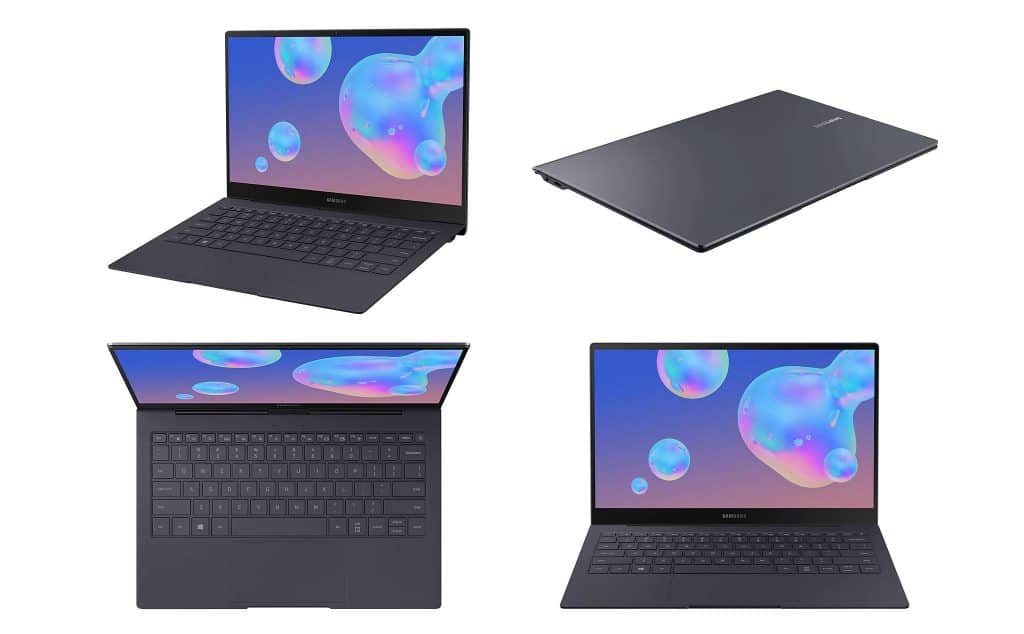
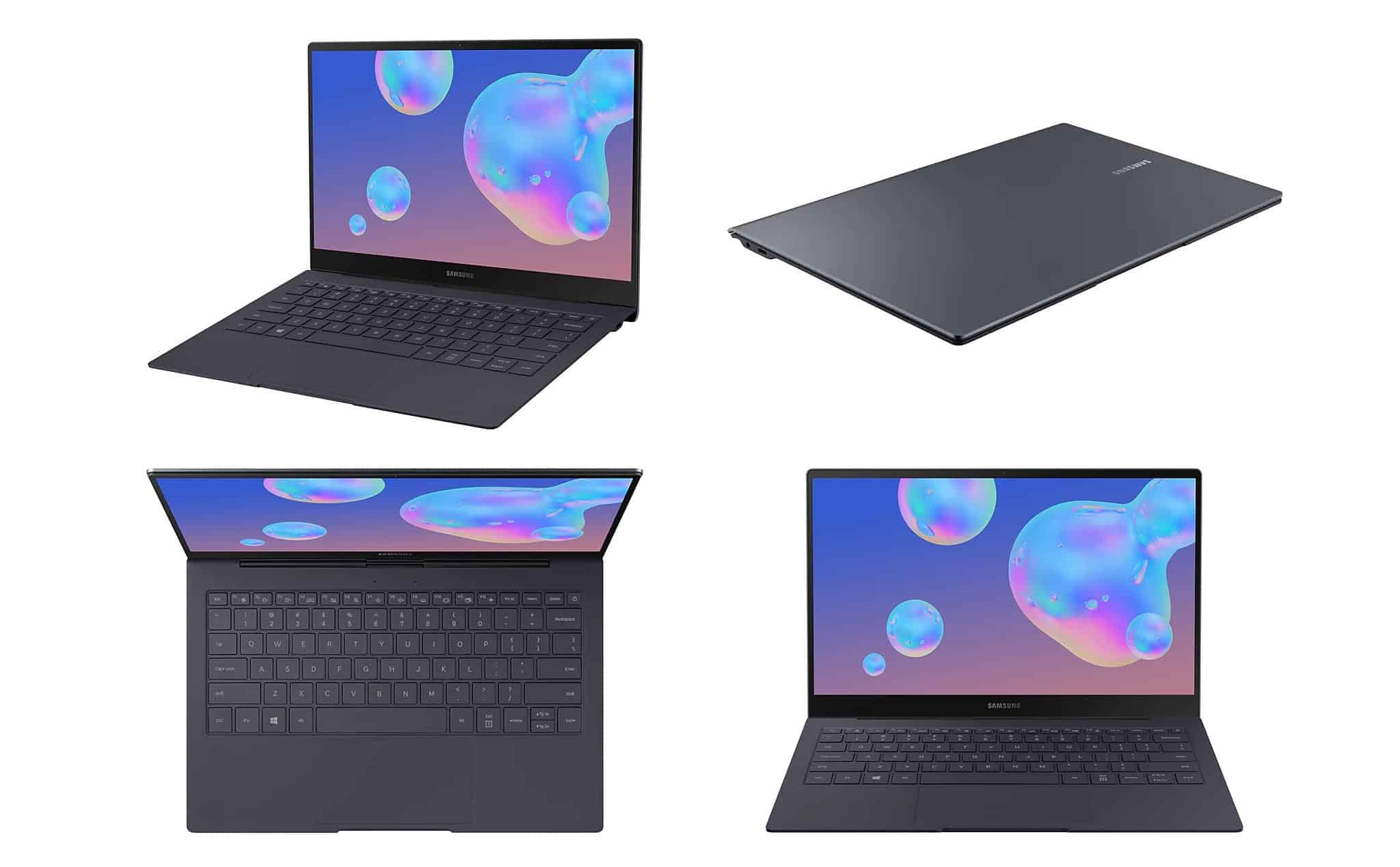
Samsung Galaxy Book S is a laptop using Qualcomm Snapdragon 8cx processor, Samsung offers 4G LTE, high battery life that can be used continuously for up to 1 day with many outstanding advantages that make Galaxy Book S an Ideal friend for work, study, or entertainment.
Samsung is a big player in the smartphone market, but the laptops from the Samsung brand are often kinda underestimated compared to rivals in the market like Apple, Dell, Asus, and so on. Still, with the Samsung Galaxy Book S laptop product, it feels like Samsung is being pretty serious about grabbing some laptop market share today.
Specifications
RAM: LPDDR4X 8GB
Processor: Qualcomm Snapdragon 8cx octa-core processor (2.84GHz, 1.8GHz)
Storage: 256 GB SSD
Operating System: Windows 10 Home
Weight: 1 KG
Graphics: Adreno 680
Design
It can be said that the Samsung Galaxy Book S is one of the most beautiful computers that Biareview has ever reviewed, it can also be said that they are a great blend between a laptop and a tablet. Bringing users an extremely compact but high-performance product.
Display
Screen Size and Resolution
The Galaxy Book S comes with a 13.3-inch Full HD touchscreen screen, and it runs at 1920 x 1080 pixels. That sort of resolution really fits this laptop size, you get clear visuals without chewing through the battery to fast or putting too much strain on the system graphics. The display uses a 16:9 ratio, which feels pretty natural for a bunch of things like checking websites, editing documents, and yes, even movie nights or videos.
Color Accuracy and Brightness
Samsung pretty much has a reputation for good displays, and here the Galaxy Book S follows through. The screen shows vivid colors and strong contrast, so it stays enjoyable whether you’re working or just relaxing. The color accuracy is especially solid, with warm lifelike tones that make everything look more real. On top of that, the brightness level is high enough that you can still see things clearly in brighter rooms, and even outdoors if the light isn’t too crazy. The touch controls are also responsive, and they feel accurate, so the whole thing has that extra flexibility you might want day to day.
Touchscreen Functionality
Adding touchscreen features to the Galaxy Book S , really boosts how easy it is to use day to day. It feels pretty responsive and accurate, so you get smooth scrolling , pinch to zoom, and those familiar touch gestures. For stuff like sketching, jotting notes, or just moving around inside apps and web pages, it does come in handy. In general, the touch layer gives the laptop a kind of tablet-like convenience, which makes it a flexible choice for all sorts of users
Operational performance
Under the hood, inside the case— the Galaxy Book S runs on a Qualcomm Snapdragon 8cx processor. These ARM-based chips are basically the same style of processors you see in today’s top smartphones and tablets. Because of that, Samsung can keep the overall build on the smaller side, also helped by the fact that it doesn’t use fans. The Galaxy Book S tips the scale at a little over 2 pounds, so it’s light enough that you might pretty much forget it’s in your backpack after a while.
When buying the Galaxy Book S, you won’t find any customization options for its specifications. Samsung makes only one model, with 8GB of memory and 256GB of storage. An SD combo microphone and SIM card slot slides out from the side of the Galaxy S Book. You can add up to 1TB of storage via a micro SD card.
Screen
The 13.3-inch touchscreen has a standard HD (1920 x 1080) resolution, but it looks sharper and has better colors than many portable stills on the market. Biareview is very satisfied with the screen of Book S from design to color. The movements when watching movies, and playing games are quite good and clear.
However, with low screen brightness (below 100), the contrast when sitting under the lights, sunlight is relatively large, making it a bit harder to see the screen. However, at 100 brightness, everything is perfect and clear.
Connection
On the right is a lone USB-C port, with another USB-C port and a headphone jack on the left. Either port can be used to charge a laptop or for tasks like syncing your phone.
There is a 720p HD webcam above the screen. Below it is a full-size keyboard, with a power button in the top right corner that doubles as a fingerprint reader. The keyboard feels quite comfortable when typing. The keys are a bit shallow, require very little pressure to activate, and snap back into place almost instantly making typing fairly quick. The touchpad is centered on the laptop’s case.
SAMSUNG Galaxy Book S 13.3″ FHD Touchscreen – 256 GB, Intel i5 -NP767XCM-K02US – Earthy Gold: Buy it now
Samsung Electronics Galaxy Book S (WIFI & LTE Verizon) – SM-W767VZAAVZW,Mercury Gray: Buy it now
Application compatibility
Galaxy Book S uses ARM processors, this is the processor commonly found on iPhone, and Samsung Galaxy phones, so they have some differences compared to processors from Intel or AMD that make many people worry that some applications will not work well on this Book S laptop.
During testing, we were able to install almost all the core apps we use for day-to-day operations: the new Edge browser (Microsoft’s latest Chrome rival), Typora, Slack, Discord, Outlook, 1Password, VLC, and VPN apps for work.
Apple’s iTunes is kinda slow, and for us, or even to say it, they are pretty much unusable. It installs and runs, but it takes forever, like every single click or scroll, while the app loads or refreshes. The biggest issue is that the 64-bit apps, for example Adobe Photoshop, don’t really run on the Galaxy Book S.
Other than that part, everything else seems to be working okay on the Samsung Galaxy Book S tablet.
Battery life
One of the headline things about the Galaxy Book S is the battery life. Samsung says you can get up to 25 hours of nonstop video playback , which is an astronomical number for any laptop.
To check that claim “natively”, we played a 4K video clip on repeat, using VLC, with screen brightness at 50% . We also turned off Bluetooth and location services , and set keyboard backlighting to off. Then, with the Wyze camera, we shot a time-lapse video, and honestly , the results surprised us a lot. The Book S lasted 14 hours and 47 minutes.
So, in perspective, sitting through the entire Harry Potter series is roughly 20 hours. Basically you could watch like 75% of the Harry Potter series on a single full charge, so the battery is genuinely pretty strong.
Overall, you could say the Samsung Galaxy Book S is a laptop with a big battery capacity that helps you work , study and unwind for around 1 day. Pretty awesome, right ?
Keyboard and Trackpad
Keyboard Layout and Comfort
The Galaxy Book S comes with a full sized keyboard , keys that are spaced out nicely so your fingers dont feel cramped. It gives a comfy typing feel and the key travel is sturdy, with tactile feedback that helps you type more accurately, and honestly it feels rather satisfying. There is also backlighting ,and brightness can be adjusted so the letters are clear even when the room is a bit dark. Overall typing is excellent, it handles long sessions well whether youre typing up reports, sending emails, or doing coding stuff.
About the Trackpad
The trackpad is large and it responds quickly, you get smooth control thanks to Windows Precision support and the tracking is pretty accurate. Multi touch gestures like scrolling and pinch to zoom,are working great without the usual lag,which makes everyday use feel easier. The surface stays smooth,so navigation across the operating system and apps feels effortless, no rubbing or weird resistance.
Software and what it includes
Operating System
On the Galaxy Book S you get Windows 10 Home,which is familiar for most people and pretty flexible. Windows 10 has a lot of built in tools and apps, so it can cover both work stuff and entertainment on the side. It is also optimized for the ARM architecture, so performance stays smooth and compatibility stays decent with most software.
Pre-Installed Software
Samsung tries to keep the pre-installed software pretty light on the Galaxy Book S, so the whole experience feels cleaner and more streamlined. It comes with the essential drivers and utilities, then there are a couple of Samsung specific apps, like Samsung Notes and Samsung Flow. Honestly these programs help the device work better with the rest of Samsung ecosystem, sort of smooth integration with other devices and services, it’s pretty useful in day to day use.
Additional Features
Beyond that, the Galaxy Book S brings some extra options that help with both usability and security. There’s a built in fingerprint sensor, so unlocking is fast and more secure too. And you also get Windows Hello support, meaning facial recognition for login. On top of that, the laptop includes a TPM (Trusted Platform Module) chip, which adds hardware based protection for sensitive data, and also for the apps that rely on it.
Audio and Webcam
Speakers and Audio Quality
For audio, the Galaxy Book S comes with stereo speakers tuned by AKG, so you get a pretty clear output and a fairly balanced sound. The volume level also holds up well, and there’s a fuller sort of profile when you’re watching videos, jamming to music, or even hopping into video calls. Dolby Atmos support is also there, which makes the sound feel a bit more immersive in the playback space, so it doesn’t seem so flat.
Webcam Quality
On the camera side, the laptop uses a 720p HD webcam, which delivers enough image quality for video calls and conferencing. The resolution isn’t anything extraordinary, but it’s still solid for most day to day communication. The webcam sitting at the top of the display gives you a natural angle, and the built in microphone array tends to capture audio that sounds clear, crisp , and usable.
Who is Samsung Galaxy Book S for?
The Galaxy Book S is one of the most compelling laptops we’ve ever used and tested. This is a mobile-first design with portability and connectivity in mind, but the applications it can run are complete PC applications.
It can be said that the Samsung Galaxy Book S with its slim, compact design will be a powerful assistant for those who often move, and need to use a computer with a large capacity for meetings, learning presentations…
At $999, the Galaxy Book S is priced competitively with the iPad Pro or Surface Pro X and is a pretty great choice to consider.
Related Posts


Tech Reviewer & Product Analyst
Định Bia has spent over 10 years testing consumer electronics with a focus on smart technology. He work as a product advisor at Biareview where he helped customers find the right devices for their needs. He personally tests every product featured on this site using a consistent evaluation framework covering quality, durability, and value. All reviews are based on experience, not influenced by the manufacturer.