Design and build quality
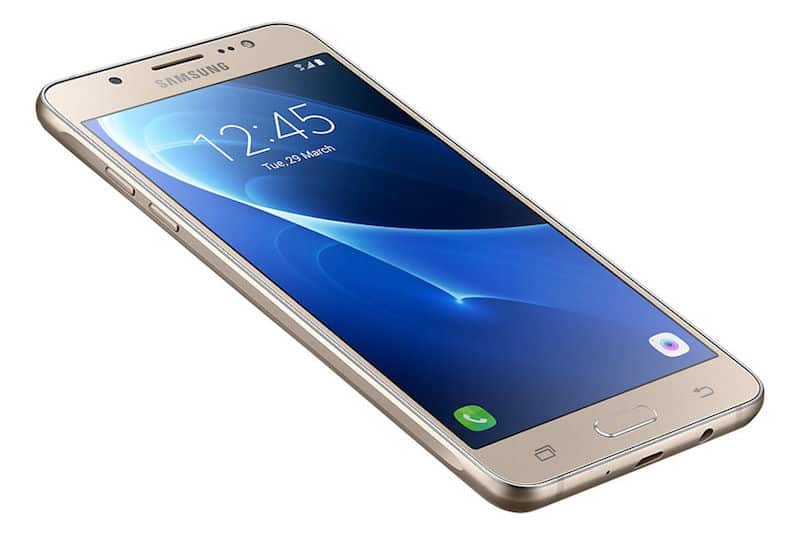
The Samsung Galaxy On7 has a pretty traditional look , honestly it feels like the style that lots of phones used around the mid-2010s. There’s a plastic back panel, with a faux leather style finish that tries to mimic leather to the touch, so you get a bit of elegance, even if the overall build stays pretty basic. The frame is plastic too, but it’s shaped and finished so it looks like metal. So in the end, the Galaxy On7 looks a little more polished than you’d expect just by checking the materials.
Size wise the phone comes in at 151.8 x 77.5 x 8.2 mm and it tips the scale at about 172 grams. That makes it on the larger side, and yeah, it can feel slightly bulky compared with modern phones. Still, the weight distribution is fairly good, and the back surface curves just enough so it sits comfortably in your hand. The bezels around the display are also quite noticeable, especially if you compare it to today’s edge-to-edge screens, but again this was normal for the era.
Up front, you’ll find a physical home button, with capacitive back and recent apps keys on either side. That layout was basically a Samsung signature back then. The home button itself does not act as a fingerprint sensor, which was something you usually only saw on higher end or newer mid-range models at the time.
For buttons placement, the volume rocker sits on the left edge, while the power key is on the right. At the bottom you have the 3.5mm headphone jack, the microUSB port, and a microphone , all lined up along the lower edge. The back cover is removable as well, so you can reach the removable battery, the SIM card slots, and there’s a dedicated microSD slot too, for storage growth when you need it.
While the design of the Galaxy On7 might not make people turn their heads , it still feels useful and built to last. The plastic frame keeps the whole thing lighter, and it makes the phone more resistant to drops and scratches than the glass-backed smartphones you see a lot these days. The back cover that comes off, plus the battery you can swap, are also nice additions, giving users more room to maneuver, something that many newer phones do not really include.
Display
The Samsung Galaxy On7 comes with a 5.5-inch TFT LCD screen, at 1280 x 720 pixels. That works out to about 267 pixels per inch (PPI). Even if the display lacks the crispness or the punchy vibrance of Samsung’s premium line , it still holds up fine for daily tasks, especially since the price is more reachable.
The TFT LCD method inside the Galaxy On7’s display is not as polished as the Super AMOLED panels used in Samsung flagship models. So the tones on the Galaxy On7 tend to look a bit less saturated, kind of subdued , and the contrast is not as strong, meaning the black shades are not as deep. Still, the screen has solid viewing angles and decent brightness, so it remains workable outdoors even when the light is right on it.
The 720p resolution, while not that high in the grand scheme, is still enough for simple stuff like scrolling the web, checking social media, and catching videos. The text is usually pretty crisp, and the images look alright, although people coming from Full HD or even higher might feel there’s a bit less sharpness than they want.
One spot where the display kinda falls a bit flat is color accuracy. The Galaxy On7 screen often leans cooler in tone, so whites can end up looking a touch bluish. There doesn’t seem to be any real way to tune the color temperature, or even tweak saturation, which is something you normally see on more premium phones. For most users this probably won’t be a dealbreaker, but if you’re picky about display quality then it’s good to keep in mind.
All in all, the Samsung Galaxy On7’s display is usable for its category. It’s not the most vibrant, not the sharpest, but it still does the basic job for people who don’t really need the best possible view. And honestly, for the device price, it feels like a fair compromise between what you pay and what you get.
Performance
The Samsung Galaxy On7 runs on a quad core Qualcomm Snapdragon 410 clocked at 1.2 GHz, teamed up with 1.5GB of RAM and 8GB of internal storage . The Snapdragon 410 , was a fairly common choice back in 2015 for budget to mid range phones, trying to keep that delicate balance between daily performance and power efficiency, sort of like a steady middle road.
In day to day use , the Galaxy On7 manages to deliver a fairly decent performance for basic stuff like browsing the web, using social media apps, and making phone calls. The user interface is usually fluid, and most apps open and run without big problems. Still, the 1.5GB of RAM becomes a real bottleneck, particularly if you multitask a bit or try to run anything more demanding. In those moments , some users may notice a bit of lag, or it feels slower when you jump between several apps , or when you launch memory hungry games.
The Adreno 306 GPU, built into the Snapdragon 410 chipset, handles simple graphics tasks well enough, but it hesitates when the workload gets heavier. Lighter games such as Candy Crush and Temple Run often feel fine on the Galaxy On7, but titles that look more graphically intense, like Asphalt 8 or PUBG Mobile , can hit frame drops and longer loading stretches. Basically, this is not a device crafted for heavy gaming, so if someone wants a noticeably better gaming experience then a more powerful phone would suit them.
Then there is the internal storage situation, because the Galaxy On7 only offers 8GB. Between the operating system and the pre installed apps, a large chunk disappears, leaving users with something like 4GB of actual usable space. It can fill up quickly, especially if you install many apps or you save a lot of media files on board. The good part is , the Galaxy On7 provides a dedicated microSD card slot, so you can expand storage by up to 128GB. That’s a pretty important safety net for folks who need extra room for apps, pictures, and videos.
When we look at benchmarks, the Galaxy On7 seems pretty in line with other phones that run on the Snapdragon 410, not exactly surprising. In Geekbench it lands around 460 for the single-core run and about 1350 on the multi-core test,so yeah the numbers are modest. This basically mirrors its place as a budget smartphone. Now sure, benchmarks never tell the full story for daily use but they still give some kind of rough picture of what you can expect compared to other models out there
All things considered, the Samsung Galaxy On7 performance is “adequate” for the people it’s aimed at. It does the everyday stuff without much fuss, yet it’s not really made for power users,or anyone who needs serious horsepower for heavy applications and gaming. If you just want a steady phone for day to day, the On7 can feel fine. But if you’re chasing more speed or smoother heavy workloads, you might rather look at alternatives
Software and User Interface
The Galaxy On7 comes with Android 5.1.1 Lollipop right from the box, and Samsung layers its TouchWiz interface over it. TouchWiz for years has been one of those polarizing choices, some folks enjoy the extra options and add-ons, while others feel it’s too heavy ,too cluttered compared to stock Android, kinda like it slows the vibe down.
On the On7, TouchWiz is basically a trimmed version of what was on Samsung’s higher end devices around that time. You still get a lot of familiar stuff, for example home screen customization, access to Samsung’s app ecosystem, and a bunch of settings. At the same time it also drags along some bloatware, meaning pre installed apps you can’t remove very cleanly, or at all. That part can be irritating especially because the device storage,already limited, doesn’t leave much room to breathe, well unless you manage it really carefully.
One of the most noticeable things about TouchWiz is how much you can tweak it. People can pick among different themes, mess with the icon forms, and reorganize how the home screen sits. In practice, these options let you make the device feel more like yours, but it also adds this kind of weight to the whole system, you know, like the interface doesn’t feel that light.
TouchWiz also brings a few helpful extras that make day to day use easier. For instance, the Ultra Power Saving Mode basically stretches battery time by dialing down what the phone can do, plus it cuts the screen brightness pretty hard. Then there’s Multi Window, which lets you keep two apps running at the same time, in split screen mode, which sounds simple, but it’s pretty handy for multitasking.
Still, TouchWiz has a few downsides. The whole experience can feel a bit sluggish at times, specially when you are hopping through menus, or swapping apps back and forth. The 1.5GB of RAM is part of that as well, because it doesn’t really leave the system enough breathing room when things start getting busy. The Galaxy On7’s Snapdragon 410, while okay for everyday basics, isn’t quite strong enough for TouchWiz’s more advanced features, so you end up seeing a lag now and then.
One area where the Galaxy On7 falls short, is in software updates. Since it is a budget device, it was not really a priority for Samsung to push out anything timely. The phone launched with Android 5.1.1 Lollipop , and honestly it didn’t get any big changes after that. So, in practice, users sort of miss out on features plus the security improvements that showed up in later Android versions. And that ongoing software support gap, it’s kind of a big deal for people who care about having the newest software on their handset.
Overall the software experience on the Samsung Galaxy On7 feels like a mixed bag. TouchWiz gives a bunch of customization options and handy extras, but at the same time it brings issues too, like sluggish performance, and there is bloatware sitting around. Then the limited update situation just makes everything feel even more dated, compared with more recent phones. Still, if you’re not that interested in having the latest Android build, and you like the extra TouchWiz features, the Galaxy On7 can feel pretty okay, as a whole.
Camera
The Samsung Galaxy On7 has a 13 megapixel rear camera , with a f/2.1 aperture and an LED flash, which is pretty typical i guess for its class. Then on the front there is a 5 megapixel camera with a f/2.2 aperture for selfies and also video calls. Overall this camera arrangement is kind of standard for a mid range phone from around 2015, but still it gives a decent photography experience for people who do not need flagship style results, or like super heavy processing.
Rear Camera Performance
With the 13 megapixel rear camera, the Galaxy On7 can take images that look detailed and fairly crisp when lighting is good. Outside on a sunny day, the photos usually show accurate colors , plus decent contrast. The dynamic range is ok, but it sometimes has trouble with high contrast scenes, like when bright highlights turn a bit too bright and shadows end up looking extra dark. Honestly this is pretty much what you would expect here, especially for this kind of price bracket.
The camera application itself is simple and easy to handle, it uses a clean interface with quick access to different shooting options and settings. You can pick modes like Panorama, Continuous Shot, Beauty Face, and Pro Mode. Pro Mode gives you room for manual tweaks , such as ISO, white balance, and exposure, so that part is nice. That said though, the control set feels a little limited compared to the deeper manual controls you get on higher end models, you know.
In low light settings, the Galaxy On7’s rear camera performance seems to drop pretty fast. The f/2.1 aperture, even if it’s decent, isn’t wide enough to pull in enough light when it gets darker , so the result are pictures that often look noisy and a bit short on fine detail. The LED flash does help brighten nearby subjects, yet it tends to make everything look a little too harsh, with strong shadows and a noticeable dip in natural color tone.
All in all the rear camera on the Galaxy On7 is usable for relaxed, everyday photography, especially when there’s decent lighting around. It’s pretty solid for grabbing those usual moments, and the straightforward camera interface feels approachable for people who don’t really mess with smartphone cameras much. Still, it’s not a great fit for someone who expects top level low light results, or who wants advanced camera features.
Front Camera Performance
That 5-megapixel front camera is basically pointed at selfie lovers, and yeah it does that job good enough for its class. With lighting that’s actually decent, the selfies look pretty clear, you get alright detail, pretty natural skin tones, and colors that stay fairly true. The f/2.2 aperture is generous enough to keep indoor shots bright , but once the light falls, the camera struggles—noise shows up quicker and the overall image softness becomes more obvious.
Samsung puts a Beauty Face mode in its camera app, it basically adds skin smoothing to selfies, so the faces look more polished, kinda like a softened glow. A lot of users go for it, even if the intensity can be changed , or the whole thing can be switched off if you want a more natural appearance. On top of that, the front camera can shoot 1080p video too, and it’s honestly enough for video calls and those everyday social media posts.
That said, the front camera doesn’t really include the flashier features you may expect from higher end flagship phones, like portrait framing or wide angle selfies. Even so, it still does the job for what it was made for. It’s a steady pick if your main habit is taking selfies , or if you rely on the front camera for frequent video calls.
Video Recording
On the Samsung Galaxy On7, the rear camera can record in 1080p at 30 frames per second. The video output is decent for a mid tier device, you typically get good clarity and accurate colors when lighting is strong. But, there’s no optical image stabilization , so if you’re walking around or recording on the move the footage may look a bit wobbly. Also, focus sometimes lags or shifts during recording, especially when the scene changes quickly or when lighting conditions are not consistent.
The front camera, as mentioned earlier , also supports 1080p video recording. The quality feels pretty similar to the rear one, with solid detail when lighting is good but there’s noticeable noise in low light moments . Since there’s no OIS, front-facing clips also look a bit shaky , so smooth footage is hard to get unless you use a tripod or some sort of stabilizer.
Overall , the Galaxy On7’s video recording is fine for casual use, but if you’re after more polished video performance , you might feel let down by the missing stabilization and how the camera handles harsher , darker lighting.
Battery Life
One of the more standout parts of the Samsung Galaxy On7 is its battery life. The device uses a removable 3,000mAh battery, and it tends to last for a full day, even with normal everyday activity. A relatively lower resolution display, a power-efficient Snapdragon 410 processor, and Samsung’s battery tuning features all work together which gives the device impressive endurance.
In typical use, meaning stuff like browsing the web, checking social media, watching videos, and making calls, the Galaxy On7 tends to run through the whole day and still leaves you with some battery, like a little cushion. And if you’re more on the cautious side, using the phone mostly for simple things such as texting, calling, and a few basic actions, you might get even more out of it, sometimes a day and a half or more on one charge.
When you’re the kind of person who notices the battery dropping quicker than you expect, the Galaxy On7’s Ultra Power Saving Mode is kinda like a real lifesaver. It narrows what the phone can do to essential apps and services, it tones down background processes, and it also lowers the screen brightness. The whole idea is to extend battery life, even when you’re already out and about. Once Ultra Power Saving Mode is on, the Galaxy On7 can stretch for several hours on a small amount of charge, which makes it handy for those emergency moments.
Another thing worth mentioning is the removable battery, this is a big perk, because in today’s world so many smartphones ship with non-removable cells. If you keep a device for years, you can swap the battery yourself once it starts to wear down, instead of having to deal with repairs. Or you can just carry a spare battery so your day doesn’t hinge on finding a charger.
The one downside to the battery experience on the Galaxy On7 is sorta the lack of fast charging, like, you know. The device charges through a standard microUSB port and it does not back fast charging tech, so it tends to take more time to fill the battery compared to newer gadgets that do support it. Most people can expect a full charge in roughly two to three hours , but it really depends on the charger they use.
On the whole, the battery performance of the Samsung Galaxy On7 is one of its better features, and it makes it a dependable pick for folks who want something that can glide through a hectic day without constant recharging. Also, the removable battery gives a bit more flexibility than some non removable setups. Still, the missing fast charging is a small but real compromise for anyone who’s used to quick top ups.
Connectivity and network performance
The Samsung Galaxy On7 includes connectivity options that feel pretty normal for mid range phones from that era. There’s 4G LTE support, so users can tap into quicker mobile data speeds when the service is around. The exact LTE frequency bands can shift by region and carrier, so it’s smart to verify that it matches your local networks before buying, or even after buying if you’re unsure.
Besides LTE, the Galaxy On7 also works on 3G and 2G networks, so it stays compatible with the older stuff in places where 4G coverage is kind of limited. In terms of usual connections, it comes with Wi‑Fi 802.11 b/g/n, Bluetooth 4.1, GPS that uses A-GPS plus GLONASS, and yes an FM radio. Still, it misses a couple of the more advanced options you’ll see on better models, for example no NFC, and also Wi‑Fi isn’t dual-band.
For calls, the Galaxy On7 is mostly pretty solid, call audio comes through clearly on both sides. The built-in earpiece comes across as plenty loud, and it sounds pretty crisp too. Meanwhile the microphone does a nice job picking up your voice, and it does not really sound distorted. The speakerphone works, yes, but it’s not all that loud or impressive , so in louder surroundings people might have a more difficult time hearing what you’re saying.
When it comes to data, performance feels dependable, the phone holds onto 4G connections steadily where the signal is decent. Wi‑Fi is also fine, but since it only supports the 2.4GHz band (not dual-band), the experience can be more crowded and slower than what you’d get from the 5GHz band on newer devices.
One area where the Galaxy On7 feels a bit lacking, is in how storage and the SIM card are set up. The phone comes with two SIM card slots , so yes, people can run two different numbers on the same handset. Still, the second slot is a hybrid kind of slot, so you have to pick, either you put in the second SIM card or you use a microSD card for extra storage. For some folks this is a real constraint, especially if you want dual SIM and also more memory at the same time.
In general, though , the Samsung Galaxy On7 gives a pretty steady connectivity feel for a mid-range device. Call quality is dependable , data speeds are decent , and you get a bunch of usual connection features. But then again , missing things that are more advanced—like NFC and dual-band Wi-Fi—plus that hybrid SIM slot, could be a drawback for certain users.
Samsung Galaxy On7 SM-G6000 16GB BLACK, Dual Sim, 5.5″, GSM Factory Unlocked International Model, No WarrantySamsung Galaxy On7 SM-G6000 16GB BLACK, Dual Sim, 5.5″, GSM Factory Unlocked International Model, No Warranty: Buy it now
Samsung Galaxy On7 SM-G6000 8GB Gold, Dual Sim, 5.5″, GSM Factory Unlocked International Model, No Warranty: Buy it now
Samsung Galaxy On7 G6100 32GB Factory Unlocked International Version No Warranty (Gold)Samsung Galaxy On7 G6100 32GB Factory Unlocked International Version No Warranty (Gold): Buy it now
Related Posts




Tech Reviewer & Product Analyst
Định Bia has spent over 10 years testing consumer electronics with a focus on smart technology. He work as a product advisor at Biareview where he helped customers find the right devices for their needs. He personally tests every product featured on this site using a consistent evaluation framework covering quality, durability, and value. All reviews are based on experience, not influenced by the manufacturer.