Design and Build Quality
Aesthetics and Build
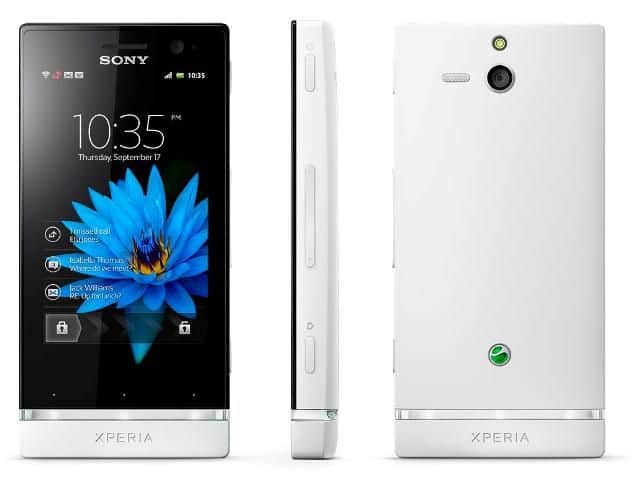
The Sony Xperia U has a distinctive sort of look that really separates it from a lot of other phones. It comes with this sleek compact body, and on the back there’s a soft-touch matte finish, so it feels good in the hand, not slippery or anything. Its size is 112 x 54 x 12 mm, which is kinda small if you compare it to newer models, and honestly that can be a plus for people who want something easier to carry around . The weight is 110 grams, so it seems sturdy, but it wont feel heavy or annoying during daily use.
A detail that stands out is the interchangeable bottom caps. They are available in different colors , so you can tweak the appearance without much trouble. For build quality , the overall construction feels quite solid, like it was made to last at least in regular use. That said, it’s still plastic , so while it works well, it doesn’t quite give that premium vibe you might expect from metal or glass body designs.
Display
On the front the Xperia U uses a 3.5-inch Reality Display with Mobile BRAVIA Engine, and the resolution is 480 x 854 pixels. The screen is on the smaller side by today’s standards , but at the time it launched it was normal for mid-range devices. In day to day life the display still looks clear, with good brightness, and it handles stuff like web browsing, social apps, and video playback without feeling weak.
The Mobile BRAVIA Engine helps a lot with the picture quality , it boosts contrast, sharpness, and color output. So even though the panel is small, the visuals look more vibrant and crisp than you might assume. Viewing angles are decent, though colors do shift a little when you look from the more extreme sides. There’s also scratch-resistant glass protecting the screen , which adds a little peace of mind for everyday scratches and scuffs.
Performance
Hardware specs
So, under the hood , the Sony Xperia U runs on a dual core 1 GHz ST-Ericsson U8500 processor, and it’s also backed up by 512 MB of RAM. On paper this setup was kinda competitive for a mid range smartphone back in 2012 , yet it quickly feels outdated when you stack it against newer phones, those have snappier cores and more memory.
The Xperia U ships with 8 GB of internal storage, with about 4.5 GB actually usable by the user. The storage is rather small, and since there’s no microSD expansion, it can become a bit of a nuisance if you want extra space for apps, snapshots, and other media stuff. The whole package runs on Android 2.3 Gingerbread though it can be updated to Android 4.0 Ice Cream Sandwich, depending on what’s available.
Benchmark results
When it comes to benchmark performance, the Xperia U stays in the “okay for its category” zone. Basic stuff, like web browsing, email, and social networks , works without too much drama. Still, the dual-core chip and the constrained RAM may cause minor lag and small stutters, especially if you try heavier applications or switch between tasks a lot. In everyday use it s usable, but if you’re after speed and smoother multitasking, more recent models will feel far more satisfying.
Camera
So the Sony Xperia U comes with a 5-megapixel rear camera plus an LED flash, and also a VGA camera up front for video calls and selfies. On the back, it includes autofocus , and it can record 720p HD video. Honestly, this kind of camera arrangement was kind of “normal” for mid-range phones back then , so it’s not surprising it aimed for solid everyday photos and usable video.
Photo Quality
In brighter situations, the Xperia U rear camera looks pretty decent. You get images with decent detail , and the colors stay reasonably true. Autofocus feels fairly quick, and the LED flash does enough lighting for darker scenes. Still, once the light drops , it can get inconsistent , with pictures sometimes looking noisy and a bit less crisp than you’d want.
There are also several camera modes and extras, like panorama mode and scene choices, which make it easier to shoot different subjects without much fuss. It does not really bring sophisticated things like optical image stabilization, but for casual photography it generally delivers results that feel acceptable.
Video Recording
For video, the Xperia U is fine for its category. The 720p HD resolution gives clear enough footage for most typical uses, but since there’s no image stabilization , the video can end up sort of shaky , especially if you’re recording while walking or moving around. The microphone audio capture is acceptable though background noise can sometimes sneak in and then the sound in the clip feels less clean.
Software
User Interface
The Sony Xperia U ships with Android 2.3 Gingerbread right away , and there’s an upgrade path to Android 4.0 Ice Cream Sandwich. Sony’s own skin, often called Timescape , goes over Android’s regular interface, adding extra touches and more visual style. Overall the experience feels tidy and easy to navigate, mostly because it leans hard into social feeds plus multimedia stuff.
Timescape also gives you what feels like a streamlined home screen , with widgets you can actually tweak and app shortcuts placed in a more sensible way. There’s furthermore a specific Timescape pane that pulls together social updates , messages, and other alerts into one scrolling stream. In practice , it means you don’t keep hopping between apps all day just to stay aware of what’s going on.
App Performance
For its category, the Xperia U usually handles apps in a decent way, though the hardware does have limits. Straightforward apps and casual games tend to feel smooth, but heavier applications might start to lag, or at least show reduced responsiveness. The 512 MB of RAM is kind of the main bottleneck here for multitasking, so if you bounce between apps rapidly, the device may struggle and slow down.
The phone includes a handful of pre-loaded applications too, such as Sony’s Walkman music player, the Album photo viewer, and the Video player. These are built to work together fairly well, offering a similar multimedia rhythm, with things like album art, playlist control, and video playback options. Alongside that, it also has common Android applications—Google Maps, Gmail, and the Play Store included—so you can reach more programs and services without extra effort.
Battery Life
Battery Specifications
The Sony Xperia U comes with a non-removable 1320 mAh battery. That capacity was sort of normal for mid-range phones back in 2012 , so it should give enough juice for a whole day under regular use. Of course, actual battery life depends on little stuff like screen brightness , the state of the network connection and how intense apps are being used, not just one thing.
Battery Performance
When it comes to battery performance, the Xperia U usually does a solid job if your daily routine is pretty moderate. Most people will likely get through the day, doing things like scrolling, social apps, browsing, and also normal phone calls. The phone also has some battery-saving tricks , like lowering the screen brightness, plus turning off background apps, which can help the battery last a bit longer.
Still , if you push it hard, like gaming nonstop, streaming videos, or using GPS for long stretches , the drain can be pretty quick. In those cases, you might end up needing a recharge by afternoon or maybe early evening. And because it does not support fast charging, the battery will take a standard amount of time to refill, often about 1.5 to 2 hours.
Connectivity
Network and Data
The Sony Xperia U supports GSM , HSPA and 3G connectivity, so you can use mobile networks for calls and data at the same time. It does not have 4G LTE support , but the 3G connection is still enough for most everyday tasks, including email, social media and web browsing. In general the Xperia U’s 3G performance is pretty dependable, with steady links and speeds that feel reasonable most of the time.
Along with mobile connectivity, the Xperia U also leans on Wi-Fi 802.11 b/g/n , so you get wireless internet for web browsing and media watching. In day to day use Wi-Fi seems solid , it holds a steady link and turns in decent speeds for the usual stuff you do online. For short-range wireless pairing, there’s Bluetooth 3.0, letting you connect to accessories like headsets or speakers.
GPS and Navigation
The Xperia U comes with GPS built in, so location tracking and navigation work as expected. GPS performance is pretty dependable, satellite lock is fairly quick, and the location readout is accurate enough for common navigation apps. There’s also the pre-installed Google Maps app, which gives turn-by-turn guidance and a few location based services, so it’s not just there “as a map” but actually useful while you’re on the move.
Additional Connectivity Features
One thing it does not have is NFC ( Near Field Communication),and that was starting to show up on more smartphones around the release period. Without NFC, you kind of lose out on contactless payments and the easy tap-to-share style of data transfer with other NFC enabled gadgets.
User Experience
Everyday Use
So, for everyday use, the Sony Xperia U gives a pretty balanced experience for people who want something compact but still usable. Since it’s small, and feels light, you can handle it without much hassle, and yeah the bottom caps are customizable, which adds a bit of flair. The screen is smaller than most newer phones, but it still manages solid clarity and brightness when you’re doing normal stuff, like quick checks and everyday browsing.
In terms of performance, it’s usually decent for basic tasks—web browsing, social media, email management, those kind of things. The camera can do decent photos and videos, especially if you’re not expecting “pro” results, but in low light it tends to get a little weaker, you know darker scenes don’t look as nice. The software side, with Sony’s Timescape UI, feels clean and easy to navigate, and there’s also useful social media linking built in, so it’s not just a plain interface.
Target Audience
Sony Xperia U is aimed at people who sort of care about a small , customizable smartphone , with solid day to day performance and multimedia features that don’t feel too cut back. Since it stays light and pretty easy to carry, it fits the kind of user who wants something more doable in the pocket, not some bigger slab just taking up space. Also, the pricing and mid-range nature of its specs make it a reasonable fit for budget-conscious users. Basically, if you want a functional and reliable phone, without paying too much, this one makes sense.
The device’s lack of advanced features like 4G LTE support and NFC can , in practice , reduce how much people want it if they are chasing more cutting edge tech. That said the Xperia U still feels pretty solid, not just because it’s durable but also because it gives some room for personalization and it handles everyday chores in a reliable way. So for people who care more about practicality and affordability, it can still make sense.
Conclusion
Strengths
The Sony Xperia U has a few strengths that really stand out , especially for the mid-range smartphone space back then:
Design and Customization: The Xperia U comes with a distinct design, and those customizable bottom caps let users tweak the look a bit more than you usually see in that segment. Plus it stays compact, and the matte finish feels both visually attractive and practical to hold.
Display Quality: Even with a small 3.5-inch Reality Display, the Mobile BRAVIA Engine helps push colors that look vibrant and visuals that feel fairly crisp. The whole setup supports clearer multimedia viewing, so it’s not just “small,” it’s also tuned for watching.
Camera Performance: The 5-megapixel rear camera does well enough in good lighting and it supports 720p HD video recording. If you want a simple camera experience, the Xperia U delivers, thanks to its autofocus system and the LED flash.
User Interface : Sony’s Timescape UI kind of adds an extra layer of usefulness and visual polish on top of the Android operating system. Stuff like social media hook-ups and that neat, easy to understand look helps make the day-to-day experience feel smoother, and honestly, more enjoyable.
Battery Life : The 1320 mAh battery offers solid enough performance for everyday use. Most users should still get around a full day when activity stays moderate ,so the Xperia U ends up being a dependable option for people who care about battery longevity a lot.
Weaknesses
Still, the Xperia U has a few downsides that can affect how attractive it feels overall , depending on what you expect
Performance Limitations : The dual-core 1 GHz processor and 512 MB of RAM handle basic chores fine, but they can get overwhelmed with heavier applications or when multitasking ramps up. At times you might notice sluggish behavior, plus a bit of stutter, especially when several apps are active at the same time.
Limited Storage : You only get 8 GB of internal storage and there’s no microSD expandability , so for users who store lots of media , this can feel tight pretty quickly. Apps plus photos and videos can fill things up faster than you’d want, leaving you with less breathing room.
Camera Performance in Low Light : In bright conditions the rear camera works pretty well. But when the lighting gets dim, it doesn’t keep up as nicely. Images can end up looking noisier , with less sharp detail ,which might be frustrating if you regularly take pictures in darker places or indoors.
Outdated software: the Xperia U originally shipped with Android 2.3 Gingerbread and later got an upgrade to Android 4.0 Ice Cream Sandwich. But since the software is already behind compared to more recent Android releases, some people may feel they’re missing out on newer features and also on important security updates, kinda like it’s always a step late.
Lack of modern features: there’s no 4G LTE support and NFC isn’t included, so connectivity and “future readiness” are a bit limited. Since these things show up a lot in newer phones now, the Xperia U might feel less appealing to users who want, at minimum, the latest kinds of wireless convenience.
Final thoughts
The Sony Xperia U, released back in 2012, can still be a decent option for people who want a small phone, that’s affordable, and also reasonably customizable, with performance that handles everyday use and multimedia in a comfortable way. The overall design and screen quality really stand out, giving a different look and a visually enjoyable user experience. Plus, the Timescape UI dresses up the standard Android interface with extra functions and social media syncing, which makes the whole thing feel smoother and pretty easy to navigate.
Still, there are some downsides. The Xperia U has performance limits, storage that runs out sooner than many expect, and an aging software base which can be frustrating if you want something stronger, or more current. And on top of that, missing “modern” items like 4G LTE and NFC may reduce its appeal in a market where advanced connectivity options are basically becoming standard.
Overall, the Xperia U fits best for users who prefer a compact device, enjoy customization, and mostly need dependable performance for daily tasks. It probably won’t match newer smartphones when it comes to raw power or feature sets, but it remains a practical choice if affordability and a smaller footprint matter more than having the newest tech.
Sony Xperia U St25i (White+ 1 Additional Bottom Cap):Unlocked GSM Phone: Buy it now
Related Posts


Tech Reviewer & Product Analyst
Định Bia has spent over 10 years testing consumer electronics with a focus on smart technology. He work as a product advisor at Biareview where he helped customers find the right devices for their needs. He personally tests every product featured on this site using a consistent evaluation framework covering quality, durability, and value. All reviews are based on experience, not influenced by the manufacturer.