Table of Contents
amazon ViewSonic TD1655 reviews
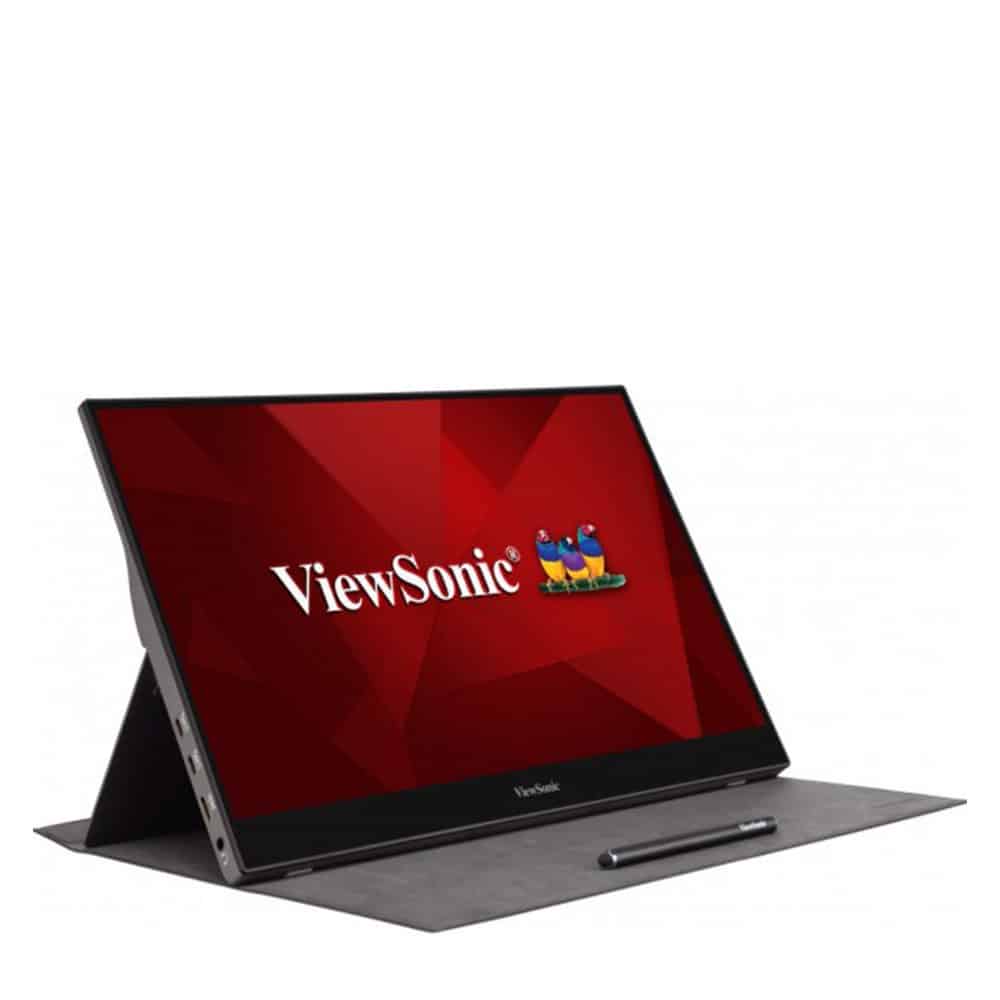
Speaking of ViewSonic, of course, we will talk about computer monitor products with product ranges that fully serve the needs of design, entertainment, and gaming. Today, we’re going to take a look at another but very interesting display – the ViewSonic TD1655 monitor, a portable 15.5″ touchscreen that supports touch.
The ViewSonic TD1655 is a portable monitor that can be taken anywhere, anytime, easily expanding into a second monitor when combined with laptops or mobile devices such as phones and tablets that support screen output support. With a second mobile screen, you will eliminate the inadequacies encountered when presenting a document or demonstrating a design to a client. You can expand the screen monitor to work while watching a popular gaming tournament being streamed, where the limitations of laptop and tablet screen sizes show a lack of display space.
ViewSonic TD1655 has a 15.6-inch display frame, equivalent to a popular 15″ laptop, this screen measures 355.6 x 232.5 x 15.24mm and weighs about 1kg. It’s still light enough to hold in your hand and easy to put in your backpack to carry with you.
The TD1655 has a plastic-finished chassis with a metal stand; the metal stand is one of the highlights of the TD1655 when not many monitors of this type have this stand. This stand can be opened to a 45-degree angle so that you can position this monitor at any working angle.
In addition, ViewSonic is also equipped with a soft cover to protect the display surface, which is linked to the screen through magnetic suction points. So you can take this part apart easily.
Setting up the screen’s functions is done via a 4-way joystick located on the back. This joystick works smoothly; every aspect of the screen is displayed in an intuitive and easy-to-use menu panel.
All connectivity ports are located on the left side of the screen, including 2 USB Type-C ports, a mini-HDMI port, and a headphone jack. The screen itself is also integrated with two 1W speakers, with this power level just enough for you to entertain in a closed room as well as with little noise. Power for the monitor works through two USB-C ports. Besides the HDMI display connection, you can also extract the signal through these two USB C ports; of course, you need a good Type C to Type C cable. In total, you will be able to connect this monitor to 3 sources at the same time.
ViewSonic has equipped the TD1655 with an IPS panel with Full-HD 1080P resolution that supports multi-touch. In the experience, you can see it has low brightness and not high contrast; the screen brightness is still not as bright as need; it’s a bit darker when compared to a laptop that is also equipped with an IPS panel.
Besides the color issue, the color display quality of this screen is not good; some colors are not accurate to be used in professional graphics. This screen becomes a more convenient tablet with the multi-touch feature when you need to manipulate the screen. Touch sensitivity is very good; whether using the included stylus or using your hands still gives accurate feedback without any touch deviation.
Specifications of the screen
Screen Size: 15.6 inches
Resolution: 1920 x 1080 (Full HD)
Aspect Ratio: 16:9
Panel Type: IPS
Brightness: 250 nits
Contrast Ratio: 800:1
Color Coverage: 45% NTSC
The Full HD (1920 x 1080) IPS panel is the ordinary resolution for a monitor of this size, and ViewSonic installed a standard panel on the TD1655. The Full HD screen finds relevance in a 15.6-inch screen size, rendering texts and images sharp on most devices without any need for zooming. The 16:9 aspect ratio is another standard that finds use in nearly innumerable applications, ranging from productivity applications to viewing videos.
Color Accuracy and Brightness
Being the most crucial factor in any display, color accuracy is also given perfect consideration by any creative industry. Covering just 45% of the NTSC color space, the TD 1655 is slightly below the average of contemporary displays. For everyday tasks like browsing, editing documents, and casual video viewing, the color display is good enough. However, use requiring precise color accuracy can pose a problem for furtherance of the monitor, such as photo edits or graphic design, and an expert may consider this monitor unsuitable. That would make this monitor obsolete for them.
Brightness is specified at 250 nits, which is quite okay for indoor usage. The monitor has decent performance in moderately lit offices or at home. It might, however, be a bit underpowered for very bright rooms or outdoor locations. The matte finish provides a reduction in glare, a nice bonus for those working under overhead lighting setups.
Viewing Angles
Being an IPS panel, the TD1655 has magnificent viewing angles. One can enjoy viewing the screen from a very wide position range without noticeable color shifts or degradation in image quality. Hence, it will be perfect with collaborative work that allows several people at once to view the screen. IPS colors and contrasts remain consistent even when viewed from the sides, contradicting TN and VA panels.
Touchscreen Performance
The ViewSonic TD1655 is equipped with 10 touch points, which makes for a very flexible device. The touchscreen is responsive and fast, with little or no lag, hence suitable for drawing, taking notes, and flipping through presentations. It works excellently with Windows and Android devices, although for full functionality under macOS, special third-party software is required.
For drawing and design applications, the TD1655 touch accuracy is accurate, but not ultra-precise like pressure sensitivity found in an actual pen tablet. However, casual sketching, annotating, and general touchscreen tasks work well on it.
Connectivity
Another great feature is the multiple connectivity options. Located on the side of the monitor are ports for:
2 x USB-C (DisplayPort Alt Mode and power delivery)
1 x mini HDMI
1 x 3.5mm audio jack
The USB-C ports are the most convenient ones due to such a connection in which a laptop/smartphone/tablet connects to the monitor via a single cable for power and (video) input. Setting up will now be very simple, leaving one more clean set up. Having two USB-C ports enables you to connect one port to display and power, and the other to charge some device like a phone or tablet.
If your device lacks USB-C, then the mini HDMI port offers an alternate route to connectivity. The monitor ships with an HDMI to HDMI-mini cable, thus being compatible with all laptops, desktops, and gaming consoles out there.
There is also a 3.5mm jack to connect your headphone or external speaker system, though the monitor itself does not contain any speakers. While the absence of the speaker may be frustrating to some, the TD1655 was designed first as a portable display and secondarily as an entertainment hub, with most going for either headphones or external speakers anyway for their audio output systems.
Ease of Use and Setup<h3>Setting up the ViewSonic TD1655 is simple and straightforward. Since it is plug-and-play, you just connect it to the respective device, without the need to install any driver. With the USB-C, power, and video signals are transmitted through the cable itself, making it so much easier to set up.</h3>
The OSD menu is controlled by a little joystick located on the side of the monitor. This is quite an intuitive control, allowing you to quickly adjust brightness, contrast, color temperature, and more. The OSD itself is very well laid out, and moving between the screens is a breeze.
ViewSonic throws in a foldable screen protector that can also be used as a stand, aside from its built-in kickstand. While the sleeve can be of great use, the lack of a hard protective case may concern those who pack the monitor with them during travel for a bit of extra protection against accidental bumps and drops.
Software Compatibility
The TD1655 is compatible with Windows and macOS operating systems, although, as previously stated, macOS users will need to source some third-party software for the monitor to apply touch features. For Windows users, the monitor just clicks: the touch interface is fully funded to work with navigating, drawing, and annotating. Android devices with USB-C also support the display, which is a fantastic feature for those who want to extend their smartphone’s screen real estate for presentations or media consumption.
The touch functionality of the screen is, therefore, highly beneficial for those who use creative software or give presentations on a regular basis: Apps like Microsoft PowerPoint and Adobe Acrobat are really helped by the touch interface, which enables you to perform more intuitive interactions with the content.
Battery Life and Power Consumption
Unlike some portable monitors that contain an internal battery, the ViewSonic TD1655 does not operate independently without external power. This can be both an advantage and disadvantage depending on your needs. The monitor will draw power from connected laptops or other devices using USB-C, allowing for a simple set-up but with the added downside of draining your laptop battery faster.
If it takes longer, though, it’s better to just have the monitor plugged into power through a USB-C power adaptor, maybe even a USB-C-enabled power bank. Thus, one should not have to worry whether working for long hours on the monitor would drain laptop or tablet batteries.
In the general sense of power consumption, the TD1655 is quite efficient, taking roughly 8-10 watts of power under normal conditions. This amount of power consumption is unlikely to significantly impact the overall battery life of the laptop during short to medium span sessions.
where can you get a ViewSonic TD1655 online
ViewSonic 15.6 Inch 1080p Portable Monitor with IPS Touchscreen, 2 Way Powered 60W USB C, Eye Care, Dual Speakers, Frameless Design, Built in Stand with Cover (TD1655): Buy it now
Advantages and Disadvantages:
Advantages:
Portability: Very light and very slim, so it is easy to carry around.
Touchscreen: 10-point multitouch system for a comfortable set of use cases.
USB-C Connectivity: USB-C acts both as a power source and video input, allowing simple connections.
IPS Display: Provides good viewing angles and good image quality.
Sturdy Build: Aluminum chassis for durability, with foldable kickstand balancing sturdiness.
Disadvantages:
Brightness: 250 nits is not bright enough for outdoor or very bright indoor environments.
Color Accuracy: Covers only 45% NTSC, which is insufficient for color-critical tasks.
No Built-In Speakers: External audio devices needed for outputting sound.
Battery-less Design: To work, it needs an external power source that could possibly drain the device it is connected to.
Conclusions
The ViewSonic TD1655 is a wonderful portable touchscreen monitor, definitely a value pick for a second monitor with the different fillings of working, travel, and entertainment. The slim and lightweight design makes it easy for portability; also, touch control lets the monitor be used for both productiveness and creative work. The Full HD IPS monitor behaves well, but depending on the profession, brightness and color accuracy could be an issue.
While it might not be better for color-critical work or high-end gaming, portable monitors shine in their respective roles-the TD1655 in this role. It has connectivity options like USB-C and mini HDMI to connect almost anything, and its build quality is such that it can certainly endure intense days of traveling.
The ViewSonic TD1655 is a fine investment that will increase productivity and entertainment on the move for business users and travelers, or casual gamers. That affordable price range makes it one of the few with that fine balance of functionality, portability, and performance, putting it comfortably in competition with other players in the portable monitor market.