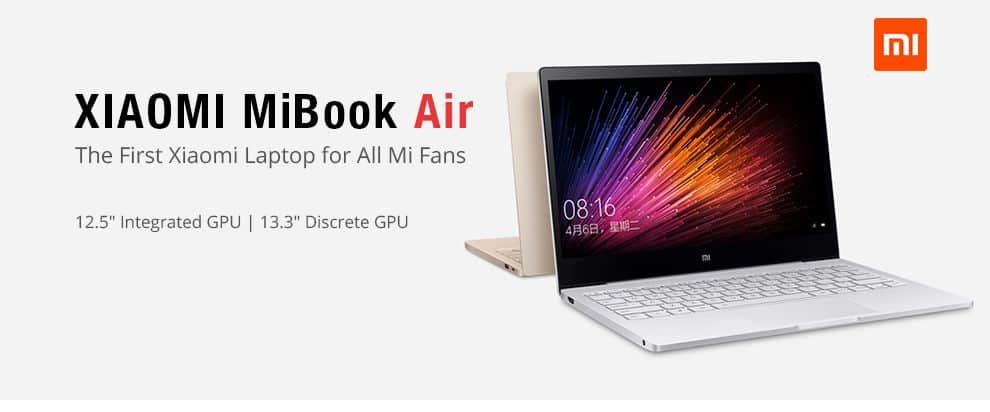
If viewed from the perspective of ordinary users – select configuration buy laptops, In range price for a laptop running the Core M3 (limited performance) such as MiBook Air 12.5 inch is unreasonable. Users can fully buy the laptop running the Core i5 or even i7 with better performance.
However, to be fair, Xiaomi MiBook Air 12.5 inch belong Ultrabook laptops (ultra thin), focused on the design, promote thin, lightweight rather than configurations racing. In other words, the “expensive” is located in the part of MiBook Air design, mobility.
Until now, the display on the smartphone / tablet Xiaomi has never been classified as beautiful, but with a MiBook Air 12.5-inch laptop, this bright screen, good detail, color reproduction standard determination, a wide viewing angle. If we watch movies, view photos, read newspapers, surf the web, Xiaomi laptop will give a good experience.
One other plus point of Xiaomi MiBook Air 12.5 inch ‘s screen is Touchpad (Andrew table) used very happy. Compared to the Surface computer (even Surface Book), Xiaomi Touchpad better experience, multi-user, swipe, touch smooth, fast response, but still lost to MacBook.
Display
Screen Quality
13.3-inch, Full HD, and sharp enough for the basics — browsing, documents, streaming. The size is a reasonable trade-off: big enough to actually work on, small enough that the laptop stays thin.
Color and brightness are good for casual use. Don’t expect the accuracy a photo or video editor would want, but for everyday viewing it looks clean. Viewing angles hold up well, and the anti-glare coating actually helps if you’re near a window or working outside.
Performance
The i5-6200U in the review unit (i7-6500U was also offered) is a 6th-gen chip — handles browsing, office work, and everyday multitasking without drama, but it’s not a chip built for anything heavier.
4GB of RAM is the real limiting factor here. It’s enough for light use, but open a dozen tabs plus a couple of other apps and you’ll feel it slow down. Worth budgeting for more RAM if you can, or knowing what you’re getting into.
Graphics
Intel HD 520, integrated. Fine for video and everyday use, not built for gaming — no surprise at this price point.
Storage
256GB SSD, quick boots and app launches, reasonable space for most people’s day-to-day files. Heavy media hoarders will want an external drive eventually.
Real-world use
Put it together and this is a laptop that’s genuinely fine for everyday computing — browsing, writing, media — as long as you respect the RAM ceiling. Push past that and things start to lag.
Keyboard
Comfortable typing, good key spacing and travel. No backlight, though — a real gap if you ever type in low light.
Touchpad
Big, smooth, handles gestures well, buttons click with decent feedback. Nothing to complain about here.
Connectivity
Ports and Slots
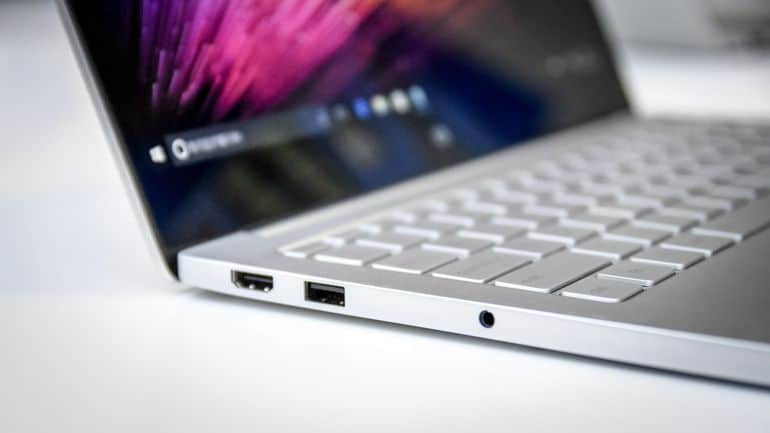
The Xiaomi MiBook Air includes a range of connectivity options to accommodate various needs. The laptop’s ports and slots include:
- 1 x USB 3.0 port: For high-speed data transfer with compatible devices.
- 2 x USB 2.0 ports: For connecting older peripherals and accessories.
- 1 x HDMI port: For connecting to external displays and projectors.
- 1 x headphone / microphone combo jack: For audio connections.
- 1 x SD card reader: For transferring files from memory cards.
These ports provide essential connectivity options, similar to having a versatile toolkit that caters to different needs and allows for easy connection to various devices and accessories.
Wireless Connectivity
Connectivity
802.11ac Wi-Fi and Bluetooth 4.0 cover the basics — stable enough for everyday internet use and pairing with wireless peripherals like a mouse or headphones. Nothing here stands out, but nothing’s missing either.
Audio
The built-in stereo speakers are fine for video calls, casual listening, and media playback, but don’t expect much low-end or real depth — think laptop speakers, not something you’d want to rely on for music. Xiaomi’s software includes some basic audio tuning that helps a little, though it’s not going to turn these into speakers you’d actually choose over a decent pair of headphones or an external speaker.
Battery life
A 40Wh battery gets you around 7-8 hours depending on what you’re doing, which is enough to get through most of a workday without hunting for an outlet. Xiaomi’s power management software lets you switch between profiles if you want to squeeze out more life at the cost of performance.
Cooling and noise
The fan stays quiet during normal use and only really becomes noticeable when you push the laptop harder — even then, it’s not particularly loud compared to other laptops in this class. Temperatures stay reasonable throughout, so there’s no real heat issue to worry about during typical use.
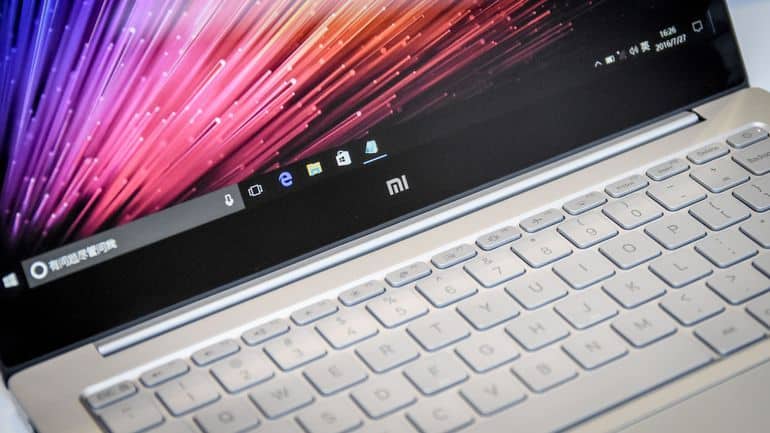
Xiaomi Air 13 Laptop – 13.3 Inch IPS Screen, Intel Core i5 CPU, GeForce GT 940MX, 8GB DDR4 RAM, 256GB SSD: Buy it now
Much of the current Ultrabook laptop with only one hard drive and no upgrade SSD slot, which main purpose is to require users to purchase a higher capacity. Meanwhile, Xiaomi to give us an upgrade SSD slot when required, saving costs, and brings back good price for users.
Through the faster experience, the battery life pretty good meet needs work office. With running continuously for approximately 8:00 pm: download the Windows 10 updates, web surfing, chat Facebook, up to 8:00 am, battery percentage display on Xiaomi MiBook Air remains 30%.
MiBook Air 12.5 inch’s keyboard is the first point of reprehensible. Firstly, this keyboard design is quite “native” quality “build” is also problematic, even longer skewed Power button. Second, typing on a Xiaomi not bad but not outstanding.
This laptop is Windows 10 Home copyright, but the default is Chinese. Users can not download, as well as changes in other languages.
User Experience
Overall Performance
Performance
For everyday use, the Core i5 with 4GB RAM and a 256GB SSD gets through the usual stuff. You can browse, type up documents, and watch media. For most standard tasks it feels stable, and you do not have to fight with it.
Portability
This is where the MiBook Air stands out. It is thin and light, so it is easy to toss in a bag. The 13.3-inch display hits a good middle ground. It is large enough to read and work on. At the same time, the whole unit stays compact.
Interface
It runs Windows 10. That means the setup is familiar. The Start menu can be changed. You also get virtual desktops. There are touch gestures too if you use them. The system does not get in your way.
Where it falls short
4GB of RAM is the biggest limitation — fine for light use, but multiple apps running at once or anything memory-hungry will expose it quickly. The integrated Intel HD 520 graphics rule out gaming or serious graphics work, though that’s expected at this tier. 256GB of storage is workable but not generous heavy file or media users will likely need external storage eventually. And there’s no backlit keyboard, a real miss for anyone who types in dim rooms.
Conclusion
The MiBook Air is a solid pick if your needs are straightforward: browsing, office work, media, portability. It’s not built for power users — the RAM ceiling and integrated graphics see to that — but for what it’s priced and positioned for, it delivers a genuinely usable everyday laptop without much to complain about.
Related Posts

Tech Reviewer & Product Analyst
Định Bia has spent over 10 years testing consumer electronics with a focus on smart technology. He work as a product advisor at Biareview where he helped customers find the right devices for their needs. He personally tests every product featured on this site using a consistent evaluation framework covering quality, durability, and value. All reviews are based on experience, not influenced by the manufacturer.