
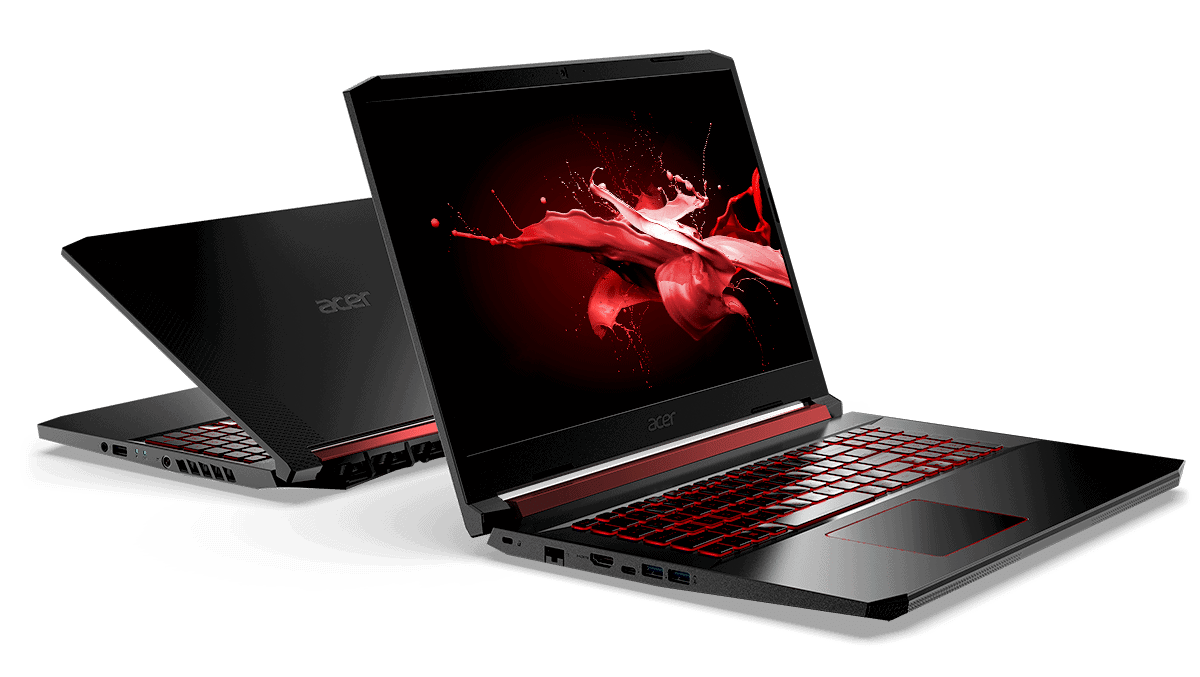
First impressions
In 2019, Acer brought thin-bezel displays to all its gaming product ranges. The Nitro 7 still has a 7.4mm thin-bezel design and 80% screen-to-body ratio, bringing a much better and more enjoyable gaming experience.
Design
Acer Nitro 7 has a metal back design with three stripes to create more accents for the machine; the hinge bar has also been replaced with black, the overall machine is almost black. But with the metal back will create a shadow effect that makes the device still stand out enough.
The inside returns to the familiar red and black tones of the Nitro 5 series so far; with Nitro 7, everything remains the same, and nothing has changed except that the hinge is changed to black, as I mentioned above.
The bottom edge of the Acer Nitro 7 with many air intakes and a warning icon in the hottest area of the machine when operating at high intensity; users should remember and avoid touching it directly while the machine is operating works at high capacity.
Display
The Acer Nitro 7 arrives with a 15.6-inch Full HD display (1920×1080) that uses IPS tech . From the start you can feel the good color accuracy and those wide viewing angles, because IPS sort of does its job. So, it ends up being quite good not only for gaming , but also for movies, and just everyday productivity stuff.
A big part of the screen experience here is the 144Hz refresh rate . With 144Hz you get visuals that feel more smooth and fluid, mainly when games get fast, you know, a lot of motion. Plus there’s a 3ms response time, that helps cut down motion blur, and it makes the whole gaming session feel more immersive , even when you’re focused on details.
Also, the panel comes with a matte finish, which keeps glare and reflections under control. That means it’s easier to stare at the screen in rooms with strong lighting. Brightness is decent indoors, but in really bright outdoor light it may feel a bit weak . Still, overall the display on the Nitro 7 is one of its stronger areas, with a nice mix between image quality and real world performance.
Performance
So under the hood the Acer Nitro 7 is usually running on a 9th or 10th generation Intel Core i5 or i7 processor , it depends on the setup you get. The unit we actually tested arrived with a 9th Gen Intel Core i7-9750H, and yeah it’s a six-core CPU with a base clock of 2.6GHz, and a turbo boost that can reach 4.5GHz. All in all, it gives more than enough punch for gaming plus everyday multitasking, without that laggy feel.
For the graphics, the Nitro 7 is paired with an NVIDIA GeForce GTX 1650 or GTX 1660 Ti GPU. We tested the GTX 1660 Ti model, and it delivered strong gaming performance for what you pay. Most newer AAA games could be played on high settings with smooth frame delivery. Titles like “Shadow of the Tomb Raider,” “Red Dead Redemption 2,” and “The Witcher 3” ran nicely, staying fluid and making the whole session pretty enjoyable.
It also ships with 16GB of DDR4 RAM, which is plenty for most games plus background stuff like browser tabs, and voice chat. The memory isn’t locked either , so you can add more RAM later if you ever need it. As for storage, you get a 512GB NVMe SSD. That tends to mean faster boot times, quick level loads, and snappy access to files. The SSD is upgrade friendly too, and there’s space for a second SSD or you can slot in a hard drive if that’s more your thing.
Keyboard and Touchpad
On the Acer Nitro 7 you get a full sized keyboard, including a dedicated numeric keypad. The keys feel well spaced , with a decent amount of travel so typing feels pretty comfortable. The WASD keys are highlighted for quick recognition, and honestly that little detail helps a lot if you game. There is also red backlighting, it gives the whole setup a sharper gaming look and it’s easier to see in dim rooms. Still, the light is not RGB, and it only sticks to one single color setting, so yeah… not as customizable as some people might want.
As for the touchpad, it’s responsive and works with Windows Precision drivers, so tracking is accurate and multi touch gestures come through smoothly. The pad is a good size and it sits a bit left of the center, which makes it easy to reach, but it also reduces the chance of brushing it by accident while you’re typing. For serious gaming, using an external mouse is the smart move. But for everyday tasks, the touchpad does the job and it feels solid enough.
Audio
So, the audio quality on the Acer Nitro 7 is pretty decent, but it s not really mind blowing either. The laptop has dual stereo speakers sitting on the bottom front edge. In general the sound comes out clear , and loud enough for casual gaming and normal media, like videos or music. Still, the bass is kinda thin, and at louder levels the whole output can feel a bit tinny , like it s missing depth.
If you want to squeeze out a better listening feel, the Nitro 7 includes Waves MaxxAudio technology. That means it drags in a few audio presets and a little bit of fiddling you can do with the settings. Honestly, matching it with a decent pair of headphones or solid external speakers really helps, a lot, especially when you’re gaming sessions and movie watching because you start noticing the little details more.
Battery Life
Battery life is usually a big worry with gaming laptops, and the Nitro 7 keeps that same story going. It ships with a 58Wh battery, and in day to day use you can expect roughly 4 to 5 hours. That s things like web browsing, writing in Word, and streaming or playing media. When you switch to games though, the runtime drops fast, to about 1 to 2 hours depending on what you play and how aggressive the settings are.
For longer gaming marathons it s kind of smarter to just keep it plugged in most of the time, so the performance stays steady, and the charge doesn’t run out too fast. Plus it also supports fast charging, which means you can fill up the battery quite quickly when you need a recharge.
Connectivity
The Acer Nitro 7 gives you a pretty solid mix of connectivity option. Over on the left side, you’ll spot a Kensington lock slot, an Ethernet port , a USB 3.1 Type-A port, an HDMI 2.0 port, a USB 3.1 Type-C port, and a 3.5mm headset microphone combo jack. Then on the right side, there are two extra USB 3.1 Type-A ports along with a dedicated power jack.
Having a USB Type-C port is honestly a nice touch. It brings some real adaptability, for plugging in modern peripherals or those everyday devices you keep reaching for. The HDMI 2.0 port also supports 4K output, so you can link the laptop to an external monitor or a TV, which is handy whether you’re gaming, or doing productivity stuff.
Wireless
For wireless, you get Wi-Fi 6 (802.11ax) plus Bluetooth 5.0 , so connection should feel quick and steady. Wi-Fi 6 is a standout here, especially when you’re gaming, because it generally means better throughput and reduced lag compared with older Wi-Fi generations.
Software
The Acer Nitro 7 ships with Windows 10 Home pre-installed, so you don’t have to deal with the setup hassle right away, and it feels familiar to most people. Acer also bundles a few useful tools and applications, that are meant to improve the overall gaming vibe. One of the biggest is NitroSense, a control utility that helps you track system status, tweak fan behavior, and personalize the keyboard backlighting.
With NitroSense you can see things live, like CPU and GPU temps, clock speeds, and overall system load. That way, you can keep a closer watch on how the laptop is performing in the moment. It also includes multiple cooling modes , so you can swing between higher performance and quieter operation, depending on what you care about most at the time.
Configuration
As the title says, Acer Nitro 7 owns a set of ultimate and more powerful basic configurations than Nitro 5 and is aimed at general gamers who want to experience the top game. Nitro 7 will be configured with a 9th generation Intel processor – i7-9750H, GTX 1660 Ti 6GB graphics card, and a 256GB M.2 SSD and 8GB of RAM.
One of the brightest elements that the Nitro 5 does not have compared to the Nitro 7 is the screen with a 144Hz refresh rate, which will be valuable for gamers and a better experience. That is also the first time that Acer has brought a 144Hz screen to the Nitro series.
The cost of owning a gaming laptop with a 144Hz screen in 2019 became more and more affordable when the Nitro 7 appeared. In addition to the 144Hz screen, do not forget that the Nitro 7 has brought a powerful configuration from the GTX 1660Ti.
A little bit about the panels on the current 144Hz and 120Hz laptop screens on the market. Obviously, for casual gamers, the difference between 144hz and 120Hz is not too much concern. Still, besides that, the color display quality of the 144Hz screen also gives better color display quality.
With the parameters that I can refer to, the 144Hz screen on the Nitro 7 will give a display quality of 71% NTSC, 96% sRGB. In contrast, the usual 120Hz screen panels will only reach 45-57% NTSC.
The Nitro Sense hotkey is also on the keyboard for quick startup, similar to Nitro 5; with this software, users can check the system clearly and easily control the system, from temperature to speed fan.
Nitro 7 is favored by Acer, with the only Killer Ethernet E2500 standard LAN port integrated into the popular gaming segment. Killer Ethernet will help gamers prioritize Internet bandwidth, fully control all applications and prioritize data flows on Nitro 7 through Killer Control Center software.
Actual Performance and Benchmark Score
With Intel Core i7-9750H paired up with NVIDIA GeForce GTX 1660 Ti graphics card to bring out better than expected gaming performance. You can quickly try your familiar games like CS: GO , and League of Legends on maximum configuration, with settings in Nitro Sense like Auto together with CoolBoost, and Max on/off. The game still maintains stable frames and temperatures below 90 degrees. The framerate difference between the oscillation modes is not high, but the temperature of 8-12 frames is good for intense gaming in the long run.
Pushing up PlayerUnknown’s Battlegrounds game with High configuration, the game always gives a high FPS, about above 65, but the temperature is also relatively higher than 92 degrees. I locked the frame to 60, and the game has also reduced the temperature to below 90 degrees (in Max mode in Nitro Sense).
Besides, Nitro Sense now has a High-Performance section; this mode will push the power consumption up to 45W (compared to balance, it’s about 35W). The machine is also hotter; this mode is more suitable for rendering than a seamless gaming experience.
When experiencing continuously with the heavier game Need For Speed: Payback, Nitro 7 gives the experience always from 60 FPS in all situations, all high-speed phases, in terms of temperature in this rather heavy game, Nitro 7 always operate on from 90 to 93 degree continuously. When playing continuously for 2-3 hours at a high temperature, the high temperature is still under the control of Nitro 7, so the device still gives the whole game experience without ‘fatigue,’ leading to a decrease in FPS.
Summarize
Acer Nitro 7 is a high-end option for the popular gaming segment; compared to Nitro 5, Nitro 7 is the most optimal configuration version that gamers can own.
Acer Nitro 7 enjoys VIP 3S1 warranty service with a commitment to fast repair within three days; if it is more than three days, it will immediately exchange for a new equivalent (or higher) machine. Gamers will certainly have no reason to be shy when intending to buy any Acer-Predator-branded machine.
Acer Nitro 7 Gaming Laptop, 15.6″ Full HD IPS Display, 9th Gen Intel i7-9750H, GeForce GTX 1650 4GB, 8GB DDR4, 256GB PCIe NVMe SSD, Backlit Keyboard, AN715-51-73BU: Buy it now
Acer – Nitro 7 Intel Core i7 GeForce GTX 1050 8GB Memory 256GB SSD AN7155170TG: Buy it now
Related Posts




Tech Reviewer & Product Analyst
Định Bia has spent over 10 years testing consumer electronics with a focus on smart technology. He work as a product advisor at Biareview where he helped customers find the right devices for their needs. He personally tests every product featured on this site using a consistent evaluation framework covering quality, durability, and value. All reviews are based on experience, not influenced by the manufacturer.