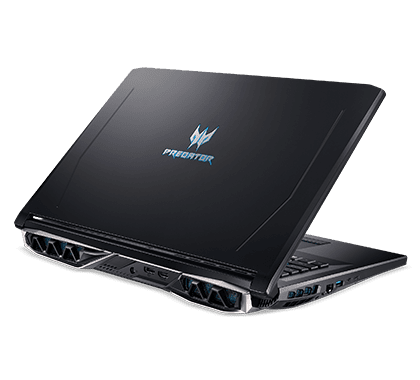
External design
Really at a glance, this Helios 500 laptop is not too aggressive like other high-end gaming laptops on the market, but its design is not too monotonous but still partly shows the outstanding personality of the laptop. Because it belongs to the Predator series, it also has some familiar design features inherited from the “elders”, such as a bit of the Predator 21x laptop combined with a bit of the Predator Triton 700. The exterior details are more minimalistic, looking softer, only pressing a few points such as the Predator logo in the center of the lid, or the rear heat sink…. to create eye-catching and attractive.
If you are a regular follower of information about Acer laptops, the beveled design of the machine looks quite familiar, but for newcomers, who have not been exposed to much, the chamfered style makes the machine look somewhat more innovative, different than the monotonous laptops currently on the market.
The first thing I don’t like about the Helios 500 is that it belongs to the high-end product line, but the case is made of plastic, which is usually only found in mid-range or low-cost gaming laptops. However, due to good texture processing and strange colors, Helios does not feel cheap, and does not suffer from creaking phenomenon when using the force of typing as well as leaning on the hand.
The surface of Helios 500 is painted with matte blue-black imitation metal, this shell is scratch-resistant, anti-slip, and does not leave fingerprints and sweat when holding. This is a remarkable positive point, and at the same time, the two sides of the machine are beveled slightly to the sides, creating a bit of an angular feeling. The manufacturer also added distinctive lines on the lid to bring the overall design harmony.
The hinge of the machine is stable and firm, you can completely open and close the lid up and down with one hand, completely reducing the phenomenon of shaking, and creaking every time you move or lightly bump the screen like some models. The hinge has the same color scheme as the machine but is not painted red as prominently as the previous Helios 300, or like the Nitro 5 Carbon.
Continuing on the two sides of the machine, on the left side we have 2 Thunderbolt 3.0 ports, 1 USB 3.0 port, 1 Ethernet port, and 1 heatsink slot. On the right side, we have 1 Kengshinton lock, 1 mic port, 1 headphone port, 2 USB 3.0 ports, and an extra heatsink slot, this side slot is made larger than the left edge. As well as the 2 large heat sink slots on the back are also made of different sizes, an asymmetrical design looks quite good, and unique, with beautiful and outstanding colors. On the back, it is indispensable to have a power port for the machine, 1 Display Port, and 1 HMDI 2.0 port.
I appreciate that Acer has removed unnecessary connections such as optical drives and VGA ports, which not only helps to reduce production costs but also contributes to the thinner and lighter Helios 500.
The bottom surface is made to look quite attractive, funny to say, but this side shows more clearly the fashion quality of a gaming laptop than the front side!!! The bottom surface is divided into areas that are quite easy to see, helping users to remove, replace and upgrade hardware components easily.
Four uniquely designed rubber feet create a comfortable slope to help dissipate heat better while creating a comfortable feeling for the user.
Recently, I have had a rough feeling about the external design of the machine, but what we are most interested in is the internal hardware of the machine and how is its performance, so right now I will start. start the machine up.
Internal hardware and performance
Predator Helios 500 is Acer’s latest gaming laptop, currently, as far as I know, there will be 2 versions in the market, i7, and i9. The version of the laptop I’m holding in my hand has almost the most advanced configuration equipped with an 8th generation Core i9 processor Coffee Lake i9-8950HK, the machine uses VGA is Nvidia GTX 1070 for powerful overclocking ability.
Next, we have 4 ram slots with 32GB available in the machine, DDR4 standard, 2666MHz bus, which can be upgraded to a maximum of 64GB. The 2 hard drives in the machine are 256GB SSD and 1TB HDD with upgrade options to SSD (512GB or 1TB) and HDD to 2TB.
Machine configuration information
With the growth of the PC gaming industry, Intel has seen growing consumer demand for laptops as fast as desktops, which has led it to bring new processors that are already on the market from PC to laptop. i9 is also the first mobile chip manufactured by Intel that has 6 cores and 12 threads, in addition to providing better gaming performance, the new high-end chip line can increase the ability to handle high-volume workloads such as Edit 4K video, run virtual reality software or handle professional 3D graphics.
Specifically, Intel said that this line can increase the frame rate (fps) when playing games by 41%, 4K video processing speed by 59%, and overall performance by about 29% compared to the generation i7 chip line high-end old life.
In addition to Core i9-8950HK, Intel also launched two more Core i7s, 8850H and 8750H, which also have 6 cores and 12 threads, so when you hear 6 cores on a laptop, don’t conclude that it is Core i9.
Core i9-8950HK has the letter K on the back, then this is a multiplier unlocked chip line. By default, this i9 runs at 2.9GHz, you can completely overclock up to 4.6GHz more easily than its previous chips thanks to TurboBoost 2.0 technology.
To optimize to push the performance limit of the chip, Intel combines TurboBoost technology with Thermal Velocity Boost, which is a feature that increases the chip clock speed by up to 200MHz when the CPU temperature is not too high ( below 50 degrees Celsius), increase the Core i9’s clock to a maximum of 4.8GHz. This feature will automatically turn on or off depending on the condition of the machine.
The i9-8950HK also supports Intel Optane, a new memory technology invented by Intel that increases response and processing times, improving performance to deliver a smooth desktop-like experience). Optane’s speed is much faster than a traditional SSD or SATA HDD. If you buy a new laptop with an HDD and support Optane, Intel says their speed can be increased by 2.2 times for normal work tasks, 4.7 times faster game loading, and multimedia file access. It is also 1.7 times faster than a normal HDD. With this kind of power, it is clear that the i9-8950HK is only used for gaming laptops and workstations, but it is difficult to be present in thin and light models like Ultrabook.
Screen
Predator Helios 500 has a screen size of 17.3 inches, a fairly thick screen border, a screen ratio of 16: 9, uses a high-quality IPS panel with the most advanced optional resolution of UHD/4K 3840 x 2160, operates at 60 Hz, and displays 100% of the sRGB color spectrum (default is FullHD 144Hz refresh rate). No matter which monitors you choose, it supports NVIDIA G-Sync technology to prevent tearing. 4K screen with G-Sync technology, this is the most remarkable feature besides the i9-8950HK chip that Acer has invested in this laptop to make a difference compared to other gaming laptops on the market. The above factors also make up the not-so-cheap price for the Helios 500, but I think it’s worth the investment.
Preliminary experience playing games on this screen with 4K resolution with the strength of IPS panels is wide viewing angle and G-Sync technology, for very good display quality, extremely beautiful and vivid, sharp images sharp, honest, fresh colors, relatively brilliant. Besides, when watching movies or playing bright colorful games, this screen can highlight the main tones (red, blue, orange, …) and flatter the viewer’s eyes.
Especially with the Thunderbolt 3 port and HDMI 2.0 port, the machine also supports G-Sync when outputting to an external display. There are some opinions of experts who are concerned about the ability of the GTX 1070 to handle the 4K screen option at a high frame rate. Acer says the GPU is also supported overclocking like the CPU if the heat dissipation is enhanced.
Helios 500 is also capable of displaying outdoors or in strong light environments very well thanks to its high brightness as well as being equipped with Anti – Glare anti-glare coating.
Unlike the screen, the sound system of the Helios 500 is only quite good. The sound quality of the machine is only good, the bass is deep but not strong enough, and the mid and treble ranges are relatively clear and not too sharp. In fact, with current technology on laptops, it is difficult to meet the needs of fastidious gamers. You should invest in a set of separate speakers or a high-quality headset.
Acer Predator Helios 500 PH517-51-72NU Gaming Laptop, Intel Core i7-8750H, GeForce GTX 1070 Overclockable Graphics, 17.3″ Full HD 144Hz G-Sync Display, 16GB DDR4, 256GB PCIe NVMe SSD, 1TB HDD: Buy it now
Keyboard
Having a large size, the Helios 500 is of course equipped with a Full-Size keyboard set with a full Numpad and anti-ghosting keys. In particular, 4 keys W S A D, and 4 navigation keys are highlighted with blue outlines – these are the keys most used by gamers in shooting games, and sports … In addition, as well as many other gaming laptops, the Helios 500’s keyboard RGB backlighting is customizable with 16.8 million colors, and the keys have anti-ghosting technology that helps complex commands and “combo” in the game be recorded. Acer also equips the Helios 500 with 1 row of 5 keys that can program its features to serve well for games that require a lot of Hot Keys (shortcuts for quick actions).
Although it is not a mechanical key, the keys on the Helios 500 have good feedback, and short key travel, when typing quickly, it makes less noise, so it is not only suitable for gamers but also for those who have work needs. An office requires a lot of typing and fast. The Touchpad area is pretty well made with a prominent blue-led border and has a delicate stylized diamond cut. The operation in this area is quite easy, with a smooth swipe, and accurate press. However, equipping a gaming mouse is essential for you to have the most optimal experience.
Each gaming laptop manufacturer almost has its specialized utility software such as Dragon Center (MSI), and ROG Gaming Center (ASUS). For Helios, it’s Predator Sense (Acer Predator)
This software not only helps us manage and monitor system performance, temperature, CPU clock, GPU, and RAM … but also provides functions to optimize the system such as adjusting fan speed higher for better cooling when gaming, or adjusting overclocking when using heavy tasks that require the CPU and GPU to operate at full capacity.
Switch between profiles using the device such as working, playing games, or saving battery, supporting game features such as surround sound, sound orientation, customizing keyboard light colors, assigning features to key sequences macros…
Gaming
For high-end professional gaming laptops like the Predator Helios 500, the gaming experience is a factor that many gamers care about. So right now I will try to play the games that are quite hot on the market today, with the highest configuration settings (Very High, Ultra, Epic) in each game. In general, games like NFS Payback, Farcry 5, GTA 5, Overwatch, and PUBG can all be played on Predator Helios 500 at the highest graphics setting with a stable frame rate.
Specifically, at 4K resolution, the average FPS is obtained from 60 – 80 in the Epic graphics of the OverWatch game, followed by Far Cry 5, a very hot game today, the feeling of playing is quite smooth. in shooting and explosion scenes with FPS ranging from 55-70 at Ultra graphics, although sometimes the FPS drops slightly, it is still stable with the impressive overclocking ability of the system.
According to my subjective assessment, this GTX 1070 when overclocked in performance will not be much inferior, compared to GTX 1080 MAX Q shortened version.
Radiators
One thing on gaming laptops that many people care about as much as performance is the cooling system. When you just start using heavy applications or playing games, the device will automatically activate the cooling system to prevent high temperatures from affecting performance.
Helios 500 with exclusive AeroBlade 3D technology maintains cool with 2 steel fans with 59 blades and 5 heat pipes that provide cold air to the main components of the machine while venting heat out. outside. According to the experience, the heat sink significantly increases the amount of air intake (about 20-25%), although it is still quite hot when playing games for a long time, the heat is mainly concentrated in the midsection of the keyboard while the palm rest area is only slightly warm. The cooling fan of the machine makes quite a loud noise.
Acer’s exclusive Dust Defender feature, the fan will reverse every 3 hours of use to push dust and heat out to keep the system clean to ensure stable operation for a long time and protect internal components to be more durable.
Fan speeds through the Predator Sense software can also be easily adjusted and customized for gaming or overclocking situations.
Battery life
Although equipped with 4 Cell batteries with a capacity of 75 WHrs, having to carry a 17.3-inch screen and powerful configuration, the battery life of Helios 500 is not impressive. Actual testing for the machine used for normal office applications, surfing the web, listening to music, watching a 1080p HD movie, using headphones instead of external speakers, and leaving the volume at 80%, and brightness at 80% for the machine to run until the battery level is 20%, this time is only about 3 hours while playing the game is about 1 hour 30 minutes.
User Interface and Software
Operating System
The Acer Predator Helios 500 comes pre-loaded with Windows 10 Home OR Windows 10 Pro operating systems, so it feels familiar right away, you get intuitive navigation, plus solid security bits for better productivity, smoother gaming performance and multimedia fun. The Windows operating system backs a broad mix of applications, work related tools, and gaming platforms, which helps users personalize how they use the machine, tune system performance, and reach digital content pretty easily, plus it still gets regular updates, security patches, and software improvements for stronger overall function, and yes, user satisfaction too.
PredatorSense Software
Acer’s PredatorSense software really levels up your control , system observation, and customization choices for the Predator Helios 500, letting you do things like:
Performance Monitoring: Check key system metrics, CPU and GPU temperatures, fan speeds, and power usage, so you can tune gaming performance, avoid overheating situations, and keep stability during heavy workloads.
RGB Lighting Customization: Adjust keyboard illumination, RGB color profiles, and lighting sync settings, basically create a personalized gaming setup, unique visual themes, and mood based lighting effects that match your preferences, your gaming style, and your general aesthetic.
Gaming profiles and macro settings
PredatorSense lets people put together custom gaming profiles, macro configurations, and keyboard shortcuts, so the whole thing feels more personal, you know, like smoother control and faster strategic actions during play sessions. The app has an intuitive layout, controls that are easy to learn, and pretty advanced customization options that help gamers tweak system settings ,adjust performance parameters, and rework peripheral setups. This way, you can match the laptop to your exact gaming needs, get a more immersive experience, and maybe even win more often across different genres, play styles, and multiplayer games.
Security and privacy features
Biometric authentication
The Acer Predator Helios 500 comes with stronger security measures, including Windows Hello biometric authentication, which is meant to protect user privacy, lock down data, and tighten system access control:
Windows Hello: Uses facial recognition or fingerprint sign-in to get into the system securely. It also helps open personal accounts and confirm online transactions without typing passwords, which should improve convenience, support data protection ,and verify identity for better security and privacy overall.
Privacy controls
The laptop also includes built in privacy features, like a webcam shutter or a physical camera cover. These are there to protect your privacy, reduce the risk of someone snooping or taking control without permission, and generally lower the privacy concerns that can happen with webcam usage. It’s supposed to give you more confidence while doing online meetings, video calls, and other multimedia activities, while keeping personal information and digital security better guarded.
Gaming Performance and Experience
So, in terms of gaming, the Acer Predator Helios 500 kinda comes ready to go with serious hardware parts, like a strong processor plus a dedicated graphics card, so you get really solid gaming muscle, better visual work, and that overall smoother feel across lots of game types, scenes, and different resolution choices. It’s more or less built for people who want both high settings and reliable results, not just “it runs” kind of stuff.
Gaming Capabilities
Graphics Performance: With NVIDIA GeForce GTX 1070 or GTX 1080 graphics inside, the system is set up to push steady frame rates, crisp high-definition visuals and a pretty immersive time on-screen, even when you crank things up to ultra. You can sink into demanding AAA games, VR , and other graphics-heavy titles where the detail, the realism, and the visual crispness matter most, so you end up with a more complete gaming experience, like it’s supposed to feel.
FPS and Frame Rate Stability: It also handles high refresh rates up to 144Hz, and throws in NVIDIA G-Sync, which helps a lot with motion smoothness, less screen tearing, and reduced input lag while you’re playing. That combo keeps FPS (Frames Per Second) acting consistently too, so your animations don’t stutter as much, and your controls feel snappy for competitive matches, quick action, and even real-time strategy, like RTS sessions. Overall you get fewer visual glitches, and performance interruptions don’t sneak in as easily, even during intense gameplay.
Thermal Management
The Acer Predator Helios 500 uses a rather advanced cooling setup, with dual AeroBlade™ 3D fans, copper heat pipes, and heat spreading tech to handle thermal output, keep internal temps steady, and push smoother system performance while you’re gaming for longer stretches, or well past what most people would call “a quick session”:
Heat Dissipation: This capable heat dissipation system helps stop overheating, thermal throttling, and that annoying performance drop, by shuffling heat away from key parts like the CPU and GPU. So you get more consistent gaming, stronger system stability, and dependable operation even during demanding workloads, intense gaming scenes, and extended use conditions where the machine really starts to feel it.
CoolBoost Technology: Acer’s CoolBoost™ tech boosts cooling efficiency and manages fan speed in a smarter way, letting you fine tune cooling settings yourself, improve airflow, and keep temperatures in a good zone during gameplay, to maximize overall performance, reduce heat buildup, and help extend the lifespan of the system without sacrificing gaming smoothness or even that small bit of user comfort you notice after a while.
Audio and Multimedia Experience
Audio Quality
The Acer Predator Helios 500 brings dual built in stereo speakers, plus Acer TrueHarmony™ and Waves MaxxAudio® tech, to create an audio experience that feels more immersive. You also get lively sound output and a stronger bass response, which helps for gaming, video playback , and basically any entertainment moment where you want richer audio rather than just “loud.”
Sound Enhancement: The integrated audio improvements really sort of tune the whole listening experience, making sound quality better, dialogue more readable, and the audio feel more immersive, so the gaming realism gets a bump, and cinematic scenes feel more lifelike too. It also helps with multimedia enjoyment , and the best part is it doesn’t insist on external speakers or headphones for the upgrade. You still get a clear and balanced sound output, plus steadier acoustic performance across different programs, video content, and audiovisual materials.
Connectivity and Multimedia Options
The laptop comes with a lot of ways to connect things, multiple USB ports, HDMI outputs, and audio jacks, all set up to fit different peripherals, external devices, and those everyday multimedia needs.
Peripheral Connectivity: You get fast data movement, multimedia output, and peripheral linking via USB 3.1 Gen 1 Type-A and Type-C ports. There’s also HDMI 2.0 , Mini DisplayPort 1.4, an Ethernet (RJ-45) port, and a 3.5mm audio jack, which is handy for flexible pairing, monitor connection, and audio device matching. Basically it helps keep multimedia playback smooth, supports customizing your gaming setup, and helps with syncing external devices, without you running into connectivity hangups or compatibility headaches.
Wireless Connectivity: Built in Wi‑Fi 6 (802.11ax) and Bluetooth® 5.0 deliver dependable wireless linking, better network results, and broad device compatibility. This supports online gaming, streaming , file sharing, and wireless peripheral use. It’s designed to help keep connections steady, reduce latency a bit, and improve network performance during those online gaming moments, multimedia streaming, and when you’re sharing content. No cables, no wired constraints, just a more direct connection experience.
Conclusion
In conclusion, the Acer Predator Helios 500 really comes across as a pretty formidable gaming laptop, it mixes strong performance with immersive gameplay , plus a bunch of advanced touches made for gamers, content creators, and power users who care about top tier gaming speed, smoother multitasking, and day to day mobility… without giving up on style, practical functionality, or plain gaming power.
With its high grade hardware setup, like serious processors, dedicated graphics cards, better-than-average cooling solutions, and customizable RGB lighting, the Helios 500 manages to hit that sweet spot of strong frame rates, sharp visuals, and a smooth overall user experience, across a wide menu of gaming genres, different scenarios, and competitive matchups. So if you’re the type who wants to level up your sessions, squeeze more productivity out of the machine, and still get immersive multimedia entertainment while moving around, this one feels like a solid pick.
Related Posts





Tech Reviewer & Product Analyst
Định Bia has spent over 10 years testing consumer electronics with a focus on smart technology. He work as a product advisor at Biareview where he helped customers find the right devices for their needs. He personally tests every product featured on this site using a consistent evaluation framework covering quality, durability, and value. All reviews are based on experience, not influenced by the manufacturer.