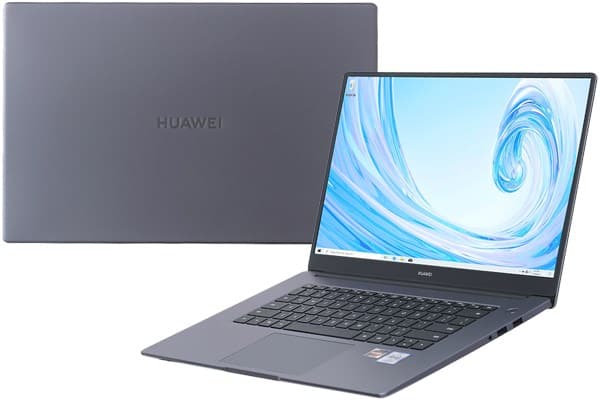
Difficulties in the smartphone segment have forced Huawei to find new directions to “keep the hot” in a fiercely competitive market. Chinese technology firms continuously “encroach” into “arenas” such as smartwatches, true-wireless headphones, and the latest is the laptop segment with the MateBook D 15.
This is a product that Huawei launched in the Chinese market from the end of 2019 and received many positive reviews from international technology sites. So in fact, how the MateBook D 15 shows and helps Huawei make a “push” in the extremely saturated laptop market like Asian with dozens of famous into the consumer subconscious.
Hopefully, the following detailed review of BiaReview will help you to partially find the answer.
The metal shell design greatly affects the MacBook Pro, the 3-sided Full View screen
As mentioned in the article on hand, at first glance, it can be seen that the design of the Huawei MateBook D 15 is heavily influenced by the MacBook Pro with minimal style, the entire case and chassis are from metal silvery gray, flat edges, square inside.
The machine is relatively compact, with a thickness of 16.9mm and a weight of 1.62Kg, flexible enough to carry with you without making backpacks and bags cumbersome. Holding the device with one hand and the other hand to operate the mouse or keyboard when needed is also completely possible without much difficulty.
Huawei’s laptop is noticeable with thin bezels on all 3 sides, which is rare in the $700 segment when most of it only has thin edges on two sides. Huawei calls this a Full View full-screen display with three equal thin upper and left sides, the size of only 5.3 mm, helping to achieve a large screen-to-body ratio of 87%. Thin bezels help the device look modern, eye-catching, and at the same time bring more spacious and airy display content. Thanks to the thin bezel, the MateBook D 15 has a large 15.6-inch screen that is not much larger than the traditional 14-inch thick bezel.
The Huawei Share feature is useful for anyone who already owns a Huawei phone
One thing Huawei really leans on with the MateBook D 15 is Huawei Share, basically it lets the laptop link up fast with Huawei and Honor phones via NFC. They also put a fairly prominent logo on the palm rest, like really right there, to highlight the whole thing , so you notice it almost immediately. In essence, this is also the area containing the NFC chip to help Huawei Share operate.
Practical experience with the Huawei P40 Pro, I just need to lightly touch my back on the Huawei Share area of the MateBook D 15, and immediately on the laptop will appear a connection confirmation message. It then takes about 5 seconds for the device to process and all the pictures of the phone will be transferred to the computer. At this time, you can use the touchpad and keyboard of MateBook to control the P40 Pro, answer messages, receive calls, chat messenger … even drag and drop photos, videos, documents or copy contents, text content, clipboard sharing back and forth from phone to computer, very convenient.
Control speed, file transfer is quite fast and smooth. Just try dragging an dropping a 1 minute 4K 60fps video file, around 260MB from your phone to a laptop and it only takes something like 13 seconds to finish the copy. So the transfer speed seems to climb up to about 20MB / s, pretty much in the same ballpark as a wired connection, almost no lag at all. The good thing is that Huawei Share doesn’t need to be connected to the Internet and the two phones don’t need to be connected to the same WiFi network.
One note is that to use Huawei Share, you will need to have PC Manager pre-enabled with WiFi, Bluetooth on MateBook D 15 and NFC enabled on the phone. In addition, Huawei Share currently only supports mid- and high-end Huawei and Honor phones running EMUI 10 or Magic UI 3.0 and above, equipped with NFC connectivity.
Fingerprint sensitivity, a comfortable keyboard, touchpad surprising
One feature that has been very popular on phones but recently introduced to laptops is the fingerprint sensor. On the MateBook D 15, the fingerprint is integrated directly into the power button, so when the power is turned on, you can always log in to Windows with touch, no need to enter a password. Fingerprint recognition speed fast, accurate, just need to touch lightly, can recognize fingers at many different angles, but fingers need to be dry. The remarkable point of Windows 10 compared to Android and iOS is that you can install as many fingerprints as you want, an unlimited number, so you can add all 10 fingers and … toes if you want.
Besides looks, the point that the MateBook D 15 continues to show influenced by Apple is the keyboard. From the layout of the keys, the font, the color, the icons to adjust the brightness, volume, or the shape of each key are more or less reminiscent of the MacBook. Even leaving 2 spaces on both sides, without the Numpad numeric keypad to enter data on a 15.6-inch laptop is what Apple often does.
The typing experience on the D 15 feels pretty comfortable, the key travel is moderate, the bounce is good, and the key surface is a bit rough , so it is easier to keep my hands steady, less slippery too. During long typing sessions, there is less fatigue which is nice. The key layout is pretty much like a desktop keyboard so I did not really take much time to get used to it, I just went with it. The one drawback I noticed is that there is no backlight , so working in low light, or in the dark is inconvenient. One more point to note is that you can still use the Fn key combination plus navigation arrow keys to trigger the Home, End, Page Up, Page Down commands, even if those symbols are not printed on the keyboard.
The large trackpad is also the point that Huawei continues to “learn” from Apple, although in terms of “super big” is not equal to the opponent. MateBook’s touchpad gives an amazingly good mouse drag experience, high sensitivity, smooth smoothness, fast response, smooth scrolling, full support for multi-point gestures, and precision touchpad compatibility. The spacious area is a big plus that makes moving the mouse very comfortable, dragging hands freely, dragging files. If I only use office tasks, browse the web, I almost rarely have to use an external mouse, besides when editing photos, editing videos, playing games need high accuracy.
On the front edge, Huawei continues to learn from Apple with the bezel completely indented, helping to create a fulcrum, support convenient and faster opening of the device. The hinge part of the MateBook D 15 is sturdy, allowing the machine to open with one hand without using too much force.
Of course, with the price of less than half, the perfection of the MateBook is hard to compare with the competition from the Apple team. There is still a little flex when pressed against the lid or the center of the keyboard (positions G, H). The metal surface is not yet sophisticated because it appears to be coated with paint instead of an anode treatment. But overall, at the price of $700, the perfection of the MateBook is still good, the palm rest area, the two sides of the keyboard, or the bottom of the machine are sturdy, cool, solid metal material.
Display quality is average, webcam “bounce” nicely
With a 16:9 aspect ratio and thin bezels, the 15.6-inch MateBook D 15 screen (yes its 15.6-inch panel) is especially suited for entertainment content like movies , music videos. You get full HD resolution (1920 × 1080) so the picture stays crisp , with sharp, fine details that you can really notice. The matte IPS panel has that anti-glare coating too, so it delivers a wider viewing angle, while also cutting down on annoying reflections. Huawei also says the screen brightness goes up to 250 nits, which feels quite practical when you’re outside , or when bright light is bouncing right onto the display. And Huawei claims the screen is TÜV Rheinland certified, meaning it should help lessen blue light exposure that can be harmful for your eyes , even if you do longer sessions.
The drawback of this screen is that the colors are less bright, the contrast is not as high as only 800: 1, so the image displayed is somewhat pale, lacking vitality. Color coverage is only about 40% AdobeRGB and 60% sRGB, so it is not suitable for photo editing and editing that require high color accuracy.
The speakers of MateBook D 15 are located on the bottom surface, the volume is quite, no distortion or distortion when maximized and enough to enjoy light music or game shows, YouTube videos that do not require too high-quality amount. Of course, the addition of headphones or external speakers is still a more reasonable solution.
An interesting point is that in order to achieve a slim bezel on both the top edge, Huawei has switched to using a “bounce” webcam, hidden under the keyboard, located between the F6 and F7 keys. This webcam only pops up when the user clicks it. When not in use, the webcam can be hidden to avoid the risk of leaking sensitive images. The handy point is that when the webcam is turned on, it can still be folded back normally without fear of hitting the screen because the camera will automatically sink a little. This mechanism helps when you turn on the device, the webcam remains on without being closed, reducing the number of times you have to click to turn on.
The image quality obtained from the “jump” webcam of MateBook D 15 similar to most laptops today, only at “have” due to the resolution of integrity … 1MP equivalent to 720p HD. Because the webcam is located in the keyboard, must be tilted from the bottom up, the resulting image will mainly be … the chin and fingers when typing. This webcam also doesn’t support Windows Hello infrared face unlock. The mic for stable, clear recording quality, effective noise filtering.
where can you get a HUAWEI MATEBOOK D 15 online
Satisfactory performance, integrated graphics superior to Intel U series chips
In terms of configuration, the MateBook D 15 version in Malaysia uses a 12nm AMD Ryzen 5 3500U CPU. This is a quad core, octa core 2.1GHz chip, that can accelerate to up to 3.7GHz. The machine doesn’t have a separate graphics card, so it relies on an integrated GPU solution, AMD Radeon RX Vega 8 Graphics with 8 cores clocked at 1200 MHz.
In other markets, the D15 also comes with versions that use Intel Core i5-10210U chips, with optional NVIDIA GeForce MX250 discrete graphics, or else integrated Intel UHD Graphics GPU. But, for this particular Malaysia version, there isn’t any info available, or at least none that I can find.
Other parameters include 8GB DDR4 Dual Channel 2400MHz hard-soldered RAM, no upgrade support, Samsung PM981a SSD 256GB NVMe PCIe 3.0 x4, and WD Blue 1TB SATA3 5400 RPM HDD, pre-installed Windows 10 Home SL.
The ports are relatively full with the left edge having 1 USB Type-A 3.0 port, 1 USB Type C 3.0 port cum charging and data transfer (no picture and audio output), and 1 HDMI port.
The right side has two more USB Type-A ports, but unfortunately only Type 2.0. Next to the 2 USB ports is a headphone/mic combo port.
The performance of the MateBook D 15 can be summed up in two satisfying words. It has a nimble response speed in nearly all of my daily tasks as a technology reporter. From browsing the web with Firefox with about 20 permanent tabs, nearly 20 pre-installed add-ons, simultaneously enabling Chrome, Edge adding 4-5 more tabs, to image processing with Lightroom, Photoshop or Full video editing. HD with Premiere Pro, Huawei’s laptop still proved undeterred.
I also tried to play some familiar games like League of Legends and Fifa Online 4 on this machine and they all run well at 60fps, Full HD resolution with the highest graphics settings. Only with 3A offline games, this GPU will “give up”, having to lower all settings to low, 720p resolution can be temporarily played at 30-40fps. This is still quite a respectable result for a thin and light office laptop with an only integrated graphics card.
The benchmark results show that the CPU performance of the AMD Ryzen 5 3500U is almost on par with the Intel Gen 10 chips like the Core i5-10210U or i5-1035G1, but the AMD Radeon RX Vega 8 Graphics GPU performance is outperformed 35% vs i5-1035G1 and 50% better than i5-10210U. This is not too surprising because AMD has always been highly regarded for integrated GPU performance, thanks to the core technologies from years of experience making discrete graphics cards.
Effective heat dissipation, cool machine, quiet
In terms of heat dissipation, the surprising point is that despite its strong performance, the MateBook D 15 runs very quietly and coolly. Although continuously running benchmarks, exhausting the system power with CPU and GPU Full load 100% for a long time, the maximum recorded temperature is only 77 degrees Celsius, the machine does not make any annoying noise from the radiator fan. The entire palm rest area, the keyboard is also very cool.
The CPU and GPU performance is therefore very stable, keeping high clock levels, without throttle as most Intel U series chips. At the same time, even when running on battery, no charger plugged in. , the performance of the device is still not degraded.
This is probably because the MateBook has a lower surface with a large heatsink, the heatsink fan, and the exposed copper tube can be seen, so the heat dissipation is much more effective than many other laptops, usually only with the slotted heat in the screen hinge.
Battery life is below average, “fortunately” with fast charging
Battery life is not really the strong side of the MateBook D 15. Even though it comes with a big 15.6-inch display , it only has a pretty modest 42Whr battery. So even when you keep things simple like web browsing and typing in Word , and you set the screen at around 40% brightness with Better Battery priority mode, it still tends to hang on for only about 4-5 hours, maybe a bit more if you’re lucky. When using heavier applications like Photoshop and Lightroom, the battery life will be reduced to about 3 hours. This is below average battery level for an office laptop today, usually having to last from 7 to 8 hours with basic tasks.
Fortunately, the MateBook D 15 comes with a compact 65W USB-C charger, kind of like half the size of the regular laptop chargers, and more or less the size you get from two phone chargers together, and it also includes a 2-pin USB-C cable. As Huawei announced , this charger supports fast charging and it can top up 53% of the battery in about 30 minutes , when the device is sitting in sleep mode. The actual test shows that, in 31 minutes of charging from 0% (the device does not turn on, the icon shows charging request), I reached the battery level to 57%. Maybe while charging I turn off the device, so the speed is even faster than Huawei’s advertising. The time to fully charge the battery to 100% is about 2 hours. The MateBook D 15’s charger is PD-compliant, so it can quickly charge compatible phones.
Summary
In the first time encroaching into the “arena” of laptops in Malaysia, Huawei showed that they are not “dreamers”. MateBook D 15 converges many elements to create an attractive laptop. The machine has an eye-catching, solid metal design. Thin and light design, convenient to move. 3-sided thin screen border modern, airy. Huawei Share features a useful phone connection, a one-touch fingerprint sensor with a built-in power button handy. The keyboard feels comfortable typing, the touchpad is spacious, the sensitivity is high, the webcam “bounces” fancy.
The performance of the MateBook D 15 is also good, especially the ability to process graphics, helping to play well popular games with high graphics settings or when you need basic photo editing. It also runs smoothly, cool, and keeps high performance even when running on battery only.
The drawback of the MateBook D 15 is low battery life, must be careful to temporarily enough use. Screen color and color coverage average, less bright. The machine also does not upgrade the RAM, lacks the keyboard backlight and the Type C port cannot output pictures or sound.
The Huawei MateBook D 15 will compete with competitors such as the Lenovo IdeaPad S340 15IIL, Asus VivoBook X509FJ, and HP 15s fq1105TU. The Huawei laptop’s superiority is the 3-sided full metal shell design, while the competitors are mainly plastic, only Lenovo’s product is present on metal. MateBook also owns many unique features such as Huawei Share, hidden webcam, Full View 3-sided thin screen, and especially agile performance.
Related Posts



Tech Reviewer & Product Analyst
Định Bia has spent over 10 years testing consumer electronics with a focus on smart technology. He work as a product advisor at Biareview where he helped customers find the right devices for their needs. He personally tests every product featured on this site using a consistent evaluation framework covering quality, durability, and value. All reviews are based on experience, not influenced by the manufacturer.