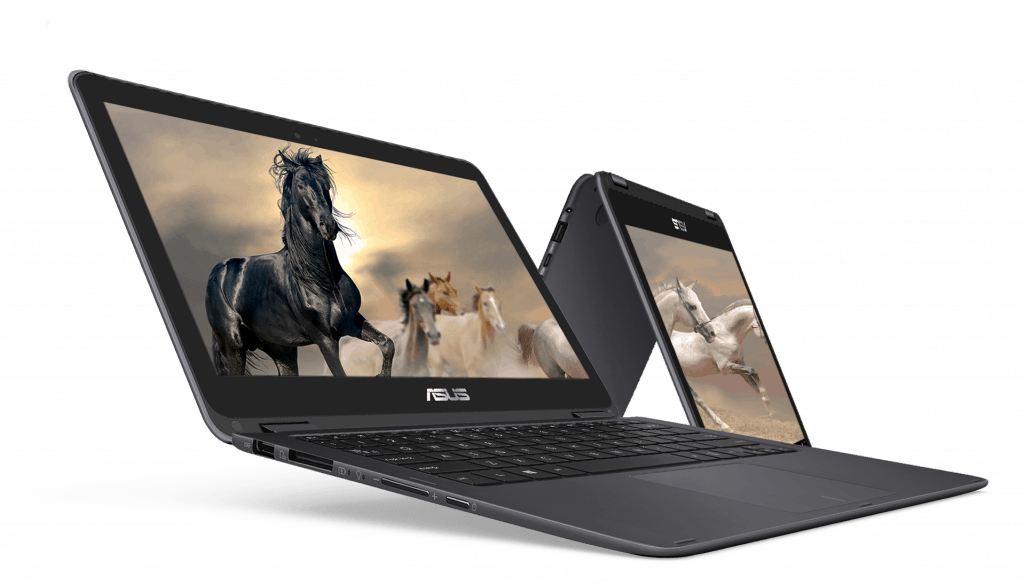

Design
Asus Zenbook Flip is designed with dark gray aluminum shell pretty attractive. The “Asus” logo is printed on the central lid, surrounded by light concentric circles. This is considered a common design on some ZenBook line of the company today.
Inside the device is a 1080p touch screen, island style keypad and spacious touchpad. Product weight and small size: 3 pounds (1.36 kg), 12.6 x 8.7 x 0.6 inches.
Connection ports
Asus Zenbook models are only equipped with a number of basic ports. On the left side is a USB 3.0 port and an SD card reader while the right is a USB 3.0 port and a USB Type-C port, an HDMI port and a headphone jack.
Screen
Overall, the 1080p touch screen on the Zenbook Flip seems able to bring out vivid colors and solid wide viewing angle views. Also the division has, apparently, hit 102% of the sRGB color range, which is well over the standard average 95%. And still, this laptop keeps a Delta-E color accuracy index of 0.7, so pretty close to 0 which is as accurate as it gets. The max brightness sits at 298 nit, and that’s just under the usual average 300 nit.
Keyboard and Touchpad
Although only cheap plastic keyboards are available, computers still support typing speeds of up to 106 words per minute and the error rate is only 3%. The 4.1-by-2.8-inch touchpad offers full interactivity and is very fast, accurate and useful for browsing the web.
ASUS ZenBook Flip UX360CA-UBM1T 13.3-inch Touchscreen Convertible Laptop Core m3 8GB DDR3 256GB SSD with Windows 10: Buy it now
ASUS ZenBook Flip UX360CA-DBM2T 13.3 – inch Touchscreen Laptop (Intel Core M CPU,8 GB RAM,512 GB Solid State Drive,Windows 10): Buy it now
2017 ASUS ZenBook Flip UX360CA 13.3″ Full HD Touchscreen Convertible 2-in-1 Laptop Intel Core m3 8GB DDR3 256GB SSD with Windows 10: Buy it now
ASUS ZenBook Flip UX360CA 13.3-inch Full-HD Touchscreen Laptop (Intel Core M CPU, 8 GB RAM, 512 GB Solid State Drive) with Windows 10–GOLD: Buy it now
Efficiency
The standard Zenbook Flip setup comes with a 0.9-GHz Intel Core M3-6Y30 CPU. It has 8GB RAM and a 512GB SSD hard drive, pretty straightforward honestly. In day to day use, it can handle about 20 tabs in Google Chrome, like you open a 1080p movie tab on YouTube too , and it still feels responsive.
Passing the overall performance test Geekbench 3, Zenbook Flip scored 4804 points. This number is below the average of the ultraportable laptops – 5457. In return, it only takes 30 seconds to transfer files of 4.97GB capacity, estimated speed 169.6 MB / sec – faster than the average level (156.7MBps). Lenovo Yoga 710 (130.5 MBps) and Dell Inspiron 13 (154.2 MBps).
The integrated Intel HD Graphics 515 graphics processor it is basically built for light gaming, nothing really heavy. Based on the 3DMark benchmark, the product reached just 52,374 points, which is a bit higher than the 51,412 average but still not even close to the Dell Inspiron 13 at 61,252 points, or the HP Specter with 62,054 points.
Performance
Processor and Memory
The ZenBook Flip UX360CA runs on an Intel Core M processor, it’s built around energy efficiency, plus it stays pretty quiet while working.
Storage
For storage, you’re looking at a 256GB SSD. That choice helps with faster startup, and files or apps tend to open quickly, like, without much waiting. The solid state drive also makes the system feel more nimble , and generally “snappy.” That said 256GB might be tight if you keep lots of photos videos, or big software installs. In those cases people usually go for external drives or lean on cloud storage.
Graphics
For visuals, it uses integrated Intel HD Graphics 515. This is fine for basic graphic tasks, and casual gaming, but it’s not really made for heavy workloads. Video playback and light photo touch ups usually go without drama, however newer AAA gaming titles, or graphics intensive programs will likely feel limited. If you’re after something for serious video editing, or higher end gaming , then a laptop with a dedicated GPU is the safer route.
Keyboard and Trackpad
Comfortable, really… typing experience
The ZenBook Flip UX360CA has a chiclet style keyboard with keys that are spaced in a pleasant way, so it feels easier to type, without that cramped sensation. The key travel is pretty solid and the tactile response is there, so even when you type for longer sessions you don’t get as fatigued. Also the backlit keyboard is a nice touch, it lets you work in low light, or wherever, without squinting too much.
Responsive trackpad
For the ZenBook Flip UX360CA the trackpad is large and responsive, which helps with accurate cursor control and the usual smooth gestures you expect. It supports multi touch movements like pinch-to-zoom, two finger scrolling, and three finger swipes, so the whole interaction feels more fluid, and not just “okay”. The glass surface is smooth to the touch, and it gives that more premium vibe when you rest your hand.
Battery life
All day battery life
A major reason people pick the ZenBook Flip UX360CA is its battery performance. Inside there’s a 54Wh battery, and it can last up to around 10-12 hours on a single charge, depending on what you’re actually doing. So if you need a device that keeps going for work, school, or even just streaming during the day, it fits pretty well.
Fast Charging
This laptop also does fast charging, so when the battery is getting low you can quickly add some juice. Stuff like that feels pretty useful for travelers and busy working folks, mainly because most of the time you do not have easy access to wall power for like, most of the day. It’s one of those little conveniences that keeps things moving, even when you’re kinda rushing.
Connectivity
Ports and Expansion
The ZenBook Flip UX360CA gives you a pretty solid set of ports, considering it’s slim and all. There are two USB 3.0 ports, plus a USB-C port, a micro HDMI connection, a microSD card slot, and a combo jack for headphone or microphone. The USB-C is a small win for future proofing, but not having a full sized HDMI port and having fewer USB options means some people will likely toss in extra adapters or dongles. And yeah, that can get annoying, pretty fast too.
Wireless Connectivity
On the wireless side, it supports newer standards such as Wi‑Fi 802.11ac and Bluetooth 4.1. That helps keep things snappy for browsing, streaming, and pairing up gadgets, generally speaking. Overall the Wi‑Fi performance feels reliable, it tends to stay steady even when there are many devices competing on the same network, at once. So you’re less likely to get those weird hiccups during everyday use.
Audio and Camera
Audio Quality
The ZenBook Flip UX360CA includes stereo speakers that deliver clear and pretty balanced sound. For a machine of this size, the audio quality is still pretty okay, so it works for videos, music and even video calls. Still, the speakers don’t really push out deep bass, so if you’re the sort of person who craves fuller low end, you might feel a little disappointed. Try headphones or external speakers, that can help a lot, in particular if you want more satisfying audio outputs, in general it makes a difference.
Webcam
The built in webcam is sort of decent, works well for video calls and conferences. You get 720p resolution which gives ok image quality , but in dim rooms it can start looking grainy , like kinda noisy too. If you do video meetings a lot, or you are making content regularly, then grabbing an external webcam might feel more reliable and sharper, honestly.
Software and User Experience
Windows 10
The ZenBook Flip UX360CA ships with Windows 10 already on it, so the whole set-up feels kind of familiar and pretty easy to, navigate around. Windows 10 also fits 2 in 1 devices quite nicely, especially because of Continuum, which lets the machine shift from laptop to tablet mode without too much hassle. On top of that, the OS brings productivity features, security options , and access to the Microsoft Store so you can grab apps when needed.
Pre-Installed Software
Asus bundles a handful of pre loaded applications and small utilities meant to improve the experience, kind of. For example there is the Asus Splendid utility for tweaking display look and feel, Asus Battery Health Charging, which is there to help extend battery life span, and Asus Tru2Life Video that’s supposed to improve video playback. Some people will genuinely appreciate these tools, but others might prefer a cleaner setup and may choose to remove whatever they consider unnecessary bloatware.

Related Posts

Tech Reviewer & Product Analyst
Định Bia has spent over 10 years testing consumer electronics with a focus on smart technology. He work as a product advisor at Biareview where he helped customers find the right devices for their needs. He personally tests every product featured on this site using a consistent evaluation framework covering quality, durability, and value. All reviews are based on experience, not influenced by the manufacturer.