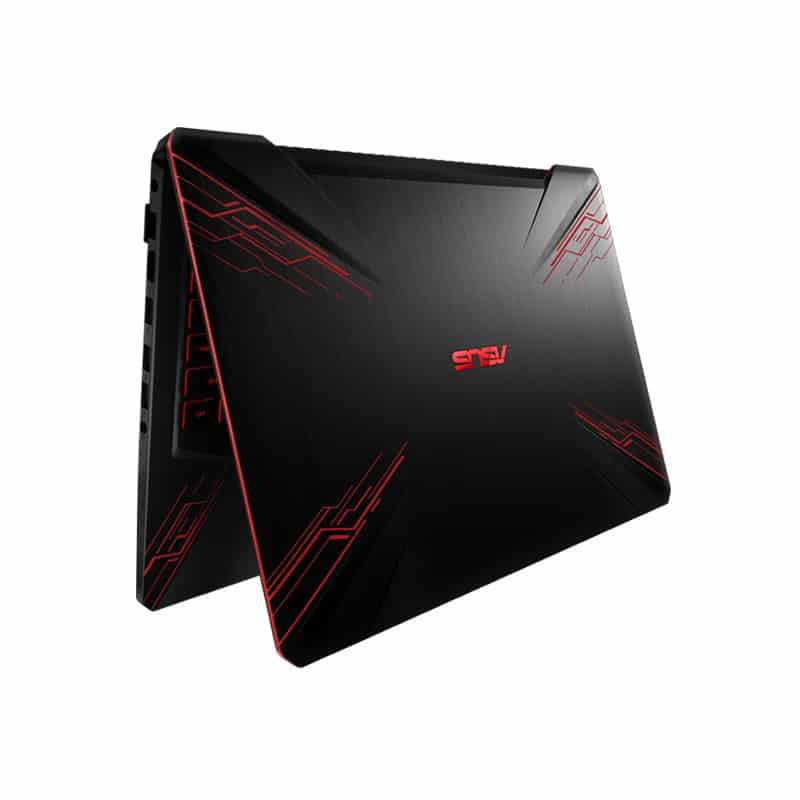
Design
In general, Tuf FX504GD has a pretty pit design and can be judged from the eyes of a gamer as “beautiful”. Even Asus is very open-handed when designing up to 4 designs for this TUF Gaming model including Red Matter, Black Matter, Fusion, and Premium steel.
But after about 4 months, in the Asian market, we can find many versions of Red Matter, and other designs are more difficult. Perhaps it is simply because this version is so beautiful. So this design review I will review for you the most popular Red Matter version in the series.
When holding the machine we can see that on the back of the screen there are ribbed design lines that rise and fall towards the middle in the style of electronic circuitry, the Asus Icon is placed in the center of the screen cover.
The Border around is a pretty cool red strip, for me, I quite appreciate the finish of this screen border, because it is drawn in rough lines alternating with a rather small amplitude, but enough to make When our hands touch there is a certain certainty and in addition the craving for gaming.
On the right side, the machine is equipped with a KenKingston lock and a full-size SD card slot
On the left side of the machine is the in/out port cluster of the machine including the charging power socket, RJ45 Lan port, HDMI port, and 3 USB sockets including 1 USB 2.0 and 2 3.0 and finally 3.5 m.m headphone jacks.
Opening the device, we will see the keyboard is designed a little lower than the palm rest, the keyboard of the Asus Tuf FX504GD Laptop is a full-size keyboard and is equipped with red led lights for work or entertainment. In the dark, the keys are placed 1.8mm apart, besides the 4 keys W, A, S, D are highlighted with darker borders, perhaps partly helps our game experience will be better.
Display
Full HD Display
The FX504GD includes a 15.6-inch Full HD (1920 x 1080) screen, which is pretty standard stuff for gaming laptops around this price point . In day to day use it looks sharp, with decent colors and stable viewing angles . I mean it is not the most punchy, or the most exact, compared with those pricier gaming models that use IPS panels but it still handles gaming and multimedia without drama.
Refresh rate and response time
Now, one thing that stands out is the 120Hz refresh option. With this you get a smoother motion, especially if you play faster paced games where reacting quickly actually matters. Add 3ms response time to the mix, and the display cuts down on blur, and that ghosting too, so the whole experience feels more lively, and less smeary.
Anti glare coating
To help with visibility when lighting is not so friendly , the display also has an anti-glare coating. It reduces reflections , and overall glare so using the laptop under bright room lights, or outside, is a bit easier.
Hardware and performance
It is quite powerful that the i7 8750H with Boost speed up to 4.1 GHz, with 6 cores divided into 12 threads, the i7 8750H promises to help us handle all operations including gaming and video rendering will be very reasonable.
For the best gaming experience, this laptop is also equipped with a GTX1050 4GB VGA for a notebook. The 1Tb HDD with 5600rpm rotation speed along with the SSD equipped with 128GB capacity will help us to have high storage capacity as well as boot windows and load games very quickly when allocating capacity for the correct SSD.
In addition, Asus is quite proud of its new heat dissipation technology called Hypercool Anti Dust Technology, which will partly solve the problem of dust when it latches onto our heatsink fins.
In general, with a configuration like this, we can comfortably today’s online games without hesitation, of course with different custom graphics settings.
To be more realistic, let’s take a look at the performance of Tuf Fx504GD when play PUBG game
Benchmarks results show that when running with Tuf Fx504GD we have a not amazing experience but is quite good if playing at High.
It can be seen that the combo i5 8750H and GPU GTX 1050 have done quite well my responsibility when the average FPS when playing PUBG at FullHD res levels and the very low to high graphics are both at 60-70 FPS. The machine temperature is also only about 45-46 degrees Celsius, feeling very comfortable, obviously HyperCool technology is doing very well.
The combination of redzone and Airdrop is dropped, the Fx504 gets a pretty drop frame compared to the average frame rate.
Next is a game with gameplay quite similar to PUBG, but the ingame calculations are not as complicated, but in return, the graphics required are quite high, which is Battlefield 1.
The results were still quite good when we got a pretty high average frame rate when playing at low, medium settings. The remaining 2 settings for the FPS level are completely stable and provide a great graphics experience.
The temperature of the device remains at 4x degrees C. Even where the left hand presses the W, A, S, D keys, the temperature is still quite cool because that is the place for the radiator fan.
Keyboard and Touchpad
Gaming keyboard
The FX504GD has what you could call a gaming grade keyboard, with red backlit keys. The keys have a decent travel distance and a solid tactile feel, so it works well for longer typing stretches and also for gaming sessions. The red glow adds that “in the zone” look, and it helps a lot in low light situations, but it’s still not customizable in the way you get on more premium gaming notebooks.
Precision touchpad
This laptop comes with a standard precision touchpad that supports multi touch gestures, and it does give accurate tracking. It feels responsive and pretty smooth, so for daily stuff like web browsing, and even moving through documents it’s comfortable. Sure, it’s not as roomy as certain higher end models, but honestly it gets the job done without drama.
Battery life
Moderate battery life
Battery life is usually a big deal for gaming laptops since the parts they use are kind of power hungry. The FX504GD includes a 48Wh battery, which ends up delivering moderate battery performance in typical use. In practice you can get roughly 4 to 5 hours when you’re doing light web browsing and productivity tasks. If you start gaming though, the battery drops quickly, and you should plan for about 1.5 to 2 hours depending on how heavy the game is.
AC Adapter
The laptop includes a compact AC adapter, for charging, and honestly it feels pretty essential if you want to keep it running steady during games or heavy work. It has fast charging support, so you can top up the battery to around 60% in roughly 49 minutes, which is nice for those quick re charges between sessions.
Audio and Connectivity
Audio Quality
The audio on the FX504GD is pretty decent considering it’s a gaming laptop in this kind of price bracket. There are dual stereo speakers and Asus’s SonicMaster tech, which helps push clearer sound and louder output. Still, the speakers do not really have much bass depth, and at higher volumes they can sound a bit tinny , but for gaming plus everyday videos they hold up fine. If you care about richer sound, then headphones or external speakers are the better route.
Connectivity Options
When it comes to ports, the FX504GD gives a solid mix. You get one USB 2.0 port, two USB 3.1 ports, an HDMI 1.4 output, plus an RJ-45 Ethernet jack. There’s also a headphone and microphone combo port. On the wireless side, it includes Bluetooth 4.0 and 802.11ac Wi‑Fi, so linking up to headsets, controllers, and networks is pretty painless.
Cooling System and Thermal Performance
HyperCool Technology
For keeping things cool, especially during gaming sessions, the FX504GD uses Asus’s HyperCool tech. In practice it sort of mixes dual fans with those anti-dust tunnels, so heat can leave more efficiently, and dust doesn’t quietly start collecting like it usually does, after a while. Under normal use the fans remain pretty steady and calm, but once you push it hard , like during heavier games it can get noticeably louder. Keeping the airflow managed well really helps the performance stay consistent, and it also supports a longer overall laptop lifetime.
Software and Features
Asus Gaming Center
The Asus Gaming Center app gives you a sort of central control area, letting you watch system activity, nudge fan speed profiles, and fine-tune gaming settings. You can adjust things in the way you like, while also seeing CPU and GPU temperatures in real time, which is pretty useful when you’re testing different titles. It also bundles GameVisual, with visual presets that are geared toward different game kinds, so you don’t have to start from zero every time.
Windows 10 Home
The FX504GD is shipped with Windows 10 Home already installed, so setup feels familiar and less stressful right away. Windows 10 brings solid support for gaming, along with wide compatibility for many software tools and games, from the Microsoft Store too , and also from other platforms.
Security Features
Kensington Lock
So for extra security, the laptop has a Kensington lock slot , so you can actually secure it in place using a compatible Kensington lock. That helps in a very practical way , especially if you’re using the device in public spots or shared offices, where theft risk is always sort of there.
Conclusion
The Asus TUF FX504GD is honestly a solid gaming laptop, and it gives pretty good value for people who are budget-minded but still want something dependable. It brings together a tough , durable build, decent gaming performance, and those essential gaming extras you usually need right away. Sure, it doesn’t have that cutting edge spec set or the super premium build you might see on higher end gaming rigs, but it does something else pretty well. It delivers a dependable gaming experience for mid-range games , including esports titles. If you’re trying to find a budget-friendly gaming laptop , and you don’t want to give up on both performance and durability, then the FX504GD is worth checking out , really.
Pros:
Durable Build: Tough, rugged style with a metallic-type finish.
Decent Gaming Performance: Works well with mid-range games and esports titles.
120Hz Refresh Rate: Smoother play, with less motion blur during action scenes.
Good Keyboard and Touchpad: Feels comfortable for both gaming and regular daily use.
Affordable Price: Gives you real gaming features , without the huge price tag.
Cons:
Plastic chassis: kinda less premium than the metal-clad kind on gaming laptops, so yeah it feels more utilitarian than “luxury”.
Average screen quality: it’s pretty standard for the price tier, but it just doesn’t get to the IPS-level color precision, you know.
Moderate battery life: basically what you’d expect from gaming laptops, so expect to be plugged in quite often during longer grindy sessions.
Overall, the Asus TUF FX504GD ends up kinda in the middle between performance, affordability, and durability , so it’s a pretty decent pick for budget gamers who care more about steady, dependable gaming outcomes than the flashy extras, you know.
Asus TUF Gaming Laptop FX504 15.6” Full HD IPS-Level, 8th Gen Intel Core i5-8300H (Up to 3.9GHz), GeForce GTX 1050, 8GB DDR4 2666MHz, 256GB M.2 SSD, Gigabit WiFi, Windows 10 – FX504GD-NH51: Buy it now
Asus FX504 TUF Gaming Laptop, 15.6” Full HD, 8th Gen Intel Core i7-8750H Processor, GeForce GTX 1050 Ti, 8GB DDR4, 256GB M.2 SSD, Gigabit WiFi, Windows 10 – FX504GE-ES72 Black Matter Edition: Buy it now
Asus TUF Gaming FX504 15.6-inch FHD(1920×1080) IPS Laptop PC, 8th Gen Intel Core i5-8300H (Up to 3.9GHz), GeForce GTX 1050, 16GB DDR4, 512GB SSD Red Backlit Keyboard, Bluetooth, Windows 10: Buy it now
ASUS TUF Gaming Laptop FX504 15.6” Full HD, 8th-Gen Intel Core i5-8300H (up to 3.9GHz) Processor, GeForce GTX 1050 Ti, 8GB DDR4, 1TB FireCuda SSHD, Wi-Fi 5, Windows 10 Home, FX504GE-US52: Buy it now
Related Posts




Tech Reviewer & Product Analyst
Định Bia has spent over 10 years testing consumer electronics with a focus on smart technology. He work as a product advisor at Biareview where he helped customers find the right devices for their needs. He personally tests every product featured on this site using a consistent evaluation framework covering quality, durability, and value. All reviews are based on experience, not influenced by the manufacturer.