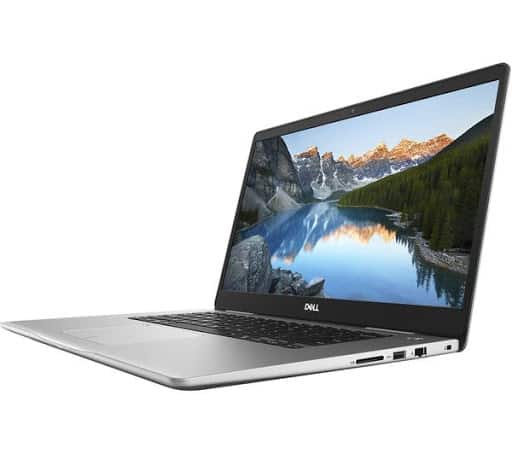
Design
The exterior design is quite similar to the previous versions, aluminum is the most prominent thing in the design of this laptop. The beveled edges around the lid and the touchpad make the whole thing feel more refined and, well, premium. This laptop weighs about 2.16 kg , which is honestly pretty nice but still not that impressive. Still the 18.8 mm thickness is something… it really is great.
The internal design is quite consistent with the appearance of the computer. There’s a solid feel around the keyboard, the touchpad and the power button are also separated from the keyboard. Removes Numpad blocks for maximum comfort while typing. The layout and keyboard design remain the same as the typical Dell designs. However, the feeling when pressing the touchpad is not very good, lacks feedback – the touchpad surface is also quite rough instead of smooth and friendly. However, it still meets the needs if you are not too concerned about the touchpad.
Screen quality
Viewing angles are good thanks to the IPS panel.
Screen brightness is around 234 cd / m2 in the middle and averages 232 cd / m2 across the entire surface with a maximum deviation of just 6%. Correlated color temperature at maximum brightness is 7070K so colors will appear slightly cooler than usual. And as we go along the gray line, the color temperature becomes colder than the optimal 6500K – 7140K. You can see how these values change at a brightness of 140 cd / m2 (60%).
The dE2000 maximum color deviation is just 1.6 from the center of the screen, which is great results as values below 2.0 have been very good, especially for color-sensitive jobs involve. Contrast Ratio is quite high – 1370: 1 before calibration and 1290: 1 after calibration.
Heat dissipation system
When testing the cooling system, it doesn’t seem quite suitable for the GPU + CPU configuration, and during heavy work, the machine will heat up but most of the time it should be fine. Consists of only one small, short heat pipe that goes through both heatsinks and connects to the cooling fan.
Real sound:
Waves MaxxAudio Pro integrated on Dell Inspiron 7570 delivers a professional sound system, immersed in immersive genres. It automatically adjusts your sound with clearer highs, boosts bass, and boosts volume so every sound you hear is the same way.
Technical of the Dell Inspiron 7570
Screen: 15.6 ”, Full HD (1920 x 1080), IPS
Processor: Intel i7-8550U (1.8GHz (maximum 4.0GHz))
Dimensions: 361 x 244 x 18.8 mm
Graphics Card: NVIDIA GeForce 940MX (4GB GDDR5)
Ram: 8GB DDR4 2400MHz
Hard drive: SSD 256 GB SSD + HDD 1TB 5400rpm
Connectivity: Wi-Fi 802.11ac + Bluetooth 4.2
M.2 slot: 1xkhe PCIe NVMe M.2 (2280, M key)
Battery: 42 Wh
Windows 10
Weight: 2.16Kg
Additional Utilities: Webcam + Keyboard with lights below
Performance
The Dell Inspiron 15 7570 is powered by Intel 8th generation Core processors, with choices that go from the Core i5-8250U up to the Core i7-8550U. These quad core chips, do bring a noticeable performance lift compared to the earlier lineup so the whole machine can manage demanding work without feeling too stressed. In our review sample, you get the Core i7-8550U plus 16GB DDR4 RAM and a 512GB SSD, which adds up to a smooth, quick-feeling experience day to day.
Processor and Memory
The Intel Core i7-8550U is basically a quad-core chip, with a base clock around 1.8 GHz, and it can jump up to about 4.0 GHz whenever things get more heavy. In practical terms, that’s pretty solid for multitasking and keeping multiple apps open at the same time , plus tackling more demanding work such as video editing and 3D rendering. The 16GB of DDR4 memory is also a solid amount, so most people shouldn’t run into slowdowns easily, and frequently used software stays readily available.
Storage
For storage, the 512GB SSD gives fast startup, quick app opening, and generally snappy day to day responsiveness. SSDs usually perform better and feel more dependable than older mechanical hard drives, and this Inspiron really leans into that advantage. If you later realize you need more space, there’s an option to add a second drive which helps for users who keep big files, like media collections or many projects.
Graphics
The laptop includes an NVIDIA GeForce MX150 dedicated graphics card, which is kind of a step up from integrated graphics. It isn’t really a top-tier gaming GPU though, but it can still manage lighter gaming, plus visual workloads like photo editing and casual video rendering. In general, a lot of current titles will run fine on medium settings with decent frame rates. For the heavier titles, you might need to dial things back a bit though so everything stays smooth and consistent.
Keyboard and Trackpad
The Inspiron 15 7570 comes with a full sized keyboard, complete with a numeric keypad, and honestly that is a nice win for anyone who lives in spreadsheets or does number-heavy work. The keys feel nicely spaced , and typing is comfortable thanks to decent key travel and tactile feedback. There’s also backlighting, so in darker rooms you can still work without squinting. That backlit setup really boosts usability across different environments.
The trackpad is pretty generous in size and it supports multi touch gestures. Because of that it feels smooth and quick, and everyday navigation just flows. It sits centered under the keyboard, so it’s convenient for both left hand users and right hand users. The surface is smooth too, and it tracks inputs accurately, which makes cursor control and gesture commands feel seamless, almost effortless.
The battery
When it comes to battery life, we have some mixed feelings about the Inspiron 7570’s performance. On the one hand, the rather small 42Wh handles the Core i7-8550U CPU fairly well while browsing the web but doesn’t offer playback times expected video. It could be due to an unoptimized Intel UHD Graphics 620 or a completely different issue. In any case, the results are displayed, and they show excellent browsing time and optimal video playback point.
All tests were run with the usual settings- Wi-Fi is turned on, screen brightness set to 120 cd / m2 , and Windows battery saver enabled, browsing time is 8 hours 54 minutes, while HD video playback results are honestly surprisingly low : 3 hours 36 minutes .
CPU – Intel Core i7-8550U
The Intel Core i7-8550U is kinda tied to the newer 8th generation Kaby Lake Refresh, and it feels like it’s carried over from the Kaby Lake family, more or less from the Intel Core i7-7500U, but also it still connects to the 6th Generation Intel Core i7-6500U. With the latest change around processor ULV ( ultra-low voltage ), Intel ups the core count from 2 to 4 but it also keeps Hyper-Threading technology, maintains the same 14nm manufacturing process, and stays with the same 15W TDP.
However, due to the change in core count, the Core i7-8550U’s base frequency is lowered to only 1.8 GHz while the Turbo Boost frequency remains quite high – between 3.7 and 4.0 GHz. This ensures significantly higher multi-core and single-core performance in a short time before going back to more tolerable frequencies than a 15W TDP but most other specs and features remain original.
The chip also incorporates a newer Intel Gen 9.5 integrated graphics called Intel UHD Graphics 620. Support for Google’s VP9 codec and H.265 / HEVC Main 10 remains iGPU’s most notable feature. Intel claims that the new UHD 620 chips improve overall power consumption over the previous version.
Connectivity and Ports
The Inspiron 15 7570 offers a good selection of ports, ensuring that users have the necessary connectivity options for various peripherals and accessories. The laptop includes:
- 2 x USB 3.1 Type-A ports
- 1 x USB 3.1 Type-C port (with Power Delivery and DisplayPort support)
- 1 x HDMI 2.0 port
- 1 x SD card reader
- 1 x 3.5mm headphone/microphone combo jack
- 1 x RJ-45 Ethernet port
Having a USB Type-C port in the mix is pretty great, gives quicker data transfer, plus you can attach it to outside screens and even plug in power, which is handy. The HDMI 2.0 connector will handle 4K output too so it’s not hard to link the laptop to external monitors or TVs , then you can work more comfortably or switch over to entertainment mode.
Audio
On the Inspiron 15 7570 you get stereo speakers, and they come with Waves MaxxAudio Pro style tuning, so the sound is usually pretty clear and it can get loud enough for a machine in this class. They’re mounted on the bottom of the unit, though, and that’s where it gets a little weird , because if you rest it on a soft blanket, your lap, or anything that soaks up vibrations, the audio can seem somewhat muted. Put it on a firmer surface , like a desk, and suddenly it sounds more decent, with better overall clarity and volume.
Still, if you’re trying to watch movies , or listen to music for longer sessions, it’s kinda better to use external speakers or headphones. The 3.5mm headphone jack makes it easy to plug in right away, and the laptop Bluetooth also opens the door for wireless audio connections if you prefer that sort of thing.
Software and Operating System
On the software side, the Dell Inspiron 15 7570 shows up with Windows 10 Home or Pro already put on it, which is a pretty familiar operating system and generally user friendly, for most people, with plenty of compatibility for everyday applications and stuff. Dell also bundles a small collection of helpful utilities, including
Dell Mobile Connect: lets you link a smartphone to the laptop, so calls , texts and notifications can show up right on the notebook side.
Dell Power Manager: helps you control battery settings and tune power use for better endurance.
SupportAssist: includes diagnostics and troubleshooting tools, so you can spot issues earlier and keep things running in a calmer way.
Build Quality and Durability
The build quality of the Inspiron 15 7570 is pretty commendable, with a chassis that feels sturdy and in general well put together. The lid and palm rest use aluminum , which absolutely boosts durability and also gives it this premium look + touch that you notice right away. It seems kind of made for the everyday wear and tear, so if you need something dependable for work studying or even plain entertainment, this laptop sorta makes sense.
The hinge mechanism feels solid too, and the lid slides open and closes in a smooth, stable manner. You can even lift it with one hand, which really says a lot about the hinge engineering. The keyboard along with the trackpad, they both feel like they can take extended typing sessions and normal everyday handling, without acting like they’re getting tired too soon.
User Experience
In terms of user experience, the Dell Inspiron 15 7570 overall is a good, positive kind of machine. It fits a wide set of users because the features are versatile and the overall performance holds up. If you’re a student, a professional, or just a casual user, you still get the right tools to manage different tasks without too much friction.
You basically get a mix of a sleek appearance, decent display quality, solid hardware, and battery life that’s not bad at all. That makes it a balanced laptop, like it covers most needs for typical users. With the portability teamed up with that sturdy construction, it kinda feels like a dependable sidekick for work and play too, even if life gets a little hectic, and you end up moving it around.
Conclusion
The Dell Inspiron 15 7570 kinda impresses in a way that feels practical and polished, all at the same time. It has that premium look and touch, but somehow without that premium price tag, which is nice for a mid-range laptop. Performance wise, it holds up well, the display looks decent and clear , and the whole setup stays flexible enough for a lot of different people. You can basically cover students, professionals, casual users , and even light gamers without much fuss. Also, the fact that you can upgrade RAM and storage later makes it more worth keeping around, over time. So overall, it’s a reliable choice, if you want a capable laptop for everyday routines , and you don’t want to overthink it too much.
Dell Inspiron 15 7570 Laptop – 15.6″ LED-Backlit Display – 8th Gen Intel Core i5 – 8GB Memory – 1TB Hard Drive with 8GB cache- 4GB Nvidia Geforce 940MX: Buy it now
Related Posts


Tech Reviewer & Product Analyst
Định Bia has spent over 10 years testing consumer electronics with a focus on smart technology. He work as a product advisor at Biareview where he helped customers find the right devices for their needs. He personally tests every product featured on this site using a consistent evaluation framework covering quality, durability, and value. All reviews are based on experience, not influenced by the manufacturer.