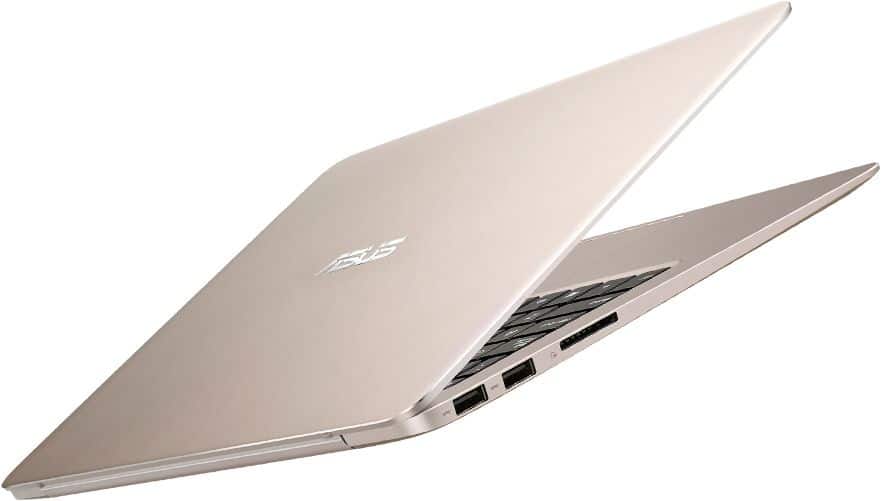
Advantage:
Good looks, lightweight
The screen is bright, pretty colors
Performance quite
battery health
Disadvantage:
Speaker volume less
The keyboard does not support LED backlight
Design
Asus Zenbook UX305 is the expert assessment of technology is ultrabook “genuine”, the ultra-slim size and ultra light with only 1.2 kg weight. Products using pure aluminum block with concentric circles on the cover of the iconic luxury Zenbook line. In addition, the company also invested in the selection and application of metal fabrication method particularly enables UX305 smooth surface while maintaining high reliability.
UX305 has a soft, compact sound than the angular, masculine version of the Zenbook predecessor. Asus also provides additional pure white version looks more and more luxury products, more eye-catching.
12.3 mm thinness is the manufacturer confirms that the world’s thinnest 13-inch laptop in the segment. The company also corners rounded to fit the mobile users to make sense of comfort when handling.
Screen
ZenBookUX305 screen is designed according to the standard 13.3-inch, high resolution up to 3200 × 1800 (276ppi), beating out Windows computers completely (2560 × 1440) or 2880 × 1800 MacBook Pro.
Thus, the image is displayed to detail sharp, words are shown vivid, impressive color. Most innovative product in UX305 must include anti-glare screen, which helps reduce glare necessarily feeling, environmental shadow sunny or intense light source.
Keyboard and Trackpad
Keyboard and Trackpad accounted for most of the inside of the Zenbook Ux305, there is a clear difference on the key features such as DEL, INS, HOME, END, PgUp, PgDn … has been integrated with the other keys, to save up area.
Start button is integrated into a keyboard with keys in the upper right, maybe this will make many people uncomfortable when used.
Spacious trackpad design, and quite unique (maybe Asus saw the convenience of the trackpad that Apple provides), smooth surface is suitable for portable operation of the finger. Optimized for operations such as move, click, text selection and multi-touch.
Configuration
The common feature is the Zenbook line quick processing speed, this time using organic UX305 most modern processors Intel Core M 2.0GHz. Machine with 8GB RAM, SSD 256GB SATA high speed bit / s, more than any other hard drive. This is a strength that few other portable laptops match. Products running on Windows 8.1 operating system with a modern interface and friendly, not to mention the company also equipped with Power4Gear Hybrid technology helps users better manage energy in adjusting laptop, aided instand On launch Instant fast without having to install any additional applications.
To ensure maximum convenience for users, the UX305 is equipped with 3 USB 3.0 full speed, while 1 an Asus Charger + technology for fast charging of mobile devices even if the shutdown.
In addition, Asus UX305 also fully supports SD card reader features, microHDMI port, headphone jack 3,5mmm. 256GB SSD huge memory helps users to comfortably store information in the computer, not to mention storage 5GB of Asus WebStorage online in the warehouse.
The expansion connectors and
Machine has 3 USB 3.0 ports, 1 SD slot, micro HDMI slot 1 1 2in1 audio jack port. It had no lan port should be the first Asus presented a conversion from USB to LAN ports.
Right of the screen includes audio jack port 1 2in1, micro HDMI slot with one USB 3.0 port and power.
Strong performance, smoothness, save battery
Zenbook UX305 equipped with the latest processor Intel Core M, built on the foundation of advanced 14nm semiconductor without using cooling fan while ensuring robust performance as the processor generations ago. Combined with 8GB RAM and SSD up to 256GB high speed SATA 6Gbit / s – 6 times faster than conventional hard drives, UX305 perfectly meets daily tasks at work, recreation , storage.
Power consumption less than 10W of power Intel Core M helps UX305 achieve battery life up to 10 hours continuously, allowing users can rest assured to use all day long.
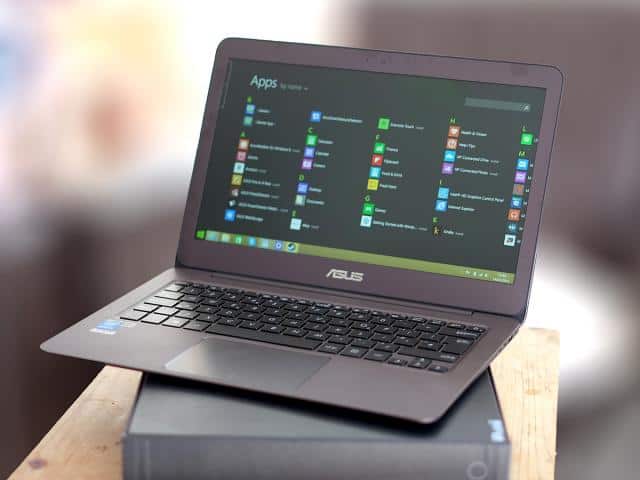
ASUS Zenbook UX305LA 13.3-Inch Laptop (Intel Core i5, 8GB RAM, 256 GB SSD, Windows 10), Titanium Gold: Buy it now
Asus Zenbook UX305FA-USM1 13.3-Inch Laptop (Intel Core M-5Y10, 8 GB RAM, 256GB SSD, Windows 8.1), Greyish Black: Buy it now
ASUS ZenBook UX305CA 13.3-Inch FHD Laptop, 6th Gen Intel Core M, 8 GB RAM, 256 GB SSD, Windows 10: Buy it now
ASUS UX305 13-Inch Laptop [PREVIOUS GEN MODEL]: Buy it now
ASUS Zenbook UX305 13-Inch Laptop Gold: Buy it now
ASUS ZenBook UX305CA 13.3-Inch Touchscreen Quad-HD+ Laptop, 6th Gen Intel Core M, 8 GB RAM, 256 GB SSD, Windows 10: Buy it now
Features:
CPU: Intel Core M 5Y10
RAM: 8GB – DDR3 – 1600 MHz
HDD: 128GB SSD
VGA: Intel HD Graphics 5300
LCD: 13.3 “16: 9 IPS Full HD (1920×1080)
Webcam: HD
5 in 1 card reader, HDMI, WiFi 802.11a / g / n, Bluetooth 4.0, USB 3.0.
Battery Life
Battery Performance
The battery’s the real story here: 45Wh, and it actually holds up — 8 to 10 hours depending on what you’re doing, which for a Core M ultrabook this thin is genuinely good. Browsing, writing, watching video, all of it fits into a workday without hunting for an outlet.
A big part of that is the Core M chip itself — it’s slow, but slow chips sip power, and that’s the trade Intel was betting on with this whole product line. ASUS’s charging software helps stretch it a bit further if you care to tinker with the settings.
Software and User Experience
Windows 10, plus the usual ASUS pile: Battery Health Charging, Smart Gesture for the touchpad, Live Update for drivers, WebStorage, Splendid for the display, AudioWizard for sound presets. None of it’s essential, none of it’s annoying — set it up once and forget it exists.
Performance and Benchmarking
Cinebench R15 puts the Core M ahead of what you’d expect from a fanless chip this small, though it’s nowhere close to the Core i5s and i7s in heavier laptops — that’s just the ceiling with Core M. 3DMark 11 confirms what you’d guess: fine for a YouTube video, rough the moment you ask for anything graphically serious. The SSD is the pleasant surprise, hitting around 500MB/s read and 300MB/s write — boots are fast, and files open without the little pause you get on a laptop with a spinning drive.
Day to day, none of this shows up as a problem. Browsing, docs, video, multiple tabs open — it just works. Light photo editing is fine too. Ask for more than that and you’ll feel the ceiling fast; this was never built for it.
Pros and Cons
Pros: thin enough that you forget it’s in the bag. The Full HD IPS screen actually looks good — decent color, wide angles. Aluminum body that doesn’t flex or creak. Battery that gets you through a full day, genuinely. Keyboard and touchpad both feel right under your fingers. SSD makes everything feel instant.
Cons: RAM and storage are soldered — buy the configuration you’ll need for good, because there’s no changing your mind later. Integrated graphics mean gaming and real graphics work are both off the table. Ports are sparse: no Ethernet, no HDMI, just a couple of USB slots, so keep a dongle handy. And the moment you need real horsepower, this chip taps out.
Conclusion
This is a laptop built around one trade-off: give up raw power, get thinness and battery life in return. For a student, a writer, someone who lives in a browser most of the day, that trade makes total sense. The screen is genuinely nice to look at, the battery holds up, and the whole thing disappears into a bag. If your work actually needs a real processor or graphics card, though, look elsewhere — this was never trying to be that laptop.
Related Posts

Tech Reviewer & Product Analyst
Định Bia has spent over 10 years testing consumer electronics with a focus on smart technology. He work as a product advisor at Biareview where he helped customers find the right devices for their needs. He personally tests every product featured on this site using a consistent evaluation framework covering quality, durability, and value. All reviews are based on experience, not influenced by the manufacturer.