Design
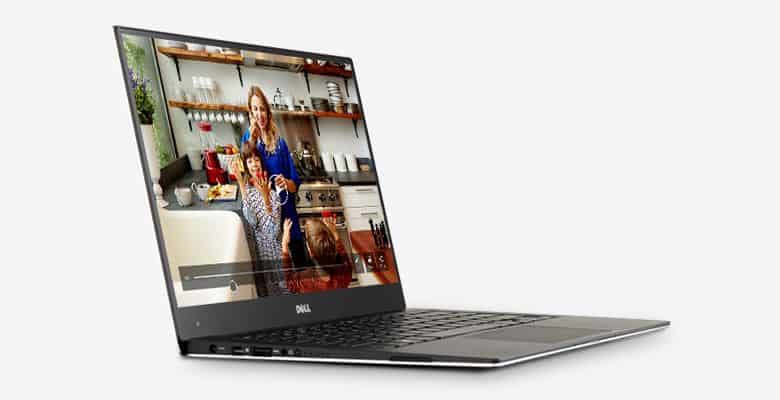
New XPS 13 is not much changed from the earlier version, retains the subtlety in design, thin and light design, carbon fiber and aluminum alloy to create certainty, durable. Highlights attract the attention of the user’s screen border and XPS 13 only 5,2mm thin laptops this is considered a pioneer in the new design.
In terms of size, XPS 13-9343 equipped with 13.3-inch screen, but only the equivalent compact 11.6-inch ultrabook weighs about 1,18kg (excluding accessories included) and quite thin, place 0,9cm thinnest and thickest only 1.5 cm only suitable for users who frequently move.
Dell also launched the version equipped with a touch screen and slightly more weight is 1.26 kg. Of course, both editions have been put in ultrabook still put those regulations by Intel launched.
However, the sound quality of the product should be more concerned. Actual test showed sound integrated speakers expressed only passable and midrange and high-minded as most other laptops. You need a headphone type well equipped for the needs of high quality music.
Interfaces, the ability to upgrade hardware
Similar to other ultrabook models, to achieve the slim size and weighs only 1,18kg requires manufacturers to omit some less important components. Specifically XPS 13-9343 only expanded image signal Mini DisplayPort port, 2 USB 3.0 ports and the card reader “3 in 1”.
Scalability is also quite limited hardware, requires removing the entire lid protects the underside. Point to note is the use of low-voltage lines low RAM (low power LP-DRAM or DRAM) integrated directly on the motherboard should not be upgraded.
Screen
XPS 13 13.3-inch screen equipped with a resolution of 1920 x 1080 pixels. Technology IGZO2 panels not only increase the higher pixel density, providing smooth picture quality and sharper, but also help narrow contoured screen (bezel). In addition, there IGZO2 energy consumption is only 1/3 of traditional LCD. This helps manufacturers have more options in product design.
Actual test shows display picture quality good, accurate color and viewing angle can be expanded to 178 at which the image is not altered although a bit darker colors. The shift in color, brightness and white as well as grayscale display on the screen is also easy to distinguish clearly. Besides, the screen also anti-glare coating (anti-glare) for more flexible viewing angle when working outdoors or environmental light sources from different directions.
Keyboard and touchpad
XPS 13 equipped with a chicklet keyboard and extra full size format LED background, handy when working in low light environments. Except function key (Fn) is quite small, the large size keypress remaining, hit soft, elasticity good enough to surf faster when typing text. Wide spacing between the keys, key moderate journey (1,3mm) for comfortable operation without fear of pressing the wrong. However, inconvenient keyboard is easy to stick fingerprints.
Touchpad sensitivity, feeling smooth low friction by moving the mouse to help more accurately, the function scroll, zoom and rotate photos easier also.
Performance evaluation
Not only designed to make their mark, the XPS 13 (9343) was one of the few samples equipped with platform hardware configuration Broadwell Core i5-5200U chip, clocked at 2.2 GHz and is capable of accelerating to reach 2.7 GHz in Turbo Boost mode.
It should be added that Core i5-5200U processor generation Core i Intel fifth (codenamed Broadwell) still use Haswell microarchitecture but applying 14nm manufacturing process, enhanced graphics performance and overall performance of the system, brings better user experience and longer battery life than the previous generation.
Specifically in the practical test with PCMark 8 engine, Home, High Performance configuration mode and the screen brightness reduced to 40% (equivalent to battery mode) shows the time of continuous use of the machine at about 5 hours 30 minutes with one battery charge.
This is the highest result in battery life allows assessment tool through PCMark 8 if compared to some laptops Tinhte ever tested. Asus Zenbook specific UX303LN reach 4 hours continuously, Lenovo Yoga 3 Pro at 5 hours 12 minutes or 2 hours 15-9530 Dell XPS 36 minutes.
Also need further explanation depends methods and test tools that get results will vary. Dell XPS example 15-9530 reached 6 hours 32 minutes in MobileMark 2007’s Productivity test with maximum screen brightness (100%) but only 2 hours 36 minutes in PCMark 8 Home tools, screen brightness reduced remaining 40%.
With graphics processing tasks 3DMark Cloud Gate, active cooling system is quite smooth and efficient as the temperature processor and integrated graphics only oscillate at 67 degrees C.
Battery
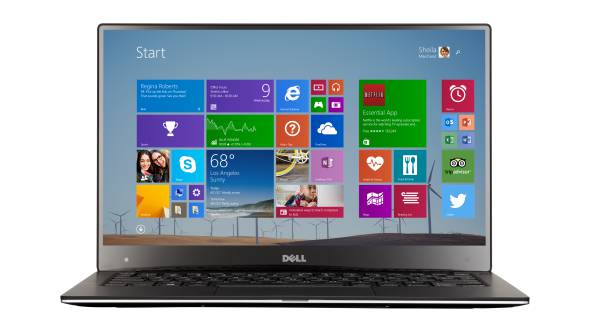
Real test with test PCMark 8 Home, High Performance configuration mode and the screen brightness reduced to 40% (equivalent to battery mode) shows the time of continuous use of the machine is only 241 minutes, low significantly more than the figure of a 330-minute version 13-9343 XPS Core i5-5200U others equipped, 13.3 inch screen Full HD resolution.
Dell XPS13 XPS13-9343 13.3-inch Ultrabook Computer (2.2 GHz Intel Core i5 Processor, 4 GB DDR3 SDRAM, 128 GB Solid State Hard Drive, Windows 8): Buy it now
Dell XPS13-9343 13.3-Inch Ultrabook (5th Gen Intel Core i5-5200U Processor 2.2GHz, 8GB DDR3, 256GB SSD, Windows 8.1) (Certified Refurbished): Buy it now
Dell XPS 13 9343-2727SLV 13.3″ Full HD Signature Edition Laptop – Intel Core i5 Broadwell, 4GB RAM, 128GB SSD, Windows 8.1,Intel HD Graphics 5500 – Silver: Buy it now
Dell XPS 13 XPS9343-8182SLV 13.3-Inch Touchscreen Laptop (Intel Core i7 5550U, 8 GB RAM, 256 GB SSD, Windows 10, Microsoft Signature Edition) Silver: Buy it now
Dell XPS13-9343 13.3-Inch Ultrabook (5th Gen Intel Core i7-5500U Processor up to 3.0GHz, 8GB DDR3, 256GB SSD, Windows 8.1) (Certified Refurbished): Buy it now
Dell XPS 13 13.3-Inch Touchscreen Laptop (XPS9343-7273SLV) [Discontinued By Manufacturer]: Buy it now
Software and User Experience
Windows 10 out of the box, plus Dell’s usual add-ons: Power Manager to trade off battery against performance, Command Update to keep drivers current without thinking about it, Mobile Connect to pull texts and calls onto the laptop screen, SupportAssist for diagnostics, and a backup tool for scheduled restores. Set it up once, mostly forget it’s there.
Day to day it just works — fast enough, quiet enough, nothing gets in the way.
Competitors
Back in 2015, the real competition was the MacBook Air, HP Spectre x360, ThinkPad X1 Carbon, and Surface Book. The Air was still likeable, but its bezels looked chunky next to the XPS’s edge-to-edge screen that display was the whole reason people were talking about this laptop. The Spectre x360 folds flat into a tablet if that’s your thing. The ThinkPad has, hands down, the better keyboard and takes far more abuse. The Surface Book goes all the way and detaches completely. None of them beat the XPS 13 on looks, though — that’s really what this laptop is selling.
Pros and Cons
What’s good: the InfinityEdge screen still looks better than most laptops released years later. Full HD or Quad HD+, your pick, both sharp. Performance is solid for daily work — nothing heavy, but everyday tasks fly. It’s light enough that you forget it’s in the bag. Battery gets you through a full day. Keyboard and touchpad are both comfortable. USB 3.0, an SD reader, and Mini DisplayPort round it out.
What’s not: RAM and storage are both soldered in — buy the config you’ll need forever, because that’s what you’re getting. No HDMI, no Ethernet, which will annoy anyone who still uses either regularly. And the integrated HD 5500 graphics mean gaming or real graphics work is off the table.
Conclusion
People remember this laptop for one reason: that screen. The InfinityEdge display and the build quality around it are what actually sell the XPS 13-9343 — everything else is just solid. It handles daily work fine, the keyboard’s comfortable, the battery lasts. The soldered components and missing ports are annoying if they hit something you actually need, but for most people, this is still one of the better-looking, most portable ultrabooks you could buy at the time.
Related Posts

Tech Reviewer & Product Analyst
Định Bia has spent over 10 years testing consumer electronics with a focus on smart technology. He work as a product advisor at Biareview where he helped customers find the right devices for their needs. He personally tests every product featured on this site using a consistent evaluation framework covering quality, durability, and value. All reviews are based on experience, not influenced by the manufacturer.