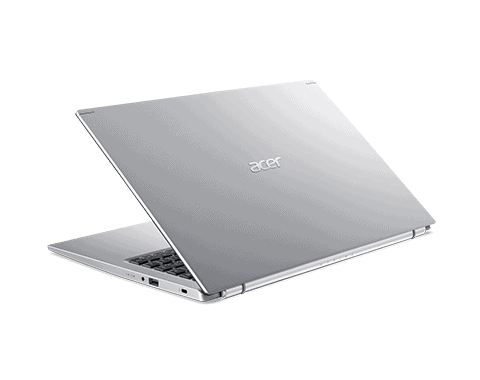
The Acer A515-56-36UT is, like one of the more affordable Windows 11 laptops you can grab right now. I mean it’s a solid pick if you’re looking for a cheap Chromebook alternative, but that low cost also means you’ll end up living with a couple compromises, mostly around the build quality, yeah.
The Acer Aspire 5 A515-56-36UT feels like an affordable laptop with fairly modern specs, aimed at people who want a device that handles the everyday stuff without paying an arm and a leg. It sits in Acer’s Aspire 5 Series, which is basically Acer trying to offer functional machines without those higher prices you’ll often see from competitors like Dell and HP.
Sure, with the Aspire 5 A515-56-36UT, Acer delivers a no-nonsense laptop with decent power for less than $400, but as always, they’ve cut a few corners to gain that price.
While its construction will do with some work, it still manages to pack an Intel Core i3-1115G4 processor, Full HD display, 128GB SSD storage, and 4GB storage. It’s by no means one of the most powerful laptops out there, but it’s a decent laptop for not only working in the office but also when you need to use it in front of clients.
All in all, the Acer A515-56-36UT is likely a decent product to use as a student laptop or a reasonably priced business laptop. If you need more power, Acer offers different configurations to suit your needs within the same line, but at different prices.
Specifications
CPU: 11th Gen Intel Core i3-1115G4
Graphics: Integrated Intel UHD
RAM: 4GB DDR4
Screen: 15.6-inch FHD (1,920 x 1,080)
Memory: 128GB SSD
Connectivity: Wi-Fi 6 / Bluetooth 5
Weight: 4.19 pounds
Dimensions: 14.31 x 9.39 x 0.7 inches
Price And Availability
Acer Aspire 5 shows up in a whole bunch of setups, usually running on 11th- generation Intel chips or, if you go the other way, the most recent AMD Ryzen options. Most laptops in this same general budget zone tend to ship with 15-inch FHD displays, yet you can still find a few that stretch it to 17-inch panels as well
The review unit we checked out, the Acer A515-56-36UT, feels like the “just get going” option in the lineup, it has an Intel Core i3-1115G4, a 128GB SSD, and 4GB of RAM. Then there’s the Acer A515-56-53S3 that kind of bumps things up a bit, with an Intel Core i5-1135G7, 256GB of storage, and 8GB of memory. But if you’re looking at the upper end, the Acer A515-56-702V steps in with an Intel Core i7-1165G7, a 512GB SSD, and memory that can climb up to 16GB.
That said, there are more Aspire 5 variants out there, so it’s pretty realistic to hunt down a different version that fits what you truly want, not only the most obvious choice.
Acer Aspire 5 A515-56-36UT, 15.6″ Full HD Display, 11th Gen Intel Core i3-1115G4 Processor, 4GB DDR4, 128GB NVMe SSD, WiFi 6, Windows 11 Home (S Mode):Buy it now
Acer Aspire 5 A515-56-36UT, 11th Gen Intel Core i3-1115G4 proc, 15.6′ Full HD Dis, 4GB DDR4, 128GB NVMe SSD-Acer Black M501 Wireless: Buy it now
Acer Aspire 5 A515-56-36UT, 11th Gen Intel Core i3-1115G4 proc, 15.6′ Full HD Dis, 4GB DDR4, 128GB NVMe SSD-Acer Wired Ear Set-Flexible Omnidirectional Mic, Adjustable Headband: Buy it now
Acer Aspire 5 A515-56-36UT, 11th Gen Intel Core i3-1115G4 proc, 15.6′ Full HD Dis, 4GB DDR4, 128GB NVMe SSD-Acer 15.6′ Black Travel BP: Buy it now
Lightweight, For An Affordable 15 Inch
At just a little over 4 pounds, the Acer Aspire 5 feels surprisingly light for an inexpensive 15-inch laptop. Most budget 15-inch machines are kind of defined by the less-than-great build quality and heavy duty materials , sort of pressed into place from plastic. The Aspire 5 comes in a silver and black color scheme that, although underrated, still performs well.
The body isn’t metal, unsurprisingly, but that plastic not only helps keep the weight down but also emphasizes the budget nature of the laptop. Again, this laptop isn’t particularly thin either, but that at least means Acer has managed to include a host of ports, including full-size USB, HDMI, Ethernet, and a single USB-C.
The 15.6-inch display is a decent size but it s surrounded by pretty thick bezels, and it kinda feels like a throwback again , a bit vintage-ish. We’ve seen ultra thin bezels on more expensive Ultrabooks, especially the InfinityEdge display on the Dell XPS 13 and the NanoEdge display on the Asus ZenBook S13, and yeah they look great, but they also cost a lot more.
The 1080p resolution is okay for a budget machine, though it doesn’t really hit the same “wow” factor as pricier laptops with higher resolution screens, especially the MacBook Air. It also means the display isn’t super bright or especially vivid compared to what we’ve used, and that yellowish tint, once again sort of underlines the budget nature of this laptop.
The non-backlit keyboard feels a bit cheap and lacks a lot of travel, which means it doesn’t give you the most satisfying typing experience that more expensive laptops with tactile keyboards offer.
Having a backlit keyboard is not just some gimmicky add-on that comes along with gaming laptops; it actually helps you figure out which keys you’re pressing, especially in a dark environment. So yeah, with the Acer Aspire 5 it can be kind of difficult to use at night if you’re not familiar with touch typing.
Good Performance In Fright Mode
As a budget machine, the Acer Aspire 5 model we review here isn’t the most powerful laptop out there. It’s a laptop that will do the basics, allowing you to watch the latest movies, run productive office tasks, answer office e-mails, and more.
Although it features a recent 11th-generation Intel processor, the A515-56-36UT model has a dual-core Intel Core i3-1115G4 designed for basic mobile devices. In the same lineup are the faster Core i5 and i7 models that offer more cores and are therefore significantly faster.
Additionally, there are several models of the Acer Aspire 5 model with dedicated GPUs, and our review model with integrated Intel UHD graphics. While this is perfectly fine for everyday tasks and watching movies and TV shows, it won’t handle intensive photo and video editing and doesn’t even think about 3D or CGI animation.
The 4GB RAM and 128GB SSD that this model comes with are pretty scarce, which explains our decision to use Windows 11 Home in S Mode, a lighter version of the latest operating system comparable to Chrome OS.
Honestly, in day to day use, the Acer A515-56-36UT is fine, as long as you keep it within basic computing stuff. If you set your expectations right , the Acer Aspire 5 in S Mode is a good enough laptop for web browsing and quick presentations. But once you start wanting more complicated apps, then yeah, you’ll be disappointed.
Good Battery Life
Acer promises something like 8.5 hours of battery life with the A515-56-36UT , but in the benchmark test it actually lasted far less than expected, more like a few minutes. In a separate run, looping a 1080p video, it managed seven hours and 55 minutes for the battery, mostly thanks to the lower power processor.
While there are a few things you can do to extend battery life, such as adjusting the number of apps you run at once and lowering the screen brightness a bit, this means you’ll be betting on using up its entire working day.
Identify
For anyone looking for a cheap laptop under $400 that runs Windows 11 (albeit in S Mode) and only uses it for simple tasks, the Acer Aspire 5 A515 model- This 56-36UT is a suitable choice. The fact that it lets you run Windows 11 programs at this price puts it ahead of cheaper Chromebooks.
However, for anyone looking to do something more ambitious, especially demanding projects at work or school, this is a laptop not worth buying, even for a price cheap like this. You’re better off saving a little more and buying something with more RAM and possibly more SSD storage. It will save you a lot of frustration in the long run.
For a bit more money you can get better alternatives including the HP 14-fq1025nr or the Acer A515-56-53S3, with Ryzen 5 and Intel Core i5 chips respectively. However, if all you need is a Windows 11 laptop for basic tasks at the lowest price, then you should strongly consider the Acer Aspire 5 A515-56-36UT.
Related Posts

Tech Reviewer & Product Analyst
Định Bia has spent over 10 years testing consumer electronics with a focus on smart technology. He work as a product advisor at Biareview where he helped customers find the right devices for their needs. He personally tests every product featured on this site using a consistent evaluation framework covering quality, durability, and value. All reviews are based on experience, not influenced by the manufacturer.