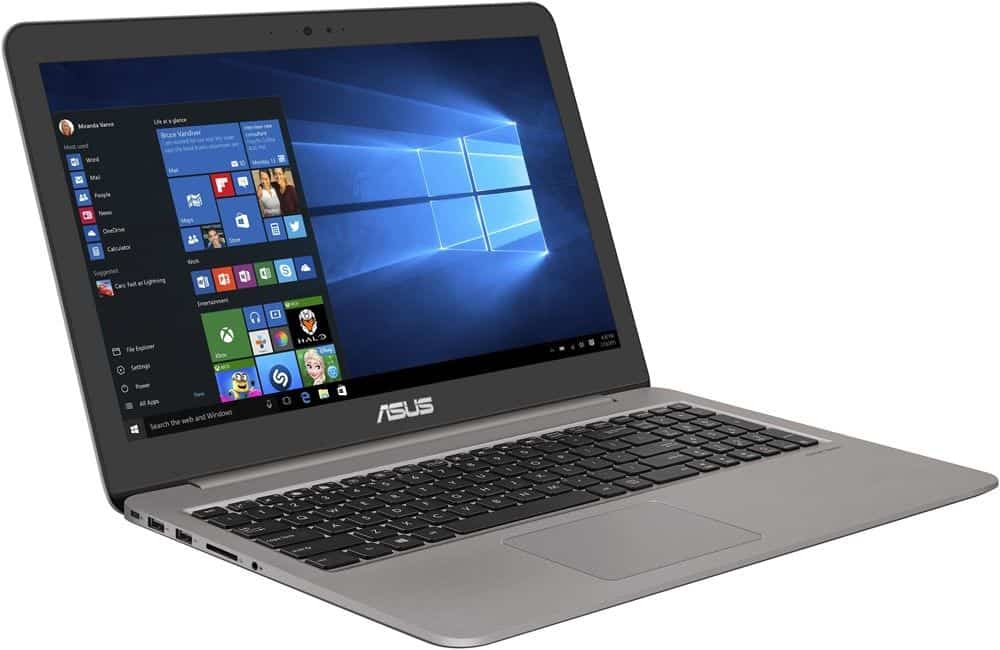
Asus X510UQ is a laptop of the Asus VivoBook series aimed at office users and students. So this laptop is good, please follow in this article.
Advantages:
Sophisticated design
Light weight: 1.5kg
Battery life is impressive
Configure
The display is pretty
Defect:
The keyboard has no backlight
Small speaker
Heat dissipation is not good
- Design
The Asus X510UQ has a delicate design, with Asus’s dusky, rounded backdrop accents that add to the elegance of the machine.
With a lightweight metal coating to make the machine makes the appearance of the machine better, more prominent.
This is a laptop model of the Asus VivoBook, aimed at users are students, office workers, who have to move frequently.
Owing to its plastic resilient kit, the weight of the machine is quite light, approximately 1.5 kg with a thickness of only 19.4 mm. Should be very convenient and easy to carry.
Thin and lightweight laptops are often shortened by manufacturers to reduce port details. But not on X510UQ.
Equipped with three USB include 2 ports 2.0 and 1 ports 3.0 , a Type-C USB port, an HDMI port and an SD card reader.
- Screen
The X510UQ features a large 15.6-inch anti-glare screen with HD (1366 x 768) resolution.
The ultra-thin NanoEdge bezel gives the impression of neatness, giving the user an impression when the boot screen is turned on.
Combined with LED backlit display technology and ASUS Splendid Video display technology, the Asus X510UQ displays images in clear colors.
Experience true picture, the screen of the machine is quite bright, good contrast, wide viewing angle. The color is somewhat slightly faint.
- Performance
The Asus X510UQ is equipped with a 1.60 GHz Intel Core i5 Kabylake Refresh (4th generation), 4 GB of DDR4 RAM and 1 TB of HDD storage.
Benefit from the 8th generation U series Intel chip which is famous for its power saving capabilities. Performance is also improved over the 7th generation up to 40%.
Equipped with a discrete NVIDIA GeForce 940MX graphics card with 2GB, the Asus X510UQ is not a gaming laptop.
With a lightweight, battery-saving design, this is inherently a laptop designed for users who are prone to learning as a student, or working on light graphics.
I try to edit the image through Adobe Lightroom software and Adobe Photoshop CC, our laptop handles quite smoothly and has less latency.
In addition, the Asus X510 series is available in different configurations such as BR543T, BR632T, BR641T. You can choose the configuration that best suits your needs.
ASUS VivoBook 15 X510UQ Thin and Lightweight FHD Gaming Laptop, Intel Core i7-7500U Processor, NVIDIA GeForce 940MX Graphics, 8GB DDR4 RAM, 1TB HDD, USB Type-C, NanoEdge WideView Display, Windows 10: Buy it now
- Battery Life
I use it constantly with the task of surfing the web, reading newspapers, editing text and watching movies. Brighten your screen to 75%, loudspeaker to the greatest extent.
In over 4 hours continuous, the battery of the machine from 100% down to 40%, making themselves quite impressive. I believe that with light usage, the battery life of the machine can be up to 8 hours of continuous use.
In addition, the charger’s power is 19V ~ 3.42A to help shorten the time to fully charge the device.
- Keyboard and Touchpad
The keyboard has a moderate button, good bounce rate, soft keys and hand grip. It makes the user’s typing experience feel comfortable.
But the keyboard has a weakness that is not backlight. It makes typing in low light or no light becomes more difficult.
Asus X510UQ is equipped with Multi TouchPad, responsive and integrated gestures.
Users can swipe down 3 fingers to return to the home screen, swipe across to switch between running apps, …
These integrated gestures feel very useful in the course of their experience.
- Sound
The sound of the speakerphone is probably the part that makes me feel a little disappointed.
The unit is equipped with dual speakers on the bottom using SonicMaster technology. However, the volume is just enough to hear even if you have the volume at the highest level.
Speaker on this product as I think would be appropriate to watch movies rather than music.
For you to enjoy music, we can choose the solution is to use headphones. Or use a bluetooth speaker, external speaker for a better audio experience.
Connectivity
Ports
The Asus X510UQ offers a good selection of ports, providing flexibility for various peripherals and devices. The ports include:
- 1 x USB 3.1 Type-C (Gen 1)
- 1 x USB 3.0 Type-A
- 2 x USB 2.0 Type-A
- 1 x HDMI
- 1 x SD card reader
- 1 x 3.5mm audio jack
Having a USB Type-C port is pretty a big plus , it brings faster data transfer and a kind of more flexible way to connect things. The HDMI port makes it simple to attach an external monitor, and the SD card reader is quite handy , especially for photographers and videographers who deal with memory cards a lot.
Wireless Connectivity
When it comes to wireless, the X510UQ includes Wi-Fi 802.11ac, plus Bluetooth 4.1. The Wi-Fi connection feels steady and it delivers quick internet speeds, so it works well for online streaming , video calls, and grabbing those larger files. On the Bluetooth side, 4.1 keeps compatibility with plenty of wireless accessories , like mice, keyboards, and headphones.
Audio Quality
Speakers
The Asus X510UQ comes with stereo speakers using ASUS SonicMaster technology, and the point is to improve the sound in general. In day to day use the audio is clear enough and loud, good for casual listening, watching videos, and even joining video calls. Still, the bass is not really there, and the overall audio quality stays sort of average. If you want a stronger listening experience , it’s better to use external speakers or go with high quality headphones.
Headphone Jack
The 3.5mm audio jack offers good audio quality for headphones. The sound output through the jack is clean and free of static, providing an enjoyable experience for music, movies, and gaming.
Keyboard and Touchpad
Keyboard
Typing on the Asus X510UQ feels pretty nice actually, the keys sit in a way that makes sense, with good spacing and enough travel that your fingers dont get tired too fast. There s a decent bit of movement when you press the keys, and the feedback is consistent, so long sessions don’t really turn into a struggle. Also, the keyboard is backlit, so low-light typing looks a lot easier , no sudden hunting around in the dark or anything like that. Overall, it’s a pleasant experience, more comfortable than you might expect from this class of laptop.
Touchpad
The touchpad feels large and it responds quickly, it supports multi-touch actions like pinch-to-zoom, and two finger scrolling (that kind of fluid glide you want). The surface is smooth , and the built in buttons give a satisfying click when you press them, not mushy at all. Accuracy is solid too, so moving around the display and aiming at icons feels pretty effortless.
Software
Asus Utilities
Asus throws in a few proprietary tools that try to make the everyday experience easier, a bit more tuned than plain Windows alone. Among them are:
Asus Splendid: lets you dial in display tweaks, like color temperature as well as brightness, for different lighting or just different moods.
Asus AudioWizard: gives customizable audio profiles so you can switch listening modes based on what you’re playing.
Asus Giftbox: basically a gateway to software offers, promos, and occasional discounts.
Windows 10 Features
The X510UQ comes with Windows 10 Home already installed. That means you get a full setup with lots of apps and services ready to go, not just a bare system. Stuff like Cortana, Microsoft Edge, and the Windows Store are there, helping with both productivity and entertainment. On the protection side, Windows Defender and BitLocker are built in, so the device has basic defenses in place against threats and unwanted access, which is at least reassuring.
User feedback and reviews
Positive feedback
People generally like the Asus X510UQ for that nice balance between performance , design and affordability. The Full HD display, a comfortable keyboard and overall connectivity options get a lot of thumbs up. A common point is also the dedicated NVIDIA graphics card, which users say is kind of a big deal for casual gaming and everyday multimedia stuff.
Common complaints
On the other hand, some complaints show up pretty often: the hard drive feels slower than expected , and the battery life is only average. A few users also mention pre-installed bloatware as a small nuisance, but it can be handled, if you uninstall unnecessary applications.
Overall user satisfaction
In general, user satisfaction looks high. The laptop is usually described as giving balanced performance for a reasonable price, so it becomes a popular pick for students, professionals ,and casual users who want something dependable and flexible.
Comparison with competitors
Similar laptops in the same price range
The Asus X510UQ goes up against other models around the same cost, like the Acer Aspire 5, HP Pavilion 15, and Lenovo IdeaPad 330. Each one has its good moments and its tradeoffs though, still the Asus model seems to stand out, mainly due to its Full HD screen, comfortable keys, and dedicated NVIDIA graphics card.
Performance, comparison
As far as how it performs , the Asus X510UQ seems pretty much neck and neck with most of its rivals. You get the Intel Core i5-7200U and 8GB RAM, so day to day speed is pretty similar to other laptops that use like, matching specs. Still , once you shift toward visuals , the dedicated graphics card kinda tips the scales and helps with graphic work plus casual gaming, you know.
Build quality and design
On the build quality and overall look , the Asus X510UQ basically holds up fine against competing models. Yes, the plastic casing doesn’t have that ultra-premium vibe some metal options do, but it feels solid enough and it stays light, so portability is a real plus here. Also the design is sleek, modern , with thin bezels. That kind of screen framing is a standout, it gives the laptop a more current appearance compared to some chunkier competitors.
Screen comparison
The Full HD IPS display is honestly a big deal for this device. A lot of other options around this price still stick with lower resolution screens or TN panels , and that’s where the difference shows. IPS also brings better color consistency and wider viewing angles , so it’s better for watching media, but also for productivity tasks where you might be sharing the screen or checking details.
Price to performance balance
In terms of value, the Asus X510UQ is kind of hard to ignore. Since it packs a dedicated GPU, enough storage, and a full HD display, it ends up being a pretty strong deal for folks shopping on a budget but still wanting decent performance , plus some genuinely useful features. It’s like, you get the good bits together without paying way more than you should.
Detailed Use Cases
For Students
For students, the Asus X510UQ gives a sort of mix between speed , portability and price. It’s light enough to move between classes without too much hassle, and the Full HD screen is nice for studying as well as multimedia , like videos or lectures. With the dedicated graphics card onboard, you can even play some lighter games, so it feels like it balances “work and play” pretty well. Also the battery life is decent and should cover a full day of classes, as long as your use is moderate.
For Professionals
Professionals might like the Asus X510UQ for a comfortable keyboard, steady everyday performance , and a modern look. There are plenty of ports too, so connecting different peripherals is straightforward, which is helpful during presentations, meetings, and when you’re multitasking. That said, the slower hard drive can become a bottleneck if you need quicker file access, or faster transfer time. For business users it’s really worth swapping to an SSD, because the difference in responsiveness can be pretty noticeable.
For Casual Users
Casual users who want a kind of do-it-all laptop will likely find the Asus X510UQ pretty reliable. It tackles typical stuff , like web browsing, streaming, and office tasks, without too much fuss. The Full HD screen helps movies and clips look better, with more crisp detail and stuff like that. On the graphics side, the NVIDIA GeForce 940MX can handle casual gaming too, it can manage basic photo editing as well ,and even some light video work if you need it.
For Gamers
So, the Asus X510UQ isn’t really a gaming laptop, more like a everyday machine, but the NVIDIA GeForce 940MX still helps it play casual stuff and some older titles. You can usually run things like League of Legends , Dota 2 and even CS without too much trouble on medium presets. Still, if you want newer games , or higher settings in general, then users are going to need something more built for gaming, with stronger graphics hardware.
Upgradability
Storage
Honestly, the biggest weak spot on the Asus X510UQ is storage. That 1TB 5400 RPM hard drive feels slow these days and it shows up as delays in the system. With a proper SSD upgrade though, responsiveness improves a lot. You get faster boot times, quicker file transfers , and overall it just feels smoother day to day.
Memory
The laptop ships with 8GB of DDR4 RAM which covers most typical tasks just fine. But if you want better multitasking , or you plan to use heavier applications, you can upgrade to 16GB. That extra headroom can make everything feel more stable, and less likely to stutter when you have multiple programs open.
Other Upgrades
Beyond storage and memory , the Asus X510UQ is kind of limited . Like, the CPU and GPU are soldered right onto the motherboard , so upgrading them isn’t really an option in a practical sense. Still , if you keep the BIOS updated and install the newest drivers from Asus , it can help with stability and make sure performance stays in that best shape it can be.
Pros and Cons
Pros
Stylish Design : A clean , modern look with thin bezels , it gives off a premium vibe.
Full HD IPS Display: Bright colors, plus solid viewing angles for regular daily use.
Dedicated Graphics: The NVIDIA GeForce 940MX handles graphics work a bit better, and it supports casual gaming too.
Lightweight and Portable: Around 1.7 kg , so it’s pretty easy to take with you.
Good Connectivity Options: USB Type-C, HDMI , and an SD card reader are all there , so you’re not stuck.
Cons
Plastic build: It does keep the weight down , but it just doesn’t feel as premium as metal.
Slower hard drive : The 5400 RPM hard drive tends to act like a bottleneck , so moving to an SSD is strongly recommended.
Okay battery run time : It’s not as long-lasting as some rivals, especially when you’re doing heavy stuff all day.
Extra preloaded junk: There’s bloatware installed already, and some users may want to remove that unused software.
Middling color range: The display color accuracy is not great , so for serious photo or video editing it may fall short.
Conclusion
The Asus X510UQ comes across as a fairly well-rounded laptop that lands a decent balance between performance, design, and price. It works for a lot of people like students, busy professionals, and casual users too , mainly because of the Full HD screen, the dedicated graphics, and its lightweight build. Sure, it has some weak points—like the slower drive and that average battery life— but those downsides can be improved with upgrades, or a few careful tweaks.
All in all, the Asus X510UQ stands out within its price band for delivering solid performance and features without making your wallet cry. It’s a flexible machine that fits different kinds of use cases, so it feels like a strong mid-range option. If you’re after something dependable for work, studying, or just everyday browsing , the Asus X510UQ is worth a look.
Related Posts


Tech Reviewer & Product Analyst
Định Bia has spent over 10 years testing consumer electronics with a focus on smart technology. He work as a product advisor at Biareview where he helped customers find the right devices for their needs. He personally tests every product featured on this site using a consistent evaluation framework covering quality, durability, and value. All reviews are based on experience, not influenced by the manufacturer.