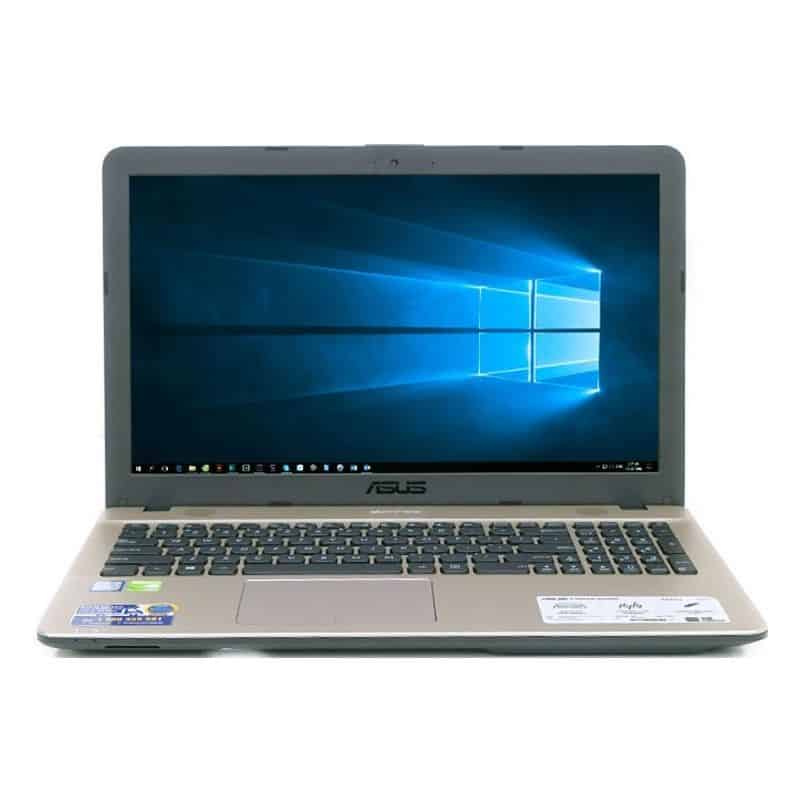
Asus X541UA is the mid-range laptop of the Asus VivoBook Max Series, with a reasonable price. This machine is suitable for students, middle-income people need a laptop for learning, work, entertainment light.
Advantages:
Light-weight
Speakerphone or play music with live bass
Beautiful screen, integrates many new technologies
There are VGA ports, optical drives suitable for students, teachers, office workers
Defect:
Configuration and performance are average
Battery life is poor
- Simple design and fashion
The Asus X541UA is fully plastic cover so it is lightweight, only about 2kg so it is convenient for you to move. The cover is adorned with beautiful black and white interwoven lines are very beautiful metal imitation.
The inner part of the machine is covered with gold foil, which has the same metal as the layer shell.
The X541UA is equipped with many of today’s popular ports and has an additional optical drive.
Specifically, the left side of the machine is the rechargeable port, USB type C, the heat sink, Ethernet port, VGA port, HDMI, USB 3.0, USB 2.0 and 3.5mm headphone jack.
While the right edge will be where the optical drive is located.
In front of the left side is the SD card slot.
Overall, the Asus X541UA is a mid-range laptop, so it does not have any special features like high-end laptops.
- Large, low resolution displays are offset by modern technology
The X541UA’s screen is a 15.6-inch screen, but unfortunately the resolution just stopped at HD. My experience with this screen of the X541UA is really good.
The screen is very good anti-glare, so working outdoors is not a problem. The X541UA is a screen that uses Splendid technology with a variety of custom modes and especially the Eye Protection mode, which helps the screen filter out the green light.
- Experiment with keyboard and touchpad
The keyboard on the X541UA is a full size chiclet and has a curved design that each button looks quite soft. However, when typing, the feeling is not very handy, the keyboard surface design feels slippery when typing. The key also generates relative noise. If you are not too hard as me, the keyboard of the X541UA is still open to good levels.
The touchpad of the X541UA works quite well, the move, using multiple touch points for fast and accurate feedback.
ASUS VivoBook X541UA 15” HD Laptop, Intel Core i5 Processor 2.5 GHz, 8GB DDR4 RAM, 1TB HDD, Windows 10, Dual-Layer DVD Drive: Buy it now
ASUS X541UA-WB51T-RD Vivo Book X541UA Touch HD Laptop, Intel Core i5 2.5GHz Processor, 8GB DDR4 RAM, 1TB HDD, Windows 10, 15″, Red: Buy it now
ASUS VivoBook Max X541UA-RH71 15.6-Inch Full HD Notebook (Intel Dual-Core i7-6500U 2.5GHz, 12 GB RAM, 1TB HDD, Windows 10): Buy it now
- Impressive external speakers with deep bass
The loudspeaker is located just above the keyboard with two pairs of side speakers and is equipped with SonicMaster technology. When trying to watch movies with the X541UA speaker for live audio, depth of feeling.
Listening to music, the bass, sure with the EDM. With young songs, lyrical music, the sound is very soft.
- Configuration and performance at moderate level for use in study, office
The Asus X541UA is configured with an Intel Core i3 Skylake 6100U CPU, clocked at 2.30 GHz; 4 GB of RAM and 1 TB of HDD. This is an average configuration and I also measured performance with GeekBench 4 software and resulted in 15124 points.
In fact, I see the machine running smoothly with the usual office tasks such as Word, Excel, reading newspapers, watching movies with Chrome. I also tested some heavy games like CS: GO or Legendary League on the Asus X541UA and the results have to reduce the game configuration to a minimum to play smoothly. However, the lag situation, sometimes still happens.
Generally speaking, this machine is not for gaming or graphics but will serve the needs of learning, office work, and entertainment.
- Heat dissipation works well
Because the machine does not have to operate in continuous heavy work or high-definition gaming environment, the machine is generally cool as usual.
The area near the heat sink is not very hot when used for a long time, about 2-3 hours continuously.
Battery Life
Battery Capacity and Performance
The laptop includes a 3-cell 36Wh lithium ion battery, which i guess gives a pretty decent runtime for something in this kind of range. In regular day to day usage, like web browsing, typing up documents, and watching video streaming content, you can expect the battery to last around 5-6 hours, and occasionally a bit more depending on the settings. For a lot of people, that is basically enough for a full day of classes or meetings, no big deal. However if you really push it hard, for example running more demanding applications or doing resource heavy work, the charge will drain a lot quicker.
Charging
The Asus X541UA is usually bundled with the normal charger, so it can refill the battery from 0% all the way to 100% in about 2-3 hours. Charging feels average , not super fast, but if someone has to do a quick top up, they can still expect a noticeable boost within an hour.
Connectivity Options
Ports and Slots
The Asus X541UA offers a good selection of ports, catering to various connectivity needs. On the left side, you will find:
- 1 x USB 3.0 Type-A
- 1 x USB 3.1 Type-C
- 1 x HDMI
- 1 x VGA
- 1 x Ethernet (RJ-45)
- 1 x 3.5mm audio jack
- 1 x SD card reader
On the right side, there is an extra USB 2.0 Type-A port, plus a DVD-RW drive, and honestly that combo is becoming kinda rare in newer laptops. This overall lineup of connections makes sure users can plug in all sorts of peripherals and outside devices, without having to rely on dongles or adapters, too much.
Wireless Connectivity
The laptop comes with dual band Wi‑Fi (802.11ac) and Bluetooth 4.1 , so the wireless stuff feels pretty fast and dependable, honestly. In day to day use , the Wi‑Fi stays stable for the most part, range seems solid , with only minimal dropouts . That helps a lot for streaming , online gaming , and video calls too.
Audio Quality
Speakers
The Asus X541UA uses stereo speakers that are tuned with Asus SonicMaster technology. They’re mounted on the underside of the laptop , so if you put it on something soft , the sound can get a little muffled, kinda like it’s being swallowed. But if you set it on a hard surface the audio comes through decently, with mids and highs that sound clear enough. The low end is limited though , which is pretty normal for a laptop in this price bracket.
Audio Software
It also includes the Asus AudioWizard software, where you can tweak audio settings depending on what you like. There are a bunch of preset modes, like Music, Movie, Gaming, and Voice, and each one aims to adjust the output for that situation. Even if the app gives some flexibility, people with a stronger ear might still lean toward external speakers or headphones for a cleaner , more satisfying experience.
Software
Operating System
The Asus X541UA arrives pre installed with Windows 10 Home , so you get a familiar and generally easy interface. Windows 10 also opens the door to a huge catalog of apps and software , which makes it a practical base for productivity, entertainment, and creative tasks. Still , for resource heavy work , the battery will run down faster.
Pre-Installed Software
On the Asus X541UA you get a few proprietary applications already on it, like Asus Splendid that lets you tweak the screen mood stuff for better visuals, and Asus Giftbox which usually brings in promo software and discounts. Some people will think these are, you know, handy , but others might see them as bloatware and then go ahead and remove them so they can keep more storage space and also better system responsiveness.
User Experience
Keyboard and Touchpad
The full sized keyboard on the Asus X541UA feels pretty comfortable for typing, keys are spaced well and the key travel is fine enough. Those chiclet style buttons are responsive and stay quiet, so for long typing sessions it doesn’t feel annoying. Also, having a numeric keypad is a real plus, especially for anyone who works with numbers a lot.
The touchpad is roomy and it supports multi touch actions , like pinch to zoom , and also two finger scrolling. It feels quick to react and pretty accurate, which makes browsing and moving around feel smooth. The left and right click areas are built in, they have a nice tactile feel and they are easy to press.
Webcam and Microphone
There’s a standard 720p webcam up top in the display bezel. The picture quality is average, so it works well enough for video calls and everyday online meetings. The internal mic captures voice clearly, but if it’s a big call, or you’re recording something important, then an external microphone or a headset is going to sound better , and usually that difference is noticeable.
Heat and Noise Management
The cooling system on the Asus X541UA seems to do its job pretty well, keeping things in check when you’re using it for normal work. In day to day scenarios the laptop is still cool to the touch even if the tasks are moderately demanding ,like web apps plus a bunch of tabs. As for the fan, the sound level stays low and honestly it doesn’t pull your attention away from what you’re doing. So overall it feels like a calm setup, no annoying whine or anything.
Pros and Cons
Pros
Affordable Price: The Asus X541UA gives you a nice mix of performance and useful extras ,without asking for a premium cost.
Full HD Display: That 15.6 inch screen in Full HD looks pretty crisp, kinda solid for work output , and it’s also nice for media watching.
Comfortable Keyboard: The keyboard comes with full size keys and a numeric keypad, so your typing feels less awkward, more steady in a way.
Decent Performance: With an Intel Core i5 processor together with 8GB of RAM, it deals with everyday tasks pretty smoothly, no big drama.
Comprehensive Connectivity: You get a bunch of ports, like USB Type-C, HDMI, and even an SD card reader, which is handy in practice.
Good Build Quality: The chassis feels solid and sturdy enough that it should handle regular use , day after day.
Cons
Limited Graphics Performance: the integrated graphics will probably struggle with heavier games or well anything that’s pretty graphics heavy, honestly.
Moderate Display Brightness: brightness feels okay inside, but if you’re outdoors, or in strong lighting, it might seem a little underpowered, like kinda weak.
Pre-Installed Bloatware: There’s some pre-installed software that a few people may consider useless and want to remove.
Average Battery Life: Battery performance is okay, yet not outstanding. If you’re aiming for long, all day use, it may disappoint a bit.
Slow Hard Drive: The 5400 RPM hard drive runs slower than an SSD, so you’ll notice slower boot times, and slower file transfers too. Swapping to an SSD would noticeably speed things up.
Related Posts

Tech Reviewer & Product Analyst
Định Bia has spent over 10 years testing consumer electronics with a focus on smart technology. He work as a product advisor at Biareview where he helped customers find the right devices for their needs. He personally tests every product featured on this site using a consistent evaluation framework covering quality, durability, and value. All reviews are based on experience, not influenced by the manufacturer.