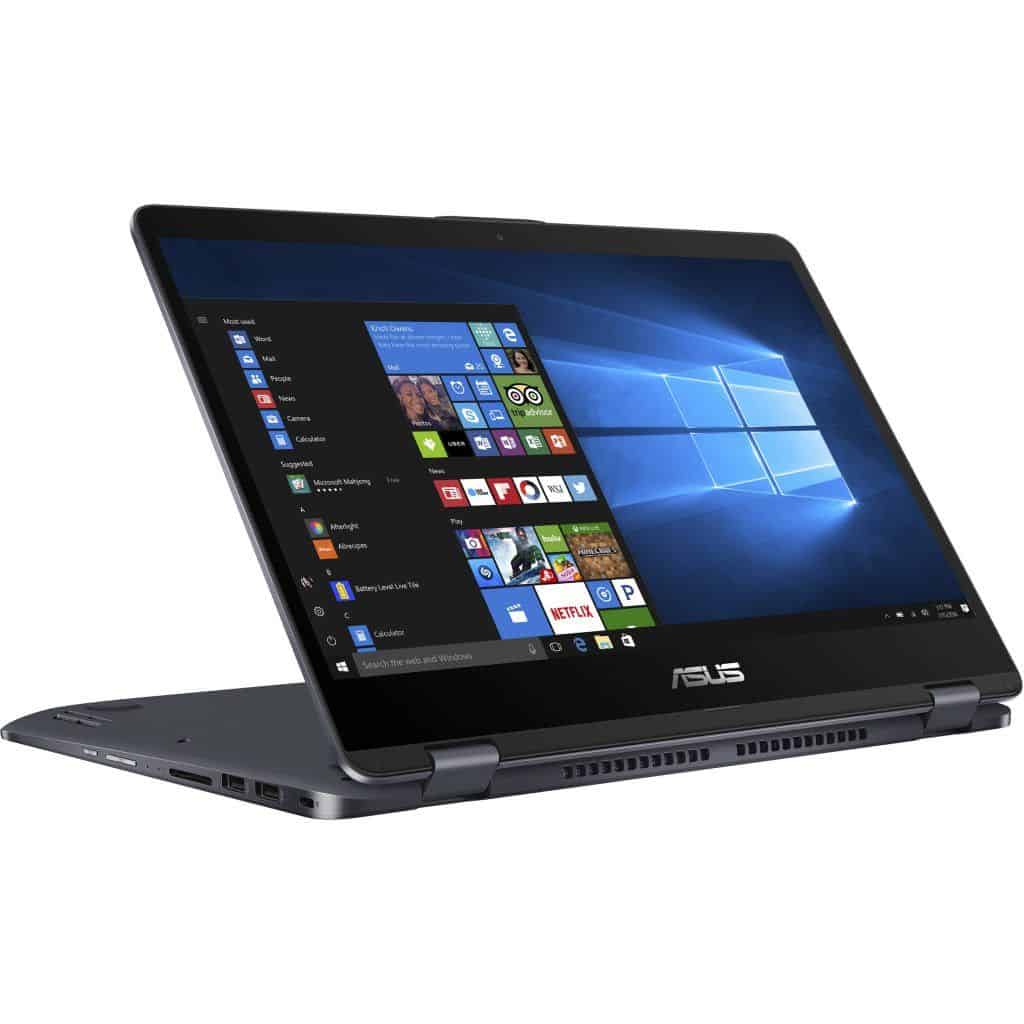
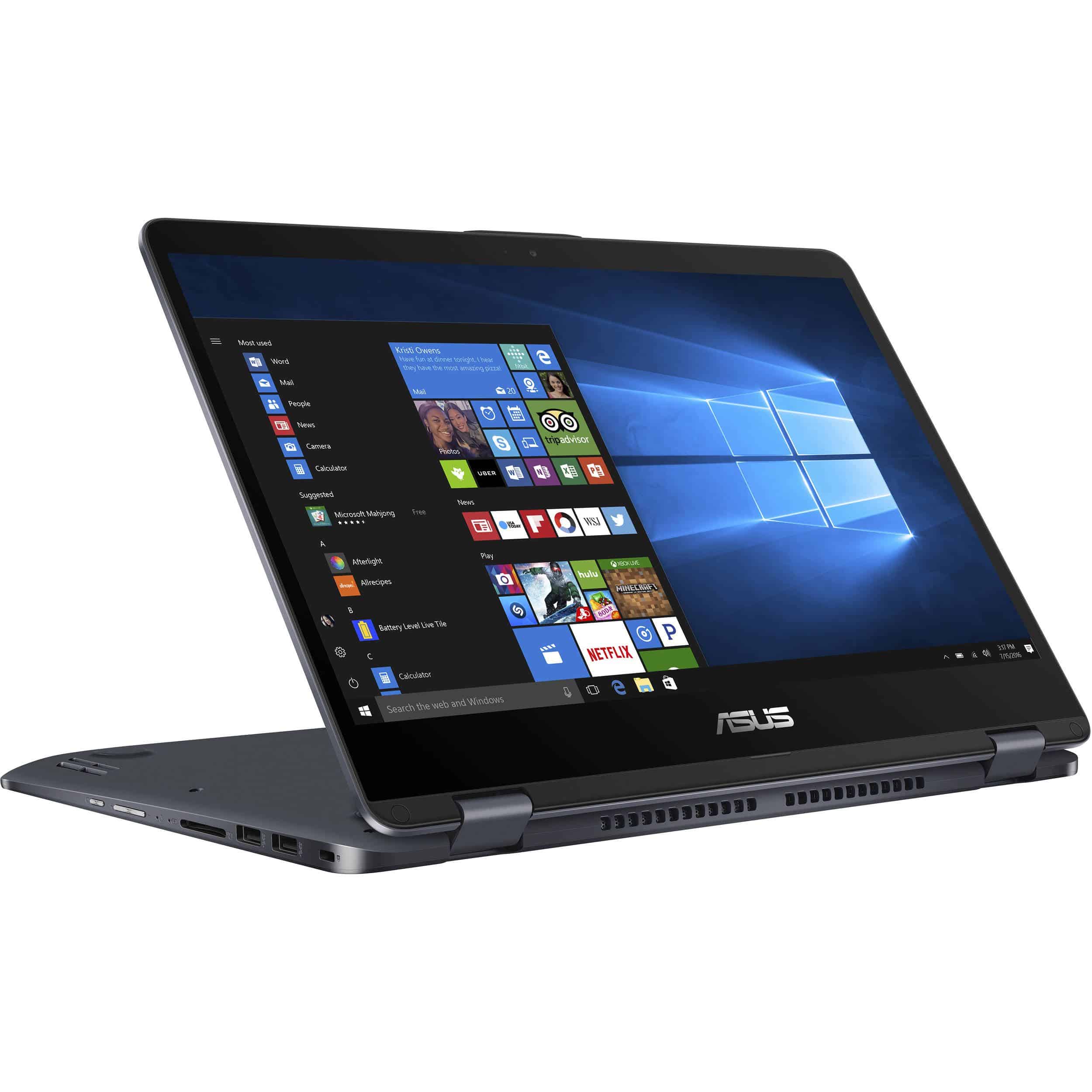
Two-in-one laptops, or still called hybrid computers, are getting more attention from the manufacturers because of the maneuverability and useful features it offers. Today I want to introduce to you laptop Asus Vivobook Flip 14.
In addition to the name, the machine is also known as Asus TP410UA and in this article I would like to called Asus Vivobook Flip 14.
Advantages:
Thin, lightweight, beautiful, metal casing.
Thin, sharp display, touch-sensitive, 360-degree rotation.
Fingerprint sensor.
Install Windows 10 Licenses.
Disadvantages:
Configured on average, not suitable for heavy gaming.
Feeling uncomfortable when using tablet mode.
Maneuverable design, ready to follow you anywhere
At first glance, the VF14 is like many other conventional laptops. But the highlight of this laptop is that you can work with the VF14 as a normal laptop, switch to folding machine to watch movies or presentations or folded down to form a tablet to work. Everything is very easy.
VF14 has a metal shell design with curved rounded edges that look perfect and beautiful. With a weight of about 1.6 kg, you can easily bring this machine to anywhere and at the same time is quite convenient to handle the machine on hand to use.
On the right side we will have the headphone jack, USB type-C port, USB 3.0 port, Micro HDMI port and charging port.
On the left we have the power button, volume up and down keys, SD card slot and two USB 2.0 ports.
And the rear edge is the heat sink of the machine.
This is the hinge that allows the VF14 to rotate 360 degrees.
Multi-touch screen display sharp
The VF14 is equipped with a 14-inch Full HD display. Asus also makes the VF14 have a thinner screen border that makes the display area up to 78.7%.
In particular, the screen also provides a relatively wide viewing angle, which Asus advertise a wide viewing angle of up to 178 degrees.
As we have tested, the touch screen on the VF14 receives at the same time a maximum of 10 touch points.
The quality of the touch screen is also very good, for quick feedback and smooth touch operation as on smartphones.
Keyboard, touchpad and fingerprint sensor
The keypad of the VF14 feels comfortable. Keyboard stroke and when pressed for relative bounce.
Similarly, the mouse on the VF14 is quite fast and smooth but I was used to touch on the touch screen so sometimes forget that the machine also has a trackpad.
This sensor contributes to the security of the VF14 when locking the screen and also responds very quickly as used on smartphones.
Extreme audio experience already
The VF14 incorporates Asus’s SonicMaster Audio technology for a great audio experience. I also listened to some music as well as some films with VF14 feeling very like, like sitting in a real cinema.
Mid range configuration, enough performance for entertainment
The VF14 uses an Intel Core i3 7100U processor, clocked at 2.40 GHz with 4 GB of RAM, a 500GB hard drive and integrated Intel Graphics 620 graphics card. This is just a mid-range configuration, office.
After using Novabench software to evaluate the performance of VF14, the machine achieved 743 points. Compared to midrange laptops, the VF14 also scores well above the 3% mark.
Actually when used, sometimes the processor is a bit slow, maybe due to use of HDD drive speed is not very fast.
In return, when used for text editing, watching movies, reading normal paper on the VF14 feels very like because of the touch screen and the ability to rotate 360 degrees.
The battery life is moderate
VF can meet up to half a day without having to plug the charger. Test conditions are 50% brightness and open wifi continuously.
Specifically when I watched the movie about 2 hours, the battery from 100% down to 57%. Then I only use the machine to edit the text and read the newspaper for about 3 hours, after this machine only 13%. I continue to use more than half an hour then the machine is off.
Charging time of VF14 is also relatively fast, only about 2 hours that the battery is full for you to use.
Software and Features
Asus includes several software features to enhance user experience, such as Asus Splendid for display color calibration, Asus Tru2Life Video technology for optimizing video playback, and various utility apps for system maintenance and optimization.
Security Features
Security features include a fingerprint sensor (depending on the model), for a convenient and secure login , which adds another layer of protection to personal AND professional data
Use cases
Students
For students, the Asus VivoBook Flip 14 is kinda versatile in a good way, and also easy to carry. Its convertible design lets it work as a laptop or a tablet, so it can handle note taking during class, research stuff, and multimedia consumption. The touchscreen along with stylus support is useful for creative tasks, and for group work projects too.
Professionals
Professionals are likely to like the Asus VivoBook Flip 14 because it is flexible ,and it still delivers decent performance. It can act as a portable workstation for presentations, meetings , and productivity duties. Being able to switch modes makes it more usable in different work settings, plus the lightweight build helps when you’re moving around during the day.
Casual users
Creatives and artists
Creatives and artists can take advantage of the touchscreen, and the stylus compatibility of the Asus VivoBook Flip 14. This makes sketching, drawing , and digital artwork creation more direct, right on the screen. Compared to more traditional laptops , it can feel more intuitive and responsive , which helps a lot when you’re making details.
Upgradability
The Asus VivoBook Flip 14 gives you pretty limited upgradability because the chassis is compact and the overall design is tight. In some configurations, you might still be able to add more RAM or swap the storage around, but it’s smart to double check the exact model , since upgrade paths can vary a lot.
Pros and Cons
Pros
Versatile 2-in-1 setup: that convertible hinge kinda makes it go in a few modes , like tent mode or tablet, so you can switch around without fuss.
Responsive touch display: it works with a stylus pen , so sketching and note-taking feel more natural than you’d expect.
Decent everyday performance: for normal tasks it keeps up fine, and for light gaming it usually handles things without too much trouble.
Slim and simple to carry: it’s lightweight enough, good for commuting , classes, or just moving around.
Solid battery life: you can often stretch it to about 8–10 hours per charge , depending on what you’re doing.
Cons
Upgrade options are a bit tight: upgrading RAM and storage feels limited, there are only a few actual routes.
Not much graphics muscle: integrated graphics, or sometimes only an entry-level discrete option , so don’t expect heavy graphics work.
Plastic build kind of shows: it doesn’t have that “premium metal vibe” , more like budget plastics.
Fingerprints pop up fast: the glossy surface tends to snag smudges and fingerprints pretty quickly.
Conclusion
The Asus VivoBook Flip 14 is a well-rounded convertible laptop with solid versatility, decent performance, and good portability for the money. It targets lots of people, students , professionals, casual users, and creatives too, mainly because the flexible design, the responsive touchscreen, and everyday-capable performance fit different needs. Still, it does have some weak spots with upgradability and graphics power, but overall it gives you a workable and portable computing experience for everyday use and light productivity.
If you’re hunting for a laptop for school, work, or even casual entertainment , the Asus VivoBook Flip 14 is worth a look for its flexibility, its usability , and the way it handles day to day tasks as a 2-in-1 convertible.
ASUS VivoBook Flip 14 TP401NA-WH21T 14” Thin and Lightweight 2-in-1 HD Touchscreen Laptop, Intel Quad-Core Pentium N4200 Processor (up to 2.5 GHz), 4GB DDR4 RAM, 64GB EMMC Storage, Windows 10 Home: Buy it now
ASUS VivoBook Flip 14 TP410UA-DB51T includes ASUS Pen, 14.0” with Fingerprint reader, 2-in-1 FHD Touchscreen Laptop, Intel Core i5-7200U 2.5GHz Processor, 6GB DDR4 RAM, 1TB HDD, Windows 10 Home: Buy it now
ASUS VivoBook Flip 14 Thin and Light 2-in-1 HD Touchscreen Laptop, Intel 2.2GHz Processor, 4GB RAM, 64GB Storage, Windows 10 in S Mode (Switchable to Win10 Pro) – TP401NA-YS02: Buy it now
Related Posts

Tech Reviewer & Product Analyst
Định Bia has spent over 10 years testing consumer electronics with a focus on smart technology. He work as a product advisor at Biareview where he helped customers find the right devices for their needs. He personally tests every product featured on this site using a consistent evaluation framework covering quality, durability, and value. All reviews are based on experience, not influenced by the manufacturer.