Do you need all the features offered by the Windows operating system? Is a laptop too redundant for your needs? If the answer is yes, then you should consider buying a Chromebook, in general, the difference between the devices is very little, is it true that it provides your daily use needs such as surfing the web, and shopping? , entertainment, word processing, … at the best possible price.
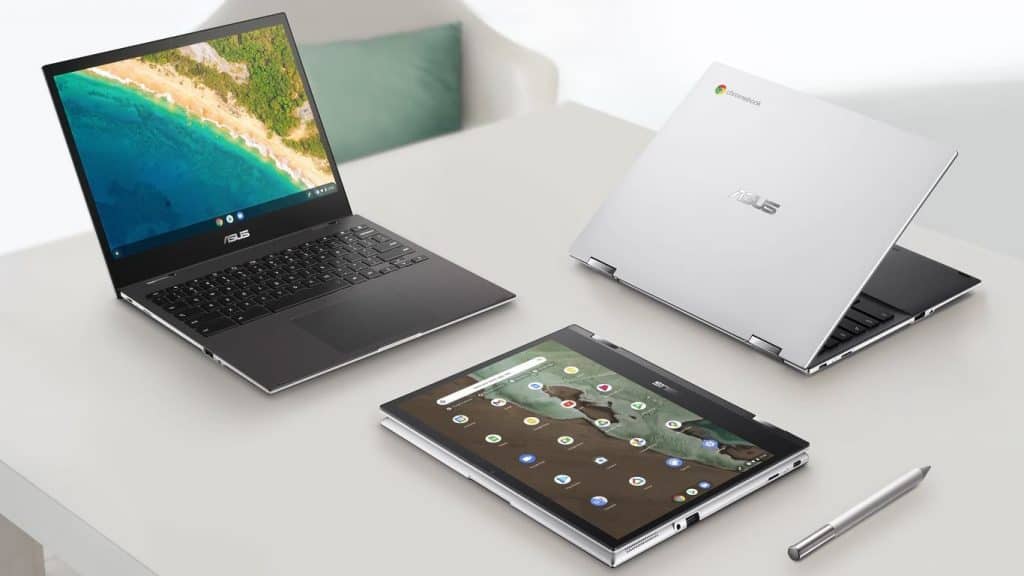
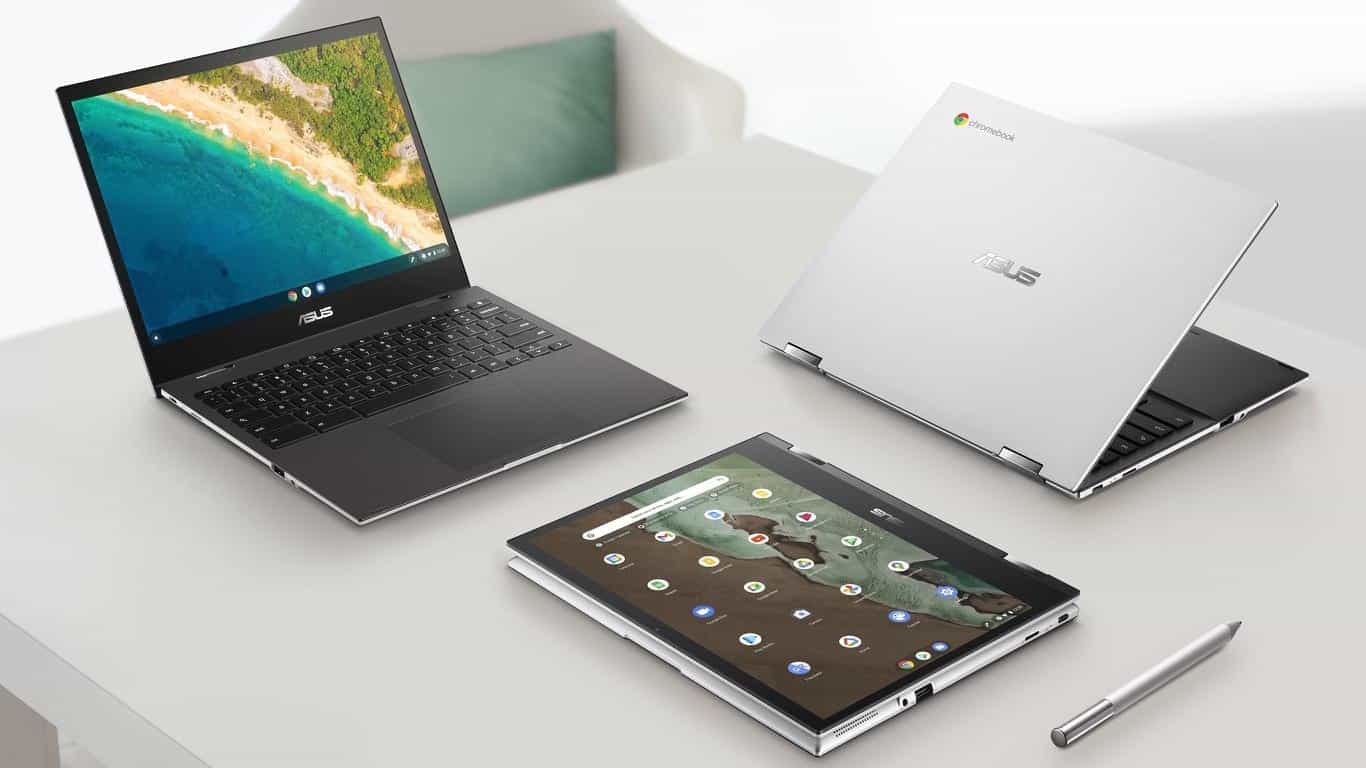
Chromebook Flip CM3 is a device developed by Asus, with a hardware orientation with sufficient performance, specifically the Mediatek MT8183 (aka Kompanio 500) processor. It has a 12-inch IPS screen with a 3:2 ratio, not too high a resolution of 1366x912p, but importantly, it has wide viewing angles and a good contrast ratio. What’s more, Asus also provides a dedicated stylus attached.
Configuration information
Mediatek MT8183 / ARM Mali-G72 MP3 / 32GB SSD / 4GB RAM
Mediatek MT8183 / ARM Mali-G72 MP3 / 128GB SSD / 8GB RAM
Operating System: Chrome
Dimensions: 269.2 x 215.8 x 16.8 mm
Weight: 1.14kg
Battery: 32Wh
Charging power: 45W
Design and finish
The whole outer shell on the Chromebook Flip CM3 is polycarbonate plastic , though the top lid uses aluminum metal . It comes in a bright silver, kinda eye catching, and you’ll notice a glossy chrome plated Asus logo right up front, like center stage. The rigidity feels fairly solid, and the display is covered with a protective sheet, made from tempered glass.
The machine is very light at only 1.14kg and has a thickness of about 16.8mm, the details and edges are handled quite neatly and squarely, not in a rounded shape like most existing Chromebook models.
Unable to open and close the lid with one hand, the screen border especially the bottom edge is relatively thick. The top edge is equipped with an HD webcam, and the hinge in the form of an Ergo Lift raises the keyboard to a small angle compared to the plane when the lid is opened.
Regarding the keyboard, the device does not have a backlight below but has a good bounce when typing. The distance between the keys is also quite reasonable, and the key size is quite large, providing a comfortable and pleasant typing experience.
In addition to the included stylus, you can use the touchpad to scroll and navigate through menus. The touchpad is much larger than on other Chromebook models that we have experienced.
The bottom is minimalistic similar to the top, in addition to the rubber feet, we will see the speaker holes.
Connector
Connectivity ports are quite limited and meager, and they are all focused on the left edge of the machine. We will have a USB-C port and always charge the device, followed by a Micro SD card reader, a USB-A port, and a headphone jack with a mic.
Disassembly, upgrade, and cleaning
Chromebook Flip CM3 does not support upgrading the Ram or storage hard drive. But the good news is that Asus has equipped a heatsink with copper heat pipes, not as usual a passive heatsink.
Regarding the battery, we will have a quite large 32Wh battery compared to the overall.
Display screen
ASUS Chromebook Flip CM3 (CM3200) has a 12-inch touchscreen with a resolution of 1366 x 912p. In addition, the device has a screen ratio of 3: and 2, and a pixel density – of 137 PPI.
IPS panels for very good viewing angles, spacious and comfortable.
The maximum brightness of the screen measured was 305 nits (cd/m2). The corresponding color temperature on a white screen and at maximum brightness is 6200K (average) – warmer than the optimal 6500K for sRGB. You can see how the screen works from a homogenous perspective. Very good contrast ratio – 1500:1.
The yellow dotted line shows how much of the color gamut the ASUS Chromebook Flip CM3 (CM3200) can cover. In other words it displays about 54% of sRGB/ITU-R BT.709 (the web/ HDTV standard) using the CIE1976 measure, so yeah it’s not full coverage but it gives a good sense of the range.
Software updates
ASUS Chromebook Flip CM3 (CM3200) shows up with a bunch of pre installed apps, that kind of automatically pull updates once they’re available. The Chrome OS release we checked on the unit is 82.0.4085.6 , and it’s stacked on Android 9.0, so it runs that base setup.
Battery life
We tested the battery life using the GFXBench test, with the screen brightness set to 120 nits. Although it has a small capacity battery (32Wh), this Chromebook model can be considered the champion of the time the screen is still on.
In the intensive gaming test, this computer model still gives a time of up to 14 hours and 11 minutes.
CPU Performance
The Chromebook Flip CM3 that we tested it has, basically a MediaTek Kompanio 500 chip (MT8183). In there you have 8 cores overall, like 4 are Cortex-A73 and the other 4 are Cortex-A53, and yeah all of them keep a steady 2.0 GHz flat throughout.
GPU Performance
Correspondingly, this SoC model comes with an integrated Mali-G72MP3 card, clocked at 800MHz.
Ending
Long battery life is one of the most outstanding advantages of the Asus Chromebook Flip CM3, 14 hours is too impressive!! It will be an interesting gift suggestion when you give a Chromebook to your kids when the device can handle school-related tasks well, without carrying a charger in a backpack.
In addition to the touch screen, IPS panels for wide and comfortable viewing angles, and a good contrast ratio. However, its color coverage and color accuracy are not high.
The device can be equipped with up to 8GB of Ram and 128GB of storage, with no support for further upgrades, but thankfully Asus is offering a one-year 100GB Google Drive subscription to customers who purchase this device. Users can also expand the storage capacity via a micro SD card slot, or via a USB-A or USB-C removable hard drive.
Note that the configuration of the Chromebook Flip CM3 has just enough performance, it will be suitable for basic use, without high performance and many other things of Windows.
ASUS Chromebook Flip CM3, 12″ Touchscreen HD NanoEdge Display, MediaTek™ Kompanio 820 (8192), Arm NATT MC5 GPU, 64GB eMMC, 4GB RAM, Wi-Fi 5, Chrome OS, Aluminum, Mineral Gray, CM3200FM1A-DS44T-S: Buy it now
ASUS Chromebook Detachable CM3, 10.5″ Touchscreen WUXGA 16:10 Display, MediaTek 8183 Processor 64GB Storage, 4GB RAM, Garaged USI Stylus, Chrome OS, Aluminum, Mineral Gray, CM3000DVA-DS44T-S: Buy it now
Related Posts

Tech Reviewer & Product Analyst
Định Bia has spent over 10 years testing consumer electronics with a focus on smart technology. He work as a product advisor at Biareview where he helped customers find the right devices for their needs. He personally tests every product featured on this site using a consistent evaluation framework covering quality, durability, and value. All reviews are based on experience, not influenced by the manufacturer.