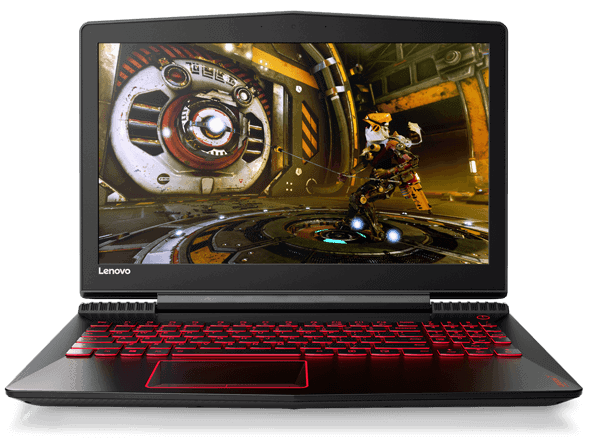
In the segment of Laptop Gaming, there are plenty of models from Alienwave, Razer, MSI, etc to more affordable models. If you do not have a lot of money to buy expensive machines, then switch to the Lenovo Legion Y520. It can be said that this is the most interesting gaming laptop today.
Design Lenovo Legion Y520 not so prominent, but bring convenience
Looking at the look and feel of the Y520 less bunker than other gaming laptops. May be called “thin” and “light” again, because the machine weighs only 2.5 kg.
The color of the Y520 creates a rather “boring” atmosphere when black from head to toe. May, there are lines along the edge of the machine plus the edge of the triangular machine as “salvaged” somewhat the appearance of the machine.
The plastic case of the Y520 gives the impression that this is a cheap machine, and also makes the machine more fingerprint. However, it will make our machine lighter in the move.
The sides are full of USB slots, memory card, charging port, USB type-C, HDMI, …
The back of the machine are the heat sink with bronze rods and hidden deep inside which is dual fan cooling system with Extreme Cooling technology of Lenovo.
When playing heavy games, need high graphics processing, you have to activate this cooling mode, otherwise the machine will be very hot and its loudness when operating with high capacity is also relatively. But actually the heat dissipation with this mechanism is quite effective, and you will not hear the sound when using.
Next, let’s open the machine together after the shell that is a design that can say is more beautiful than what you think.
The first is the dual speakers on the sides of the machine is highlighted. The sound of this loudspeaker sounds loud and clear; the weak point is that the bass is not so sure, but it does not require too much on a laptop speaker. Due to the design of two stereo side speakers, the machine will give us the feeling of the most alive.
Next is the TouchPad area is also designed quite a bunker with two lines cut off 3D pretty nice.
Finally, the keyboard, the first point that I like on this machine is the design of four navigation keys are set off to Numpad and keys always fullsize. This makes my hands feel more comfortable playing games that are associated with these four keys.
The key stroke is not too short, so when you click for good bounce rate, you can get your hands on and fast-forward. The Y520’s LED system also features a “gamer” with monochrome and has three modes: off, moderate light and strong lighting.
Full HD display meets the needs of gaming, entertainment
FullHD resolution screen, for bright and true colors, comes with IPS technology for wide viewing angles and anti-glare. The visibility of the Y520 is well judged by the technology, whether indoor or outdoor, the quality remains unchanged.
For most gamers, FullHD is the minimum standard for gaming, because it has to be beautiful and sharp.
Display
The Lenovo Legion Y520 comes with a 15.6-inch Full HD (1920 x 1080) IPS display. This screen is known for decent color reproduction and wider viewing angles, so it feels kinda handy for gaming, watching media, and even light content creating now and then. There’s also an anti-glare coating on top of it , which helps to reduce reflections and makes it easier to work or play in rooms that are brightly lit.
Now, it is not perfect though. Brightness is okay but not really standout, so if you like gaming in sunny conditions or strong indoor lighting, you might notice it. Color accuracy is fine in general, but it likely won’t hit the level people expect for pro photo or video work.
Even with those small drawbacks, the display in the Legion Y520 is still more than enough for gaming and everyday use. The 60Hz refresh rate is pretty standard for laptops of this kind, but competitive gamers might want the smoother feel that higher refresh rates from other gaming models can bring.
Performance
Performance is kinda where the Lenovo Legion Y520 really, shines. You get an Intel Core i7-7700HQ inside it, a quad core CPU from Intel 7th generation Kaby Lake roster. Put that together with the NVIDIA GeForce GTX 1050 Ti, and the Legion Y520 feels like it can deal with most today’s games on medium to high settings, no big panic or anything.
As for memory it ships with 8GB of DDR4 RAM, and honestly that’s enough for most gaming plus everyday multitasking. Still, it’s not a dead end, the RAM is upgradable so you can expand to 16GB, or even 32GB if you actually need it. For storage, there’s a 256GB SSD, which helps with quick boot and faster game loads, applications too. Some versions also bundle an extra 1TB HDD, for those who want more roomy space without swapping stuff all the time.
In the real world of gaming, the Legion Y520 manages to keep things smooth and playable, like, frame rates that are stable in Overwatch , Fortnite , and PUBG when you leave the settings at medium to high. When you move to heavier titles such as The Witcher 3 or Assassin’s Creed Odyssey, you might need to tone things down a little, just to preserve that steadiness in the frame rate. Still, even then , the overall vibe stays enjoyable, fun, and kind of worth it.
Keyboard and Touchpad
The keyboard on the Lenovo Legion Y520 is one of those features that really stands out. It’s a full sized, backlit keyboard with red lighting, it boosts the whole gaming look and makes keys easier to see in dim rooms. The keys have a decent amount of travel and tactile feedback, so both typing and actual in game sessions feel more comfortable. The layout also feels thoughtfully arranged, with roomy arrow keys plus a dedicated number pad, which is honestly pretty convenient.
You’ll also notice the WASD keys are highlighted, a small, but very gamer friendly detail. On top of that, the keyboard includes media control keys , so changing volume and playback is easy without leaving what you’re doing.
As for the touchpad, the Legion Y520 one is responsive and fairly precise, with support for Windows Precision drivers. The surface feels smooth and tracking is solid. That said, even though it works well for everyday use, most players will probably stick to a separate external mouse for better control and finer precision during gaming.
Audio
The audio quality on the Lenovo Legion Y520 is decent but not really outstanding, it is kinda fine. There’s a pair of Harman speakers sitting along the bottom front edge of the laptop. Those speakers are tuned with Dolby Audio, and that helps improve the overall sound for gaming, movies and music, it does a little extra
In day to day use the audio comes out clear, and it gets loud enough for most situations, still it can feel a bit thin. You might notice the lack of depth and the bass impact, the kind some gamers always look for. If you want a richer experience, it’s better to use a solid set of headphones or external speakers.
The Legion Y520 also includes a built in microphone, it handles in-game chats and video calls pretty well, not amazing but adequate.
Lenovo Legion Y520 – 15.6″ Gaming Laptop Computer i5-7300HQ / Nvidia GeForce GTX 1050 Ti 4GB / 8GB DDR4 DRAM / 256GB PCIe SSD / Windows 10 Signature Image 80WK00FHUS: Buy it now
Lenovo Legion Y520 Gaming Laptop – Core i7-7700HQ, 16GB RAM, 2TB HDD + 256GB SSD, 1050Ti 4GB, 15.6″ Full HD: Buy it now
Lenovo Legion Y520 15.6 Gaming Laptop (7th Generation Intel i7, 1TB HDD, 8GB DDR4, Windows 10, NVIDIA GeForce GTX 1050 Ti) 80WK001JUS: Buy it now
Lenovo Legion Y520 15.6″ 2.8GHz i7-7700HQ 16GB 128GB+1TB Gaming Notebook: Buy it now
Configuration
Also considering the configuration of the machine I’m holding the CPU Core i7 7700HQ, 8GB DDR4 RAM, GeForce GTX 1050Ti 4GB graphics card, 128GB SSD Samsung and 1TB 5400rpm HDD.
Games such as the legendary Alliance or CS: GO at max configuration, FPS can reach over 120. But the awesome games like Battlefield 1, Sniper Ghost Warrior 3, Call of Duty: Infinite Warfare also reached 60 FPS .
Overall, this configuration is a pretty easy and casual battle with the Lenovo Legion Y520.
Of course, following the current trend of the laptop, the Y520 is also equipped with removable battery that attaches to the inside. The battery life, according to many reviews, is also not that high, basically because of such a daunting configuration, which batteries can withstand. As far as I know, when used normally, the Y520 also takes 4 – 5 hours.
Connectivity
The Lenovo Legion Y520 does give you a decent mix of ports for connectivity, you know, the usual stuff but still pretty useful. On the left side, there is an Ethernet port, a USB 2.0 port, an audio jack and a Novo button for system recovery. The right side has two USB 3.0 ports, then an HDMI port, a USB-C port and that Kensington lock slot too. At the back of the laptop you’ll find the power connector along with another USB 3.0 port as well.
Honestly the USB-C inclusion is a welcome bit, it adds some extra flexibility for linking newer peripherals or an external display. Still, it’s also fair to point out that the USB-C port on the Legion Y520 does not come with Thunderbolt 3, so if you were hoping for the quickest data movement or external GPU support, this could feel a little limiting.
For wireless, the laptop uses an Intel Dual Band Wireless-AC 3165 card, it tends to stay pretty stable for Wi‑Fi. Bluetooth 4.1 is included as well, so you can hook up wireless gadgets like headphones , a mouse, or even a keyboard without too much fuss.
Battery Life
Battery life is kind of always a thing with gaming laptops , and Lenovo Legion Y520 really is no exception to that. Inside it comes with a 3-cell 45Wh battery, and it usually lasts about 4 to 5 hours when you’re just doing lighter stuff, like web browsing, word work, or document edits. But as soon as you start gaming , the battery drops fast, and most people end up seeing something like 1 to 2 hours of playtime on a full charge.
If you’re planning on longer gaming sessions then honestly it’s better to keep it connected to power. The included 135W adapter tops things up fairly quickly, though the bigger truth is that battery performance is one place where the Legion Y520 could use a bit of upgrading.
Thermals and Noise
Keeping temperatures under control matters a lot for how well a gaming laptop performs over time. The Lenovo Legion Y520 comes with dual fans plus rear exhaust vents, so the inside basically stays cooler while you’re pushing it pretty hard. Over all the cooling setup does a decent job at preventing thermal throttling, which means the performance keeps more steady, even after a longer run of gaming.
That said, the fans can get pretty loud when the load is heavy, which is fairly normal in this category. Still, the noise is usually tolerable , and it can be toned down in a practical way if you just use headphones. Also, the keyboard area and palm rest tend to stay relatively cool, so you don’t feel that extra heat too strongly while you’re typing or resting your hands.
Software and Features
The Lenovo Legion Y520 shows up with Windows 10 pre- installed, plus a couple of useful utilities and software. Lenovo Nerve Sense is one of those things, it gives people quick access to system tweaks, performance tracking, and personal gaming profiles. There’s also options like network priority, your internet bandwidth gets arranged for gaming in a smoother way.
You might also notice some pre-installed bloatware which can feel annoying at times, but honestly it’s pretty removable. Lenovo Vantage is another handy app too, it helps with system updates, hardware checks, and power control settings, pretty straight forward once you open it.
Upgradability
A big upside of the Lenovo Legion Y520 is, how easy it is to upgrade, you know. The bottom cover can be unscrewed and then taken off, so you can reach the inside parts without too much fuss. From there upgrading RAM and storage, or even swapping the Wi-Fi card is possible. This kind of flexibility means the Legion Y520 can stay current with newer hardware, which helps it last longer , and also keeps it more in line with upcoming gaming needs.
Value Proposition
The Lenovo Legion Y520 comes with a pretty strong value proposition for gamers who are watching their budget, it really feels like a sweet spot between what you pay and what you actually get. There’s a decent mix of performance, looks, and small features that are useful…at a cost that is easier to reach for many players. Sure, it may not match the more premium build quality or the top tier specs you see on pricier gaming laptops, but honestly it still manages to deliver a reliable experience for the money.
With the Intel Core i7-7700HQ paired with the NVIDIA GTX 1050 Ti, it can push through most modern games at respectable settings. Plus, the laptop’s upgradability, the display that’s “good enough” and the keyboard which feels comfortable during long sessions, make it stand out a bit more than you’d expect in this price range.
Conclusion
Overall, the Lenovo Legion Y520 is a well-rounded gaming laptop that gives good performance along with helpful features for an affordable amount. It looks sharp, the build feels sturdy, and the keyboard is comfortable, so it’s enjoyable not only for gaming but also for everyday tasks that you do without thinking too much about it. The display quality and battery life are not its brightest moments though, you can feel the limitations there, but they seem like minor trade offs compared to the total value.
If you’re searching for a budget-friendly option that doesn’t really leave performance behind, the Lenovo Legion Y520 is a solid pick. The upgrade path also helps it last longer, so it can keep up as future game demands rise, which makes it a smarter investment if you want to enter PC gaming without emptying your wallet.
Related Posts


Tech Reviewer & Product Analyst
Định Bia has spent over 10 years testing consumer electronics with a focus on smart technology. He work as a product advisor at Biareview where he helped customers find the right devices for their needs. He personally tests every product featured on this site using a consistent evaluation framework covering quality, durability, and value. All reviews are based on experience, not influenced by the manufacturer.